
Your competitors publish their ad strategy every day, for free. Meta's Ad Library shows every active ad a business runs across Facebook, Instagram and Meta's other apps. Google and TikTok have their own versions. You can't see a competitor's results, but you can see something almost as useful: which ads they keep paying for, and which ideas they keep making new versions of.
This playbook shows you how to read those signals, log them in a simple tracker, find the patterns and turn them into ads that are entirely yours. It is called a heist for fun. Nothing here is secret, and nothing here involves copying someone's ad.
The workbook calculates days running, flags each ad as proven, testing, quiet or too early, builds a pattern summary by format, hook and offer, and has a brief builder with an originality checklist.
The three free libraries
| Library | Where | What you see | Best for |
|---|---|---|---|
| Meta Ad Library | facebook.com/ads/library | Every active ad on Facebook, Instagram, Messenger and Audience Network, with the date it started running | Any brand that advertises on Meta, which is most of them |
| Google Ads Transparency Center | adstransparency.google.com | Ads from verified advertisers, with format, region and the last date shown | Search, YouTube and Display ads |
| TikTok Creative Center (Top Ads) | ads.tiktok.com/business/creativecenter | A gallery of high-performing ads that advertisers have authorised to appear, filterable by region, industry and objective | Format and style ideas for your category |
| TikTok Commercial Content Library | library.tiktok.com | Paid ads shown in Europe, searchable by advertiser or keyword | Looking up one brand's TikTok ads, if they advertise in Europe |
Meta describes what its library includes and how long ads stay in it in its help article about the Meta Ad Library. Google described the Transparency Center at launch as a place to see the ads an advertiser has run, the regions, "the last date an ad ran, and the format of the ad" (Google: announcing the Ads Transparency Center). TikTok's help says a login isn't required for Creative Center, and that all ads in Top Ads "are authorized by advertisers inside TikTok Ads Manager" (TikTok: about Creative Center, TikTok: about Top Ads).
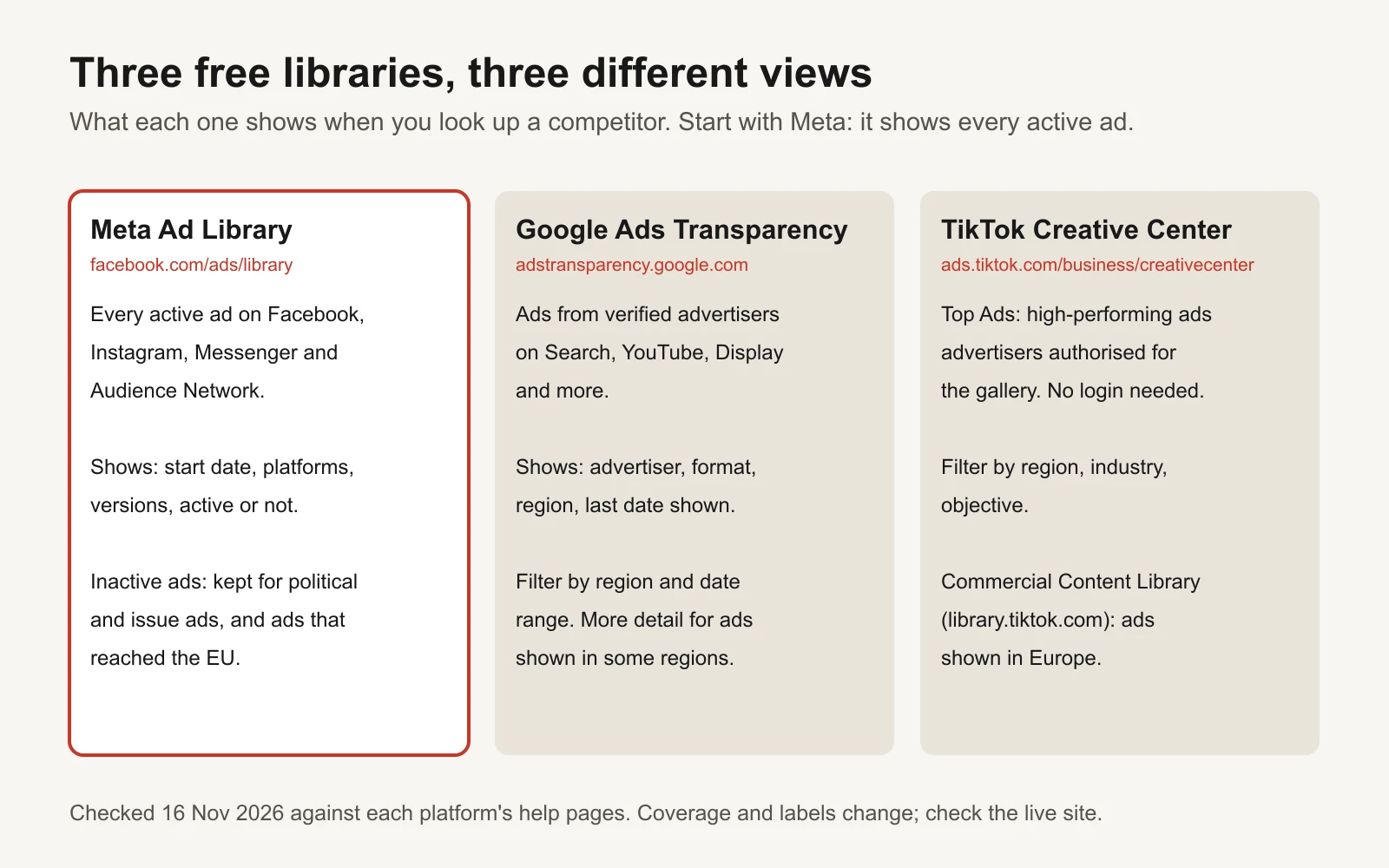
Start with Meta. It is the only one that shows every active ad for a brand, anywhere it runs.
Step 1: find the competitor and filter to active ads
- Open facebook.com/ads/library.
- Choose the country your customers are in. Ads can differ by country.
- Set the ad category to All ads.
- Type the competitor's brand name and pick their Page from the suggestions. Searching the Page, rather than a keyword, gives you every ad that Page runs.
- Filter to active ads. You can also filter by platform and media type (images, videos).
- Sort or scan for the oldest start dates first.
Keyword search is useful too. Search a phrase your customers would use, like "dry skin" or "emergency plumber", to find advertisers you didn't know were competing with you.
Each ad card shows a library ID, whether the ad is active, the date it started running, which Meta apps it appears on, and whether there are several versions. Click into the ad to see the versions and the full text.
Step 2: read "started running" as a survival signal
Every day an ad runs, someone pays for it. Advertisers who watch their numbers switch off ads that lose money and keep the ones that pay. So an ad that has been active for weeks has survived many decisions to turn it off. That makes days running the best free signal of a winner you will get.
It is a signal, not proof. An ad can run a long time because:
- it works (the usual reason);
- it is a small, cheap brand ad nobody looks at;
- someone forgot to turn it off.
That is why you combine days running with a second signal: variants.
Why you check every week
Outside the EU, the Meta library generally shows ads that are active now. Meta's research page says people can search "all active ads running across products from Meta". Ads about social issues, elections or politics stay for seven years, and ads that delivered in the EU are archived for one year after their last impression (Meta Transparency Center: Ad Library tools). For a typical US or Australian competitor, an ad that stops can disappear from view.
So the library is a snapshot. Your tracker is the memory. Check each competitor once a week, update "last seen active" for ads still running, and mark ads that have gone.
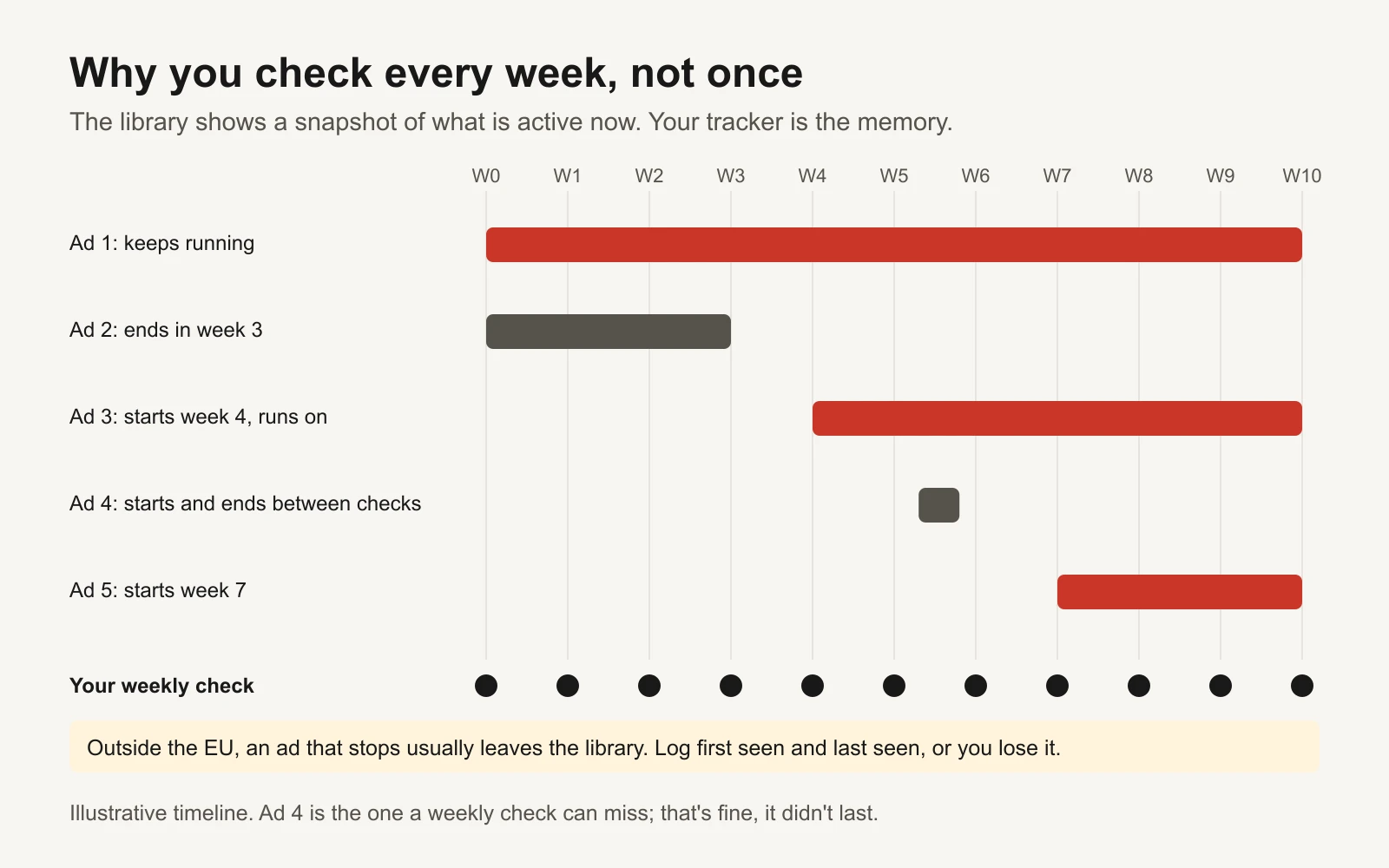
A weekly check catches almost everything that matters. Ads that start and stop between checks didn't last, which is a signal too.
Step 3: spot the ads they keep re-making
When a brand finds an idea that works, it makes more of it: the same hook with a different face, the same video with a new first line, the same offer in a square and a vertical version. Many versions of one idea means the advertiser is investing in it.
Ways to count variants:
- The "multiple versions" note. Some ad cards say the ad has several versions. Open it and count them.
- Same creative, many ads. Some cards say how many ads use the same creative and text.
- Same idea, different execution. Group ads by the idea yourself: same customer problem, same promise, different visuals or wording. This is the most useful count and only a human (or an AI with your screenshots) can do it.
Now put the two signals together. Here is an illustrative example: 12 ads from one fictional skincare competitor, checked on 16 November 2026.
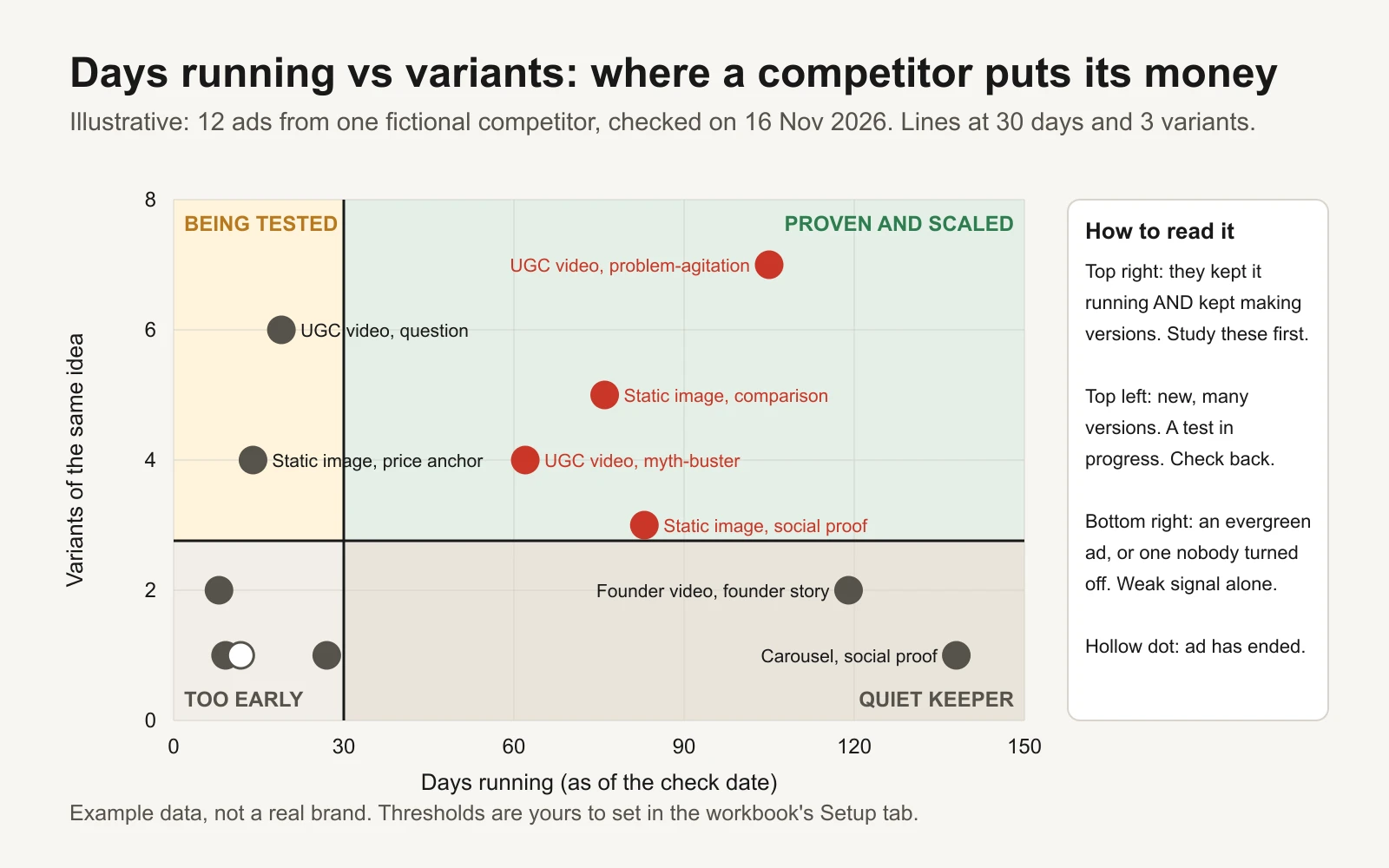
Example data for a fictional brand. Study the top-right corner first; check the top-left again next week.
| Box | What it means | What to do |
|---|---|---|
| Proven and scaled (long-running, many variants) | They kept it running and kept making more | Study first. This is where their best angles live |
| Being tested (new, many variants) | A test in progress | Note it. Check next week to see what survives |
| Quiet keeper (long-running, few variants) | Evergreen, low-budget, or forgotten | Weak signal on its own. Look for a pattern across several |
| Too early (new, few variants) | Not enough information | Log it and move on |
The thresholds (30 days, 3 variants) are starting points. Set your own in the workbook's Setup tab. A fast-moving brand that launches ads weekly might deserve a lower bar.
Step 4: build a pattern table
One ad tells you little. Ten ads tell you a pattern. Log every ad in a table with five things:
- Format: UGC (user-generated style) video, founder video, studio video, static image, carousel.
- Hook type: how the first seconds or first line grab attention. Question, bold claim, myth-buster, price anchor, social proof, problem-agitation, curiosity gap, POV, founder story, comparison, urgency, how-to.
- Offer: none, percentage off, free shipping, bundle, sale, free trial, free quote, guarantee.
- Days running: from the start date to today, or to the last day you saw it.
- Variant count: how many versions of that idea are live.
Here is the example data as a pattern table:
| Format | Hook type | Offer | Days running | Variants | Signal |
|---|---|---|---|---|---|
| UGC video | Problem-agitation | % off first order | 105 | 7 | Proven and scaled |
| Static image | Social proof | Free shipping | 83 | 3 | Proven and scaled |
| Static image | Comparison | Bundle | 76 | 5 | Proven and scaled |
| UGC video | Myth-buster | % off first order | 62 | 4 | Proven and scaled |
| Carousel | Social proof | Bundle | 138 | 1 | Quiet keeper |
| Founder video | Founder story | Free shipping | 119 | 2 | Quiet keeper |
| UGC video | Question | % off first order | 19 | 6 | Being tested |
| Static image | Price anchor | Bundle | 14 | 4 | Being tested |
What it says, in plain words: this competitor's money goes behind UGC-style videos that name a customer's problem or bust a myth, with a first-order discount, plus static images that compare or quote a review. Social proof shows up in both long-running static and carousel ads. The question hook is new and being pushed hard; check it next week.
The workbook's Pattern summary tab does this counting for you: ads, long-runners, share long-running, average days and total variants for each format, hook type and offer, plus a format-by-hook grid of long-runners.
Step 5: turn their angles into your own ads
This is where most competitor research goes wrong. The goal is not to make a copy of their ad. A copy is unethical, can infringe copyright and trademarks, and usually performs worse anyway, because it borrows a promise you might not be able to keep.
The rule: copy the question, never the answer.
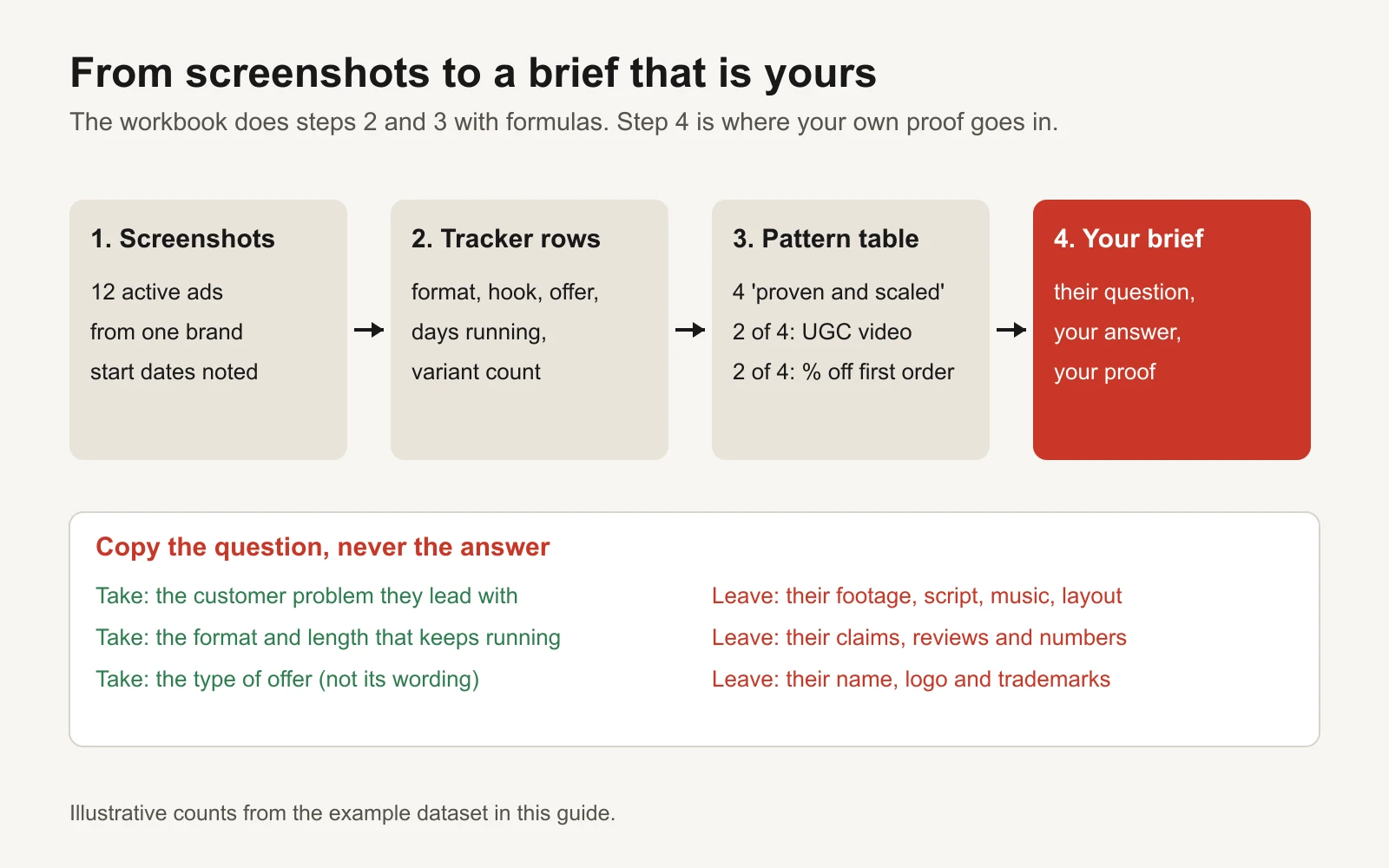
Their research tells you what customers respond to. Your product, proof and voice decide what you say.
| Take (fair game) | Leave (not yours) |
|---|---|
| The customer problem they lead with | Their footage, photos, music and layout |
| The format and rough length | Their script and on-screen text |
| The type of offer | Their claims, numbers and reviews |
| The emotional angle (relief, pride, fear of missing out) | Their brand name, logo and trademarks |
| The fact that a hook type works in your category | Their creator or spokesperson |
A worked example. The competitor's top pattern is a UGC video that opens on "makeup sitting on top of dry skin by midday". Your brief keeps the moment, not the words:
- Their question: what does dry skin look like at the worst moment of the day?
- Your answer: your product, your ingredient, your routine.
- Your proof: your own reviews, your own before-and-after photos taken with consent, your own guarantee. If you can't prove a claim, don't make it.
- Your hook: written fresh. For example, a customer filming her reflection in a car mirror at 4pm, with your words on screen.
Before you brief anyone, the workbook's Brief builder asks five yes-or-no originality checks, and only says "ready" when all five are yes.
Prompts to analyse screenshots with an AI assistant
Save screenshots of each ad (and each version) into one folder per competitor. Then use an AI assistant that accepts images, such as Claude or ChatGPT. Paste the prompts as written and attach the screenshots.
Prompt 1: turn screenshots into tracker rows
I'm attaching screenshots of ads from one competitor, taken from the Meta Ad Library.
For each ad, return one row in a table with these columns:
Library ID | Started running (as shown) | Active? | Format (UGC video, founder video,
video, static image, carousel) | Hook type (question, bold claim, myth-buster, price
anchor, social proof, problem-agitation, curiosity gap, POV, founder story,
comparison, urgency, how-to) | Offer (none, % off, free shipping, bundle, sale, free
trial, free quote, guarantee) | Angle in 10 words or fewer | Variants visible.
Only use what is visible in the screenshots. If something is unclear, write "unclear"
instead of guessing. Output the table as CSV so I can paste it into a spreadsheet.
Prompt 2: group variants into ideas
Here are the same screenshots. Group the ads into "ideas": ads that make the same
promise to the same customer problem, even if the visuals, person or wording differ.
For each idea give: a short name, the ads in it (by Library ID), what changes between
versions (face, first line, length, format, offer), and the oldest start date.
List the ideas from most versions to fewest.
Prompt 3: find the pattern
Here is my tracker as CSV, including days running and variant counts.
Treat ads running 30+ days with 3+ variants as "proven and scaled".
1. What do the proven-and-scaled ads have in common (format, hook type, offer,
   customer problem)? Count, don't guess.
2. What is being tested right now (new ads with many variants)?
3. What does this brand NOT do that customers in this category might respond to?
Keep each answer under 80 words. Say clearly where the data is too thin to conclude.
Prompt 4: write an original brief
My business: [what you sell, who buys it, price].
What I can prove: [reviews, guarantees, test results, certifications].
Competitor pattern: [paste the answer to prompt 3].
Write 3 ad concepts for my business that answer the same customer problem in a
different way. Rules: do not reuse any wording, visuals, claims or structure from the
competitor's ads; only use claims from the "what I can prove" list; give each concept
a hook (first 3 seconds or first line), the format, the body in 3 beats, and the offer.
Then, for each concept, tell me if anything is too close to the competitor's ad.
If you use Claude a lot, you can save these prompts as a reusable Agent Skill so the same steps run every week. Anthropic's anthropics/skills repository has examples of how skills are structured.
The official API and open-source options
You don't need code for any of this. If you want to automate it, use the official routes.
The Meta Ad Library API. Meta's ads_archive endpoint returns ads from the library by keyword or Page. Its scope is narrower than the website: Meta's documentation says ads that did not reach any location in the EU only return if they are about social issues, elections or politics (Meta for Developers: Ad Library API reference). In practice, the API is useful for commercial ads that ran in the EU, and for political and issue ads anywhere. For a US-only competitor's product ads, the website is the way.
Scraping is not the answer. Meta's Automated Data Collection Terms say you will not collect data by automated means without Meta's express written permission (Meta: Automated Data Collection Terms). Many "ad spy" scrapers ignore this. Screenshots and the official API keep you on the right side of it.
The TikTok Commercial Content API. TikTok offers an API for searching ads and other commercial content. Its product page says the data currently covers EU countries, and that the public and researchers can apply (TikTok for Developers: Commercial Content API).
| Tool | What it's for | Who should use it |
|---|---|---|
| facebookresearch/Ad-Library-API-Script-Repository | Meta's own Python examples and a small command-line tool for the Ad Library API. Last code change was in early 2025, so treat it as a starting point | Developers pulling EU or political ad data into a spreadsheet |
| meta/facebook-python-business-sdk | Meta's official Python SDK for its Marketing APIs | Developers building their own Ad Library or reporting scripts |
| anthropics/skills | Example Agent Skills for Claude | Anyone who wants the four prompts above as a repeatable weekly routine |
| TikTok Commercial Content API | Official, application-based access to EU ad data | Researchers and teams tracking TikTok ads in Europe |
| Google Ads Transparency Center | The website, with region, format and date filters | Everyone; no code needed |
Mistakes to avoid
- Copying the ad. Covered above. It is the fastest way to a takedown, and it doesn't teach you anything about your own customers.
- Reading one ad as a trend. Look for the same pattern across several long-running ads before you change your plan.
- Assuming long-running means profitable. Combine days running with variant counts, and treat quiet keepers as weak signals.
- Comparing yourself to a giant. A brand with 300 active ads is running a different game. Pick two to four competitors your size or slightly bigger.
- Looking in the wrong country. Set the library to where your customers are.
- Researching instead of testing. The point is a better first test, not a perfect plan. Brief two or three ideas and let the results decide.
Where this fits with the rest of your testing
Competitor research gives you better starting hypotheses. It doesn't replace testing your own ads. Write each idea as a hypothesis with the ad creative hypothesis template, label it with the same format and hook names using a creative taxonomy, and test the opening on its own using the hook test design guide. If you need hook wording to start from, the hook bank has 100 templates by type.
If you'd rather not run the whole loop yourself, GaaS can help: it makes original ads for your business from your website and tests them on Meta and Google within the spend limit you set, asking before anything spends. Either way, the tracker in this kit works on its own.
Sources
- Meta Business Help Center: about the Meta Ad Library
- Meta Transparency Center: Ad Library tools
- Meta for Developers: Ad Library API (ads_archive) reference
- Meta: Automated Data Collection Terms
- Google: announcing the launch of the Ads Transparency Center
- TikTok Ads Help: about Creative Center
- TikTok Ads Help: about Top Ads
- TikTok for Developers: Commercial Content API