
Your best ad is called "Copy of Copy of Ad 3 - FINAL v2". That's why you can't find the next one.
Every account that has run ads for a year has the same Ads Manager list: "New Ad (2)", "IMG_4471.MOV", "DO NOT USE - Copy", "jess hook B use this one". Each name made sense to someone on the day. None of them tells you what was in the ad. So when you ask the question that matters, "which hook makes us money?", the only honest answer is "let me open 500 ads and look".
This post fixes that with a six-part name, a short list of allowed values for each part, and a workbook that builds the name for you and later reads it back out of your Ads Manager export. It's built for business owners running their own Meta ads, and it's the same system a performance team needs for creative reporting.
Why the name matters more than it looks
Most ads don't get much spend. In Motion's Creative Benchmarks 2026, an analysis of 578,750 Meta creatives from 6,015 advertiser accounts and $1.29 billion of spend, "roughly five percent of creatives on Meta spend at least 10× their account median" (Motion: winners are rare). Motion calls those winners; it means the ads Meta chose to put real money behind, not necessarily the most profitable.
If about 1 in 20 of your ads is a winner, the useful question is what those ads have in common. Was it the hook, the format, the creator? Ads Manager can sort by spend and ROAS, but it can only group by what's in the name. If the name says "FINAL v2", that's all you can group by.
The convention: six parts, always in the same order
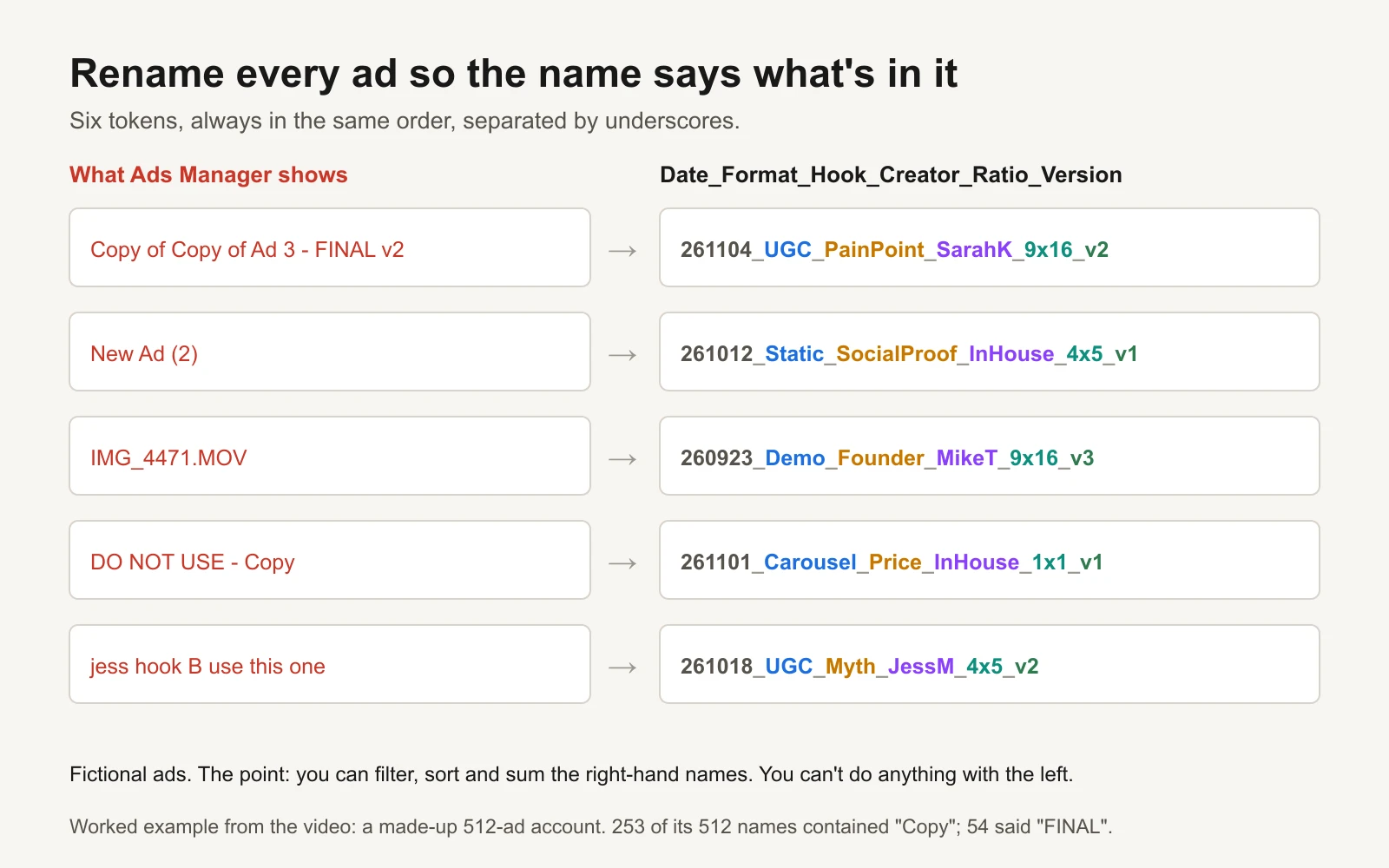
Fictional ads. You can filter, sort and sum the names on the right.
Date_Format_Hook_Creator_Ratio_Version, separated by underscores:
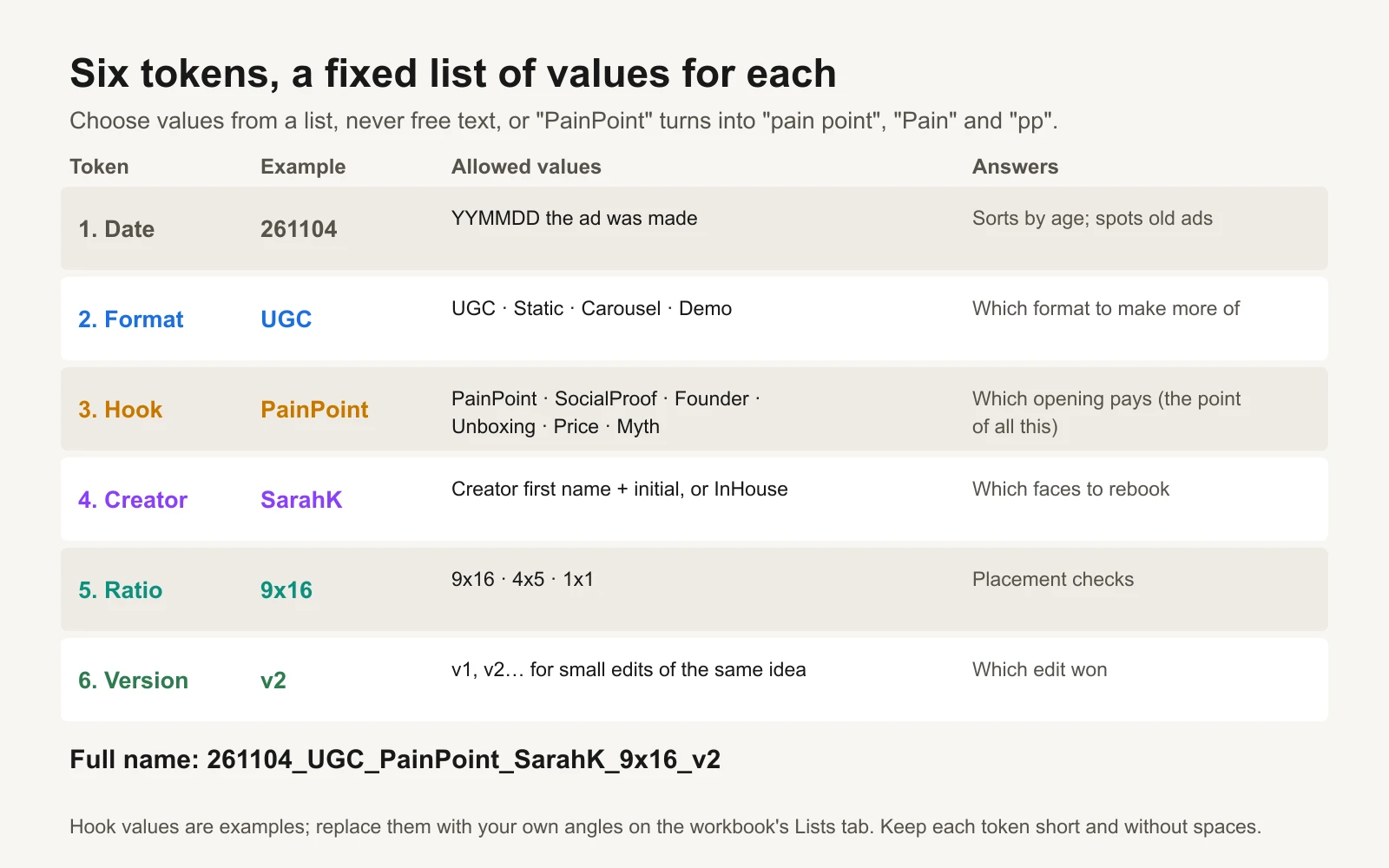
Hook values are examples. Use your own angles.
| Part | Example | Allowed values | What it answers |
|---|---|---|---|
| Date | 261104 | The day the ad was made, YYMMDD | How old is it? |
| Format | UGC | UGC, Static, Carousel, Demo | Which format should we make more of? |
| Hook | PainPoint | PainPoint, SocialProof, Founder, Unboxing, Price, Myth | Which opening pays? |
| Creator | SarahK | First name and initial, or InHouse | Which faces should we rebook? |
| Ratio | 9x16 | 9x16, 4x5, 1x1 | Did each placement get the right size? |
| Version | v2 | v1, v2, v3… | Which edit of the same idea won? |
Five rules make it work:
- One word per value, no spaces, no underscores inside a value. "PainPoint", not "pain point". The underscore is the separator, so the report can split the name.
- Only values from the list. Free text kills the system: within a month "PainPoint" becomes "Pain", "pain point" and "pp", and your report splits one hook into four. The workbook's dropdowns enforce the list.
- The hook is the part that matters most. Define each hook in one sentence so two people would tag the same ad the same way. The workbook's Lists tab has a definition column.
- Date first. Names then sort by age, and you can see at a glance which ads are old.
- Rename duplicates before publishing. A duplicated ad starts life with the old ad's name. If you don't rename it, two different ads share one name and the report can't tell them apart. That is how "Copy of Copy of…" lists happen.
Keep the campaign and ad set names for structure (audience, objective, budget). Put the creative description in the ad name. The agency naming convention guide covers campaign-level naming and stable IDs, and UTM naming covers the tracking side; this post is only about ad names, and only about reading results from them.
Where to write the name
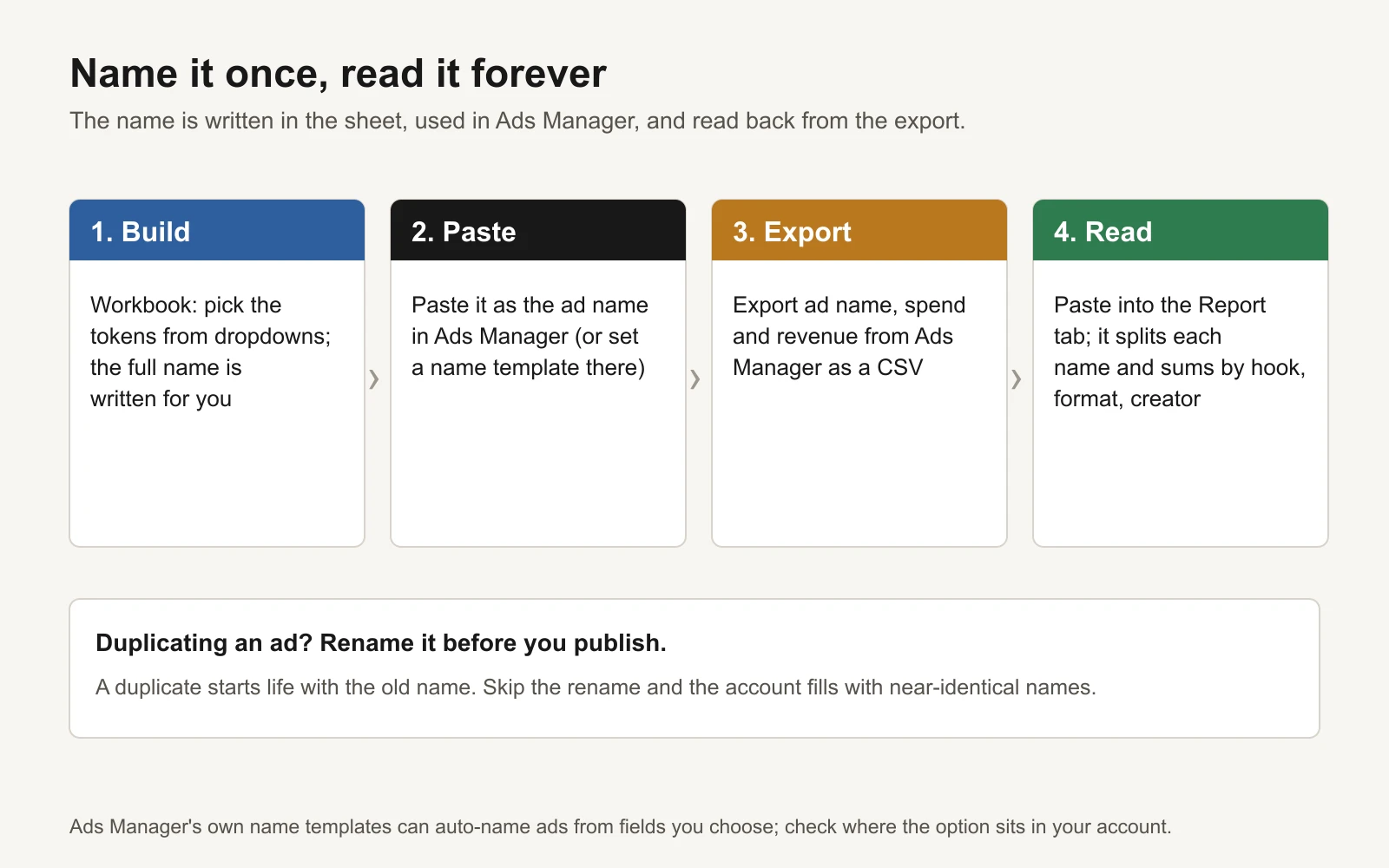
Name it once, read it forever.
Option 1: the Name builder tab. Pick the date, format, hook, creator, ratio and version from dropdowns. Column H writes the name; column I checks it ("ready to paste", "a part is missing" or "a value isn't on the Lists tab"). Copy it into the ad name field.
Option 2: Ads Manager's name templates. Ads Manager has built-in name templates that auto-name campaigns, ad sets and ads from fields you choose, with your own separator and custom text (Meta Business Help Center: Apply a name template in Meta Ads Manager; Meta's API describes them as name templates "for ads interfaces autonaming", with fields and a separator (Marketing API reference)). Built-in fields cover things like campaign name and objective; your hook and creator still need to be typed as custom text. The menu has moved over time, so check where the option sits in your own account, and use the workbook's lists as your values either way.
Reading it back: ROAS by hook
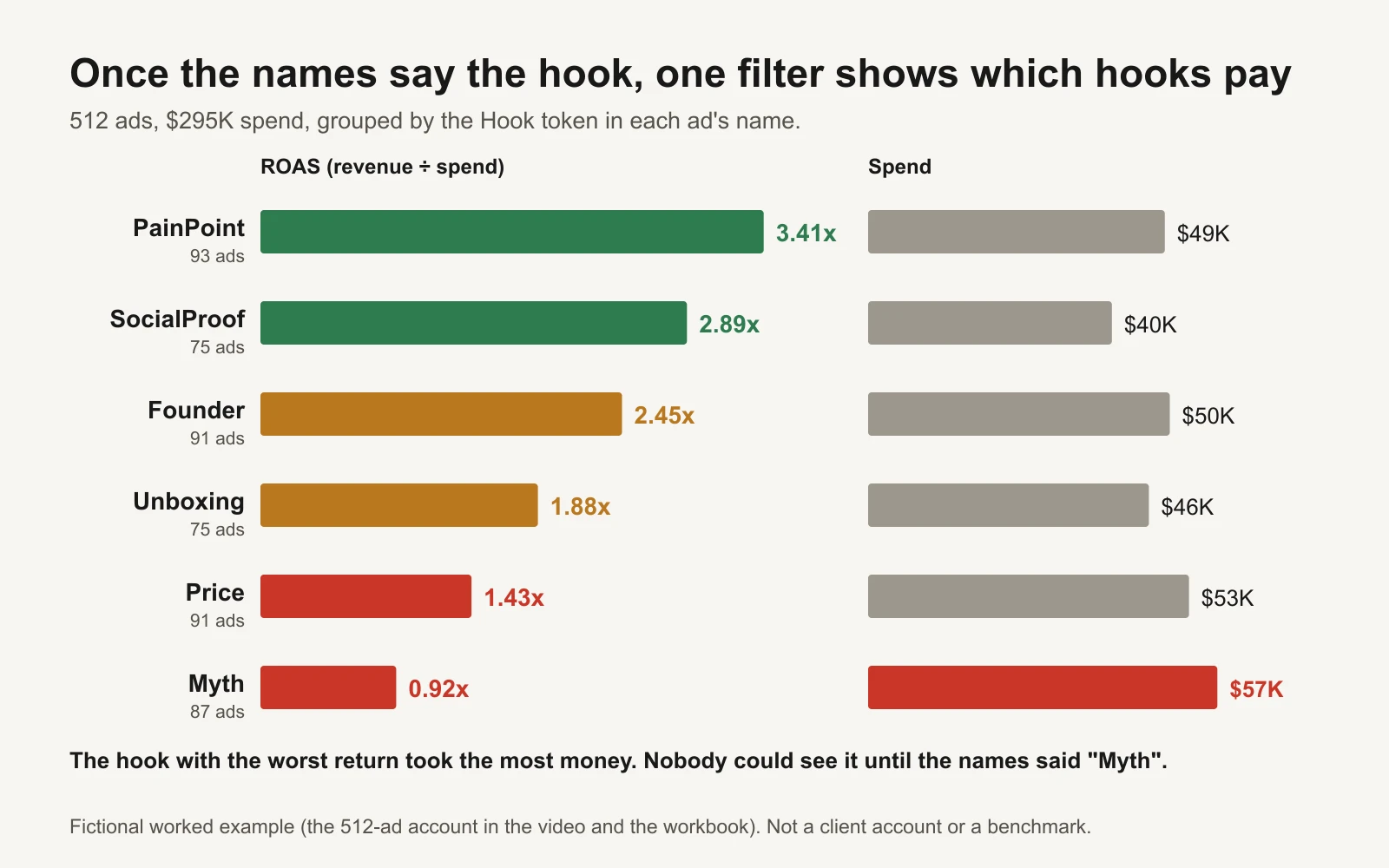
Fictional worked example (the 512-ad account from our video and the workbook). Not a client account or a benchmark.
Once the names are clean, reporting takes minutes:
- In Ads Manager, go to the Ads level, pick your date range, and export ad name, amount spent and purchase conversion value.
- Paste those three columns into the workbook's Report tab.
- The Report splits each name into its six parts and flags any name that doesn't parse. The Summary tab adds up ads, spend, revenue and ROAS (revenue divided by spend) by hook, format and creator, and says which to make more of and which to move budget away from.
The workbook comes prefilled with the fictional account from our video: 512 ads, $295,064 of spend, and old names where 253 contain "Copy" and 54 say "FINAL". With the old names, nobody could answer "which hook works?". With clean names, one filter shows it: PainPoint returned 3.41x and Myth 0.92x. The uncomfortable part is spend. Myth had taken $57K, more than any other hook, while losing money. That isn't unusual: when you can't see results by hook, budget follows whatever happened to get a good week, not what pays over time.
Read your own version with care. ROAS here is Meta's reported conversion value, which depends on your attribution setting; compare hooks against each other, not against your bank account. And a hook with very few ads or little spend isn't proven either way. The ad hook bank has more hook types to add to your list once you can measure them.
What's in the workbook
- Lists: the allowed values for format, hook, creator and ratio, plus a one-sentence definition of each hook. Replace them with your own.
- Name builder: dropdowns for each part, the finished name, and a check that it's valid.
- Report: paste your Ads Manager export; each name is split into six parts and checked. Prefilled with the fictional 512-ad account, with each ad's old messy name beside its clean one.
- Summary: ads, spend, revenue and ROAS by hook, format and creator, with a reading for each and charts of ROAS and spend by hook.
Tools and repos that help
| Tool or repo | What it is for | Who should use it |
|---|---|---|
| Meta Business Help Center: name templates | Auto-naming campaigns, ad sets and ads in Ads Manager | Anyone launching many ads a week |
| Meta Marketing API: name template settings | The fields and separators behind Ads Manager's auto-naming | Developers building launch tools |
| Motion Creative Benchmarks 2026 | How rare winning creatives are, across 578,750 Meta ads | Anyone sizing a testing plan |
| anthropics/skills | Public agent skills, including an xlsx skill so Claude can rename a list of ads or summarise the report | Anyone cleaning up an old account |
Or let GaaS run it
GaaS is an AI agent that creates, launches and optimizes Meta and Google ads from three inputs: your website, a spend limit and a one-line goal. Every ad it makes is labelled with its hook, format and angle from the start, so it can see which ones pay and make more of them, and nothing spends without your approval. See how GaaS works. Either way, the name builder is yours to keep.