
AI can make a hundred ad images in an afternoon. The trouble shows up in image number seven: the logo has an extra letter, the tin is a slightly different shape, the person holding it has a new face, and the "20% off" now says "2O% of". A customer who sees three of your ads should feel they came from the same brand. A customer who buys should get the product they saw.
This kit is the system we'd use to keep AI ads consistent. It has four parts: a brand bible that turns into a reusable prompt block, a reference pack of images the tools copy from, the consistency features in current image and video tools (checked against their official docs on 16 November 2026), and a QA scorecard that stops a bad ad before it spends money. It also covers the open-source route (ComfyUI, reference adapters and LoRA training) with every GitHub repo verified.
The workbook builds your prompt block for you: fill in colours, fonts, product facts, the person or character, the style, and your do and don't lists, and a formula assembles the block you paste into any tool. It also has a reference pack checklist, a 20-ad QA scorecard with pass-or-fail rules, and a prompt log so you can repeat a look later.
The short version
- Write it down once. Colours as hex codes, fonts, exact product facts, the person or character, the style, do and don't lists, approved claims.
- Collect references. Product from three angles on a plain background, the logo file, a character sheet, two or three style images.
- Generate scenes, not truth. Let AI make the setting, light, people and motion. Don't ask it to draw your logo, label text or price.
- Composite what must be exact. Add the real logo, packshot, price and words in an editor (Canva, Figma, Photoshop, CapCut or similar).
- QA every ad. Logo, product, text and claims are pass-or-fail. Then score the rest.
- Feed winners back. Approved ads become references for the next batch.
Why AI ads drift
An image or video model doesn't "know" your brand. Each time you ask, it builds a new picture from noise, guided by your words and any images you give it. The same words produce a different tin, a different smile, a different shade of teal. Models are especially weak at exact text and small marks. OpenAI's own image generation guide says its model "may occasionally struggle to maintain visual consistency for recurring characters or brand elements" and can still struggle with precise text placement (OpenAI image generation guide).
So the strategy is simple: the more exact something must be, the less you should ask the generator to make it.
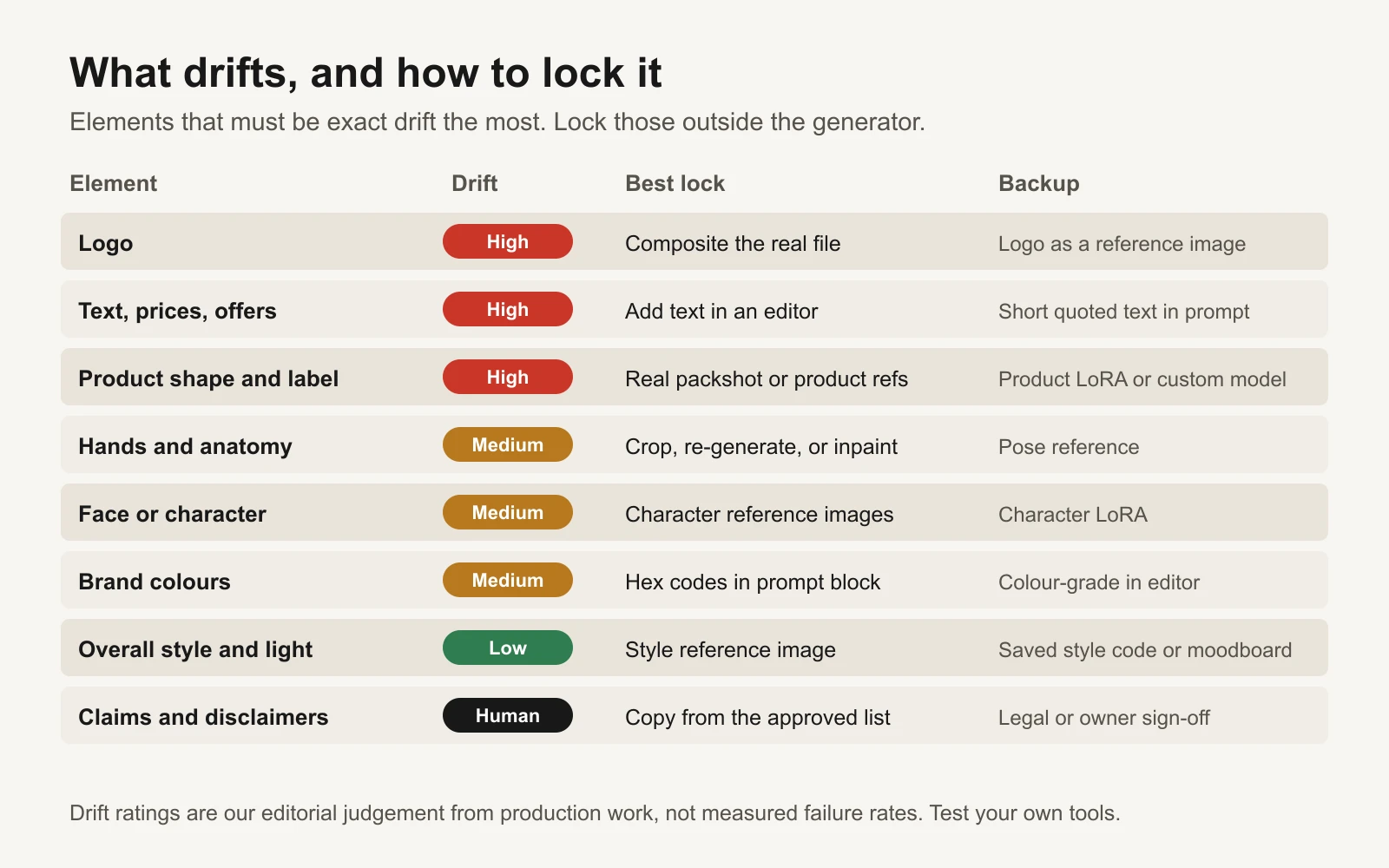 Elements that must be exact drift the most. Lock those outside the generator.
The workflow
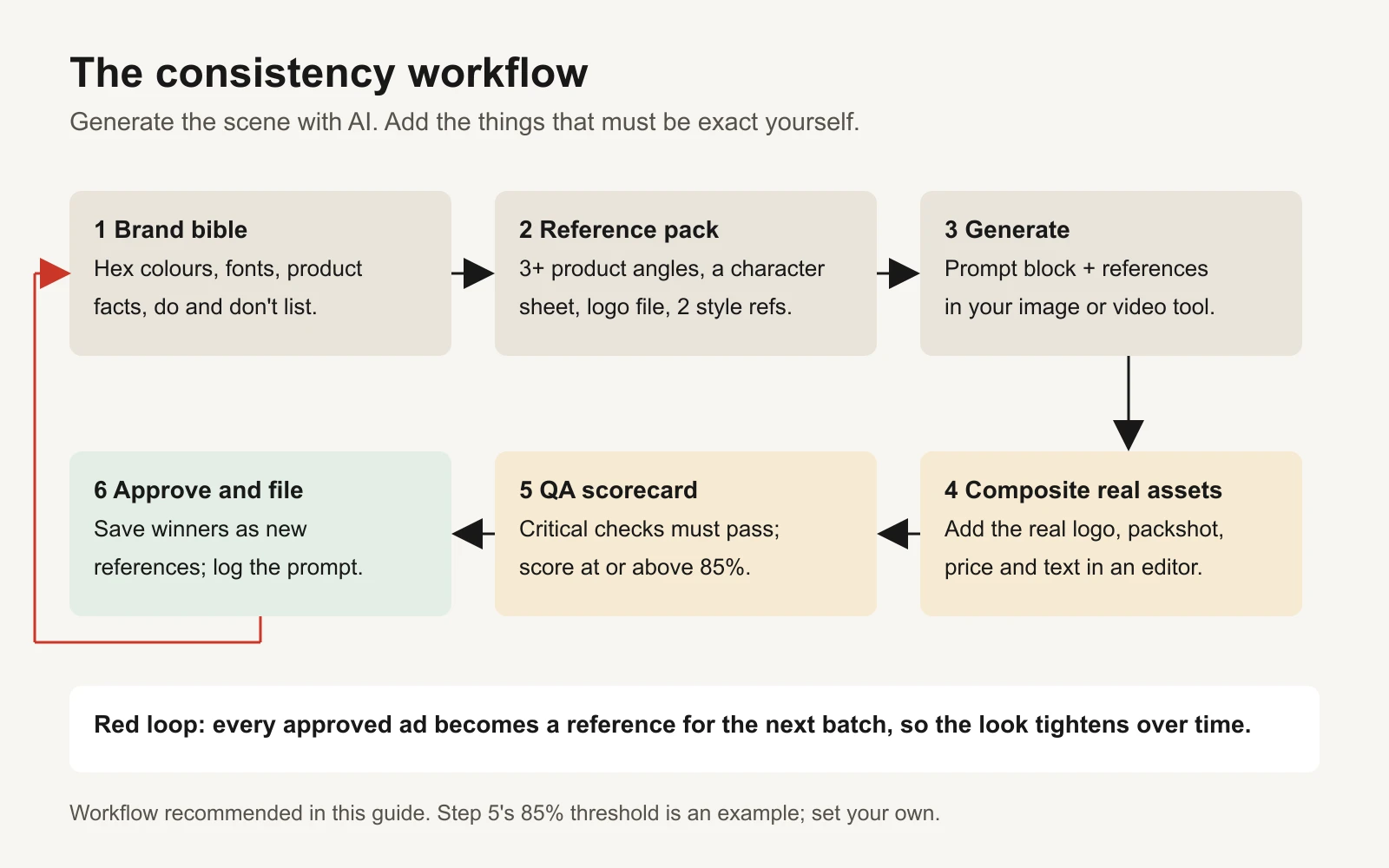 Generate the scene with AI. Add the things that must be exact yourself.
Step 1: build the brand bible and its prompt block
A brand bible is a one-page list of facts the generator must respect. Keep it short enough that you'll actually paste it every time.
| Field | What to write | Example (fictional tea brand "Kettle & Crane") |
|---|---|---|
| Colours | 3 to 6 colours with hex codes and a role | Deep teal #0F4C4A (main), saffron #F2A93B (accent), cream #FAF3E3 (background), ink #1C1C1C (text) |
| Fonts | Headline and body fonts, used only in the editor | A rounded serif for headlines, a clean sans for body |
| Logo rules | Where it goes, minimum size, never-do list | Bottom-right, never recoloured, never stretched, never generated |
| Product facts | Shape, size, colour, materials, what's in the pack | Matte deep-teal cylindrical tin, 8 cm tall, gold crane emblem, 100 g loose leaf |
| Person or character | Age range, look, wardrobe, mood, and consent status | "Maya", early 30s, dark curly hair, mustard knit jumper, calm and warm |
| Style | Light, lens, setting, mood | Warm morning window light, 35mm photo look, real kitchen surfaces |
| Do | 3 to 5 things every ad should have | Steam visible, hands in frame, product in the top third |
| Don't | 3 to 5 things that break the brand | No neon, no gloss, no extra logos, no fake labels, no text in the image |
| Approved claims | The only claims an ad may make | "Small-batch blend", "100 g makes about 50 cups" (only if true for you) |
Then turn it into one block of text you paste at the start of every prompt. The workbook builds this with a formula, so updating a colour updates every future prompt.
BRAND BLOCK v3 (Kettle & Crane, fictional example)
Product: a matte deep-teal (#0F4C4A) cylindrical tea tin, 8 cm tall, with a small gold crane
emblem on the front. Keep the tin's shape, colour and emblem exactly as in the product reference.
Leave the label area plain: no words, no letters, no numbers.
Person: Maya, early 30s, dark curly shoulder-length hair, mustard knit jumper, calm and warm.
Match her face to the character reference.
Style: warm morning window light, 35mm photo look, shallow depth of field, real kitchen surfaces,
cream (#FAF3E3) and deep teal with small saffron (#F2A93B) accents.
Always: visible steam, hands in frame, product in the top third.
Avoid: any text or logos in the image, neon, glossy plastic look, warped or extra tins,
extra fingers, distorted hands.
Two notes. First, models treat hex codes as a hint, not a rule. Expect to colour-grade in your editor. Second, tell the model to leave the label plain. You'll add the real label in step 4.
Step 2: assemble the reference pack
References do more than words. Collect these once, name them clearly, and keep them in one folder.
| Reference | How many | Tips |
|---|---|---|
| Product, plain background | 3 angles (front, three-quarter, side) | Even light, no shadows across the label, high resolution |
| Product in hand | 1 to 2 | Shows real scale |
| Logo | 1 vector or transparent PNG | For compositing, not for the generator to redraw |
| Character sheet | Front, three-quarter, profile, plus 2 expressions | Same outfit and hair in every view |
| Style references | 2 to 3 | Past ads or photos with the light and mood you want |
| Approved past ads | Grows over time | Your best references after a few weeks |
If your character is a real person (a founder, a customer, a creator), get written consent for AI use of their likeness before you upload a single photo.
Step 3: use your tool's consistency features
Every major tool now has some way to accept reference images. Names, limits and versions change often, so we list the feature and link the official page; check it before you rely on a number. Checked on 16 November 2026:
| Tool | Consistency feature | Key detail from the docs |
|---|---|---|
| Midjourney | Style Reference (--sref, strength --sw); Omni Reference (--oref, --ow) on V7; on V8 the docs describe an Edit Model that takes up to 4 reference images and replaces Omni and Character Reference | --sw runs 0 to 1000 (default 100). The seeds page warns seeds shouldn't be relied on across sessions. Style Reference, Edit Model, Seeds |
| OpenAI image API | Image edits with several input images, plus masks for editing one area | No seed parameter; the guide itself warns about recurring characters and brand elements. Image generation guide |
| Google Gemini image models ("Nano Banana") | Multi-image reference for objects, characters and style | Up to 14 reference images in total, split by type depending on the model. Outputs carry a SynthID watermark. Gemini image generation |
| Google Veo 3.1 (Vertex AI) | Reference images ("ingredients"), and first and last frame | Up to 3 asset images (scene, object or character). The docs say the same seed with the same inputs gives consistent results. Veo reference images |
| Runway | Gen-4 References | Up to 3 references per image, called in the prompt by tag, for example @maya. Runway help |
| Kling | Kling 4.0 references and elements | Image and video references and multiple elements; start, end and middle frames. Kling 4 user guide |
| Black Forest Labs FLUX | Multi-reference editing | FLUX.2 accepts up to 8 reference images through the API; FLUX.1 Kontext is described as a previous-generation model. FLUX.2 editing |
| Ideogram | Character Reference and Style Reference | Style Reference takes up to 3 images to make a custom style. Style Reference |
| Adobe Firefly | Style and Structure Reference; Custom Models for a subject or a style | Reference strength runs 1 to 100. Style reference API, Custom models |
A few habits work in all of them:
- Start every prompt with the brand block, then describe only what changes: the scene, the action, the camera.
- Send the same references every time, in the same order, with the same names.
- Change one thing per round. If you change the scene and the light and the lens, you won't know what broke the face.
- Record what worked: tool, model version, references, seed if the tool has one. The workbook's Prompt log tab is for this.
- For video, start from an approved still. Generate the first frame as an image, pass QA, then use it as the start frame or reference. It's easier to fix a still than a clip.
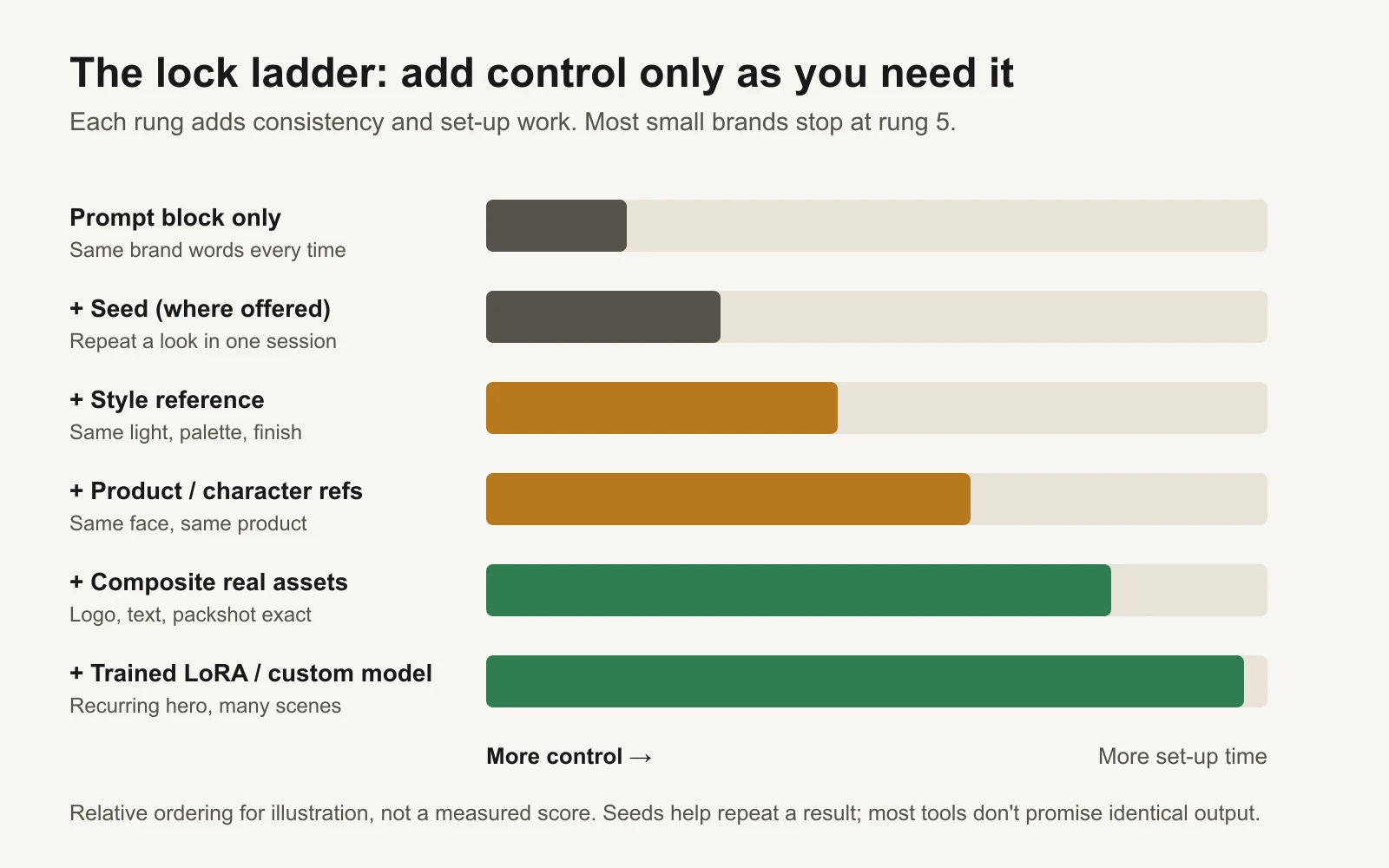 Add control only as you need it. Most small brands get what they need by rung 5.
Step 4: composite what must be exact
This is the step most people skip, and it fixes most of the problems. Generate the scene with a plain product or an empty space where the product goes. Then, in your editor:
- Place the real product photo (a cut-out packshot) or replace the label area with the real label.
- Add the real logo file. Never accept a generated logo, however close it looks.
- Type the headline, offer and price in your brand fonts.
- Colour-grade to bring the palette back to your hex codes.
It takes a few minutes per ad and removes the three highest-risk failures: a misspelled offer, a warped logo and a product that doesn't match what arrives.
The open-source route
If you want full control, or need many images of one product or person, open-source tools let you build a repeatable pipeline on your own computer or a rented GPU. Every repo below was checked with the GitHub command-line tool on 16 November 2026; stars and dates are from that day.
| Repo | What it does | Who should use it |
|---|---|---|
| Comfy-Org/ComfyUI (147,176 stars) | A node-based app for building image and video workflows you can save and re-run | Anyone going open source; the hub for everything below |
| Comfy-Org/ComfyUI-Manager (16,853 stars) | Installs and updates ComfyUI add-on nodes | Every ComfyUI user |
| Comfy-Org/comfy-mcp (347 stars) | An official MCP server, so an AI agent such as Claude can drive ComfyUI workflows | People who want an agent to run saved workflows in batches |
| cubiq/ComfyUI_IPAdapter_plus (6,183 stars) | IP-Adapter nodes: use an image as a style or subject reference | Still widely used, but the author put it in "maintenance only" mode in April 2025 |
| tencent-ailab/IP-Adapter (6,718 stars) | The original image-prompt adapter research code | Developers; last updated in 2024 |
| instantX-research/InstantID (11,994 stars) and ToTheBeginning/PuLID (3,554 stars) | Keep a person's face from one or a few photos | Character consistency without training; both are research code |
| QwenLM/Qwen-Image (8,486 stars) | Image generation plus Qwen-Image-Edit for editing with references | Open multi-image editing |
| black-forest-labs/flux2 (2,877 stars) | FLUX.2 models with multi-reference editing | Check the licence: the README lists FLUX.2 [klein] 4B as Apache-2.0 and the 9B models under a non-commercial licence |
| VectorSpaceLab/OmniGen2 (4,122 stars) and bytedance/USO (1,241 stars) | Generate new images that keep subjects and styles from your references | Experimenters comparing open approaches |
| ostris/ai-toolkit (12,641 stars) and kohya-ss/sd-scripts (7,267 stars) | Train a LoRA: a small add-on file that teaches a model one product, person or style | Brands with one hero product or mascot used in many scenes |
| huggingface/diffusers (34,925 stars) | The Python library behind many of these models | Developers scripting a pipeline |
| Wan-Video/Wan2.2 (18,703 stars) with kijai/ComfyUI-WanVideoWrapper (6,818 stars) | Open video models, including image-to-video and a character animation model | Open-source video ads from an approved still |
| Lightricks/LTX-2 (10,274 stars) | Open audio and video model with its own LoRA trainer | Video teams who want sound and picture together |
| Fannovel16/comfyui_controlnet_aux (4,285 stars) | Pose, depth and edge guides that hold a layout or pose steady | Matching a proven ad's composition |
| anthropics/skills (195,987 stars) | Agent Skills; brand-guidelines is Anthropic's own brand applied as a skill, a useful template for writing yours | Teams that want an AI agent to apply the brand bible automatically |
A LoRA (low-rank adaptation) is the strongest lock for a recurring product or character. You train it on a set of consistent photos, then load it whenever you generate. Read each trainer's guidance on how many images to use. Two rules matter more than the settings: train only on images you own or have permission to use, and check the base model's licence allows commercial use before an ad goes live.
The QA checklist before an AI ad ships
Score each check 0 (fail), 1 (needs a fix) or 2 (pass). The four critical checks must score 2. Then the total must reach your threshold (85% in our example).
| Check | What to look for | Critical? |
|---|---|---|
| Logo exact | Every letter, colour and proportion matches the file. No extra marks, no ghost logos in the background. | Yes |
| Product accurate | Shape, size, colour, label, pack count and contents match what the customer receives | Yes |
| Text, price and offer exact | Spelling, numbers, currency, dates and terms match the offer. Zoom to 200%. | Yes |
| Claims approved | Every claim is on the approved list, with proof on file. No implied before-and-after you can't support. | Yes |
| Hands and anatomy | Five fingers, natural joints, nothing melted or merged | No |
| Face or character | Matches the character sheet across every ad in the set | No |
| Colours | Within the palette after grading | No |
| Style | Matches the style references; feels like the same campaign | No |
| Placement fit | Key content inside safe zones for Stories, Reels and feed crops; readable on a phone | No |
| AI disclosure | You've checked whether the platform labels it or you must disclose it (see below) | No |
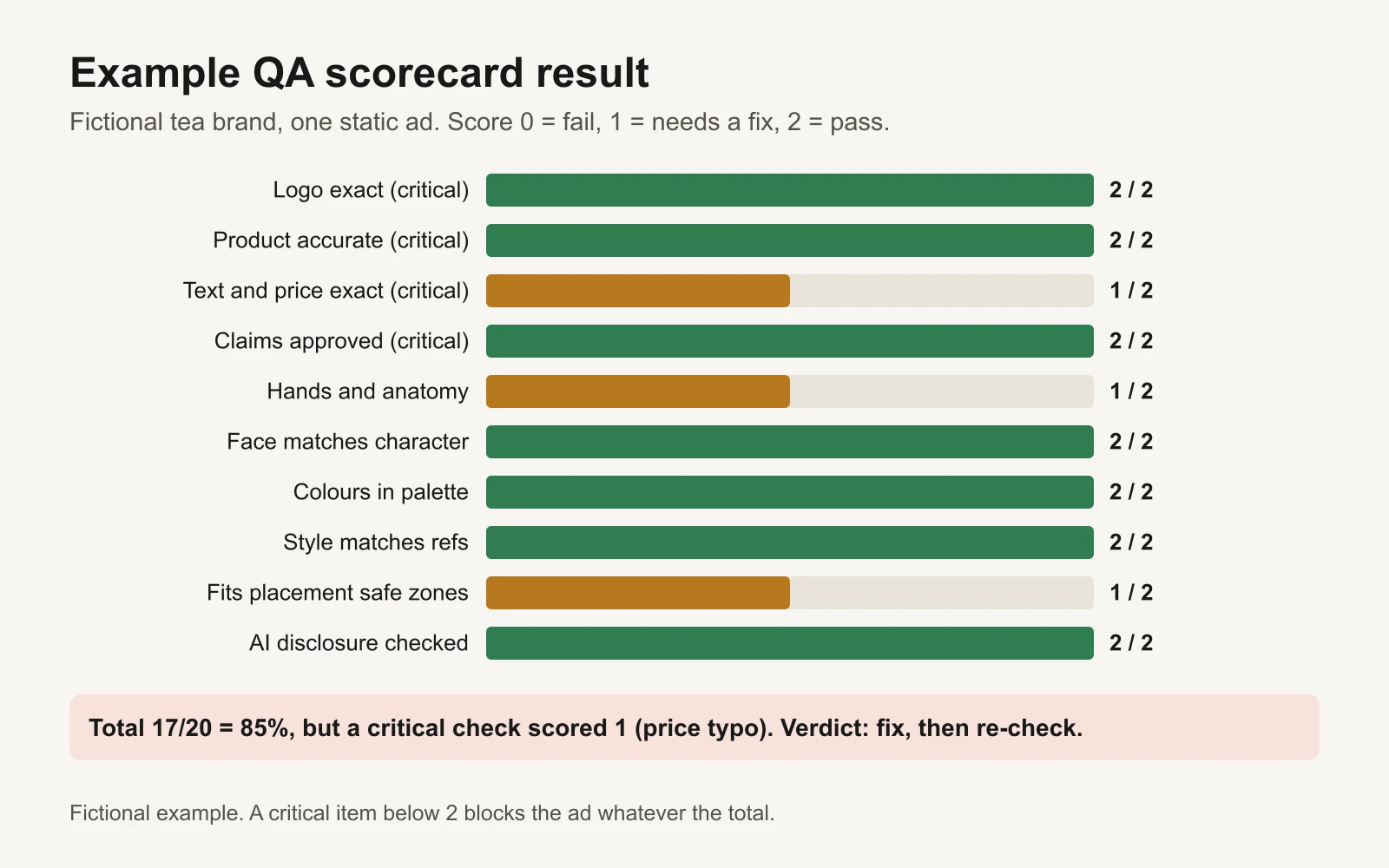 A high total doesn't save an ad with a critical failure.
For claims in regulated categories, add the steps from our AI ad claims review. For packaged goods, the guide to logos and packaging misrepresentation goes deeper.
Platform disclosure rules (checked 16 November 2026)
- Meta adds an "AI info" label to ads made or significantly edited with Meta's own generative AI tools. When an ad shows a photorealistic AI-generated person, the label appears next to "Sponsored" (Meta announcement). Ads about social issues, elections or politics must disclose photorealistic AI images, video or realistic audio (Meta policy).
- Google Ads has allowed advertisers since July 2026 to put AI labels directly in image and video creatives, or to use a new AI label setting. Google says the setting "doesn't guarantee compliance" with specific regulations (Google Ads policy update). Election ads with synthetic content have their own disclosure rules (political content policy).
- Many generators also embed provenance data or watermarks (for example SynthID on Google's image models). Keep your original exports.
A worked example: one week, one fictional brand
Kettle & Crane (fictional) wants six static ads and two short videos for a new chai tin.
- Monday: fill in the brand bible in the workbook. The prompt block is ready in the Brand bible tab.
- Tuesday: shoot the tin on a white table from three angles with a phone. Make a character sheet for "Maya" with the generator, approve one face, and save five views.
- Wednesday: generate 30 scenes (brand block plus references), keep 10. Composite the real tin, logo and "Masala Chai, 100 g" label in the editor.
- Thursday: QA all 10. Four fail a critical check (a warped tin, two wrong hands on the tin, one typo). Fix two and drop two. Six ads pass at 85% or above.
- Friday: use two approved stills as start frames for two 8-second videos. QA again.
- Next week: the six approved ads become style references for the next batch.
The numbers are an example of the process, not a benchmark. Your keep rate depends on the tool, the product and how strict your checks are.
When a new image or video model launches
- Re-run five saved prompts with the same brand block and references. Score the results on the same QA sheet.
- Check the official docs for changed limits (number of references, seed behaviour, strength settings).
- Don't switch your whole pipeline until the new model passes your critical checks as often as the old one.
- Log the model name and version for every ad, so you can trace any drift back to a change.
What's in the workbook
- Start here: how to use it.
- Brand bible: colours, fonts, logo rules, product facts, character, style, do and don't lists and approved claims. A formula assembles the prompt block and an avoid block, plus a short video add-on.
- Reference pack: a checklist of the references you need, with file names and a completion percentage.
- QA scorecard: score up to 20 ads on 10 checks. Formulas total the score, find the lowest critical score and give a verdict: Ship, Fix critical item, or Improve. The threshold is a setting.
- Prompt log: tool, model version, prompt block version, references and seed, so you can repeat a good result.
- Tool features: the table above with links, to re-check when tools update.
Or let GaaS keep it consistent
GaaS starts from your website, so the ads it makes draw on your own product facts and brand, and nothing goes live or spends until you approve it. If you run your own pipeline, the brand bible and QA scorecard above will do most of the work.