
In 2026 you can ask an AI assistant "which ads wasted money last week?" and get an answer pulled live from your ad account. The same connection can also let it create campaigns, change budgets and switch ads on. That second part is where small mistakes turn into real spend.
This guide shows the whole stack: what connects an assistant such as Claude or ChatGPT to Meta Ads, Google Ads, Google Analytics 4 (GA4) and Shopify; which official and community tools exist today (each one checked on GitHub on 16 November 2026); how to set it up read-only on day one; how to let it draft changes for your approval in week two; and the guardrails that stop an agent from spending money you didn't agree to. It is written to work with any model. A short box near the end explains what to re-check when a new model comes out.
The workbook has two tools. The permissions planner lists 30 common agent actions across Meta, Google Ads, GA4 and Shopify and lets you mark each one Allowed, Needs approval or Forbidden, with spend caps that calculate your daily and weekly limits and a review log. The prompt library holds 24 prompt patterns with their purpose, the data each one needs and its risk level.
The short version
If you read nothing else, do these six things in order:
- Give the agent its own login or token with read-only access. Never reuse your admin login.
- Set a spend limit inside the ad platform (for example, Meta's account spending limit). The agent can't talk its way past a limit it can't edit.
- For one week, ask only reporting questions, and check five answers by hand against Ads Manager.
- Then let it draft changes. Every change becomes a request you approve, edit or reject, one change at a time.
- Log every tool call: who asked, what changed, the old and new value, and when.
- Keep billing, payment methods, user access and deletes out of the agent's tool list completely.
How the pieces fit together
A few terms first, in plain words:
- API (application programming interface): the official door a program uses to read or change your ad account. Meta's is the Marketing API; Google's is the Google Ads API.
- SDK (software development kit): a code library that makes an API easier to use from Python, Node.js or another language.
- MCP (Model Context Protocol): an open standard that lets an AI app call outside tools in a consistent way. An MCP server wraps an API and offers a list of named tools, such as "get campaign insights" or "create ad set". An MCP client is the AI app that calls them: Claude, ChatGPT, Gemini, Cursor, Claude Code, Codex and many others.
- OAuth: the "Log in with Facebook / Google" style sign-in that grants an app limited access without sharing your password.
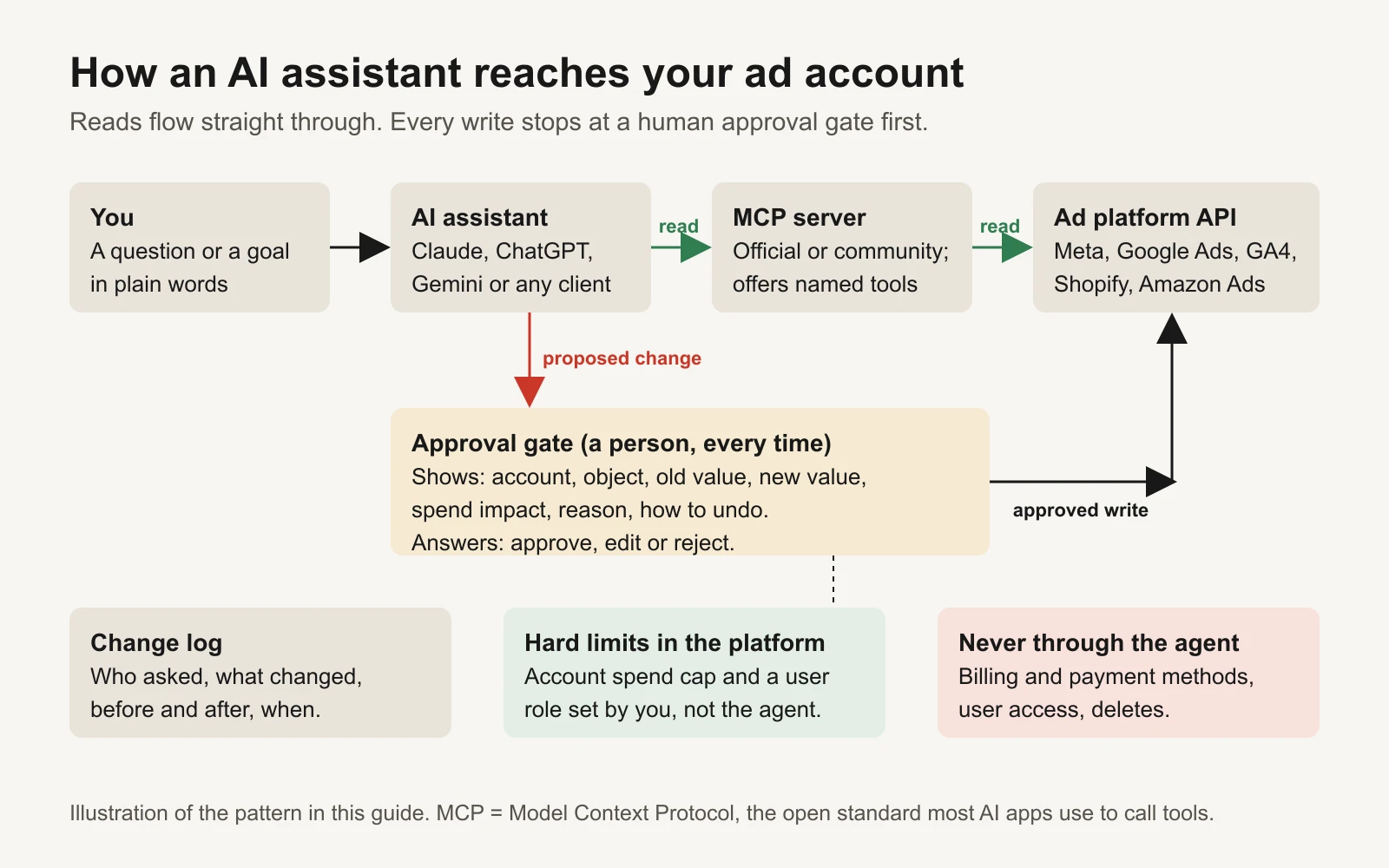 The pattern this guide recommends: reads flow straight through, writes stop at a person.
The important idea is the split. Reading data is low risk: the worst case is a wrong answer, which you can check. Writing (creating, editing, activating, deleting) changes what you spend and what your customers see. The MCP specification itself says there "SHOULD always be a human in the loop with the ability to deny tool invocations" (MCP tools specification). Everything else in this guide follows from that.
What exists today: connectors, SDKs and repos
Every GitHub repository below was checked with the GitHub command-line tool on 16 November 2026. Star counts and last-update dates are from that day and will change. Stars measure popularity, not safety. A server you connect will see your ad data and, for some, hold a token that can spend money. Prefer official servers, read the code of community ones, and check who maintains them.
Connectors (MCP servers) for ad accounts and data
| Connector | Who makes it | What it can do | Who should use it |
|---|---|---|---|
Meta Ads MCP server (mcp.facebook.com/ads) | Meta, hosted | 28 tools: reporting, Ad Library search, audiences, and creating campaigns, ad sets and ads. Meta's docs say write tools create objects paused, and a separate ads_activate_entity tool "starts spending budget". | Anyone on Meta. Start here before any third-party option. |
| googleads/google-ads-mcp (1,183 stars, updated Nov 2026) | Google, open source | Read with GAQL (Google Ads Query Language). Small set of writes (assets, labels) behind a "propose and confirm" step with a checksum, plus a built-in audit log. Write tools can be switched off in tools_config.yaml. | Google Ads advertisers who want an official, read-first server. |
| googleanalytics/google-analytics-mcp (3,800 stars) | Google, open source | GA4 reports, funnels, realtime and conversions reports. Write tools only appear with an --allow-write flag. | Anyone who wants the agent to check site behaviour and conversions, not just ad clicks. |
| Amazon Ads MCP server | Amazon, open beta since 2 Feb 2026 | Campaign creation, updates and deletes, reporting, account settings, and access to billing and financial data. Available to Amazon Ads API partners with active credentials. | Amazon sellers with API access. Lock it down: it can reach billing. |
Shopify/Shopify-AI-Toolkit (649 stars) and the Dev MCP (@shopify/dev-mcp) | Shopify | Shopify documentation, API schemas and code validation; store management through the Shopify CLI. The Dev MCP itself runs locally without store authentication. | Teams building on Shopify. For store data such as orders, see the community row below. |
| pipeboard-co/meta-ads-mcp (1,375 stars) | Pipeboard, open source plus hosted service | Meta Ads read and write; sister servers for Google, TikTok, Snap and Reddit. Says writes ask for confirmation and new campaigns start paused. | People who want one connector across several ad platforms and accept a third party in the middle. |
| cohnen/mcp-google-ads (724 stars, last push Oct 2025) | Community | Google Ads analysis through GAQL. | A simple read-only learning project. Less active than Google's official server. |
| GeLi2001/shopify-mcp (239 stars) | Community | Shopify Admin API: products, customers, orders, inventory. Includes order cancel and refund tools. | Store owners who want order and product data. Give its app read scopes only. |
| AdsMCP/tiktok-ads-mcp-server (54 stars) | Community | TikTok Ads Marketing API. We found no official TikTok MCP server. | TikTok advertisers comfortable reviewing a small project's code. |
SDKs and agent builder kits
| Repo | What it is for | Who should use it |
|---|---|---|
| meta/facebook-python-business-sdk (1,624 stars) and meta/facebook-nodejs-business-sdk (626 stars) | Meta's official Marketing API libraries | Developers writing their own Meta tools |
| googleads/google-ads-python (763 stars) and googleads/google-ads-java (211 stars) | Google's official Google Ads API libraries | Developers writing their own Google Ads tools |
| tiktok/tiktok-business-api-sdk (237 stars) | TikTok's official Business API SDK | Developers on TikTok |
| modelcontextprotocol/python-sdk (24,874 stars) and typescript-sdk (13,774 stars) | Official kits for building your own MCP server | Anyone wrapping an API as a small, safe tool list |
| modelcontextprotocol/inspector (11,308 stars) | Test an MCP server and see exactly which tools it exposes | Everyone, before connecting a server to a live account |
| modelcontextprotocol/registry (7,470 stars) and modelcontextprotocol/servers (92,050 stars) | The community registry of MCP servers, and the reference servers | Finding servers and learning how good ones are built |
| anthropics/claude-agent-sdk-python (8,563 stars) and claude-agent-sdk-typescript (1,886 stars) | Build your own agent on the same loop as Claude Code, with permission controls | Developers building an internal ads agent |
| openai/openai-agents-python (30,719 stars) and openai-agents-js (4,021 stars) | OpenAI's agent framework, with MCP support | Developers on OpenAI models |
| google/adk-python (22,242 stars) and langchain-ai/langgraph (45,032 stars) | Google's Agent Development Kit, and a graph-based agent framework | Developers who want to choose any model |
Skills, plugins and hooks
| Repo | What it is for | Who should use it |
|---|---|---|
| anthropics/skills (195,987 stars) | Anthropic's public Agent Skills. skill-creator helps you write your own; mcp-builder guides building an MCP server. | Anyone turning a repeated ads task into a reusable skill |
| coreyhaines31/marketingskills (60,793 stars) | Marketing skills for Claude Code and other agents, including ads and ad-creative. The ads skill tells the agent to label unavailable inputs "MISSING" rather than estimate. | Marketers who want a good starting playbook for the agent |
| anthropics/claude-plugins-official (47,465 stars) | Anthropic's directory of Claude Code plugins. Shopify's AI Toolkit installs from it. | Claude Code users |
| anthropics/claude-code (155,912 stars) and openai/codex (135,530 stars) | Terminal agents that connect to MCP servers. Claude Code adds permission rules and hooks you can use as guardrails. | People comfortable in a terminal who want the strongest controls |
Pick your setup
| No code | Terminal agent | Build your own | |
|---|---|---|---|
| What you use | Claude or ChatGPT apps with a custom connector | Claude Code or Codex with MCP servers | An agent SDK plus the official ad SDKs |
| Set-up time | Minutes | An hour | Days |
| Approval controls | The app's own confirmation prompts | Allow, ask and deny rules, plus hooks that can block a call | Whatever you build: your own approval queue |
| Best for | Owners who want answers, not code | Marketers and technical founders | Teams with a developer and a clear workflow |
For the no-code route, Claude supports custom connectors using remote MCP. ChatGPT supports custom MCP servers in developer mode; OpenAI's page labels it "Elevated risk", says write actions need confirmation by default, and treats any tool without a readOnlyHint annotation as a write action.
Day 1: read-only reporting
The goal today is narrow: the agent can see everything and change nothing.
1. Give the agent its own, limited access.
| Platform | What to grant | Where it's documented |
|---|---|---|
| Google Ads | A separate user with Read only access. Google's help says Read only users can view campaigns and run reports but can't edit campaigns or billing. | Google Ads access levels |
| Meta Ads | For Meta's MCP server, the minimum permissions are ads_mcp_management plus ads_read or ads_management. Choose ads_read. Meta notes that Admin-role system user tokens can't use the server; only Employee-role ones work. | Meta MCP: get started |
| GA4 | The official server needs only the analytics.readonly scope. Leave off the --allow-write flag. | GA4 MCP README |
| Shopify | A custom app with read_ scopes only (for example read_orders, read_products). | Your Shopify admin, Apps settings |
2. Set a spend limit in the platform, by hand. On Meta, the ad account's spending limit (spend_cap in the API) means "when the amount is reached, all delivery stops" (Meta Ad Account reference). Set it yourself in billing settings, outside the agent's reach. It's the last line of defence if everything else fails.
3. Connect. These are the documented commands for Claude Code. Other clients use the same server URLs.
# Meta's official server (replace with your Meta app ID)
claude mcp add --transport http --client-id YOUR_META_APP_ID meta-ads https://mcp.facebook.com/ads

# Google Analytics 4, read-only (credentials set up as in the README)
claude mcp add analytics-mcp --scope user \
  -e "GOOGLE_APPLICATION_CREDENTIALS=PATH_TO_CREDENTIALS_JSON" \
  -e "GOOGLE_CLOUD_PROJECT=YOUR_PROJECT_ID" \
  -- pipx run analytics-mcp

# Shopify developer docs and schemas (no store access)
claude mcp add --transport stdio shopify-dev-mcp -- npx -y @shopify/dev-mcp@latest
For Google's Ads server, turn the write tools off before you connect it. Put this in a tools_config.yaml (the README calls this a "strictly read-only" setup):
namespaces:
  labels: false
  assets: false
4. Block writes in the client too. Belt and braces: even with read-only access, tell the client to deny write tools. Claude Code evaluates rules in the order deny, then ask, then allow, and a deny always wins. MCP tools are named mcp__server__tool. This project .claude/settings.json lets the agent read Meta data freely and denies the tools that spend or touch personal data:
{
  "permissions": {
    "allow": [
      "mcp__meta-ads__ads_get_ad_accounts",
      "mcp__meta-ads__ads_get_ad_entities",
      "mcp__meta-ads__ads_get_creatives",
      "mcp__meta-ads__ads_library_search"
    ],
    "deny": [
      "mcp__meta-ads__ads_activate_entity",
      "mcp__meta-ads__ads_delete_custom_audience",
      "mcp__meta-ads__ads_update_custom_audience_users"
    ]
  }
}
Use an allow list for reads, not a list of what's forbidden. Servers add tools over time. A new tool that isn't on your allow list will prompt you instead of running silently.
5. Ask, then check. Use the analysis prompts below. Pick five answers and check them by hand in Ads Manager or Google Ads: same date range, same attribution setting, same currency. If two of five disagree, fix the prompt (usually the date range or attribution window) before going further.
Week 2: let it draft changes for your approval
Once its numbers match yours, let the agent propose changes. It still can't make them.
- On Meta, allow the create tools. Meta's docs say they create campaigns, ad sets and ads paused, and "your AI client asks for confirmation before activation." Keep
ads_activate_entitydenied: you switch ads on yourself in Ads Manager after checking the preview. - On Google Ads, the official server's write tools already use a two-step "propose and confirm" flow. The first call is a dry run that returns the change and a checksum. The second call only works with that exact checksum, after you approve.
- On OpenAI's API, remote MCP tools ask for approval by default. The
require_approvalsetting can switch that off for named tools; leave it on for anything that writes (OpenAI: MCP servers).
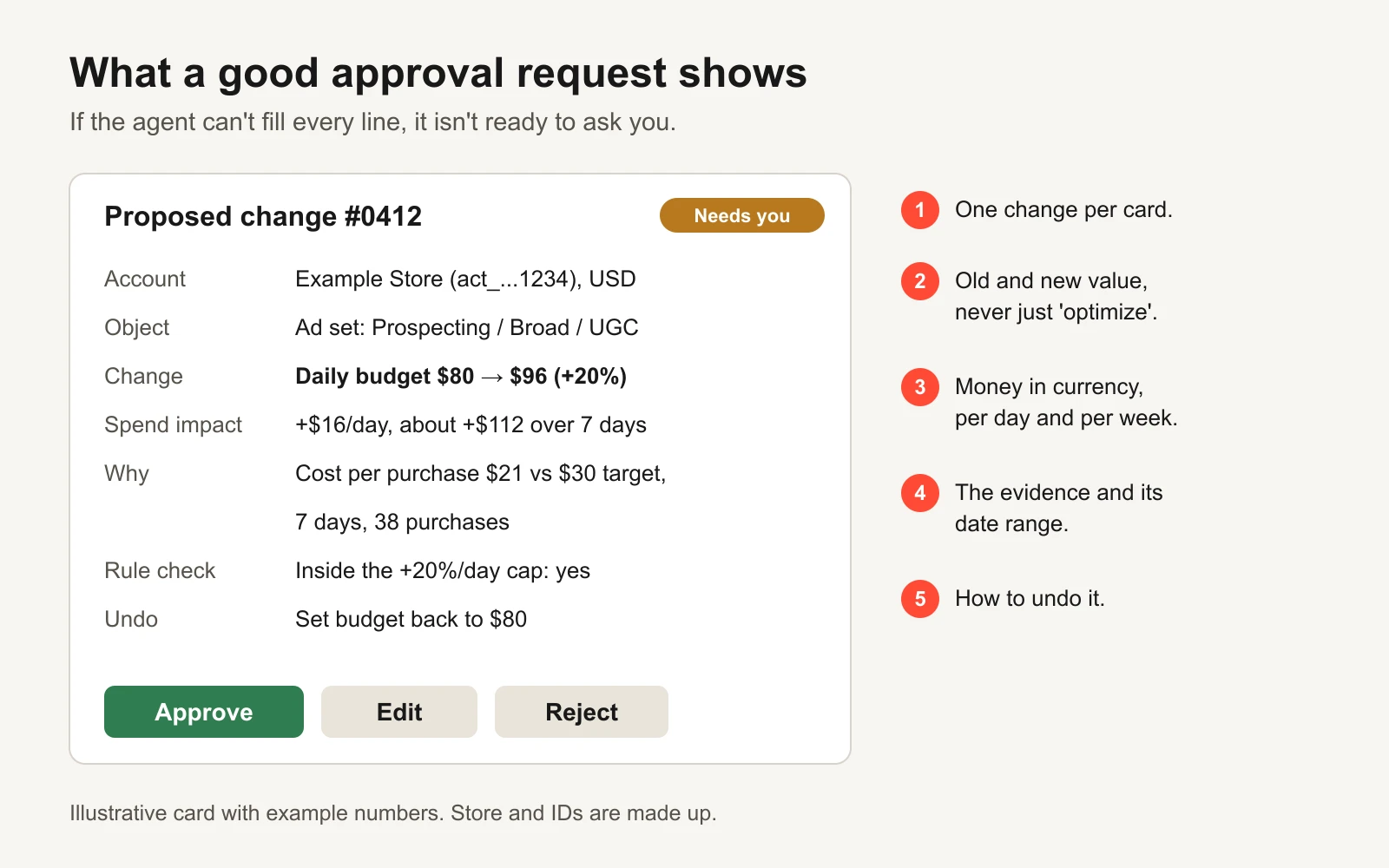 If the agent can't fill every line of this card, it isn't ready to ask you.
Add a hook that logs and blocks
In Claude Code, a hook is a small script that runs before or after each tool call. A PreToolUse hook that exits with code 2 blocks the call, and a matching permission deny rule still applies whatever the hook says (Claude Code hooks). This one writes every ad tool call to a log file and blocks anything that activates, deletes or touches billing or users:
#!/usr/bin/env bash
# ~/.claude/hooks/ads-guard.sh  (needs jq installed)
input=$(cat)
tool=$(echo "$input" | jq -r '.tool_name')
echo "$(date -u +%Y-%m-%dT%H:%M:%SZ) $input" >> "$HOME/.claude/ads-agent-log.jsonl"
case "$tool" in
  *activate*|*delete*|*billing*|*payment*|*_users*|*spend_cap*)
    echo "Blocked: $tool must be done by a person in the ad platform." >&2
    exit 2 ;;
esac
exit 0
{
  "hooks": {
    "PreToolUse": [
      { "matcher": "mcp__.*", "hooks": [ { "type": "command", "command": "~/.claude/hooks/ads-guard.sh" } ] }
    ]
  }
}
The log file is your change log's raw material. Once a week, copy the write calls into the workbook's Review log tab.
Weeks 3 and 4: small, capped changes (optional)
Some teams let the agent make a few pre-agreed changes without asking each time, inside caps. If you do, write the rules down in numbers. An example for a fictional store spending $3,000 a month:
| Rule | Example value | Why |
|---|---|---|
| Monthly spend cap set in Meta billing | $3,000 | The platform stops delivery here, whatever the agent does |
| Largest daily budget change, per ad set | +/-20% | Small steps are easy to undo and to read |
| Largest total daily increase across the account | $50 | Caps the damage from several "small" changes at once |
| Actions allowed without asking | Pause an ad that spent 2x target cost per purchase with zero purchases | Reduces spend; easy to reverse |
| Actions that always need a person | Activating anything, new audiences, new claims, any increase above the caps | These start or raise spend, or change what customers see |
The workbook's Spend caps tab turns your monthly cap into a daily allowance and flags any proposed change that breaks a rule.
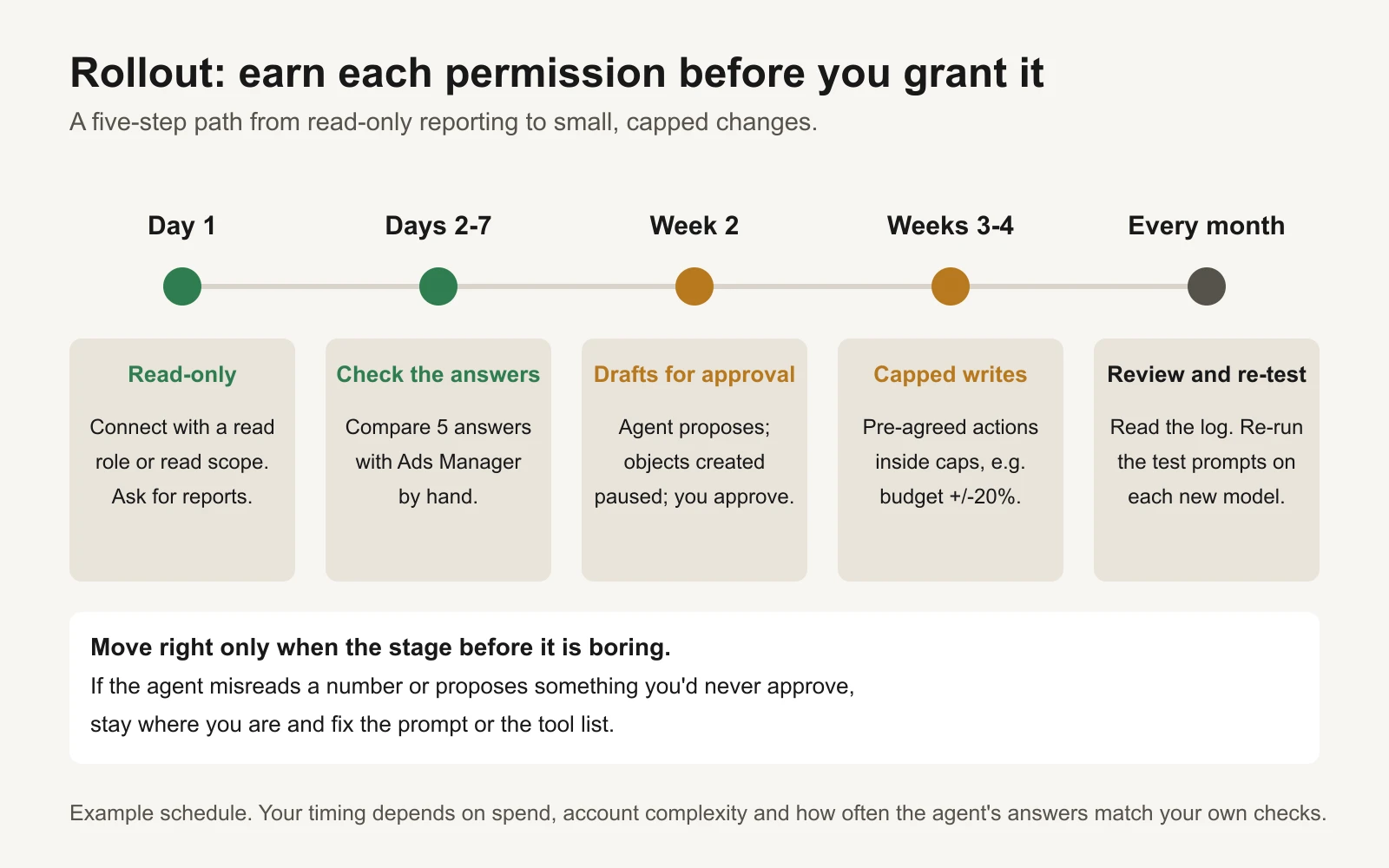 Move right only when the stage before it has become boring.
The guardrails, and why "nothing spends without approval"
GaaS works on one rule: nothing spends without the owner's approval. It's the right default for a do-it-yourself setup too, for four reasons.
- Money spent can't be un-spent. A wrong report costs you a minute. A wrong budget increase costs you the money, and you only see it a day later.
- Agents misread context. Attribution windows, currencies, time zones and test campaigns all look like ordinary numbers. A person spots "that's the old campaign" in a second.
- Text can carry instructions. Ad comments, landing pages and competitor ads in the Ad Library are text written by strangers. An agent that reads them can be pushed by them; this is called prompt injection. OpenAI's MCP guidance warns that servers can carry hidden prompt injections, and that a malicious server "can exfiltrate sensitive data from anything that enters the model's context." An approval step means injected text can't spend money on its own.
- Approvals teach you the account. Reading a clear request every day is the fastest way for a busy owner to learn what's working.
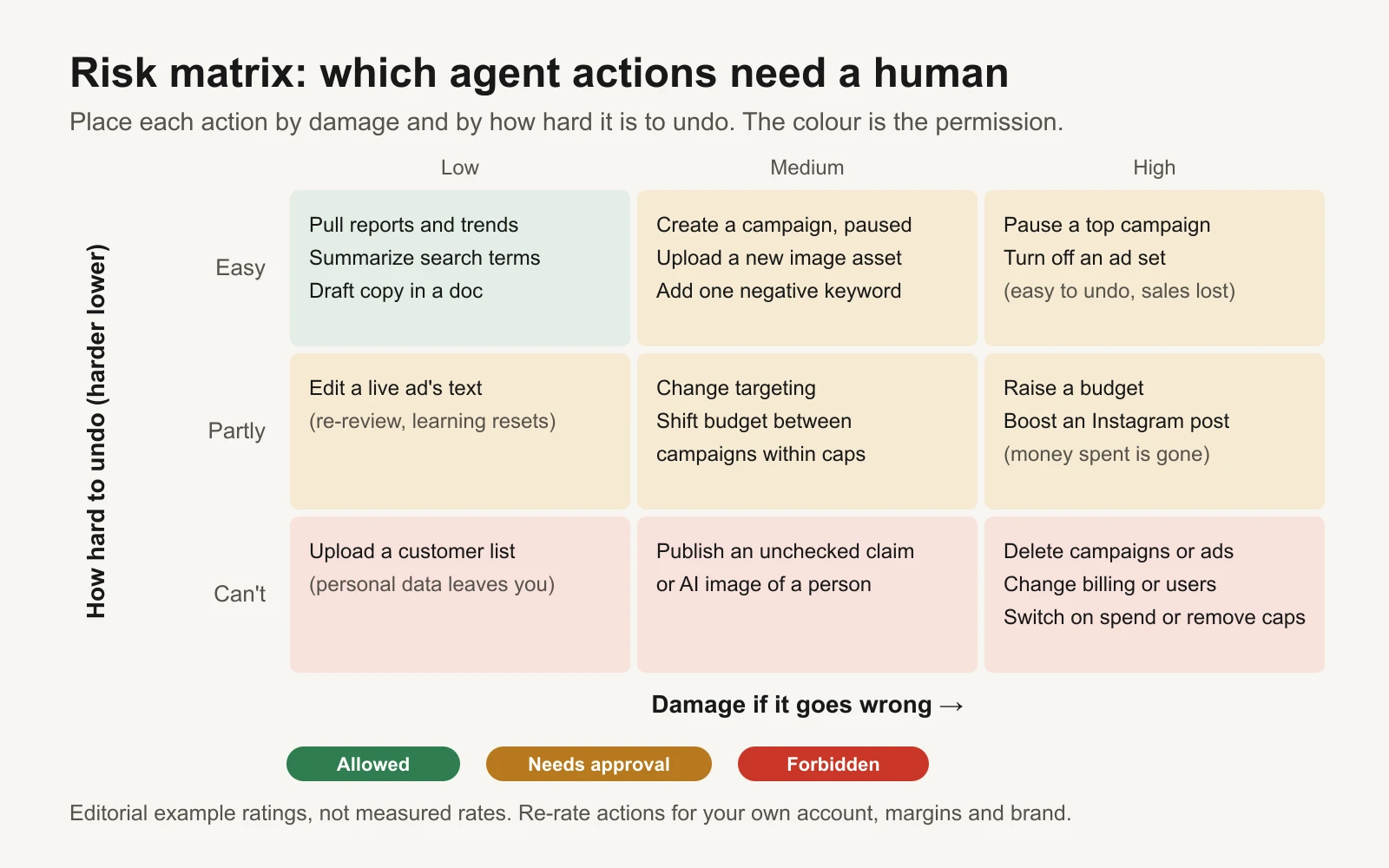 Place each action by damage and by how hard it is to undo. The colour is the permission.
The rules in one list:
- Read-only first. Separate login, read role, read scopes.
- Caps live in the platform. Account spending limit set by a person. The agent's own rules are a second layer, not the first.
- One change per approval, showing old value, new value, money per day and per week, evidence with dates, and how to undo it.
- Log everything: every tool call, not just writes. Google's official Ads server already writes a structured audit record for each call.
- Never through the agent: billing, payment methods, adding or removing users, deleting campaigns or ads, removing spend caps. Pause instead of delete; a person deletes.
- Trust the server, not the stars. Prefer official servers. For a community server, read the code, pin a version and test it with the MCP Inspector before it sees a live token.
- Revoke in one click. Know where to remove the agent's access (the user in Google Ads, the app or token in Meta Business settings) before you need to.
The permissions matrix guide goes deeper on assigning each action, and the budget guardrails guide on choosing cap values.
Prompts that work
Analysis prompts and change prompts need different shapes. An analysis prompt should pin down scope and ask the agent to show its working. A change prompt should ask it to propose, not do.
| Use | A prompt pattern that works | Why |
|---|---|---|
| Analysis | Name the account, date range, attribution setting and currency | Most wrong answers come from the wrong scope |
| Analysis | "Show the raw numbers and the query you ran" | You can check them in a minute |
| Analysis | "If a number is unavailable, write MISSING. Don't estimate." | Stops confident guesses |
| Change | "Propose up to 3 changes. Don't make any." | Keeps writes behind your approval |
| Change | "For each: old value, new value, spend impact per day and week, evidence with dates, how to undo" | Fills the approval card |
| Change | "Check each change against these caps: ..." | The agent flags its own rule breaks |
Four to copy:
ANALYSIS: weekly check
Account: [account name / ID]. Date range: last 7 full days vs the 7 days before.
Attribution: 7-day click, 1-day view. Currency: USD.
Show spend, purchases, cost per purchase and ROAS (revenue / spend) by campaign.
List the 3 biggest changes and the likely cause of each, labelled as a guess.
Show the raw numbers and the query or tool call you used.
If any number is unavailable, write MISSING. Do not estimate. Do not change anything.
ANALYSIS: wasted spend
For the last 14 full days, list ad sets or keywords that spent more than [2x target cost per purchase]
with zero purchases. Include spend, impressions, clicks and the date range.
Sort by spend. Read only: do not pause or edit anything.
CHANGES: draft for approval
Based on the weekly check, propose up to 3 changes. Do not make any change.
For each one give: the object (name and ID), the current value, the new value,
the spend impact per day and per 7 days, the evidence with its date range,
whether it breaks any of these caps [paste caps], and exactly how to undo it.
Never propose deleting anything or touching billing, payment methods or users.
CHANGES: new campaign draft
Draft a new campaign for [product] using [audience] and [budget per day].
Create it PAUSED if your tools allow drafts; otherwise write it out as a plan.
List every setting you chose and why. I will review the preview and activate it myself.
The workbook's Prompt library tab has 24 of these, each with the data it needs and a risk level.
How to update this when a new model launches
- Re-run your ten saved test prompts and compare the answers with the known correct numbers in the workbook. Note any that changed.
- Check tool use: did the new model call any write tool during an analysis prompt? If so, keep it on read-only until you know why.
- Re-list each server's tools (the MCP Inspector or the client's tool list). Servers add tools; your allow list should catch them.
- Keep caps and approvals unchanged for two weeks, whatever the launch claims.
- Update the "last checked" date in your planner, and refresh this page's star counts and tool lists.
What's in the workbook
- Start here: how to use it, in five steps.
- Permissions planner: 30 actions across Meta, Google, GA4 and Shopify. Each one has a risk score from damage and undo difficulty. Choose Allowed, Needs approval or Forbidden; the sheet counts your choices and flags any action you allowed that scores 4 or more out of 6.
- Spend caps: enter a monthly cap and change limits; it calculates the daily allowance and checks a list of proposed changes against your rules.
- Review log: one row per agent change, with old and new values and a formula for the change in percent.
- Prompt library: 24 prompts with purpose, data needed, risk level and the expected output.
The CSV version on the template page has the permissions list for any spreadsheet tool.
Or let GaaS run it
If you'd rather not wire this up yourself, GaaS is built on the same rule. You give it your website, a spend limit and a one-line goal; it makes, launches and improves Meta and Google ads, and every change that spends money waits for your approval in plain words. Either way, the guardrails above are worth keeping.