
Every "Comment GaaS 👇" post is a DM machine. Meta lets it send exactly one message.
"Comment a word and I'll send you the link" works because it's easier than "link in bio": one word in the comments, and the thing arrives in your inbox. It also pushes the post, because every comment is engagement. That's why you see it on reels, carousels and, more and more, on ads.
What most people don't know is how tightly Meta limits it. The automatic reply is a single message, it has a deadline, and you can't follow up unless the person writes back. If your one message is "Here you go! 🙌" with three links and no question, the conversation is over. This guide covers Meta's rules, how to pick a keyword, the scripts, and a free tracker.
The workbook has Meta's rules with sources, a keyword tester (paste real comments and see which ones your rule catches), five DM scripts with character counts, and a funnel tracker per post. Example numbers in this article and the workbook are a fictional worked example unless a source is linked.
Meta's rules for automatic replies
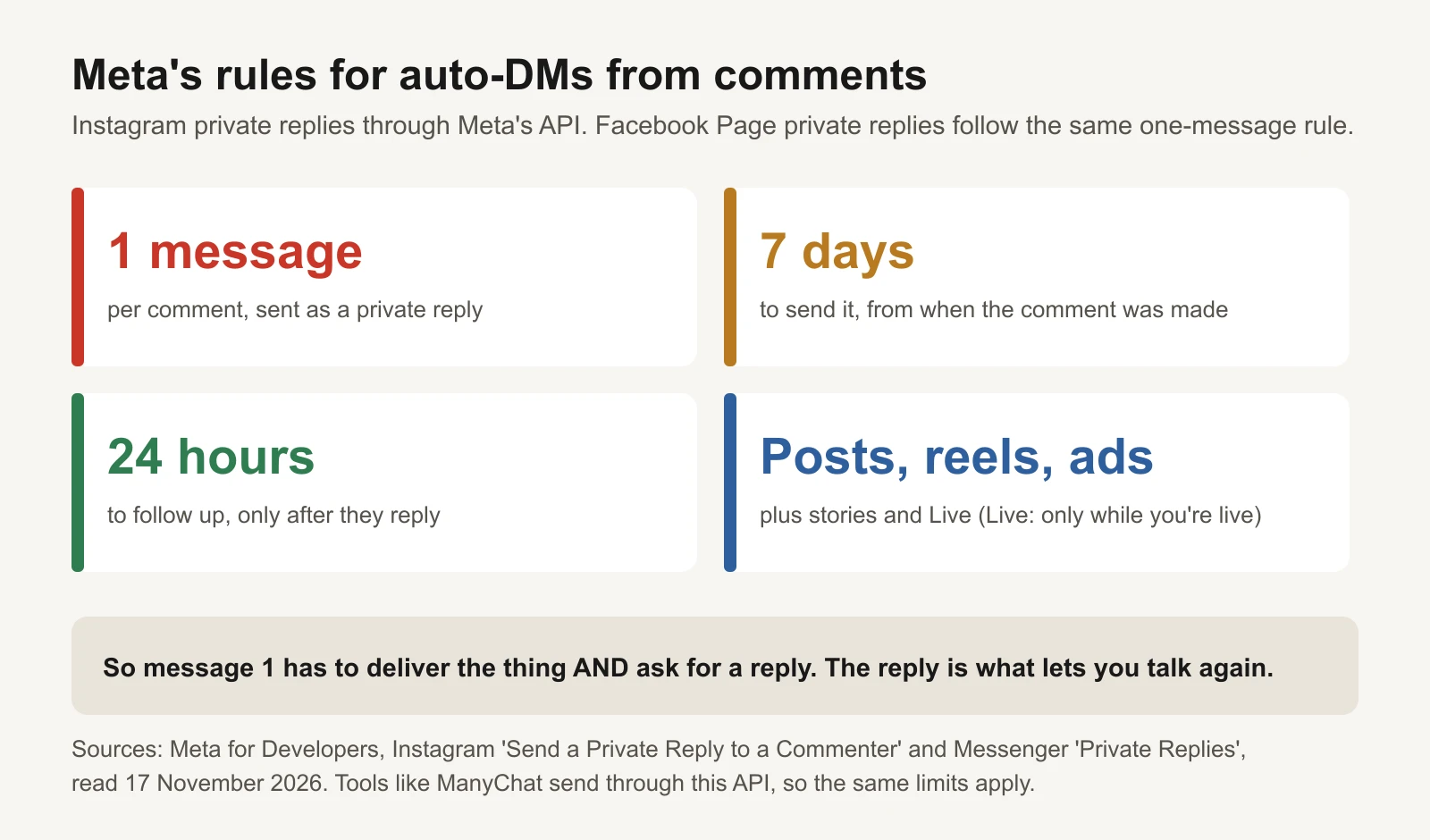
Source: Meta for Developers, read 17 November 2026.
Comment-to-DM tools (ManyChat and others) send through Meta's official "private replies" feature. Meta's developer documentation for Instagram (Send a private reply to a commenter) sets the rules:
| Rule | What Meta's docs say | What it means for you |
|---|---|---|
| One message | Only one message can be sent to the commenter | Message 1 has to do everything |
| 7 days | It must be sent within 7 days of the comment | Turn the automation on before the post goes live |
| Follow-ups | Only if the person responds, and within 24 hours of that response | Their reply opens your only window |
| Live | During an Instagram Live, only while the broadcast is running | Run it live, not after |
| Where | Comments on the account's posts, reels, stories, Live and ad posts | A "Comment X" ad works the same way |
Facebook Pages have the same shape: one private reply per comment within 7 days, and the conversation can only continue if the person responds, inside the 24-hour messaging window (Messenger Platform: private replies).
Use a tool that connects through Meta's login and permissions. One that asks for your Instagram password is not using the official route.
Step 1: pick a keyword people can't get wrong
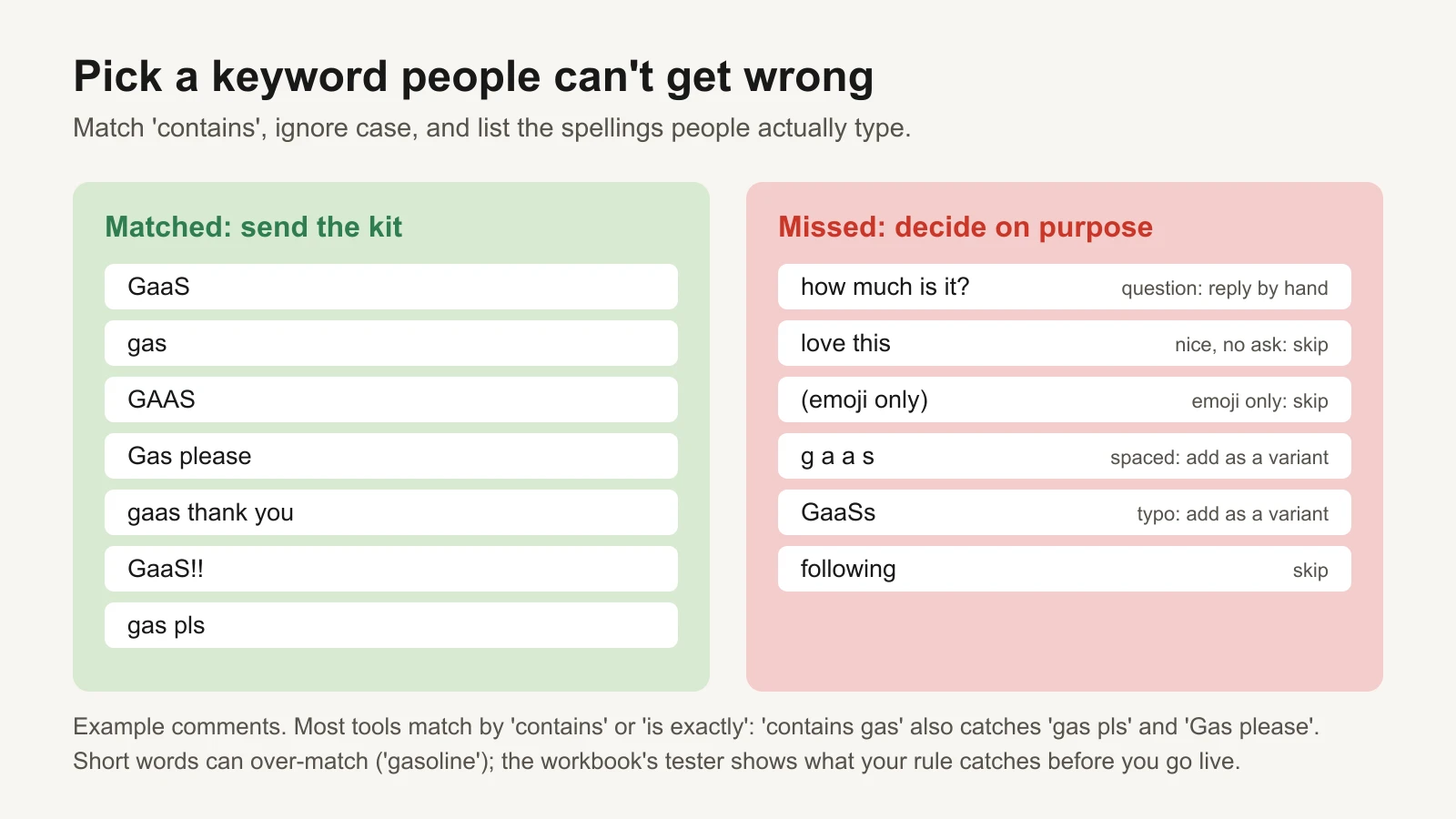
Example comments. Matching ignores case and works like "contains".
People type keywords badly. They add emojis, capitals, "please", typos and spaces. Rules that make keywords work:
- One short word, ideally your brand or the thing. "GaaS", "GUIDE", "RECIPE". Not "TEMPLATE2026".
- Match "contains", ignore case. Most tools offer "is exactly" and "contains". "Contains gas" catches "gas pls" and "Gas please"; "is exactly gas" misses both.
- List the spellings people use. Spaced-out versions and common typos, as extra keywords.
- Exclude words that contain your keyword. "Gas" sits inside "gasoline"; add exclusions or choose a word that doesn't.
- Say the exact word in the caption and in the first frame of a video or the first slide of a carousel.
Before going live, paste 50 real comments from an old post into the workbook's tester. It shows which ones your rule catches, which it misses, and flags missed comments that are questions.
Answer the questions by hand. "How much is it?" is the hottest comment on the post and it doesn't contain your keyword. A tool won't reply to it. You should.
Step 2: write the one message
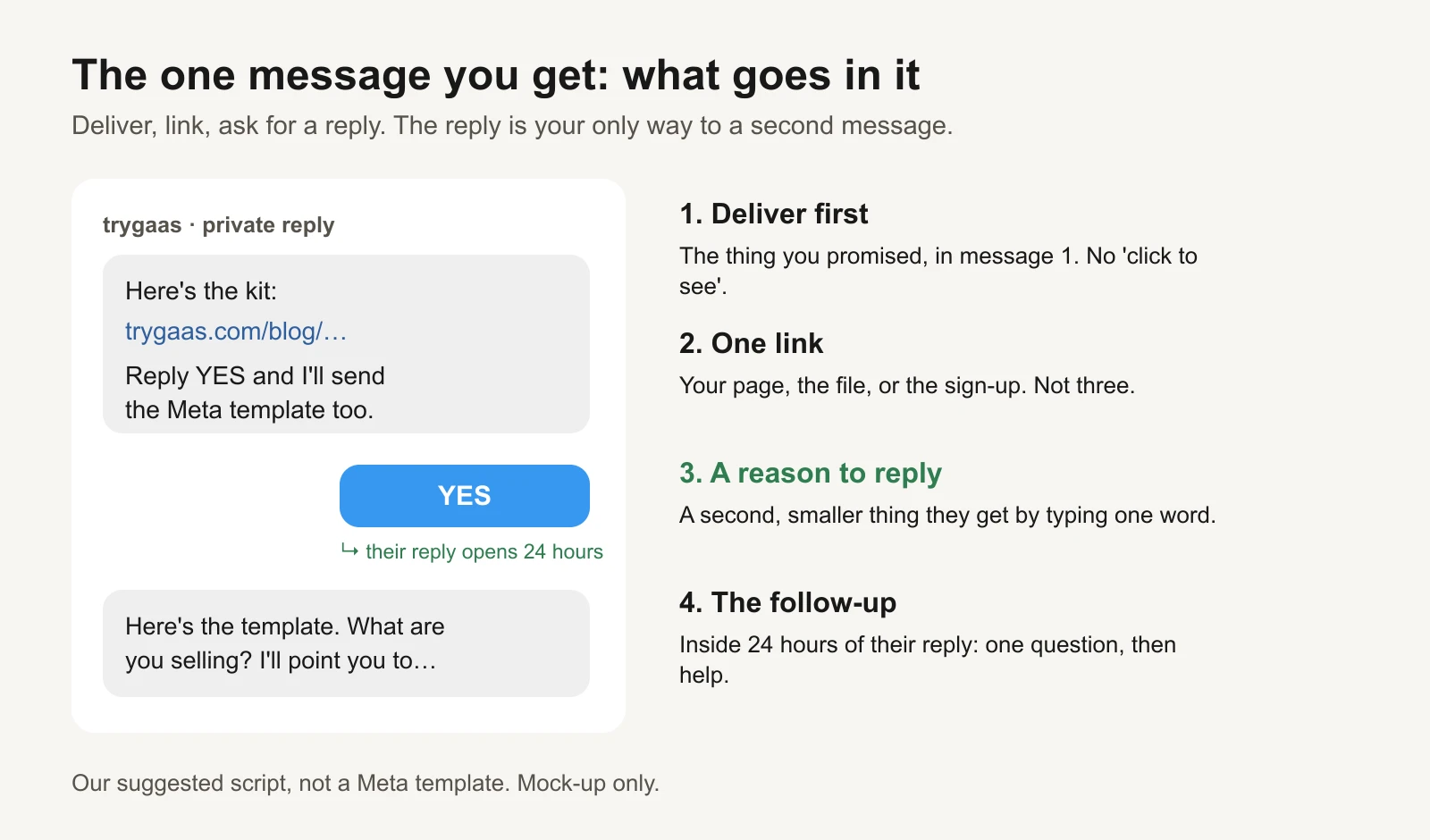
Our suggested script, not a Meta template.
Because you get one message, it has four jobs:
- Deliver what you promised. The link to the guide, the code, the product. Not "click here to get it" leading to another opt-in.
- One link. Three links split attention and look like spam.
- A reason to reply. A second, smaller thing they get by typing one word: "Reply YES and I'll send the template too." Their reply is what lets you message again.
- Then the follow-up, within 24 hours of their reply: one question about them ("What are you selling?"), then help that fits the answer.
The workbook has five scripts (free guide, discount code, product link, booking a call, waitlist) with the message 1 and the follow-up for each. Keep message 1 under about 300 characters so it reads in one screen; the sheet counts them.
Step 3: track the funnel per post
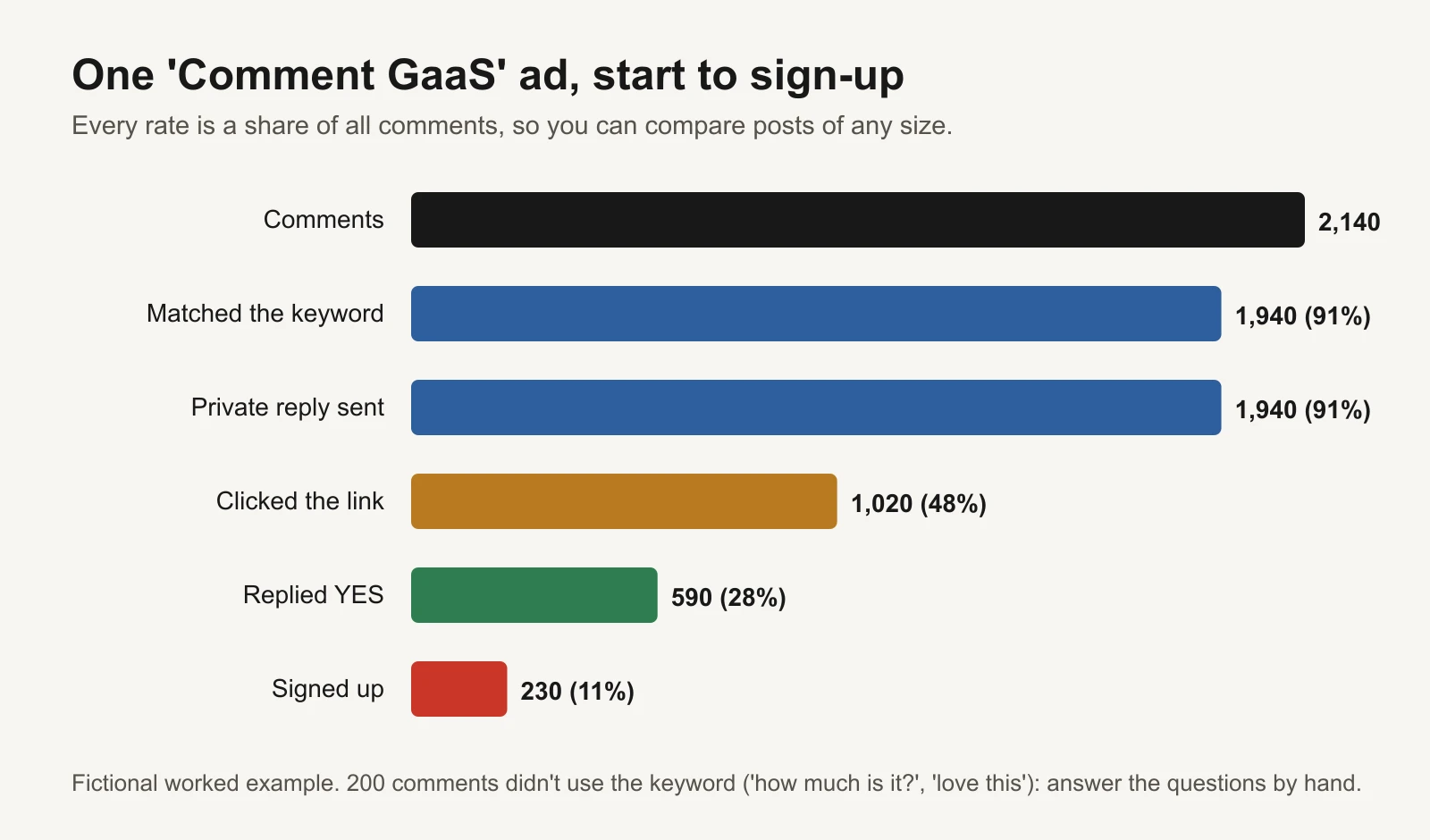
Fictional worked example. Rates are shares of all comments.
Worked example (fictional): a "Comment GaaS and we'll DM you the kit" ad.
| Step | Count | Share of comments |
|---|---|---|
| Comments | 2,140 | |
| Matched the keyword | 1,940 | 91% |
| Private replies sent | 1,940 | 91% |
| Clicked the link | 1,020 | 48% |
| Replied YES | 590 | 28% |
| Signed up | 230 | 11% |
The 200 comments that didn't match were mostly "love this", emojis and questions. The questions got a manual reply.
The tracker takes one row per post and flags the weakest step, using our rules of thumb (not benchmarks):
| Flag | Rule | Fix |
|---|---|---|
| Keyword too hard | Under 80% of comments match | Simpler word, say it in the first frame |
| Missed replies | Fewer replies sent than matches | Check the 7-day window and your tool's limits |
| Few clicks | Under 30% click | Deliver in message 1, one link |
| Few replies | Under 15% reply | Give a better reason to reply |
In the example, a carousel with the keyword "FORMATS" only matched 63% of comments: people wrote "formats pls", "format", "the formats one". A shorter word would have caught them.
Using it on ads
Comments on ad posts are covered by the same private-reply feature, so a "Comment X" ad works like an organic post. A few differences:
- Ad comments come from strangers. Expect more off-topic comments and more questions. Staff the manual replies.
- The ad keeps getting comments while it runs. The 7-day limit runs from each comment, so keep the automation on for the life of the ad.
- You're paying for engagement. Track sign-ups per dollar, not comments per dollar. The tracker's sign-up rate is the number to judge the ad by, alongside your normal cost per lead (see lead quality vs cost per lead).
- Reply fast. Most tools send the DM within seconds. If you answer questions by hand, do it the same day (lead response time).
Mistakes that kill the funnel
- Two-step delivery. Message 1 says "click to get it", the link asks for an email, then sends the thing. You lose most people at each step.
- No reason to reply. Without a reply you can never message again.
- Long, rare keywords. Every typo is a lost lead.
- Turning the automation on late. Comments older than 7 days can't get a private reply.
- Ignoring the non-matching comments. Questions are buyers.
Or let GaaS run it
GaaS is an AI agent that creates, launches and optimises Meta ads from three inputs: your website, a spend limit and a one-line goal. It can write "Comment X" ads and the scripts that go with them, tracks which posts turn comments into sign-ups, and asks before anything that changes spend. If you'd rather run it yourself, the kit has everything.
Limits of this kit
- Meta's rules are from its developer documentation as read on 17 November 2026. Meta changes them; re-check, and check your tool's own limits.
- The rules cover Instagram and Facebook. "Comment X" posts on other platforms follow those platforms' rules or are answered by hand.
- Matching behaviour ("contains", "is exactly", emoji handling) differs between tools. Test yours with the tester before going live.
- The funnel flags are our rules of thumb. The example post, comments and counts are fictional.
Sources
- Meta for Developers: Instagram Platform, Send a private reply to a commenter (read 17 November 2026)
- Meta for Developers: Messenger Platform, Private replies (read 17 November 2026)