
Leaving an ad agency is normal. Budgets change, priorities change, and sometimes the fit just isn't right any more. The hard part is not the conversation. It is making sure that, the day after the contract ends, you still have your ad accounts, your tracking, your creative files and your history, and that your ads are still running.
This kit is written for business owners who are not marketers. It walks you through what you need to own, how to check who owns it today, which contract clauses to read, a polite exit email, a 30-day plan and what to do in your first week alone. It is not a case against agencies. Many owners leave one agency for another. The same steps apply.
If your agency is the one handing an account to a new team, the ad account handover checklist covers that operating handover. This kit is the owner's side: what you protect before, during and after you give notice.
The workbook includes an ownership audit for 27 assets with a risk flag, a contract clause sheet, a dated 30-day plan, six email templates that fill in your names and dates, and a week 1 sorting sheet.
The one idea that matters: ownership vs access
Every asset in your advertising setup has an owner and can have people with access. The owner can add and remove people. Someone with access can work in the asset but can be removed by the owner.
The setup you want before you leave is simple: your business owns everything, and the agency has access. Then leaving is mostly a matter of removing their access on the last day.
The risky setup is the opposite. The agency created your ad account inside its own business, or your tracking lives in its Google account, or your videos sit only on its drive. Then you are the guest, and you need their help to take things with you.
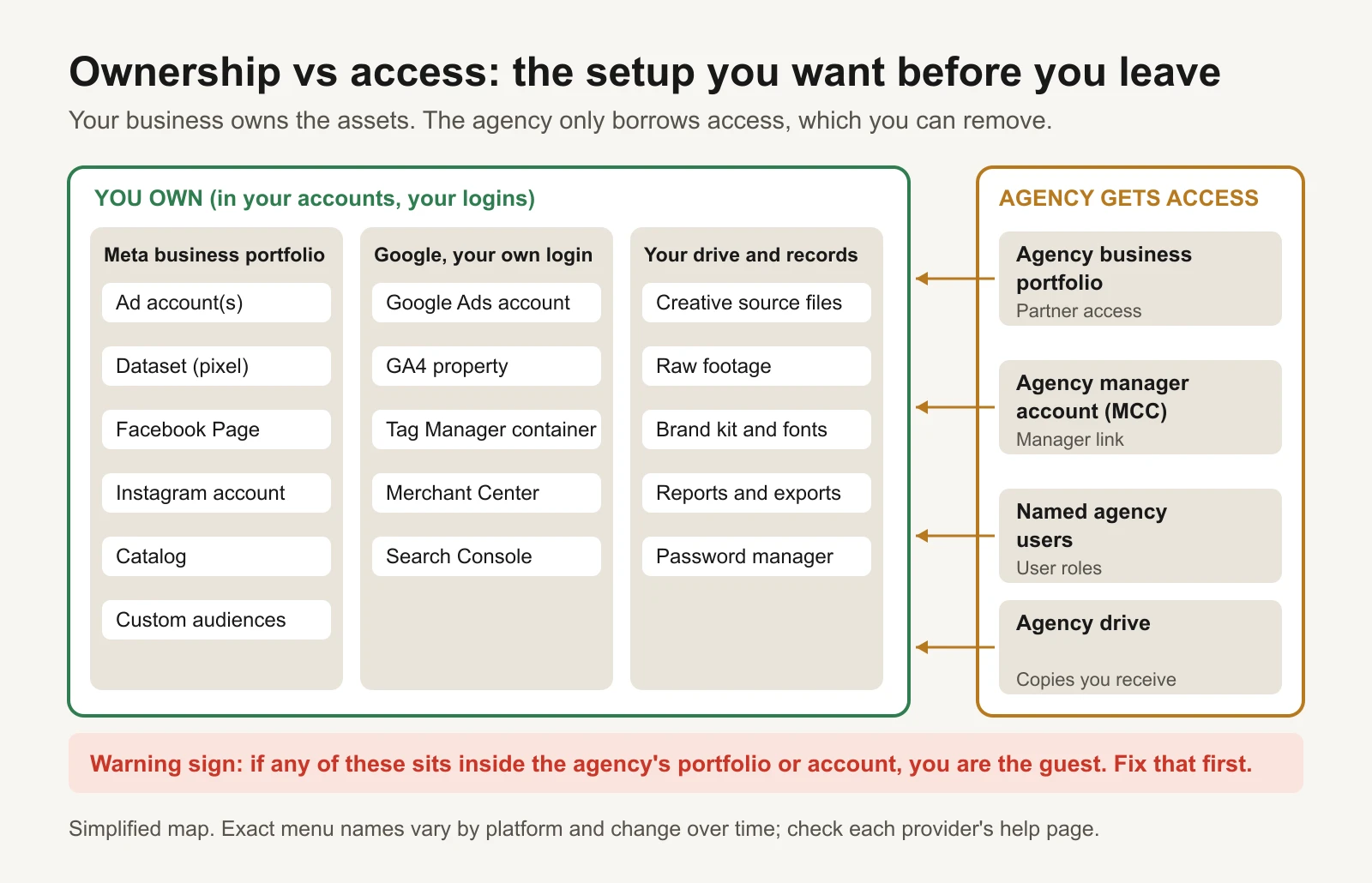
The healthy setup: your business owns the assets and the agency borrows access you can remove.
A few terms, defined once:
- Business portfolio (still often called Business Manager): Meta's container for a company's ad accounts, Pages, datasets and people.
- Dataset (pixel): Meta's tracking. The pixel on your website and server events (the Conversions API) send purchases and leads into a dataset.
- Manager account (MCC): a Google Ads account an agency uses to manage many client accounts. It links to your account; it is not your account.
- GA4: Google Analytics 4, your website analytics.
- GTM: Google Tag Manager, where tracking tags are often installed.
What you must own before you leave
This is the short list. The workbook has the full 27-row audit.
| Asset | Who should own it | What happens if the agency owns it |
|---|---|---|
| Meta business portfolio | You, with at least two of your own people on full control | Nothing else can be fixed until you have your own portfolio |
| Meta ad account | Your business portfolio, agency as a partner | It stays in their portfolio. You may need a new ad account |
| Dataset (pixel) and Conversions API | Your business portfolio | Your history and audiences built on it stay with them |
| Facebook Page and Instagram | Your portfolio; you hold the Instagram login | You can lose control of your public brand pages |
| Custom audiences | Inside your ad account | They leave with the ad account |
| Google Ads account | You, as Admin, with your own Google login | Usually fixable: Google says the client account owns its data |
| Billing on every platform | Your own card or invoice | Ads can stop the day billing changes |
| GA4 property | Your Google Analytics account, you as Administrator | You can lose years of website data |
| Tag Manager container | Your Tag Manager account, you as Admin | Your tracking can be changed or deleted by someone else |
| Creative source files and raw footage | You, if your contract says so | You keep the exported ads but can't edit them |
| Licences (music, stock, fonts, creator content) | Licences that cover your use | An ad can become unusable when a licence ends |
| Reports and history | A copy you keep | Dashboards in the agency's tool disappear with access |
Meta: the ad account question comes first
Meta lets you add an ad account to your business portfolio in three ways: create a new one, add one you already own, or request access to one owned by someone else (Meta Business Help Center: add an ad account to your business portfolio). An ad account lives in only one business portfolio at a time. An ad account created inside the agency's portfolio belongs to that portfolio, and you should not expect it to move to yours.
That is why this is the first thing to check. If the agency's portfolio owns the ad account, your realistic options are:
- Ask for partner access with full control. The agency's portfolio keeps ownership, but your portfolio can run the account. This works if the relationship is friendly and the agency agrees to keep the arrangement after you leave.
- Start a new ad account in your own portfolio. Export the history, rebuild the campaigns and ads that worked, and run old and new side by side until the new account delivers steadily. The new account starts with no history, so expect a settling-in period.
Datasets (pixels) work the same way. The owning business can share a dataset with another business and choose what that business may do with it. Meta's developer documentation describes this sharing between businesses, including that the receiving business must accept a pending request (Meta for Developers: sharing Meta Pixel between businesses). If the agency's portfolio owns your dataset, ask them to share it with your portfolio. If that's not possible, create a dataset in your portfolio, install it alongside the old one, and let it collect data before you depend on it.
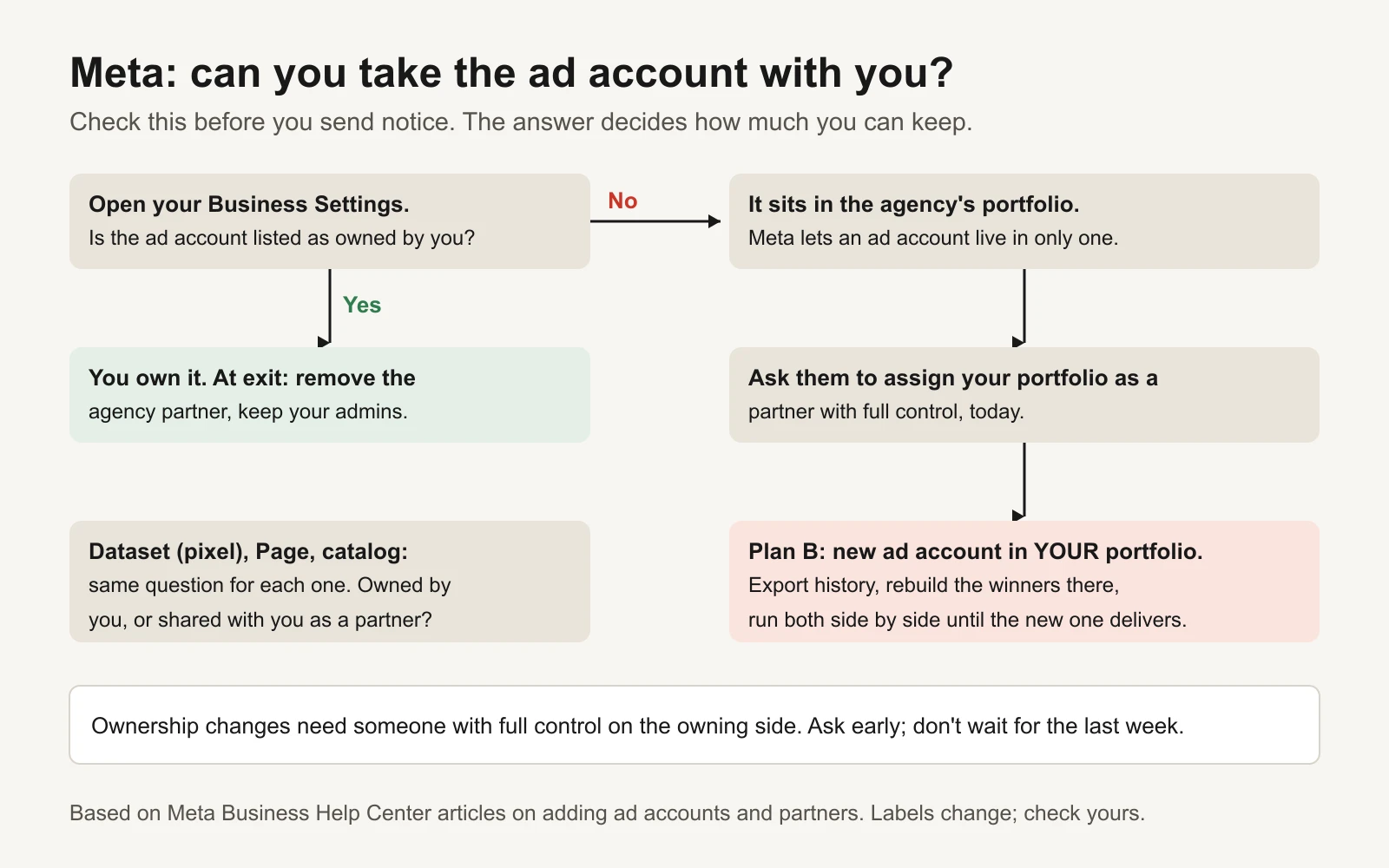
Check Meta ownership before you send notice. The answer decides how much you can keep.
At the end, you remove the agency from your portfolio. Meta has a help article for exactly this (Meta Business Help Center: remove partners from your business portfolio). Removing a partner is the last step, not the first.
Google Ads: a manager link is not ownership of your data
Most agencies manage Google Ads through a manager account linked to yours. Google's help is clear that a manager account can "own" a client account, which gives it full admin access, but "the client account still owns its data" and can remove the owner manager by unlinking (Google Ads Help: about ownership of client accounts).
Unlinking is done from your own account: Admin, then Access and security, then the Managers tab, then Remove access next to the manager (Google Ads Help: unlink accounts from your manager account). Before you do it, read what changes. Google lists these effects (Google Ads Help: about unlinking accounts from your manager account):
- Your campaigns and history stay with your account.
- Audience lists shared from the manager stop working for you, and campaigns that target them stop running.
- A cross-account conversion tag set up in the manager stops recording new conversions. Your own conversion tag, if you have one, resumes.
- If you pay by monthly invoice through that manager, ads stop serving after the unlink. Move billing first.
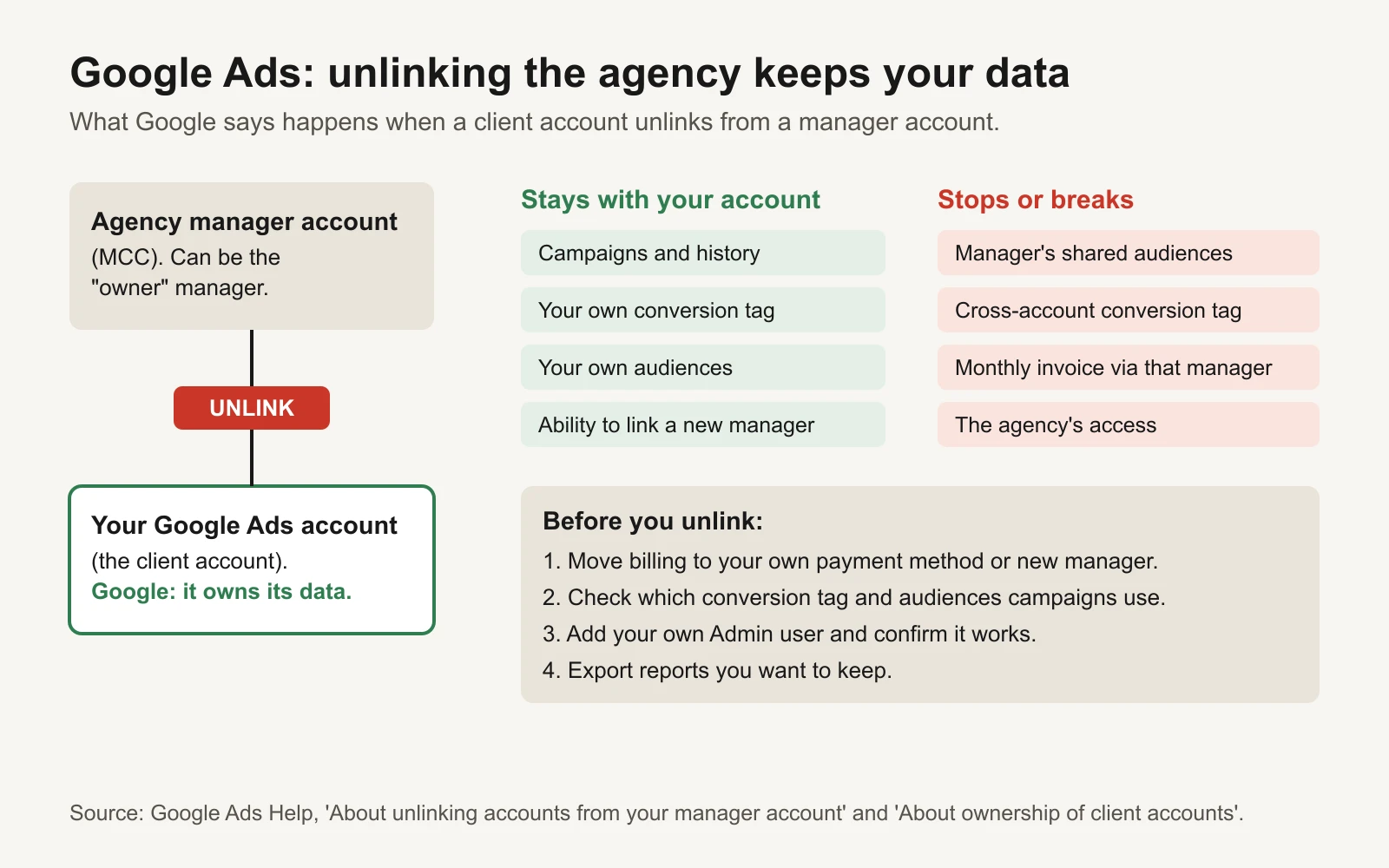
Google Ads is usually the easy one, as long as you move billing and check tracking first.
If you are not an Admin on your own Google Ads account, ask to be added now. Google's ownership guide says to add the new owner as an admin first and remove the previous owner after (Google Help: transfer ownership of a Google Ads, Analytics or Merchant Center account). The same order applies to every platform: add yours, confirm it works, then remove theirs.
GA4 and Tag Manager: where your tracking lives
GA4 properties sit inside a Google Analytics account. If the agency created the property inside its own Analytics account, the fix is to move the property to an account you own. Google documents this, with conditions: you need Administrator and Editor roles on both accounts, the two accounts must be in the same Google Marketing Platform organization (or none), and the destination account can't be at its property limit (Google Analytics Help: move a property). If a move isn't possible, at least get Administrator access and export the reports you rely on.
Google Tag Manager has two levels of permission: account (User or Admin) and container (Read, Edit, Approve, Publish). Google recommends at least two active administrators so nobody gets locked out (Tag Manager Help: managing users and permissions). Also export your container. Tag Manager can export a container version as a JSON file, which is a full backup of your tags, triggers and variables (Tag Manager Help: container export and import).
How to check today who owns what
Set aside an hour. Do this before you mention leaving. You are only reading, not changing anything.
Meta (about 20 minutes)
- Go to business.facebook.com and open Settings for your business portfolio. If you can't find one, you may not have one. That's your first fix.
- Under People, count the people from your company with full control. You want at least two.
- Under Accounts, open Ad accounts. Open each account and read which business owns it. If it names the agency's business, you are a guest.
- Under Data sources, open Datasets (pixels). Check the owner and which partners have access. Ask who set up server events (Conversions API) and where that runs.
- Check Pages, Instagram accounts and Catalogs the same way.
- Under Partners, note which businesses have access to your assets. You'll remove these at the end.
- Open the ad account's billing and see whose payment method is on file.
Google Ads (about 10 minutes)
- Sign in with your own Google login and open the account.
- Admin, then Access and security. On the Users tab, find your email and its access level. You want Admin.
- On the Managers tab, note each linked manager account and whether one has ownership.
- Open Billing and check who pays: your card, or monthly invoicing through the agency.
- Open Goals, then Conversions. Note where each conversion comes from.
GA4 and Tag Manager (about 10 minutes)
- In GA4, open Admin. Check the account name above your property. Is it your company's account or the agency's? Under Access management, check your role.
- In Tag Manager, open Admin, then User management, for both the account and the container. Check you are an Admin with Publish.
Files and logins (about 20 minutes)
- List every shoot and every batch of ads you paid for. Where do the source files live?
- List any login the agency used: website, page builder, email tool, CRM, ad platforms. Note any shared passwords.
- Find where leads go after someone fills in a form. Is any connection running in the agency's account?
Record each finding in the Ownership audit tab. Pick the owner and your access from the dropdowns. The Risk column marks anything owned by the agency, or unknown, as High.
The contract clauses to read
Read the contract before you send notice. This is not legal advice. If anything is unclear, ask a lawyer, especially if the agency pays the platforms on your behalf.
| Clause | What to look for | Why it matters |
|---|---|---|
| Notice period | How many days, in what form, and when the clock starts | Sets your end date. Get the form wrong and notice may not count |
| Minimum term | A lock-in period before you can leave | Leaving early may mean paying the rest |
| Fees and final invoice | How the notice month is billed; any exit or "tail" fees | Avoids a surprise final bill |
| Ownership of creative (IP) | Who owns ads, scripts and videos, and when ownership passes (often on payment) | Decides whether you can keep running and editing your ads |
| Source files and raw footage | Whether you get editable project files or only final exports | Final exports are hard to edit or reuse |
| Third-party licences | Music, stock, fonts and creator content: whose name, what use, what end date | An ad can become unusable when a licence ends |
| Accounts and data | Who owns the ad accounts, datasets, analytics and the data in them | Decides whether you keep history and tracking |
| Handover help | Whether the agency must help with the transition | Sets expectations for the call and file delivery |
| Media billing | Whether the agency pays the platforms and re-bills you | Billing must move before access is removed |
| Non-solicitation | Limits on hiring the agency's people | Matters if you want to hire someone from the account team |
The workbook's Contract clauses tab has a column for what your contract says and a status for each row.
The polite exit email
Keep it short, kind and specific. Thank them, give notice in writing, state the end date as you read it, ask for a handover call, and ask them to keep things steady until the end. Leave the reasons out of the notice; save them for a conversation if they ask.
Subject: Notice of ending our engagement: [Business]

Hi [Agency contact],

Thank you for the work your team has put into [Business]'s ads. We've decided
to change how we run our advertising, and this email is our written notice
under our agreement with [Agency].

By our reading of the contract, the engagement ends on [End date]. Please tell
me if you read the notice terms differently.

We want a smooth handover for both sides and want our ads to keep running
throughout. Could we book a 45-minute handover call in the next week? I'll
send a short list of the access and files we need so nothing gets missed.

Until [End date], please keep campaigns running as they are, and check with me
before launching new campaigns or making large budget changes.

Thanks again,
[Your name]
The workbook has six emails in the order you'll need them: the exit notice, an access and ownership request, a files and records request, a handover call agenda, a friendly nudge if nobody replies, and a close-out email for the last day. Each one fills in your names, dates and folder link from the Setup tab.
The 30-day handover plan
Most of the risk sits in the order you do things. Fix access before notice. Collect files while everyone is still talking. Move billing before you remove anyone. Remove the agency last.
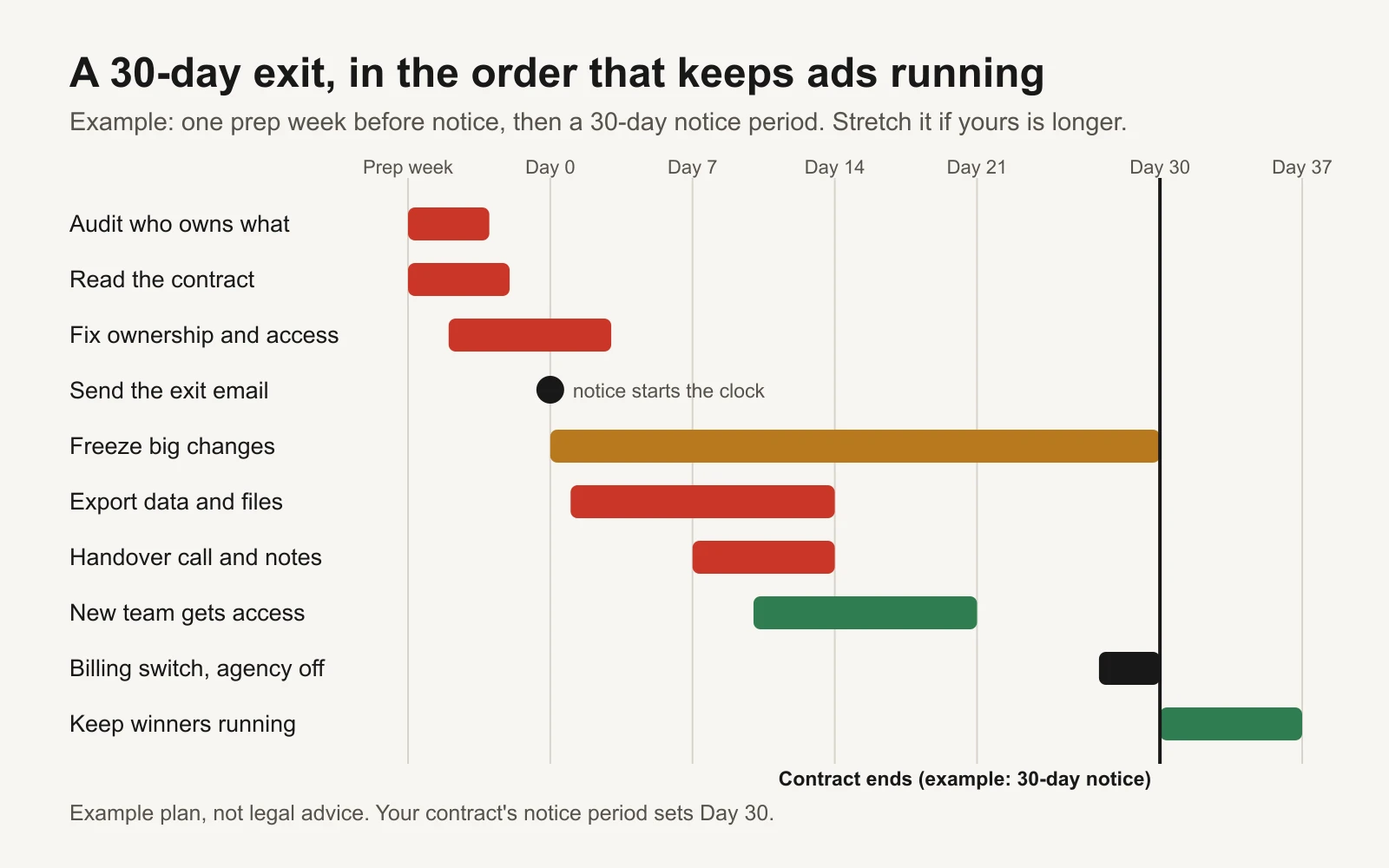
An example plan for a 30-day notice period. Stretch the bars if your notice is longer.
| When | What to do |
|---|---|
| Prep week (before notice) | Fill in the ownership audit. Read the contract. Add a second full-control person to your Meta portfolio. Confirm your Admin access on Google Ads, GA4 and Tag Manager. Download all-time performance exports by month. Decide who runs ads next. |
| Day 0 | Send the exit email. Ask for a handover call. |
| Days 1 to 7 | Agree a change freeze. Send the access request and the files request. Confirm who pays each platform. Hold the handover call. |
| Days 8 to 14 | Get written notes on structure, naming, audiences, exclusions, conversion setup and automated rules. Agency-owned assets shared with you by Day 10. Files delivered by Day 14. Export the Tag Manager container. |
| Days 15 to 21 | New team gets its own access (never shared passwords) and reviews without changing anything. If an ad account can't be shared, start Plan B: a new account in your portfolio. |
| Days 22 to 30 | Check the final invoice. Move billing. Remove agency partners, unlink the manager, remove agency users, but only after the new team confirms its access works. Change shared passwords. Send the close-out email. |
The 30-day plan tab builds these dates from your notice date, shows your progress, and turns late tasks red.
A note on the change freeze: you are asking the agency not to start new campaigns or make large budget changes without you. You are not asking them to stop managing the account. Day-to-day care should continue until the end date.
Week 1 after: don't pause everything
The most common mistake after an agency leaves is a reset: pause everything, rebuild from scratch, start fresh. It feels clean. It also throws away whatever was working, and every platform needs time to settle after big changes.
Instead, sort each live campaign by two questions. Is it hitting the target you care about (your cost per sale or lead)? And do you understand why?
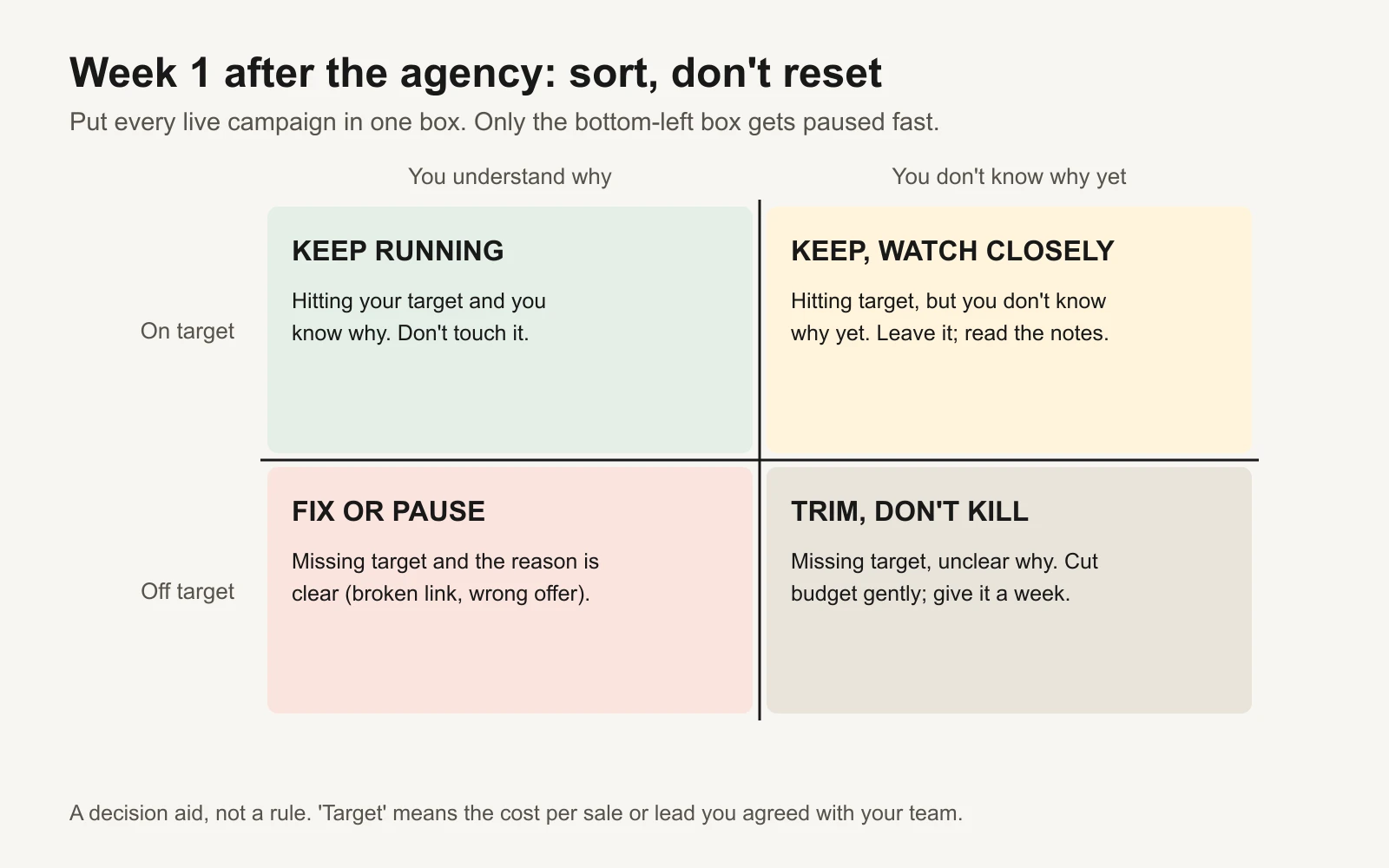
Sort, don't reset. Only clear problems get paused fast.
A worked example from the workbook's Week 1 sort tab, with a target of $40 per lead (example numbers, not results):
| Campaign | Spend, last 7 days | Leads | Cost per lead | Know why? | Action |
|---|---|---|---|---|---|
| Prospecting video ads | $700 | 21 | $33.33 | Yes | Keep running |
| Search, brand terms | $250 | 12 | $20.83 | No | Keep, watch closely |
| Retargeting, catalog | $300 | 4 | $75.00 | No | Trim, don't kill |
| Search, competitor terms | $400 | 3 | $133.33 | Yes | Fix or pause |
Three more checks for week 1:
- Conversions still record in each ad platform and in GA4. Tracking often breaks quietly during handovers.
- Billing went through on your own payment method.
- Nobody outside your company and your new team still has access.
Then pick one test for the new team to run, rather than ten. The ad creative testing template is a good place to write it down.
Tools and repos that help
You don't need any of these to follow the kit. They help if you or your new team want a full copy of your data, or want an AI assistant to read your accounts for you.
| Tool | What it's for | Who should use it |
|---|---|---|
| googleads/google-ads-mcp | Google's open-source MCP server. Lets an AI assistant query your Google Ads account (read with GAQL queries), with a propose-and-confirm step before any change | Owners or marketers who want to ask an assistant "what is running and what did it cost?" |
| googleanalytics/google-analytics-mcp | Google's MCP server for the Analytics Admin and Data APIs | Pulling GA4 reports into an assistant before access changes |
| meta/facebook-python-business-sdk | Meta's official Python SDK for its Marketing APIs | A developer exporting full ad history by month |
| googleads/google-ads-python | Google's official Python client for the Google Ads API | A developer exporting Google Ads history |
| Google Ads Editor | Google's free desktop app that downloads a copy of your whole account | Anyone who wants an offline copy of campaigns, ads and keywords |
| Tag Manager container export | Built into Tag Manager (Admin, Export Container) | Everyone. It is a one-click backup of your tracking |
Connect these tools with your own login, after you have your own access. Never ask the agency for their password or token.
Mistakes that cost owners the most
- Removing the agency first. Remove access last, after billing has moved and your new team has confirmed its own access.
- Pausing everything on Day 31. You lose working campaigns and add a settling period.
- Taking exported videos instead of source files. Exports are hard to edit. Ask for project files and raw footage.
- Forgetting licences. Creator content and music often have usage limits or end dates.
- One admin. If the only person with full control leaves your company, you're locked out. Keep two.
- No copy of history. Download monthly reports for as far back as you can before anything changes.
Or let an agent run it
If you are leaving an agency because you want something faster and cheaper, GaaS is one option. You give it your website, a spend limit and a one-line goal, and it creates, launches and improves Meta and Google ads, asking for your approval before anything spends. It connects to accounts you own, which is the whole point of this kit. Whatever you choose next, do the ownership audit first.
Sources
- Meta Business Help Center: add an ad account to your business portfolio
- Meta Business Help Center: remove partners from your business portfolio
- Meta for Developers: sharing Meta Pixel between businesses
- Google Ads Help: about ownership of client accounts
- Google Ads Help: about unlinking accounts from your manager account
- Google Ads Help: unlink accounts from your manager account
- Google Help: transfer ownership of a Google Ads, Analytics or Merchant Center account
- Google Ads Help: manage access to your Google Ads account
- Google Analytics Help: move a property
- Google Analytics Help: add, edit and delete users
- Tag Manager Help: managing users and permissions
- Tag Manager Help: container export and import