
Your account structure decides one thing above all: how many pieces your budget gets cut into. Cut it into too many and nothing gets enough sales to learn from. Cut it too few ways and you can't tell what is working. Most small accounts we see have the first problem: ten ad sets, each with a sliver of budget, each stuck "learning".
This blueprint shows a simple structure for 2026, using the product names Meta uses today. It gives you three layouts by budget size, a naming system, the rule for how many ads to run, and the mistakes to avoid. It is written for owners running their own ads, and it is specific enough for marketers setting a house standard.
Every Meta product name below was checked against Meta's Business Help Center on 16 November 2026. Meta renames things often, so if your Ads Manager shows a different label, trust your screen and the linked help page.
The workbook turns your monthly budget and target cost per sale into a recommended campaign layout, checks whether each campaign can get enough sales to learn, builds names for campaigns, ad sets and ads with dropdowns, and scores your current account against 13 common structure mistakes.
The three levels, in one picture
A Meta ad account has three levels. Each one owns different decisions.
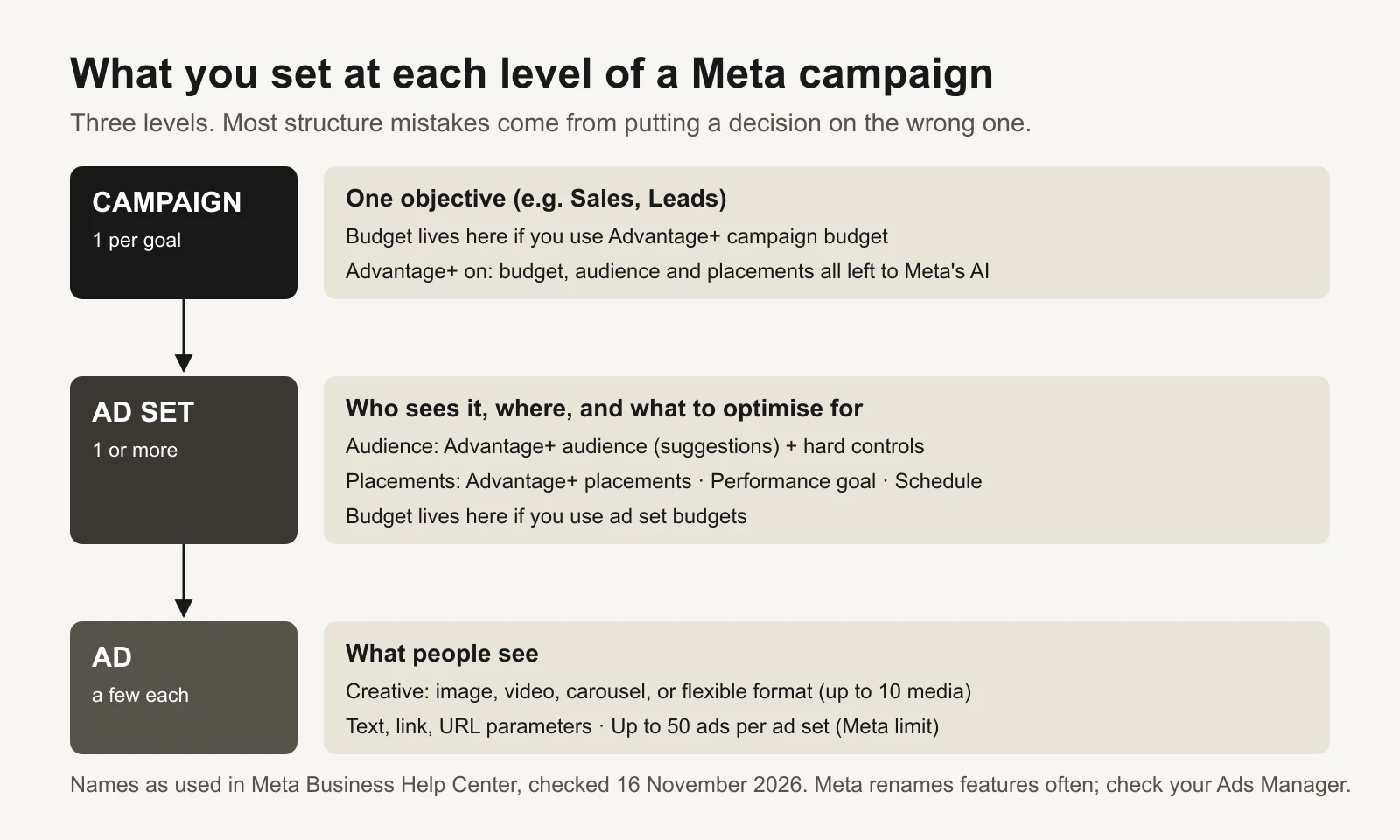
Most structure mistakes come from making a decision at the wrong level, such as splitting ad sets by placement.
- Campaign = one objective, such as Sales or Leads. If you use Advantage+ campaign budget, the budget sits here.
- Ad set = who sees the ads, where, and what Meta should optimise for (the performance goal, such as purchases). If you use ad set budgets, the budget sits here.
- Ad = what people actually see: the image or video, text, and link.
Meta's limits for a regular ad account are up to 50 ads per ad set, 5,000 ad sets and 5,000 campaigns (Meta: Campaign, ad set and ad limits). You will never need anywhere near that. The real limit is your budget.
The 2026 names, and what they replaced
| Name in Ads Manager today | What it does | Older name you may still hear |
|---|---|---|
| Advantage+ sales campaigns | A Sales campaign with Advantage+ budget, audience and placements all on | Advantage+ shopping campaigns ("ASC"). Meta's Marketing API no longer creates the old type |
| Advantage+ leads campaigns / Advantage+ app campaigns | The same idea for the Leads and App promotion objectives | The older app campaign type is being retired in the API too |
| Advantage+ campaign budget (also shown as "Campaign budget" or "Budget with Advantage+ on") | One budget on the campaign, moved in real time to the ad sets with the best opportunities | What marketers still call "CBO" (campaign budget optimization) |
| Ad set budgets | A fixed budget on each ad set | What marketers call "ABO" |
| Ad set budget sharing | Ad set budgets, but up to 20% can be shared between ad sets when opportunities appear | – |
| Advantage+ audience (or "Audience with Advantage+ on") | Meta's AI finds the audience; your age, gender, interests and custom audiences become suggestions | Often called "broad" targeting |
| Advantage+ placements | Ads can run across Facebook, Instagram, Messenger, WhatsApp, Audience Network and Threads | Automatic placements |
| Advantage+ creative | Optional enhancements to your images and videos, some using generative AI | – |
| Flexible ad format | Up to 10 images and videos in one ad; Meta picks single image, video or carousel per person | Meta recommends it instead of dynamic creative for Sales and App campaigns |
| Advantage+ catalog ads | Shows products from your catalog to the people most likely to buy them | Dynamic ads, dynamic product ads |
| Account controls (in Advertising settings) | Account-wide limits such as minimum age, excluded countries or placements; Meta says it is rolling this out gradually | – |
Sources: Advantage+ sales campaigns, Meta Marketing API: Advantage+ campaigns, About Advantage+ campaign budget, About campaign budgets and ad set budgets, About Advantage+ audience, About Advantage+ placements, About Advantage+ creative, About the flexible ad format, Set account controls.
What "Advantage+ on" means now
When you pick the Sales, Leads or App promotion objective, Ads Manager now starts you in the Advantage+ setup. A campaign counts as Advantage+ when its budget, audience and placements are all left open to Meta. If you narrow any of the three too far, that section shows "Advantage+ off", and the campaign no longer gets all of Meta's AI optimisations. Manual settings are all still available (Meta: What turns Advantage+ on and off, About the Advantage+ campaign experience).
Two details that matter for structure:
- Account-level controls don't switch Advantage+ off. If your business can't sell to under-21s or ship to some countries, set that once in account controls and every new campaign inherits it.
- For the Leads, App promotion and Sales objectives, Meta is rolling out Advantage+ placements as the default, with the option to pick placements removed at ad set level. Awareness, Traffic and Engagement still let you choose (Meta: About Advantage+ placements).
Broad or interest targeting?
In the Advantage+ setup, most audience settings are suggestions, not walls. You can suggest age, gender, interests (detailed targeting) and custom audiences, and Meta will start there but also show ads to other people when it predicts better results. Only a few settings are hard controls: location, minimum age, custom audience exclusions and languages (Meta: Choose audience settings in Advantage+ campaigns).
So in 2026 the question is less "broad or interests?" and more "suggest or restrict?".
| Situation | What to do |
|---|---|
| You sell to most adults in your country | Advantage+ audience with only location and minimum-age controls. No suggestions needed |
| You know your buyers well (e.g. new parents, dentists) | Add interests or a customer list as suggestions. Meta still explores beyond them |
| A legal or business rule limits who can buy (age, region, licence) | Use controls, ideally at account level so nobody forgets |
| Retargeting past visitors or cart abandoners | Meta says Advantage+ audience isn't recommended for retargeting. Use a custom audience in its own ad set, or let a broad sales campaign cover it |
| You want to know whether interests beat Advantage+ audience | Run a Meta A/B test. Meta recommends testing Advantage+ audience against your current approach for almost all campaign types |
Meta publishes its own results for Advantage+ audience: 7.2% lower cost per result for the Sales and App promotion objectives, and 9.7% for Traffic, Engagement and Leads, on average (Meta: About Advantage+ audience). Those are Meta's averages across advertisers, not a promise for your account. That is why the A/B test is worth running.
Where tests live, and where scaling lives
Your account has two jobs:
- Find new winners. Each new idea needs a fair amount of spend to get a verdict.
- Spend on proven winners. Here you want Meta free to put money wherever sales are cheapest.
Those jobs want opposite budget settings. A test needs fixed spend per idea, or Meta will pour the money into whichever ad got lucky first and starve the rest. Scaling wants flexible spend. So, once your budget allows it, give them separate campaigns:
- Testing campaign: Sales objective, ad set budgets, one creative concept per ad set, 3 to 4 ads per concept.
- Scaling campaign: Advantage+ sales campaign with Advantage+ campaign budget, one ad set, only ads that passed your scale rule.
Once a week, ads with a SCALE verdict from the Kill / Hold / Scale rulebook move into the scaling campaign, all in one batch. Adding a new ad to an ad set is a significant edit that can restart learning, so one batch a week beats one ad a day (Meta: Significant edits and learning phase).
Strategy questions, such as "does Advantage+ audience beat my interest list?", are different. Use Meta's A/B test (in Ads Manager or the Experiments tool). Meta specifically advises against testing informally by turning ad sets or campaigns on and off, because audiences overlap and results become unreliable (Meta: About A/B testing).
How many ads per ad set
Meta's hard limit is 50 ads per ad set. Meta's advice goes the other way: when you run too many ads at once, each one delivers less, fewer leave the learning phase, and more budget is spent before delivery is optimised. It recommends fewer ads per ad set but varied creative inside them, noting that one ad can hold up to 10 creative assets (Meta: About managing ad volume).
A practical rule ties the number of ads to your budget:
New ads you can judge per week = weekly testing budget ÷ (3 × target cost per sale).
The "3 ×" is the data rule from the rulebook: an ad needs to spend about three times your target cost before its numbers mean anything. Worked example: $66 a day of testing is about $460 a week. At a $30 target cost, each ad needs $90 to be judged. That's about five new ads a week. Launching 20 means 15 of them never get a fair test.
| Budget | Scaling ad set | Testing |
|---|---|---|
| Under $3k a month | 4 to 6 ads, mixed formats | 2 or 3 new ads every two weeks, in the same ad set |
| $3k to $30k a month | 6 to 10 proven ads | 2 or 3 concepts, 3 to 4 ads each |
| $30k+ a month | 8 to 15 proven ads, plus catalog ads if you sell many products | 4 to 6 concepts, 3 to 4 ads each |
These are our recommendations, not Meta rules. The workbook works out your own numbers.
Campaign budget or ad set budget?
Meta's own guidance on choosing (About campaign budgets and ad set budgets), in short:
| Use | When |
|---|---|
| Advantage+ campaign budget | You value all ad sets the same, you judge results at campaign level, and you want Meta to move money between ad sets |
| Ad set budgets | You need to control spend per ad set (tests), ad sets differ a lot in value or audience size, or you mix optimisation goals or bid strategies |
| Ad set budget sharing | You want ad set budgets, but are happy for up to 20% to flow to where opportunities are |
If you use Advantage+ campaign budget, Meta's best practices are worth following to the letter (Best practices for Advantage+ campaign budget):
- It suits campaigns with at least 2 ad sets, and Meta says don't exceed 70 ad sets per campaign.
- Don't pause and unpause ad sets by hand, and don't pause ad sets just because they get little delivery.
- Make changes in bulk rather than one at a time.
- Judge results at campaign level, not ad set by ad set.
- Remember that bigger audiences tend to attract more of the budget.
Why fewer ad sets win on small budgets
Meta says an ad set usually leaves the learning phase after about 50 results in the week after its last significant edit (About the learning phase). Every ad set you add splits the same sales into smaller piles.
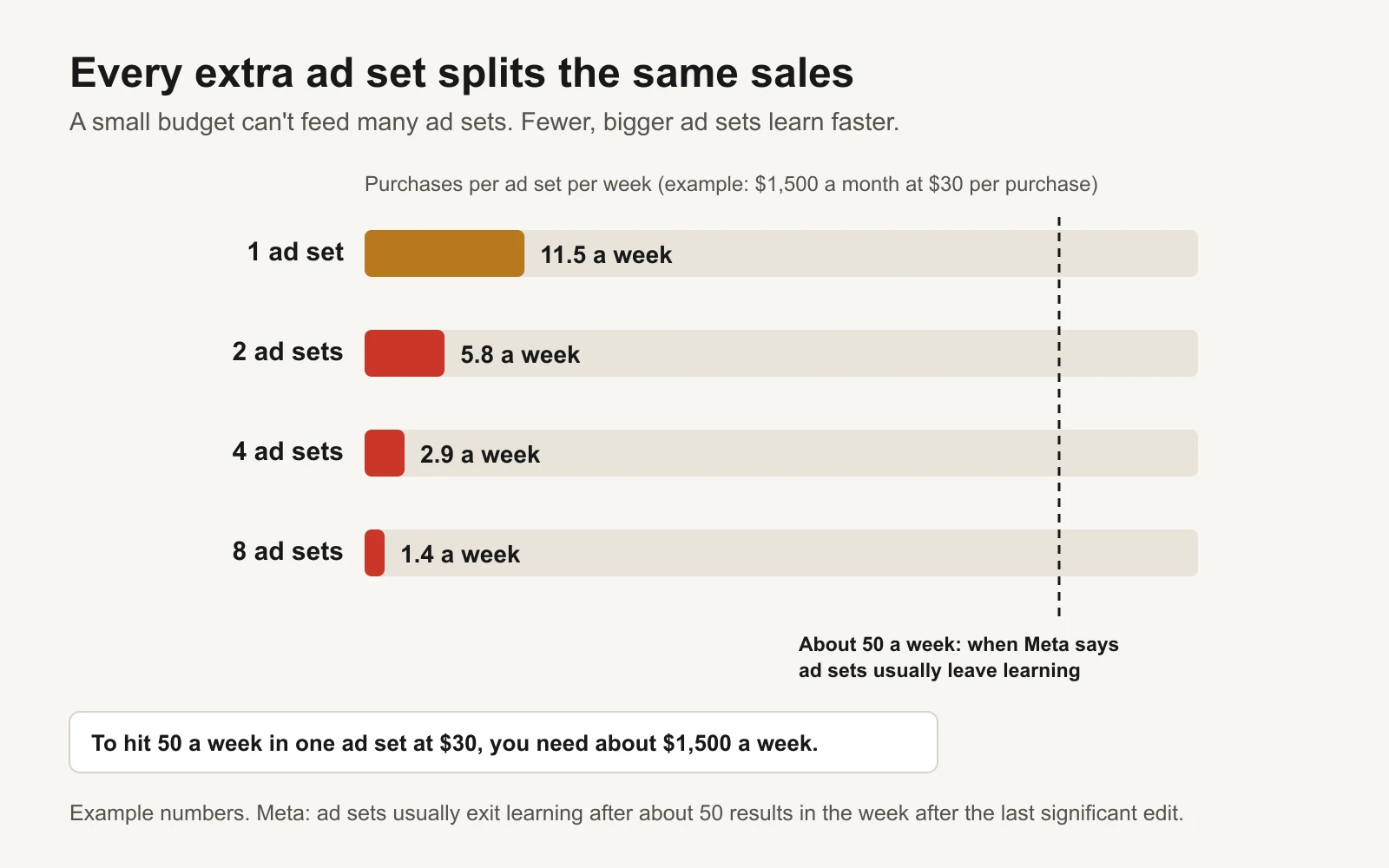
Example: even one ad set falls short of 50 a week at this budget. Splitting it makes things worse, not better.
You don't have to hit 50 to make money. Many small accounts live in "Learning limited" and still sell. But you should never choose a structure that guarantees it.
Blueprint 1: under $3,000 a month
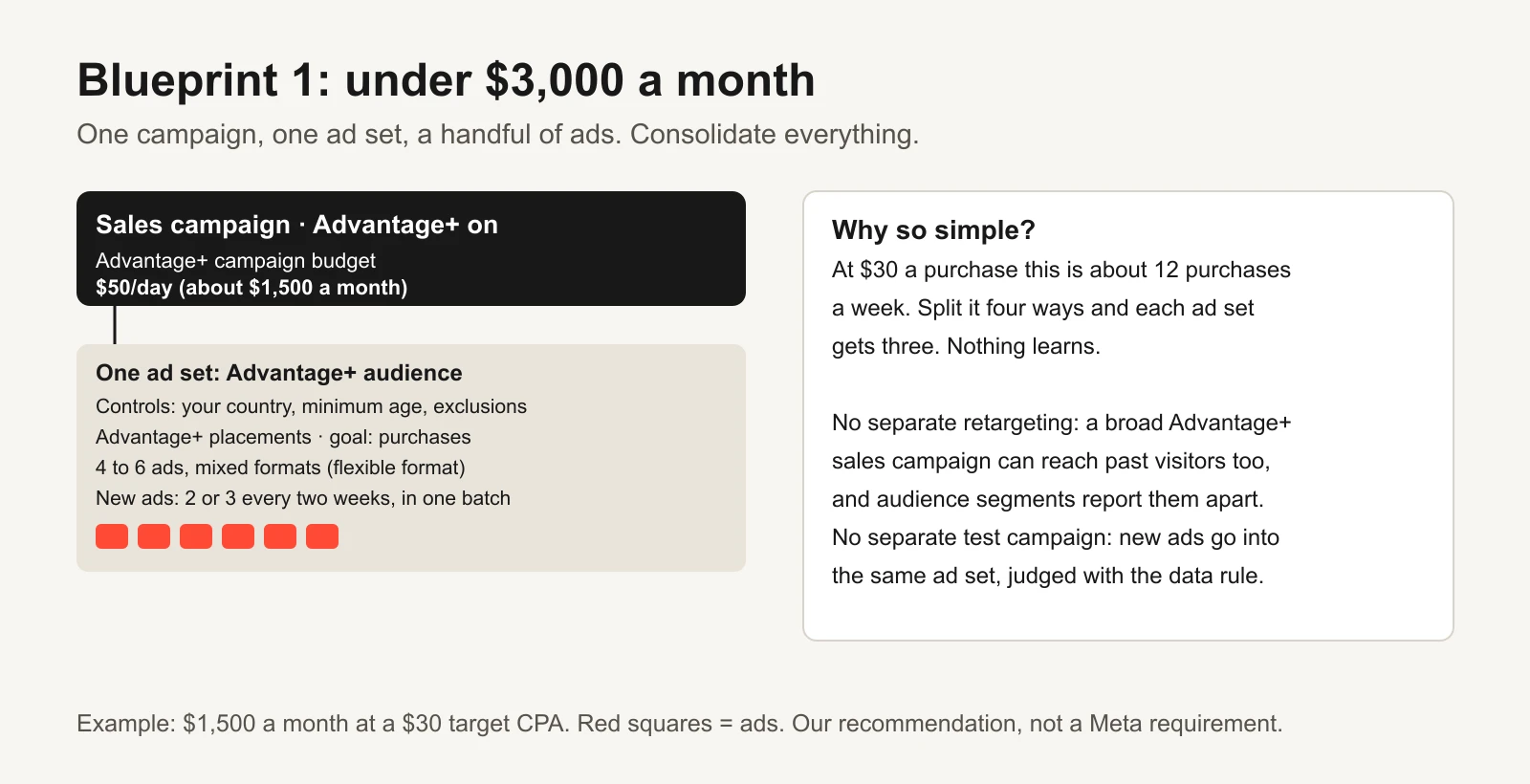
Example numbers. One of everything except ads.
| Level | Setup |
|---|---|
| Campaign | 1 × Sales, Advantage+ on (an Advantage+ sales campaign), Advantage+ campaign budget |
| Ad set | 1 × Advantage+ audience; controls only for location, minimum age and exclusions you really need; Advantage+ placements; goal: purchases |
| Ads | 4 to 6, mixing video, image and flexible format |
| Testing | Add 2 or 3 new ads every two weeks in one batch. Turn off losers using the rulebook's data rule |
| Retargeting | None separately. A broad sales campaign can reach past visitors too, and Meta's audience segments let you report new, engaged and existing customers apart |
Blueprint 2: $3,000 to $30,000 a month
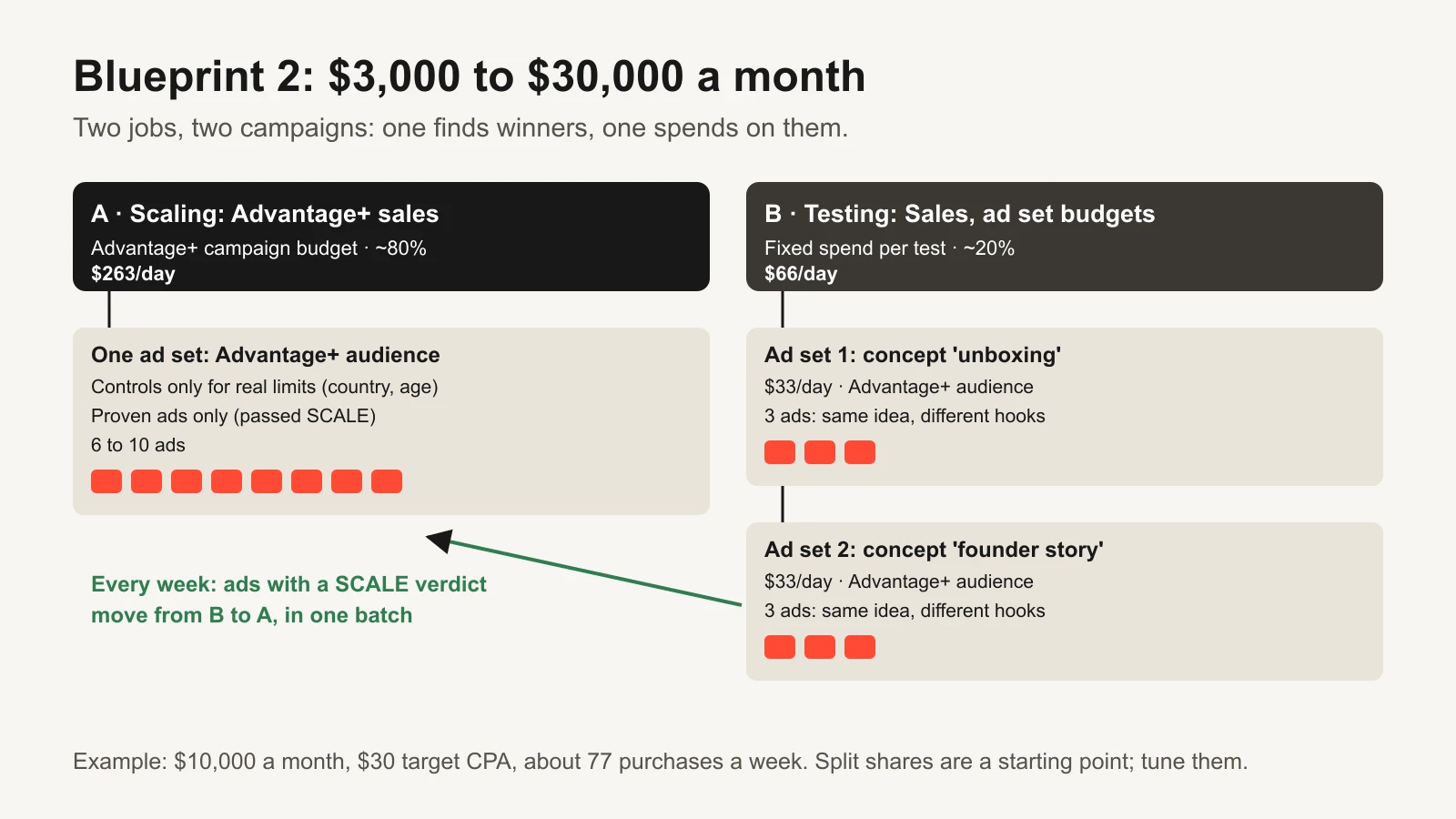
Example: $10,000 a month at a $30 target cost is about 77 purchases a week.
| Campaign | Budget | Ad sets | Ads |
|---|---|---|---|
| A · Scaling: Advantage+ sales campaign | Advantage+ campaign budget, about 80% | 1, Advantage+ audience | 6 to 10 proven ads |
| B · Testing: Sales objective | Ad set budgets, about 20% | 2 or 3, one concept each | 3 to 4 per concept |
The weekly routine: run the rulebook on campaign B, move SCALE ads to A in one batch, kill the KILLs, and launch the next concepts.
Blueprint 3: $30,000+ a month
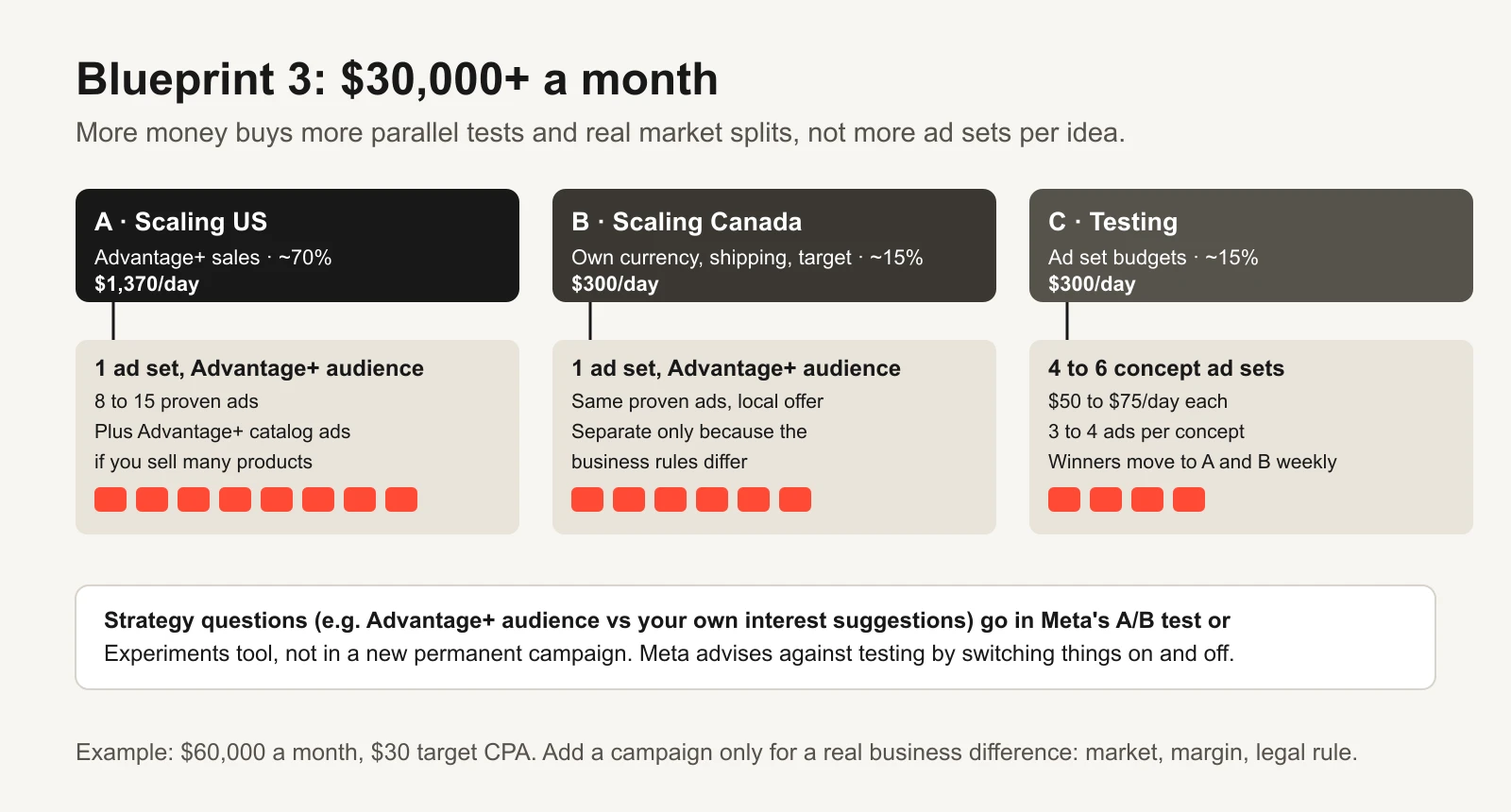
Example: $60,000 a month. The extra money buys more tests and real market splits, not more ad sets per idea.
At this size the temptation is to build a campaign for every idea. Resist it. Add a campaign only for a real business difference:
- a different country with its own currency, shipping or legal rules;
- a product line with a very different margin, so it needs its own target cost;
- a different objective (for example a Leads campaign for a wholesale form).
Everything else, such as audience ideas, placements and creative angles, stays inside the existing campaigns or goes into an A/B test. The fragmentation audit is a good way to challenge each split you already have.
Naming conventions that hold up
A name should tell you, at a glance in a report, what the thing is for. Use short codes, an underscore between parts, no spaces, and the launch date as YYMMDD so names sort in order.
| Level | Pattern | Example |
|---|---|---|
| Campaign | Brand_Objective_Role_Market_Budget_Date | GLOW_SALES_SCALE_US_CB_261109 |
| Ad set | Audience_Controls_Event_Concept_Placements_Date | ADVAUD_US-18PLUS_PURCH_C014-UNBOX_ADVPL_261109 |
| Ad | Concept_Angle_Format_Hook_Version_Creator | C014_UNBOX_VID916_H2_V1_UGC-ANNA |
Codes used: SCALE / TEST / XP (experiment) for the role; CB (Advantage+ campaign budget), ASB (ad set budgets) or SHARE (ad set budget sharing) for budget; ADVAUD for Advantage+ audience; PURCH for purchase. The workbook has the full list and lets you add your own.
Put the names to work in your analytics with Meta's dynamic URL parameters. For example:
utm_source=facebook&utm_medium=paid&utm_campaign={{campaign.name}}&utm_content={{ad.name}}
One catch that makes naming discipline worth it: Meta fills name-based parameters with the name the ad had when it was first published. Rename it later and your analytics keep the old name. Meta also notes that changing URL parameters after publishing may send the ad set back into learning (Meta: Specifications for dynamic URL parameters). Name it right, then publish.
For agencies and bigger teams, the naming convention guide and the UTM convention guide go deeper.
Common structure mistakes
| Mistake | Why it hurts | Fix |
|---|---|---|
| One ad set per interest, all in one campaign | Splits sales and overlaps audiences | One Advantage+ audience ad set; interests as suggestions or an A/B test |
| Separate ad sets per placement, age band or city | Meta recommends combining these; each piece learns less | Combine, then use breakdowns in reporting |
| Ten ad sets on $50 a day | Nobody gets near enough results to learn | Follow Blueprint 1 |
| 20 new ads at once on a small test budget | Most never get enough spend for a verdict | Launch what your budget can judge per week |
| Testing by switching things on and off | Meta warns this gives unreliable results | Testing campaign with ad set budgets, or Meta's A/B test |
| Pausing low-spend ad sets inside a campaign budget | Meta advises against it; it limits where budget can go | Judge at campaign level; move or remove ad sets in one batch |
| Mixed optimisation events under one campaign budget | Meta lists mixed goals as a reason for ad set budgets | Split campaigns or use ad set budgets |
| Edits dripped in, one a day | Each significant edit can restart learning | One review day a week; batch the changes |
| Advantage+ audience on a retargeting ad set | Meta doesn't recommend it for retargeting | Use a custom audience there |
| Hard limits on audiences "just in case" | Turns Advantage+ off and shrinks delivery | Controls only for real business or legal rules |
| A new campaign for every test | Fragments budget and history | One testing campaign, one ad set per concept |
| Names that don't say role or date | Reports become guesswork | Use the naming pattern above |
| Renaming ads after publishing | Name-based URL parameters keep the old name | Name before publishing |
Moving an existing account to this structure
Don't rebuild everything in one afternoon. A calm migration:
- Pick the winners. Run the rulebook on the last 14 to 30 days. Note every ad with a SCALE or strong HOLD verdict.
- Build the new scaling campaign with those ads, all at once, using the new names.
- Run old and new side by side for a week. Lower old budgets in steps rather than switching them off overnight.
- Build the testing campaign (if your budget tier has one) and move ideas you were still testing into it.
- Turn off what's left once the new campaigns are delivering. Keep the old campaigns paused rather than deleted, so the history stays readable.
Tools and repos that help
Everything here can be done by hand in Ads Manager. If you want to build, audit or rename at scale, these public repositories (checked on 16 November 2026) are useful:
| Repo | What it is | Who it's for |
|---|---|---|
| meta/facebook-python-business-sdk | Meta's official Python SDK for its Marketing APIs: read and create campaigns, ad sets and ads, including the Advantage+ settings described in the Advantage+ campaigns API docs | Developers auditing structure or launching from a template |
| meta/facebook-nodejs-business-sdk | The same SDK for Node.js | JavaScript teams |
| pipeboard-co/meta-ads-mcp | Open-source MCP server (a connector that lets AI assistants such as Claude or ChatGPT use your Meta Ads account), with a hosted option | Marketers who want an assistant to list every ad set and flag overlaps. It can also make changes, so keep a human approval step |
| anthropics/skills | Anthropic's public Agent Skills repository, including skill-creator and an Excel (xlsx) skill | Turning your naming rules and blueprint into a reusable skill an assistant follows every time |
Or let GaaS build it
GaaS is an AI agent that builds and runs Meta and Google campaigns from three inputs: your website, a spend limit and a one-line goal. It sets up a structure like the one above, names everything consistently, moves winners from testing to scaling, and asks before anything that changes spend. If you'd rather do it yourself, the planner below gives you the same layout and names.
Limits
- Budget tiers, split shares and ad counts are our recommendations from the arithmetic above, not Meta requirements.
- Meta's percentages quoted here (Advantage+ audience, placements) are Meta's own published averages, not independent measurements.
- Lead generation and app accounts follow the same logic, but replace "purchases" with qualified leads or the app event you optimise for.
- Product names and defaults change. Everything was checked on 16 November 2026 against the linked Meta pages.
Sources
- Meta Business Help Center: About Advantage+ sales campaigns, About the Advantage+ campaign experience, What turns Advantage+ on and off
- Meta for Developers: Advantage+ campaigns (Marketing API)
- Meta Business Help Center: About Advantage+ campaign budget, Best practices for Advantage+ campaign budget, About campaign budgets and ad set budgets
- Meta Business Help Center: About Advantage+ audience, Choose audience settings in Advantage+ campaigns, Set account controls
- Meta Business Help Center: About Advantage+ placements, About Advantage+ creative, About the flexible ad format
- Meta Business Help Center: About the learning phase, Significant edits and learning phase, About managing ad volume, Campaign, ad set and ad limits
- Meta Business Help Center: About A/B testing, Specifications for dynamic URL parameters