
Most ad accounts don't fail because of one bad ad. They fail because of mood. A good ad gets switched off after a slow Tuesday. A bad ad gets more money because it had one great Saturday. Budgets jump on a hunch, then get cut in a panic two days later.
A rulebook fixes that. You decide the rules once, while you are calm, from your own numbers. Then every ad gets the same test, every review. This guide gives you those rules in plain words, shows the maths, and walks through a worked example with 10 ads.
It is written for business owners who run their own Meta ads (Facebook and Instagram), and it is exact enough for performance marketers who want a written policy for their team. All numbers in the examples are fictional and labelled as such.
The workbook has a Settings tab where you enter your margin once, an Ads tab where you paste an export from Ads Manager, and formulas that give each ad a verdict (SCALE, HOLD, KILL or WAIT FOR DATA), the reason, and the suggested budget change, with colours.
The rulebook on one page
Here is the whole thing. The rest of the article explains where each number comes from and when to change it.
| Rule | Default | In plain words |
|---|---|---|
| Break-even ROAS | 1 / contribution margin | Below this, every sale loses money after ads |
| Target ROAS | 1 / (margin − profit you keep) | Above this, the ad earns the profit you want |
| Target CPA | Order value × (margin − profit you keep) | What one sale should cost |
| Data rule | Spend at least 3 × target CPA and 3 days live | Don't judge before this. Verdict: WAIT FOR DATA |
| Hard stop | Zero purchases after 3 × break-even CPA | Kill early, even before day 3 |
| Kill | ROAS below break-even, after the data rule | Turn it off |
| Hold | ROAS between break-even and target | Leave the budget alone; work on creative or offer |
| Scale | ROAS at or above target and 10+ purchases | Raise budget about 20%, then wait about 3 days |
| Fatigue | Frequency 3.5+ and CTR down 30%+ from launch | Don't scale; add new creative |
A few words, defined once:
- ROAS (return on ad spend) = revenue the platform reports ÷ ad spend. A ROAS of 3 means $3 of sales for each $1 of ads.
- CPA (cost per acquisition) = ad spend ÷ purchases. Here it means cost per purchase.
- Contribution margin = what is left of a sale after product cost, shipping, payment fees and returns, before ad spend. Not your markup, and not net profit.
- CTR (click-through rate) = clicks ÷ impressions. Use link CTR if you can.
- Frequency = how many times, on average, each person saw the ad in your date range.
Step 1: work out your three numbers
Every rule below hangs off three numbers. You only work them out once, and again when prices or costs change.
Worked example (fictional): a skincare shop sells a $60 average order. After product cost, shipping, payment fees and an allowance for returns, $24 is left. That is a 40% contribution margin. The owner wants to keep 10% of revenue as profit after ads.
| Number | Formula | Example |
|---|---|---|
| Break-even ROAS | 1 ÷ 0.40 | 2.50 |
| Target ROAS | 1 ÷ (0.40 − 0.10) | 3.33 |
| Break-even CPA | $60 × 0.40 | $24 |
| Target CPA | $60 × (0.40 − 0.10) | $18 |
Read it like this. If an ad spends $24 to get one $60 sale, the shop keeps nothing after ads. If it spends $18, the shop keeps $6, which is the 10% it wanted. ROAS and CPA say the same thing in two ways: $60 ÷ $18 = 3.33.
If you are not sure what your margin is, the break-even ROAS guide walks through which costs to include. If repeat purchases matter a lot in your business, you may accept a higher first-order CPA; the allowable CAC guide shows how to set that ceiling without fooling yourself. Start with first-order numbers. They are the safe default.
Step 2: decide how much data counts as "enough"
The most expensive mistake in this whole process is judging too early. Sales arrive in clumps. An ad that should average two sales a day will have days with zero and days with four.
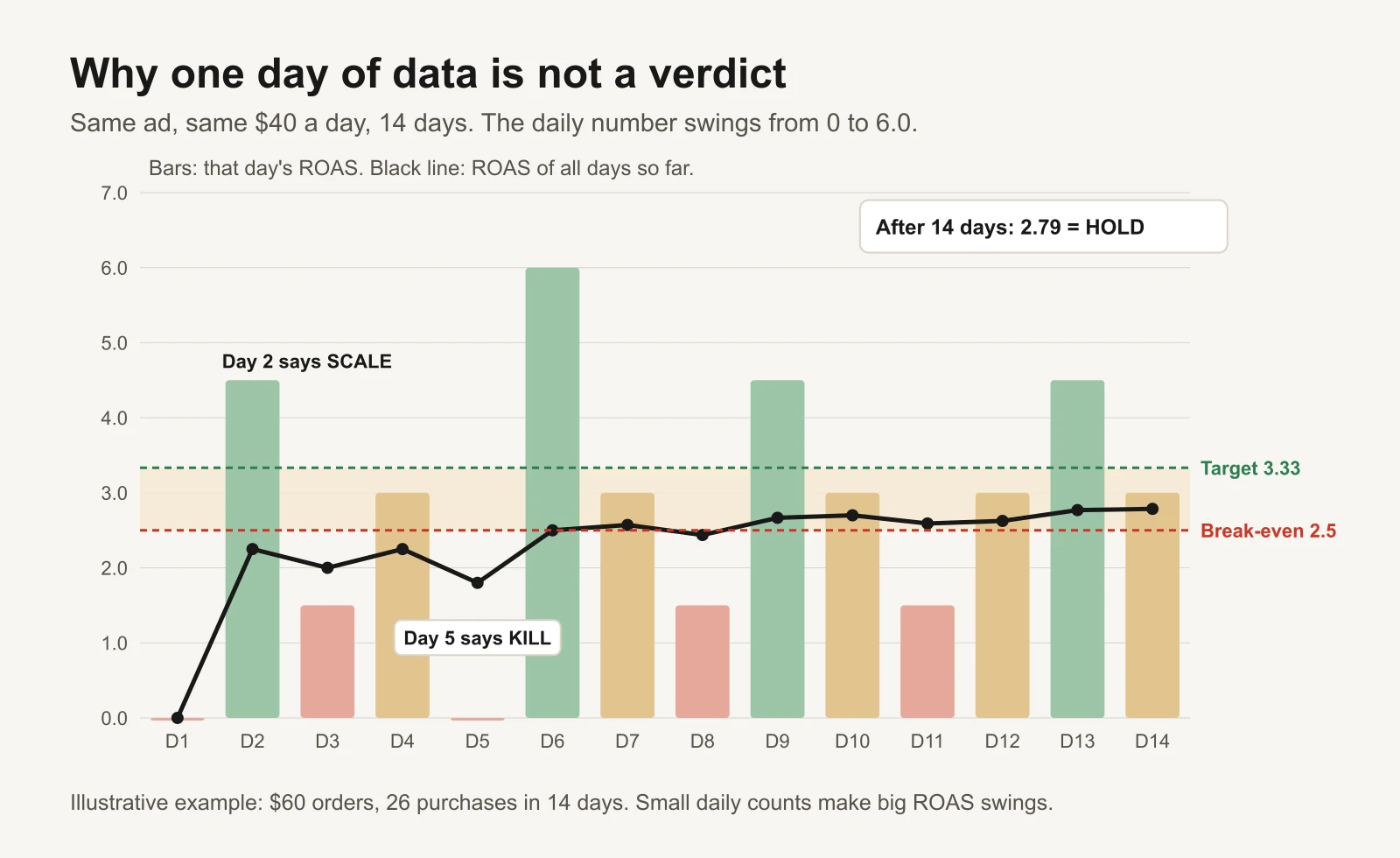
Illustrative example: the same ad looks like a winner on day 2 and a loser on day 5. After two weeks it is a steady HOLD.
So the rulebook has a data rule. An ad is not judged until both are true:
- It has spent at least 3 × your target CPA. In the example that is 3 × $18 = $54. By then a healthy ad "should" have about three sales. Zero or one sale after that point means something.
- It has been live at least 3 days. This covers the gap between a click and a purchase, and the difference between weekdays and weekends.
Until both are true, the verdict is WAIT FOR DATA. Leave it alone.
The one exception is the hard stop: if an ad has spent 3 × your break-even CPA ($72 in the example) and has zero purchases, kill it now, even on day 2. Waiting longer only costs money.
There is also a separate, higher bar for scaling: 10 purchases. An ad that hits your target ROAS on four sales could be lucky. Ten is not proof, but it is far less likely to be noise. Below 10, a strong ad stays on HOLD and keeps running.
Why not wait for much more? Because waiting has a cost too. Meta's own guidance is useful here. It says an ad set usually leaves the learning phase after about 50 results in the week following its last significant edit, and that during learning, performance is less stable and cost per result is usually higher (Meta: About the learning phase). That 50 is per ad set, not per ad, and it is about delivery settling, not about whether an ad is good. Small accounts may never reach it. So use the learning phase as a reason to be patient with ad sets, and use the data rule above to judge individual ads.
Step 3: the decision tree
Ask five questions, in this order. The first one that fits decides the verdict.
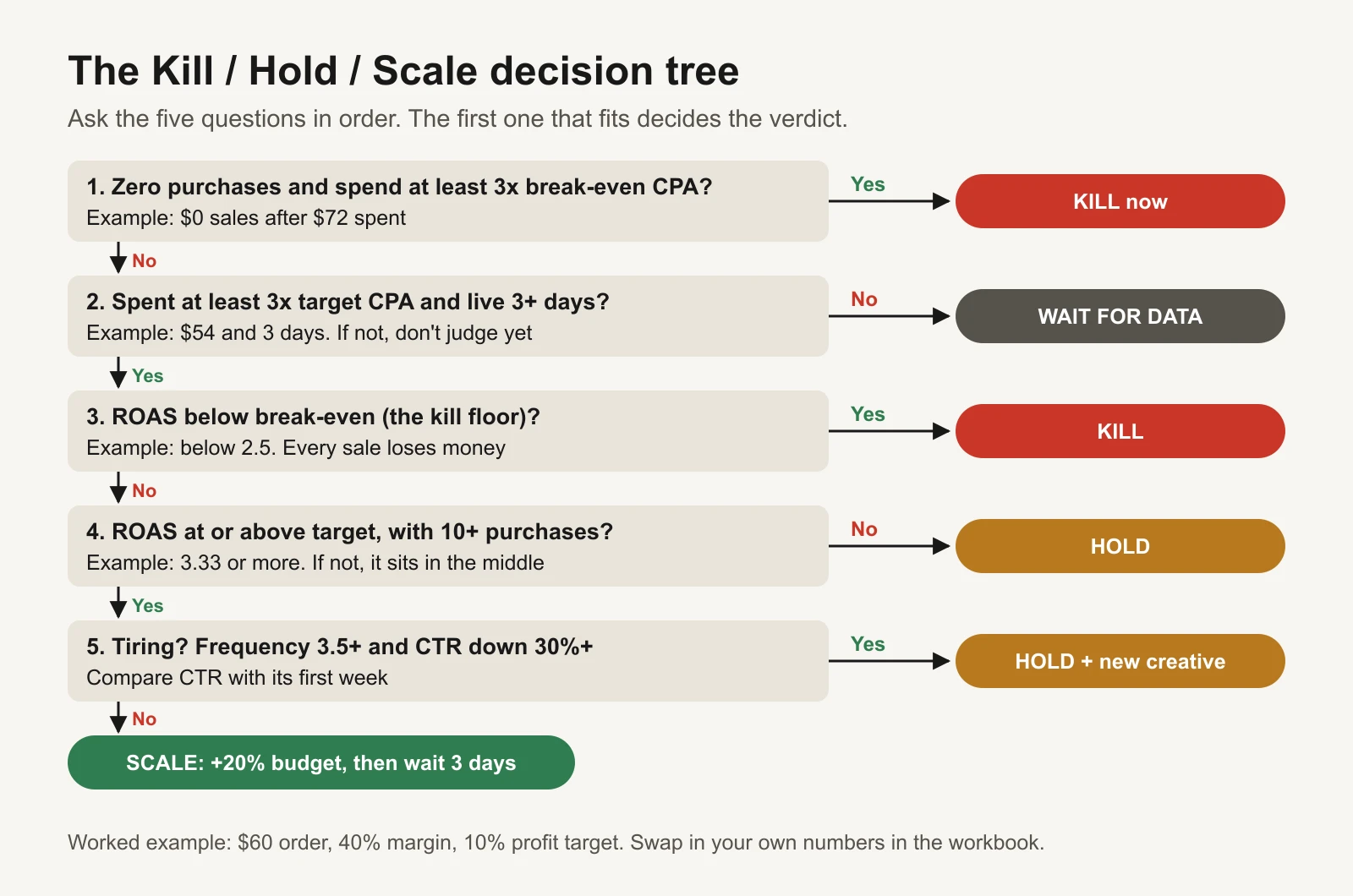
The order matters: a hard stop beats everything, and nothing is judged before the data rule passes.
Why this order?
- Hard stop first, because a no-sale ad burning money should not hide behind "it's only day 2".
- Data rule second, because every rule after it compares ROAS, and ROAS on tiny spend is mostly noise.
- Kill floor third, because losing money per sale is the clearest signal you will get.
- Scale test fourth, with a minimum purchase count.
- Fatigue last, as a brake: an ad can pass the scale test today while it is already tiring.
The three bands
Once an ad has enough data, its ROAS puts it in one of three bands.
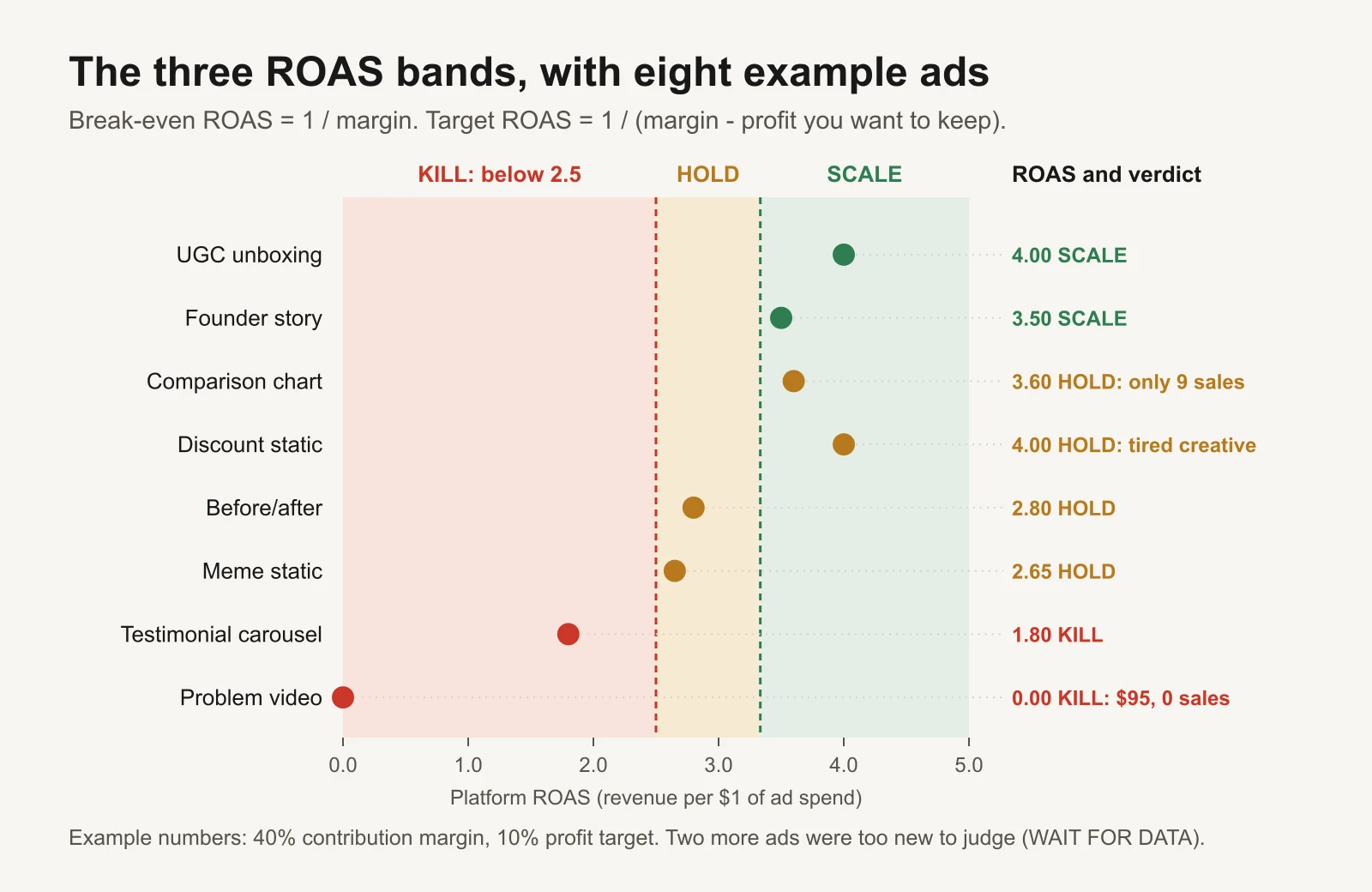
Worked example: the band is a starting point. Two ads in the scale band still get HOLD, for different reasons.
Kill: below break-even
An ad below break-even ROAS loses money on every sale it drives, before you even count overhead. Once it passes the data rule, turn it off.
Two cautions:
- Platform ROAS is an estimate. Meta reports purchases using its attribution setting, not your bank account. If you have checked, over several months, that Meta consistently under-reports your real sales, you can set the kill floor a little below break-even (the workbook has a "kill floor %" setting). Don't lower it on hope. The attribution reconciliation guide shows how to check.
- With Advantage+ campaign budget, low spend is not a verdict. When the budget sits on the campaign, Meta moves money between ad sets on its own. Meta's advice is not to pause ad sets just because they get little delivery, and not to pause and unpause ad sets by hand (Meta: Best practices for Advantage+ campaign budget). An ad set that has spent $9 is WAIT FOR DATA, not KILL. Judge it if and when it spends.
Hold: between break-even and target
A HOLD ad pays for itself but doesn't hit your profit target. This is where most ads live, and it is fine. Don't touch the budget. Instead:
- Give it a new hook or a new first three seconds as a separate ad.
- Check the landing page. If CTR is healthy but sales are weak, the problem is often after the click; the 25-point landing page audit covers it.
- Re-check it at the next weekly review.
A HOLD is also the right call for an ad above target with fewer than 10 purchases ("promising"), and for an ad above target that is showing fatigue.
Scale: at or above target, with enough sales
An ad (or ad set) in the scale band with 10+ purchases earns more budget. How much, and how fast, is the next section.
How to scale without breaking what works
What Meta actually says about budget changes
Meta's help centre lists the edits that always restart learning: any change to targeting, creative or optimization event, adding a new ad to an ad set, pausing for 7 days or more, and changing bid strategy. Budget changes are in a second group: they may or may not count as significant, depending on how big the change is. Meta's own example: going from $100 to $101 is not likely to restart learning, while going from $100 to $1,000 may (Meta: Significant edits and learning phase).
Three more facts from the same help pages:
- With Advantage+ campaign budget (what used to be called campaign budget optimization), changing the campaign budget can send several ad sets in that campaign back into learning at once.
- Meta's learning-phase page advises against frequent budget changes (Meta: About the learning phase).
- If you change a daily budget mid-day, Meta recalculates. The spending limit for that day is 75% more than the highest daily budget in place that day (Meta: About changing your daily budget).
Meta does not publish a "safe" percentage. The common practitioner habit is around 20% at a time, with a few days in between. That is a convention, not a platform rule, and the workbook lets you change it.
The scale rule
- Raise the budget by one step (default +20%) on the ad set, or the campaign if you use Advantage+ campaign budget.
- Make the change once, ideally early in the day in your ad account's time zone, so the new budget applies to a full day.
- Wait (default 3 days) and don't edit anything else in that ad set.
- Re-run the rules. Still in the scale band? Step again. Dropped to HOLD? Stop there. That is roughly where this ad set's extra money stops paying.
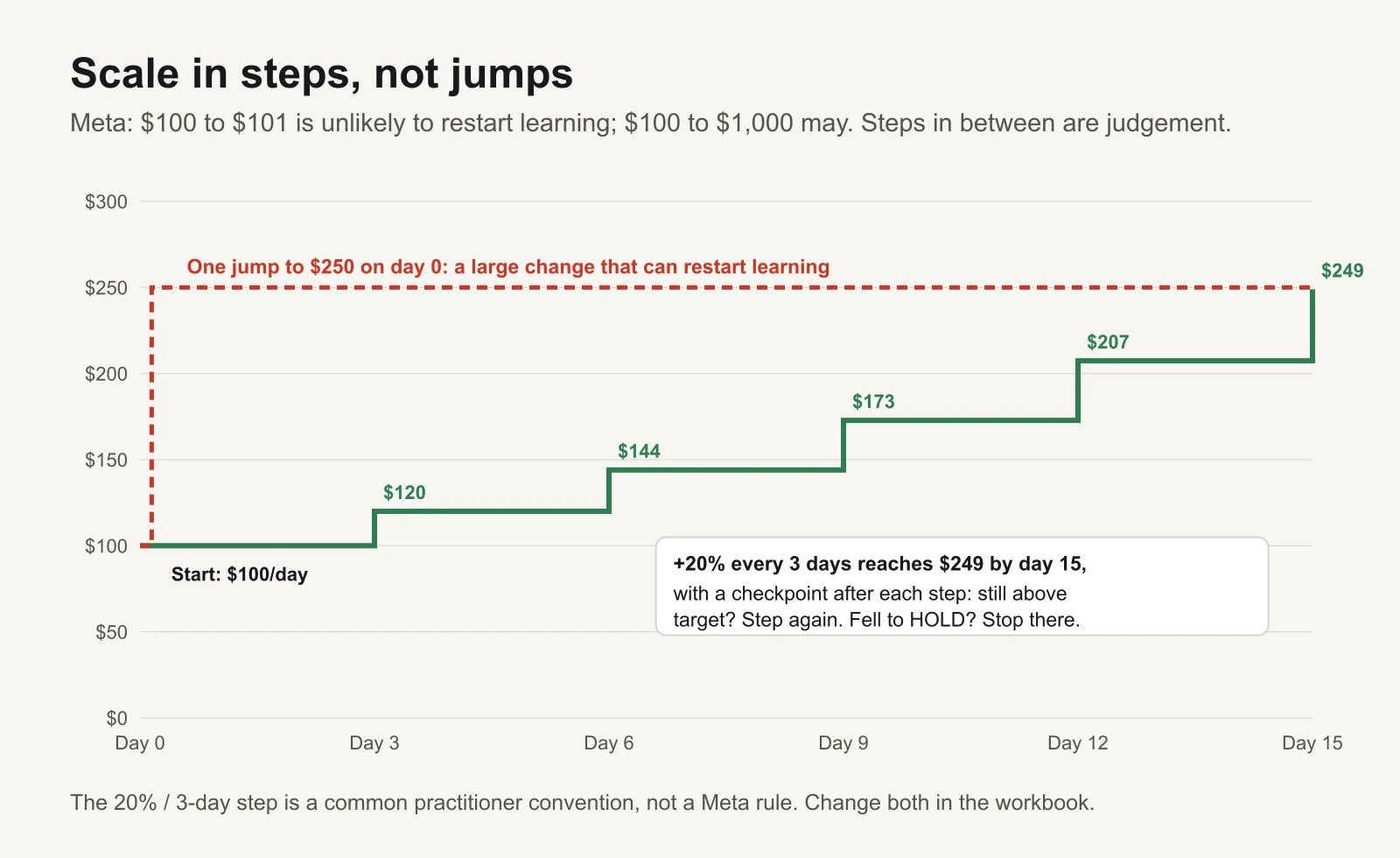
Example: five checked steps get you to about the same budget in two weeks, with five chances to stop.
Average ROAS will usually fall as budget rises, because the cheapest sales are found first. What matters is whether the extra spend still pays. The marginal ROAS guide shows how to read that.
Scaling sideways
The other way to scale is to put a winning ad into your main scaling campaign (for example an Advantage+ sales campaign). Remember that adding a new ad to an ad set is itself a significant edit for that ad set, so batch these moves, don't drip them in one a day. The account structure blueprint shows where tests and scaling campaigns sit.
Fatigue: the brake on scaling
Creative fatigue means the people you reach have seen the ad so often that they stop responding. Frequency alone doesn't prove it; a frequency of 4 might be fine for a retargeting audience and a problem for a cold one. So the rulebook uses two signals together:
- Frequency at or above 3.5 in your date range, and
- CTR down 30% or more from the ad's first week.
Both together trigger "HOLD + new creative". Treat both numbers as defaults to tune for your account, not as laws. Our frequency and fatigue guide explains why there is no universal cut-off.
Meta now flags this itself on some ad sets. In Ads Manager you may see Creative limited when an ad's cost per result is higher than your past ads but less than twice as much, and Creative fatigue when it is twice as much or more. Meta counts recent exposures of the same image or video across your Page's campaigns. Its suggested fixes are to create a new ad with creative that is clearly different from the original, expand the audience, or try Advantage+ creative, and it notes that keeping the original ad active instead of turning it off may maximise results (Meta: About creative fatigue recommendations). If you see those statuses, take them seriously.
What to do with a tired winner:
- Keep it running at the same budget. Don't scale it.
- Launch one or two new ads that are genuinely different: new hook, new format, new angle. A colour swap is not new creative.
- Let the new ads pass the data rule before you judge them.
Moving budget to winners
Each review frees some money (from kills) and asks for some money (from scales). They are separate decisions.
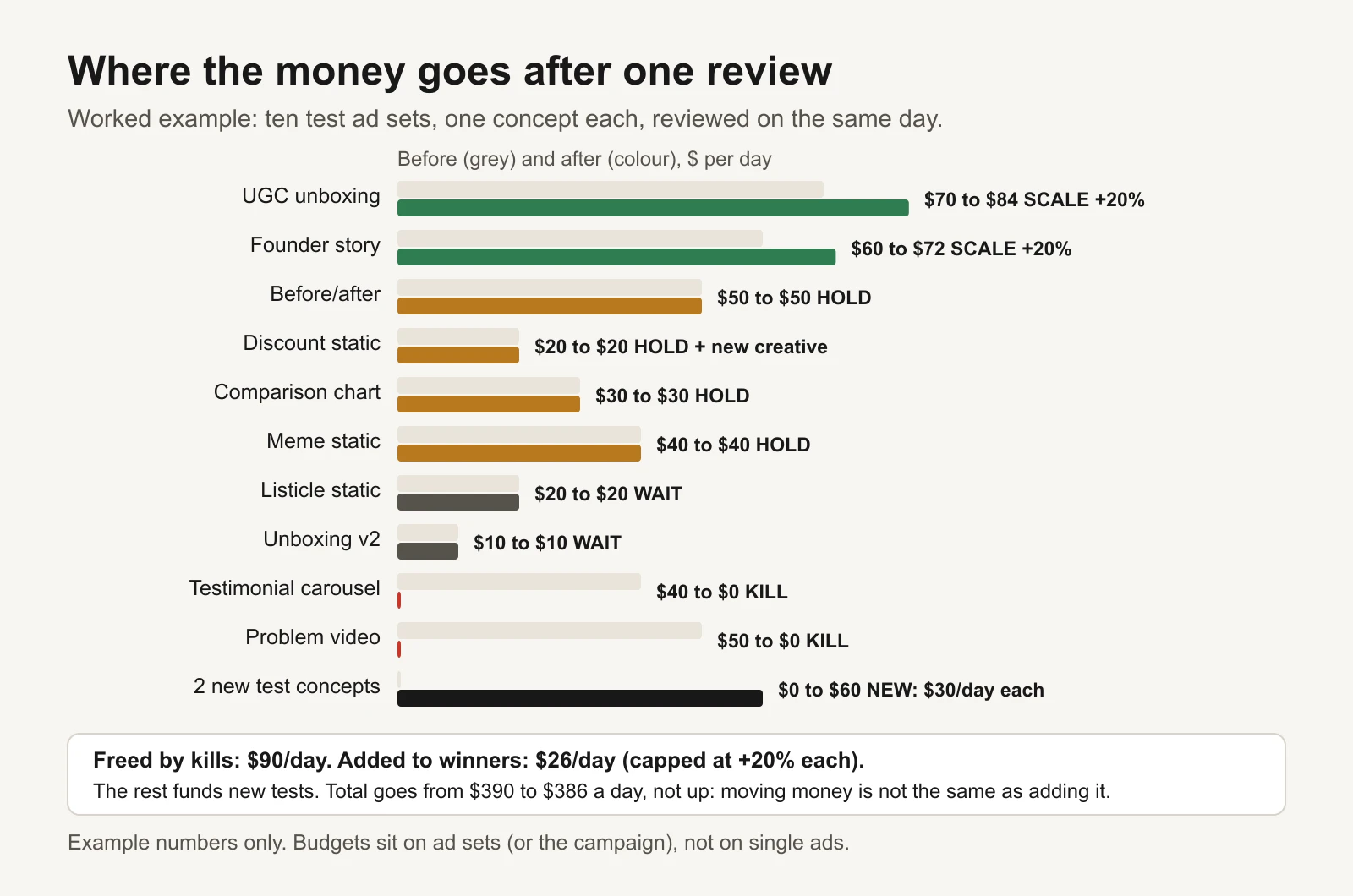
Worked example: kills free $90 a day, but winners only get one step each. The rest funds new tests.
The rules:
- Kills free budget. They don't automatically fund winners. Pouring all freed money into one winner is the same big jump the scale rule avoids.
- Each winner gets at most one step per review.
- Leftover money goes to new tests or stays unspent. Replacing killed concepts with new ones keeps the pipeline full.
- Watch the total. In the example, the account goes from $390 to $386 a day. If you want to grow total spend, do it on purpose, not as a side effect of moving money around.
What NOT to judge on
| Don't judge on | Why | What to do instead |
|---|---|---|
| One day of data | Daily sales counts are small, so ROAS swings wildly | Use 7 or 14 days and the data rule |
| Tiny spend ($5, $10) | One sale more or less flips the verdict | Wait for 3 × target CPA |
| The first days after a big edit | Meta says results during learning don't reliably predict later performance | Wait at least the step-wait period |
| CTR on its own | Clicks are not sales; cheap curiosity clicks can look great | Use CTR for fatigue and diagnosis only |
| An ad set that barely spent under Advantage+ campaign budget | Meta chose not to spend there; that is not a test result | Leave it; judge the campaign as a whole |
| Two date ranges with different attribution settings | The numbers measure different things | Keep one attribution setting for all reviews |
| A sale or holiday period vs a normal week | Prices and demand changed, not the ad | Compare like with like |
| Account-wide ROAS dips you haven't diagnosed | Could be tracking, delivery or a site outage | Run the delivery drop checklist first |
The worked example: 10 ads, one review
A fictional shop with the numbers from Step 1 runs a testing campaign with one creative concept per ad set. It exports the last 14 days. The workbook's Settings are the defaults: $54 minimum spend, 3 days, 10 purchases to scale, $72 hard stop, 3.5 frequency, 30% CTR drop.
| Ad | Spend | Revenue | Buys | ROAS | Freq. | CTR now / launch | Days | Verdict | Why |
|---|---|---|---|---|---|---|---|---|---|
| UGC unboxing | $820 | $3,280 | 52 | 4.00 | 1.9 | 1.6 / 1.7 | 12 | SCALE | Above 3.33 with 52 purchases |
| Founder story | $610 | $2,135 | 34 | 3.50 | 2.1 | 1.3 / 1.4 | 10 | SCALE | Above 3.33 with 34 purchases |
| Comparison chart | $150 | $540 | 9 | 3.60 | 1.4 | 1.5 / 1.5 | 5 | HOLD | Above target, only 9 purchases |
| Discount static | $380 | $1,520 | 25 | 4.00 | 4.2 | 0.7 / 1.5 | 21 | HOLD | Tired: frequency 4.2, CTR down 53% |
| Before/after | $450 | $1,260 | 21 | 2.80 | 1.7 | 1.1 / 1.2 | 9 | HOLD | Middle band |
| Meme static | $260 | $690 | 11 | 2.65 | 1.6 | 1.0 / 1.1 | 7 | HOLD | Middle band, just above break-even |
| Testimonial carousel | $300 | $540 | 9 | 1.80 | 1.5 | 0.9 / 1.0 | 8 | KILL | Below 2.50 with enough data |
| Problem video | $95 | $0 | 0 | 0.00 | 1.1 | 0.8 / – | 2 | KILL | Hard stop: $95, no sales |
| Listicle static | $40 | $120 | 2 | 3.00 | 1.0 | 1.2 / – | 2 | WAIT | Under $54 and under 3 days |
| Unboxing v2 | $35 | $60 | 1 | 1.71 | 1.0 | 1.1 / – | 6 | WAIT | Six days, but only $35 spent |
What the example teaches:
- Two ads with the same 4.00 ROAS get different verdicts. UGC unboxing scales; Discount static holds because it is tiring. ROAS alone would have scaled both.
- "Comparison chart" looks better than "Founder story" (3.60 vs 3.50) but has only nine sales. It earns patience, not money, yet.
- "Unboxing v2" has been live six days and still isn't judged. Days live is not the same as data. It has only spent $35.
- "Problem video" is killed on day 2. $95 with no sales is past the hard stop.
- In total the 10 ads spent $3,140 for $10,145 in reported revenue, a ROAS of 3.23: just under target. The account average hides two clear winners and two clear losers. That is why you judge ad by ad.
Make it a routine
- Pick one or two review days a week, always the same ones.
- Export the same date range (last 7 or 14 days) and the same attribution setting every time.
- Paste into the workbook. Read the verdicts and the "Why" column.
- Kill the KILLs. Don't argue with the floor unless you have changed your margin.
- Step up the SCALEs once. Note the date.
- Add new creative for every tired ad and every killed concept.
- Leave HOLDs and WAITs alone. Write down anything you want to test next.
- Re-check your margin each quarter or whenever prices, shipping or product costs change.
Tools and repos that help
You can run this rulebook with a spreadsheet alone. If you or a developer want to automate the export or let an AI assistant read your numbers, these are public, actively maintained projects (checked on 16 November 2026):
| Repo | What it is | Who it's for |
|---|---|---|
| meta/facebook-python-business-sdk | Meta's official Python SDK for its Marketing APIs. Pull ad-level spend, purchases, frequency and CTR on a schedule | A developer who wants the export to fill the workbook automatically |
| meta/facebook-nodejs-business-sdk | The same, for Node.js | JavaScript teams |
| pipeboard-co/meta-ads-mcp | An open-source MCP server (a connector for AI assistants such as Claude or ChatGPT) for Meta Ads, with a hosted option. It can read insights and also make changes | Marketers who want to ask "which ads passed the data rule this week?" in chat. Keep write actions behind your own approval |
| anthropics/skills | Anthropic's public repository of Agent Skills, including an Excel (xlsx) skill and a skill-creator | Anyone who wants an AI assistant to apply the same written rules every time instead of improvising |
| googleanalytics/google-analytics-mcp | Google's MCP server for the Analytics Admin and Data APIs | Checking Meta-reported revenue against GA4 before you trust a kill floor |
A tip if you use an AI assistant: paste the rule table from the top of this article into its instructions, word for word. The value of a rulebook is that it doesn't change with mood, and that applies to software too.
Or let GaaS run the rulebook
GaaS is an AI agent that creates, launches and optimises Meta and Google ads from three inputs: your website, a spend limit and a one-line goal. It applies rules like these every day, explains each proposed kill or scale in plain words, and nothing that changes spend happens without your approval. If you'd rather keep the spreadsheet, the workbook below does the same maths.
Limits of this rulebook
- It uses platform-reported revenue. That is Meta's attribution, not proof that the ad caused the sale. Use experiments when the decision is big.
- The defaults (3 × target CPA, 3 days, 10 purchases, 20% steps, 3.5 frequency, 30% CTR drop) are sensible starting points, not Meta rules or benchmarks. Change them in the Settings tab and write down why.
- It is built for purchase-optimised campaigns. For lead generation, use cost per qualified lead and your close rate instead of ROAS.
- First-order maths is conservative. If you know your repeat-purchase value well, raise your target CPA deliberately, not by lowering the kill floor.
Sources
- Meta Business Help Center: About the learning phase
- Meta Business Help Center: Significant edits and learning phase
- Meta Business Help Center: About changing your daily budget
- Meta Business Help Center: Best practices for Advantage+ campaign budget
- Meta Business Help Center: About creative fatigue recommendations in Meta Ads Manager
- GitHub repositories listed above, checked 16 November 2026.