
Performance Max (PMax) is Google's all-in-one campaign: one budget, one set of assets, and Google decides where your ads run across Search, Shopping, YouTube, Display, Gmail and more. Its reports often look excellent. Sometimes that's because it's good. Sometimes it's because a large part of its sales came from people who typed your brand name into Google.
Those people were already looking for you. Many would have clicked your free listing, your brand Search ad or your Shopping ad anyway. When PMax takes the click, PMax takes the credit, and its ROAS (return on ad spend: revenue divided by ad cost) looks far better than what it earns finding new customers.
This guide shows you how to measure that in about 20 minutes, what to do if the number is high, and what to watch afterwards so the fix doesn't cost you sales. It is written for business owners running their own Google Ads, with enough detail for a performance marketer to use as a checklist.
The workbook splits a PMax search terms export into brand and non-brand, shows the ROAS without brand searches next to the ROAS Google reports, gives a verdict, and walks you through the fix with a checklist. All numbers in this article are a fictional worked example unless a source is linked.
The short version
- Download the search terms report for your PMax campaign: Campaigns > Insights and reports > Search terms, then "Search terms and landing pages for Performance Max".
- List every way people spell your brand, including misspellings and the version with a space.
- Split the terms into brand and non-brand. Work out the campaign's ROAS without the brand terms.
- If that ROAS is below break-even, or brand searches are a big share of PMax's value, check you have a funded brand Search campaign, then add a brand exclusion to PMax.
- Decide on purpose whether Shopping ads may still show on your brand.
- Re-run the check in 14 to 30 days and judge on total sales across all campaigns.
Why PMax ends up on your brand name
PMax uses your assets, your product feed, your website and Google's signals to decide which searches to serve. Nothing stops it serving a search for your own name unless you tell it not to. And brand searches are the easiest conversions on the internet: the person already knows you and is trying to reach you. A campaign that is rewarded for conversions will happily take them.
It also overlaps with your other campaigns far more than most people assume. In February 2025, Optmyzr looked at Search and PMax campaigns running side by side in the accounts it manages. In 91.45% of 503 accounts, a PMax search term exactly matched a keyword in a Search campaign. In 97.26% of 511 accounts, PMax and Search had served at least some of the same search terms (Optmyzr: Is Performance Max cannibalizing your Search campaigns?).
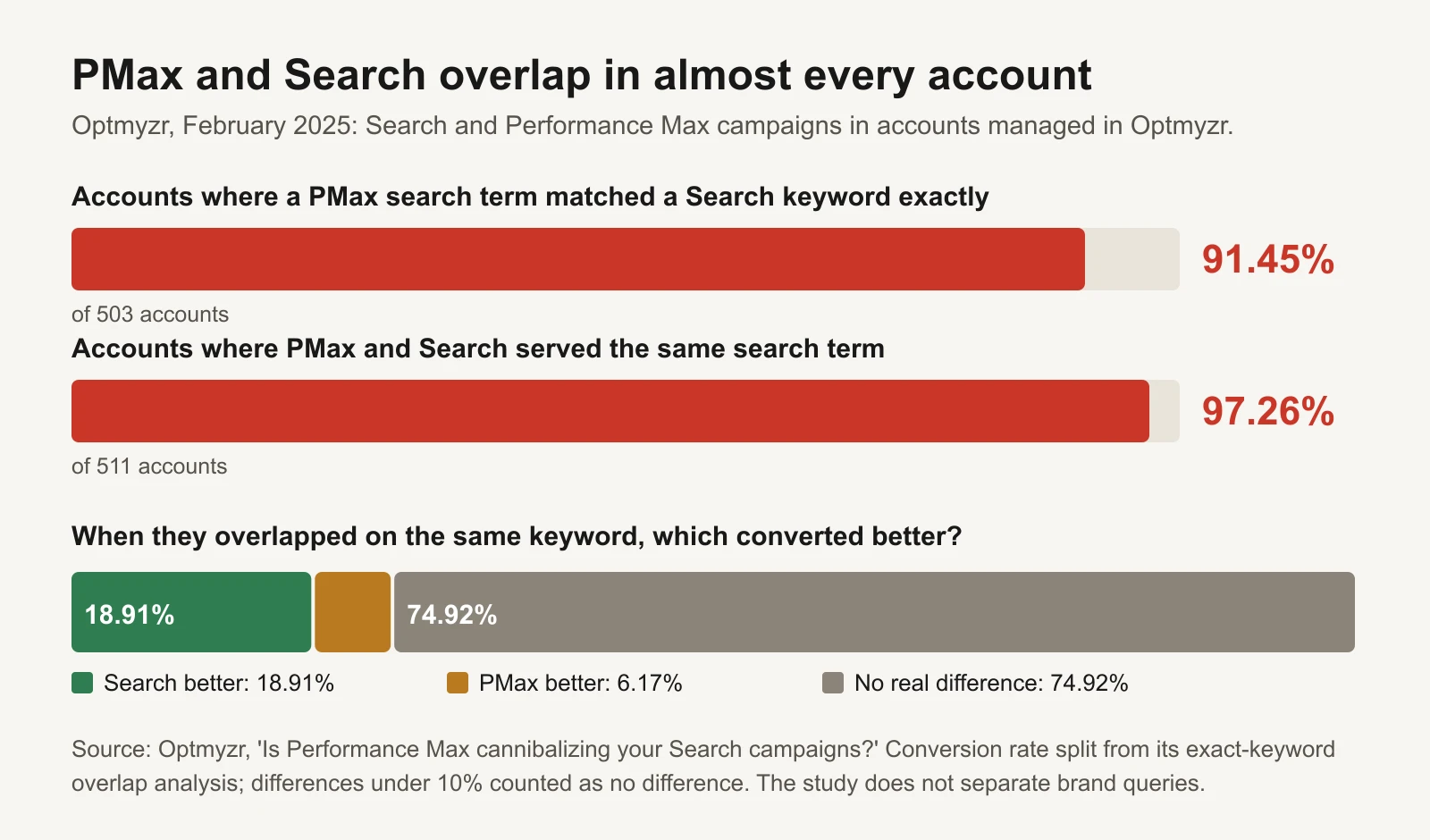
Overlap is the norm, not the exception. Note the study did not separate brand queries.
Two things about that study keep this article honest. First, it does not break out brand searches, so it shows overlap in general, not how much PMax spends on brand. No credible published figure for "the share of PMax spend that goes to brand terms" exists, and we won't invent one; the only number that matters is yours, and the workbook gives it to you. Second, when the same keyword was served by both, the conversion rate was usually about the same: Search did better 18.91% of the time, PMax 6.17%, and 74.92% of the time there was no meaningful difference (under 10%). Optmyzr couldn't compare cost or ROAS, because PMax search term costs weren't reported at the time.
Google has rules for who wins. When a search exactly matches (or is spell-corrected to) a keyword in one of your Search campaigns, Google says the Search campaign is preferred over PMax; otherwise the campaign with the higher Ad Rank serves (Google Ads Help: How Performance Max interacts with other campaigns in your account). That helps only for the exact searches you've added as keywords. Misspellings, "brand + product" searches and "brand + discount code" searches can still go to PMax.
A recent change, and why you should still check
In early November 2026, PPC Land reported that the same Google help page now says PMax "may also filter out navigational or brand-specific search queries", and asks advertisers to make sure their brand Search campaigns have enough budget and eligible ads to pick them up (PPC Land, 2 November 2026). When we checked the English version of the page on 17 November 2026 we couldn't find that sentence, so treat it as reported, not confirmed. Either way, it isn't known which accounts it applies to or what happens if you have no brand Search campaign. "May" is not "will". The search terms report tells you what actually happened in your account, so the audit below is still the first step.
Step 1: pull the PMax search terms report
Google rolled out search terms reporting for Performance Max in 2025, describing it as the same detail you get for Search and Shopping campaigns (Google Ads & Commerce blog, 30 April 2025). Here's how to get it (Google Ads Help: About the search terms report in Performance Max):
- In Google Ads, click Campaigns, then Insights and reports, then Search terms.
- In the view drop-down, choose Search terms and landing pages for Performance Max.
- Filter to one PMax campaign. Pick the last 30 days (data goes back to March 2023).
- Add columns for impressions, clicks, cost, conversions and conversion value if they aren't showing.
- Download it and paste it into the workbook's Search terms tab.
Then, from the Campaigns view, note the same campaign's total cost and conversion value for the same dates. You'll need both, because the search terms report doesn't cover everything PMax spends: Display, YouTube outside search, Gmail and Discover have no search terms, and Google leaves out searches that too few people made.
If your view has no cost or conversion value column, leave those blank. The workbook still shows the brand share of clicks, which is enough to see whether this is a problem worth fixing.
Step 2: mark your brand searches
List every spelling of your brand on the workbook's Settings tab:
- The brand name:
kettlewick - With a space:
kettle wick - Common misspellings:
ketlewick,kettlewik - Your domain without the .com, if people search it
- Product names that only you sell (careful: a generic product word is not brand)
The workbook marks any search term containing one of those as Brand. It's plain text matching, so read down the flagged rows once. "Kettlewick candles" is brand. A competitor's name is not your brand, even though it's a brand; keep competitor terms in non-brand.
Step 3: compare the two ROAS numbers
Here's what that looks like for a fictional candle brand, Kettlewick, over 30 days. PMax spent $11,500 and reported $40,500 in conversion value: a ROAS of 3.52. Its break-even ROAS is 2.50, so PMax looks comfortably profitable.
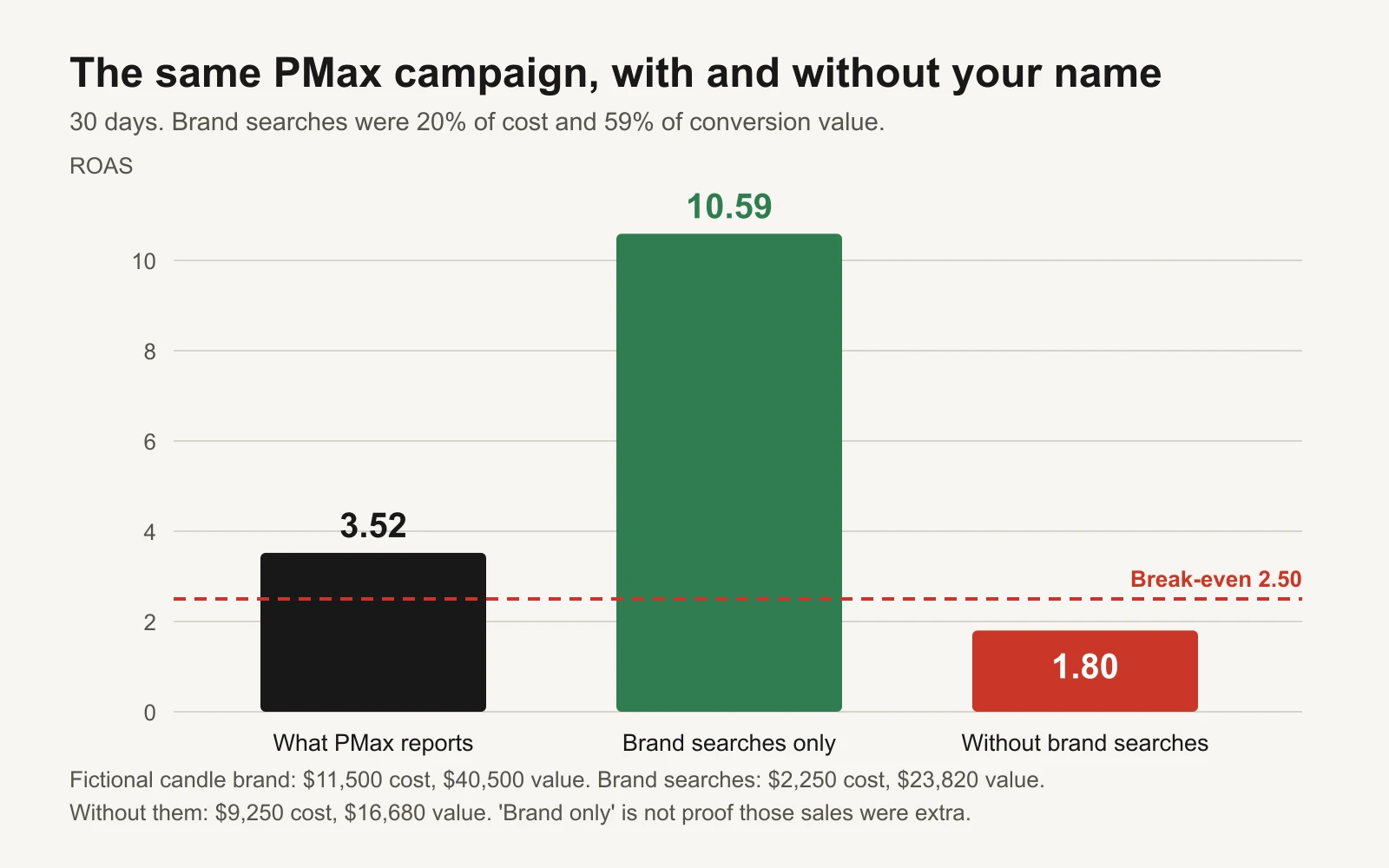
Fictional example. Brand searches were 20% of PMax's cost and 59% of its conversion value.
| Brand searches | Non-brand searches | Not in search terms report | Whole campaign | |
|---|---|---|---|---|
| Clicks | 4,370 | 8,500 | – | – |
| Cost | $2,250 | $6,620 | $2,630 | $11,500 |
| Conversion value | $23,820 | $10,430 | $6,250 | $40,500 |
| ROAS | 10.59 | 1.58 | 2.38 | 3.52 |
Seven brand search terms took 19.6% of the cost and brought 58.8% of the conversion value. Take them out and the rest of the campaign spent $9,250 to make $16,680: a ROAS of 1.80, below the 2.50 break-even. The campaign that looked like it was making money was losing money on every new customer and being carried by people who already knew the name.
Two cautions before you act on a number like that:
- Brand ROAS isn't proof of extra sales. The 10.59 ROAS on brand searches is what PMax was credited with, not what it caused. Some of those people would have bought through your brand Search ad, your Shopping ad or your free listing anyway. Some might not. This audit can't tell you which, and neither can PMax's own report.
- "Without brand" includes channels you can't see by search term. The $2,630 of cost outside the search terms report is in the 1.80. That is the honest comparison, because you can't exclude it either way.
The workbook gives a verdict from two numbers you can change: brand share of conversion value (our starting point calls 30% or more "high") and whether the ROAS without brand clears break-even. For more on reading brand traffic, see auditing branded traffic in Performance Max.
Step 4: decide
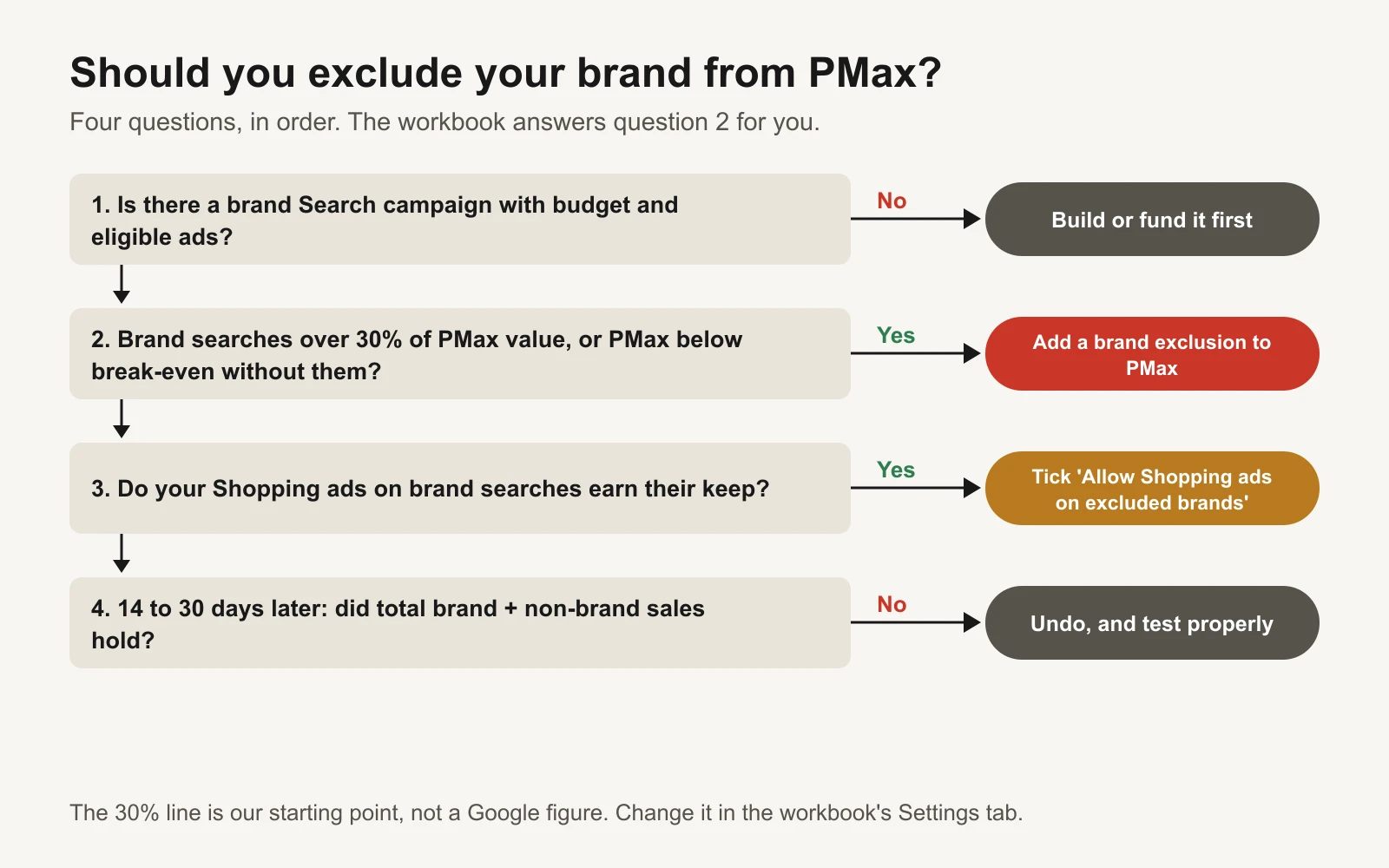
Ask in order. The 30% line is our starting point, not a Google figure.
Question 1 comes first for a reason. If you exclude your brand from PMax and nothing else bids on your name, a competitor's ad can sit above your listing when someone searches for you. A brand Search campaign is cheap insurance: exact and phrase match keywords for your brand, a small budget, sitelinks to your best pages. Check it isn't "Limited by budget".
Step 5: the fix, step by step
Brand exclusions in PMax don't use keywords. They use brand lists, built once at account level and applied to campaigns (Google Ads Help: About brand settings for Search and Performance Max, Manage a brand list). Once your brand Search campaign is in place, adding a list to one campaign takes about five minutes (our estimate).
- Create the brand list. Tools > Shared library > Brand lists > +. Name it ("Our brand") and search for your brand in Google's brand library. If it isn't there, choose Request a brand. Google's library uses one global brand name, not regional variants, and only adds brands with something like a logo, trademark, domain or business name behind them.
- Apply it to PMax. Open the PMax campaign > Settings > Additional settings > Brand exclusions, and choose the list. To change several campaigns at once, select them and use Edit > Change brands > Brand exclusions (Google Ads Help: Apply brand exclusions to Performance Max or Search campaigns).
- Decide about Shopping ads. The same setting has a box called "Allow Shopping ads on searches that mention excluded brands". Tick it if your product ads should still appear when someone searches your name (for example "kettlewick fig candle"). Leave it off if you want brand demand to go entirely to your brand Search and Shopping campaigns. Either is reasonable; leaving it to chance isn't.
- Cover the misspellings. A brand list matches Google's idea of your brand, not every typo. Optmyzr notes PMax can still serve close misspellings with exclusions on, and recommends adding branded misspellings as exact match keywords in Search. You can also add them as negative keywords in the PMax campaign; PMax now accepts up to 10,000 campaign-level negatives (PPC Land, March 2025), and they apply to Search and Shopping inventory only (Google Ads Help: Negative keywords in Performance Max).
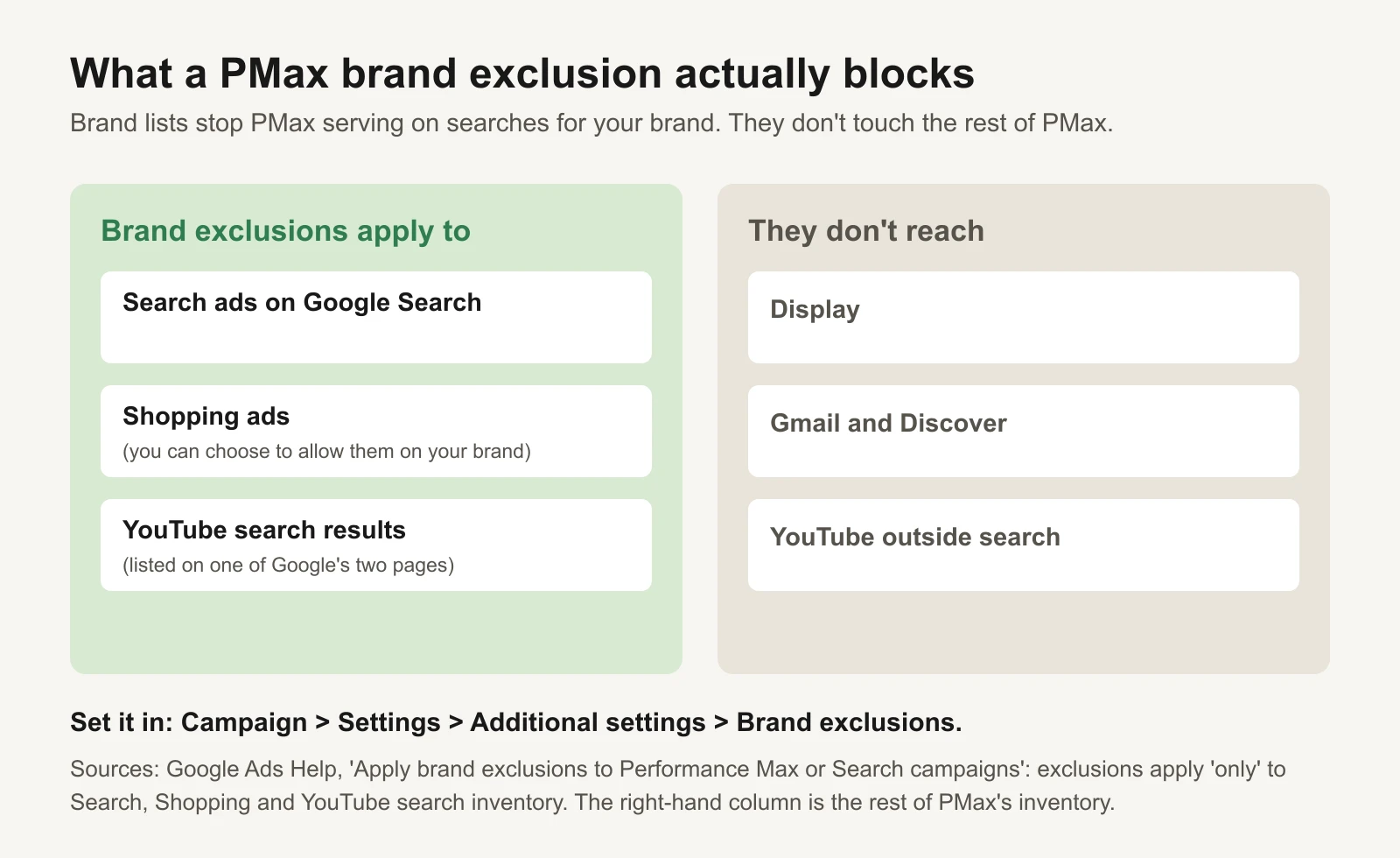
Google's two help pages differ slightly: one lists Search and Shopping, the other adds YouTube search.
One more distinction: a brand exclusion is not an account-level negative keyword. If you added your brand name as an account-level negative keyword, it would block your brand in every Search and Shopping campaign, including the brand Search campaign you just set up (Google Ads Help: About account-level negative keywords). Keep brand blocking at campaign level.
Step 6: what to watch afterwards
The point of the fix is a truer picture and, ideally, PMax money moving towards new customers. It isn't automatically more sales. Watch these for 14 to 30 days:
| Watch | Where | What good looks like |
|---|---|---|
| Brand share in the PMax search terms report | Re-run the workbook | Falls close to zero (Shopping on brand remains if you allowed it) |
| Brand Search campaign conversions | Campaigns view | Rise by roughly what PMax lost on brand |
| Brand Search impression share and cost per click | Brand campaign | Stable. A jump in cost per click can mean a competitor moved in |
| PMax cost and conversions | Campaigns view | Lower reported ROAS is expected. It is the honest number |
| Total revenue across all campaigns and your store | Your store's sales report | Holds steady or grows |
That last row decides it. If total sales fall after the change, PMax's brand clicks were doing more than catching people who'd have bought anyway. In that case undo it and run a proper test: Google Ads experiments let you split traffic and compare. Don't judge on PMax's ROAS alone; it will drop by design.
Common mistakes
- Excluding brand with no brand Search campaign. The most expensive version of this fix.
- Comparing PMax's reported ROAS before and after. It will fall. That's the brand credit leaving, not the campaign breaking.
- Counting competitor names as brand. They are non-brand prospecting, and often expensive. Judge them with the rest.
- Forgetting misspellings. Check the search terms report after the change for brand-like terms that slipped through.
- Judging after three days. Conversions arrive late. Give it at least two weeks before reading the result, longer for expensive products.
Tools and repos that help
These are public, maintained projects (checked 17 November 2026):
| Repo | What it is | Who it's for |
|---|---|---|
| googleads/google-ads-mcp | Google's MCP server (a connector that lets AI assistants use the Google Ads API). Its search tool runs GAQL reports; its write tools use a propose-then-confirm step | Teams who want an AI assistant to pull the PMax search terms and campaign totals |
| googleads/google-ads-python | Google's official Python client library for the Google Ads API | A developer who wants the monthly brand split to run automatically |
Or let GaaS run it
GaaS is an AI agent that creates, launches and optimizes Google and Meta ads from three inputs: your website, a spend limit and a one-line goal. It reads search terms, separates brand from prospecting when judging what works, and proposes changes like brand exclusions in plain words. Nothing that changes spend happens without your approval. If you'd rather run the check yourself, the workbook below is yours to keep.
Limits of this audit
- Brand matching is plain text. Read the flagged rows; it can't tell a brand from a word that happens to contain it.
- The search terms report omits low-volume searches and non-search channels, so some brand traffic may sit in the "not in search terms report" column.
- The audit measures how much of PMax's reported result comes from brand searches. It can't measure how much was incremental. Only a controlled test can.
- The 30% threshold is a starting point we chose, not a Google figure. Change it in Settings.
- Google changes PMax often. The brand-filtering wording reported in November 2026 may change how much brand traffic you see; this audit shows what actually happened in your account.
Sources
- Optmyzr: Is Performance Max cannibalizing your Search campaigns? (data February 2025)
- Google Ads Help: How Performance Max interacts with other campaigns in your account
- PPC Land: Google's Performance Max may stop serving brand searches (2 November 2026)
- Google Ads & Commerce blog: Channel performance reporting is coming to Performance Max (30 April 2025)
- Google Ads Help: About the search terms report in Performance Max
- Google Ads Help: About brand settings for Search and Performance Max, Manage a brand list and Apply brand exclusions to Performance Max or Search campaigns
- Google Ads Help: Negative keywords in Performance Max campaigns and About account-level negative keywords
- PPC Land: Google raises negative keywords limit to 10,000 for Performance Max campaigns (March 2025)
- GitHub repositories listed above, checked 17 November 2026.