
Your ROAS didn't drop. Your ad got old.
Every ad gets tired. The same people see it again and again, they stop stopping, and you pay more for each sale. That part you can't prevent. What you can prevent is the gap that usually follows: the winner fades, nothing is ready to replace it, and you spend two or three weeks briefing, making and testing new ads while the account slides.
This guide is a system for closing that gap. It shows how to measure fatigue against each ad's own history, how to project the week an ad will be tired, and how to work backwards so the replacement is made and tested before that week arrives. It is written for business owners who run their own Meta ads (Facebook and Instagram), with enough detail for a performance marketer to use as a team routine.
The workbook has a Tracker tab (one row per live ad, with a status, a projected "tired" date and a "brief by" date), a Refresh calendar, a Lifespan tab that works out how many new ads you need each week from your own history, and a chart of one ad's fatigue curve. Example numbers in this article and the workbook are a fictional worked example unless a source is linked.
The system on one page
| Step | What you do | Default |
|---|---|---|
| 1. Baseline | Note each winner's cost per result and CTR in its first 7 days | Its own numbers, not a benchmark |
| 2. Status | Compare last 7 days with the baseline | FRESH below 1.3x, WATCH from 1.3x, TIRED from 2x |
| 3. Early signs | CTR down from the first week and frequency high | 30% down and 3.5+ = WATCH, even if cost hasn't moved yet |
| 4. Project | From the last two weeks' rise in cost, estimate when it will reach 2x | Re-run every week |
| 5. Brief | Brief the replacement before the tired date | Tired date − days to make − days to test |
| 6. Refresh type | Pick how different the new ad must be | New hook, format, angle or offer |
| 7. Pipeline | Test enough new ads to keep your winner slots full | Your slots ÷ (winner lifespan × hit rate) |
A few words, defined once:
- Cost per result = ad spend ÷ results (purchases, leads or whatever your campaign optimises for). For a sales campaign this is your cost per purchase, or CPA.
- CTR (click-through rate) = link clicks ÷ impressions. Use link CTR, not "all clicks".
- Frequency = how many times, on average, each person saw the ad in the date range.
- Winner slot = one place in your account where a proven ad runs. If you want six proven ads live at any time, you have six slots.
How long do ads actually last?
You will see confident numbers online: "ads die after 7 days", "refresh every 21 days". We looked for a credible source for those and didn't find one. The best public data we found measures something narrower: how long ads are seen running.
AdSpyder, an ad-intelligence company, published first-seen and last-seen dates for 24,650 ads from its May 2026 archive. For the 4,000 Meta ads in the sample, the median observed run was 4.0 days. 29.8% were seen running for 30 days or more and 15.5% for 90 days or more (AdSpyder: ad fatigue benchmarks).
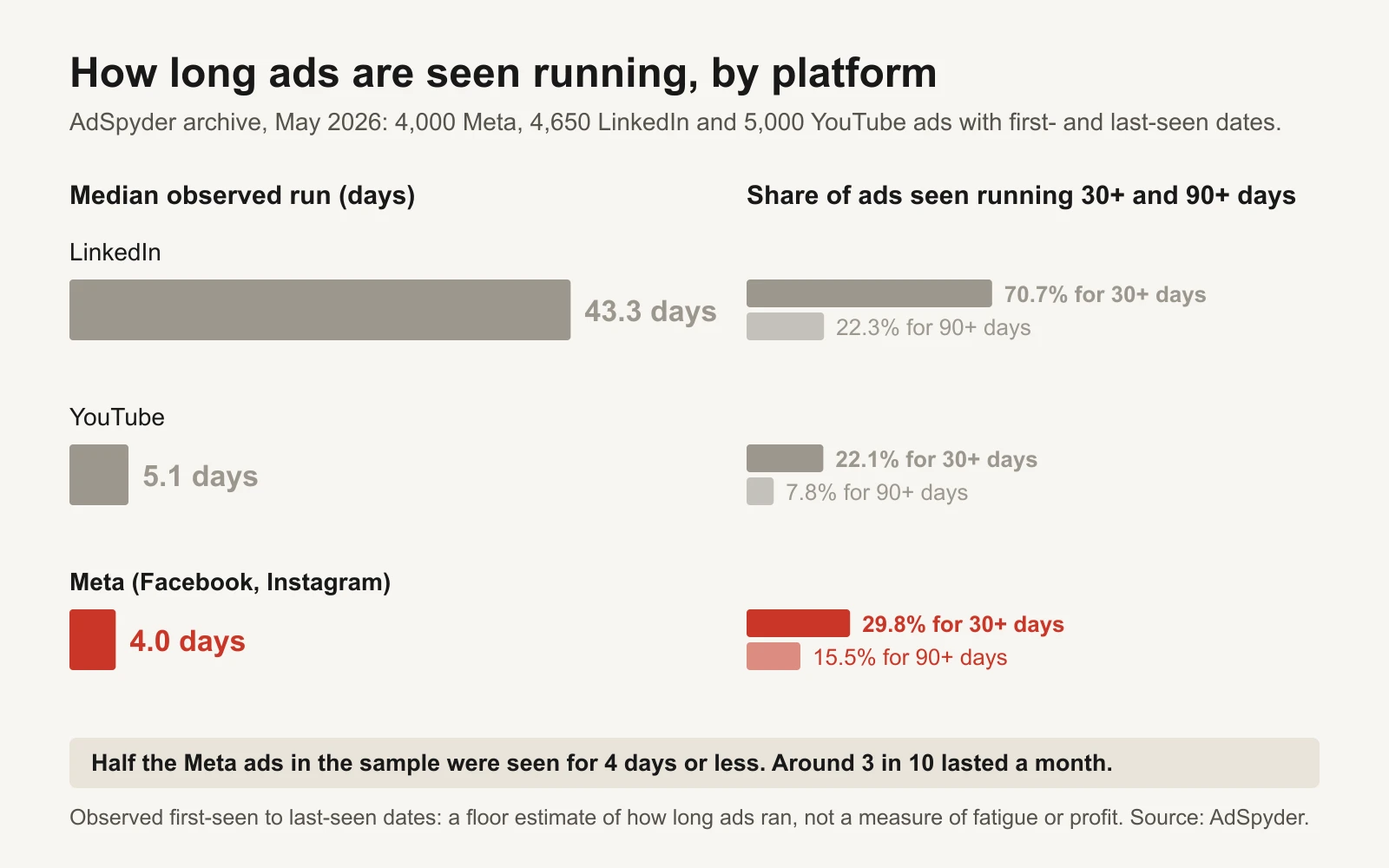
Source: AdSpyder. Observed run length is a floor estimate, not a measure of fatigue or profit.
Read that carefully. AdSpyder itself says observed duration is a floor estimate, that it has no spend, CTR or sales data, and that a long run does not mean an ad was profitable. Many of those short-lived ads were tests that lost, not winners that tired. What the data does show is the shape of a normal account: most ads are short-lived, and a minority run for a month or more.
So the number that matters is not anyone's average. It is how long your own winners last, and the workbook's Lifespan tab works that out from your past ads (more on that below).
What Meta tells you, and when
Meta does flag fatigue on some ads. In Ads Manager you may see Creative limited when an ad's cost per result is higher than your past ads but less than twice as much, and Creative fatigue when it is twice as much or more. Meta counts recent exposures of the same image or video across your Page's campaigns, and suggests creating new ads with creative that is clearly different from the original (Meta: About creative fatigue recommendations).
Take those labels seriously when you see them. But notice what the fatigue label means: by the time it appears, the ad already costs about twice what it used to per result. And you only see it on the ads where Meta shows it. A system that waits for the label is a system that briefs replacements late.
The tracker uses the same 2x line for TIRED, and adds a WATCH stage before it so you have time to act.
Step 1: baseline each winner against itself
Different ads have different "normal" costs. A retargeting ad with a $12 cost per purchase and a cold video at $30 can both be healthy. Comparing either one with an industry benchmark tells you nothing about whether it is tiring.
So each ad gets its own baseline: its cost per result and CTR in its first 7 days live. In Ads Manager, set the date range to the ad's first week and note both numbers. Then, every week, compare the last 7 days with that baseline.
Step 2: three statuses
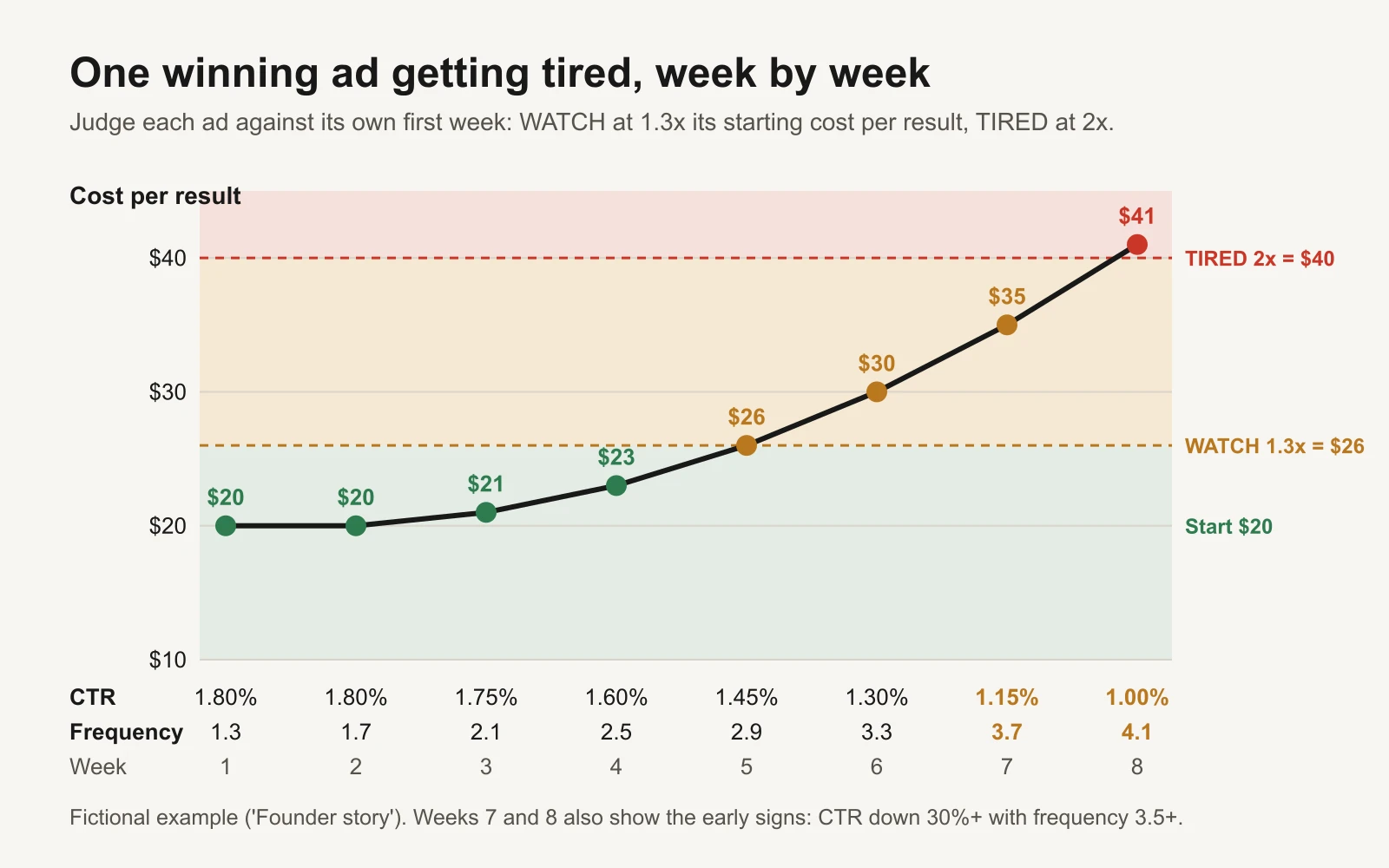
Fictional example: the ad is still "working" in week 6, but it is three weeks from tired.
| Status | Rule (defaults) | What it means |
|---|---|---|
| FRESH | Cost per result below 1.3x its first week | Leave it alone |
| WATCH | Cost per result 1.3x or more, or CTR down 30%+ with frequency 3.5+ | Get the replacement on the calendar |
| TIRED | Cost per result 2x or more | Launch a clearly different replacement now |
Why 1.3x for WATCH? Because weekly costs move up and down for reasons that have nothing to do with the ad: a slow weekend, a competitor's sale, a holiday. Meta's own "Creative limited" label fires on any rise below 2x; 1.3x keeps normal noise out of your inbox. It is a default, not a law. Change it in Settings.
The early-sign rule is there because cost sometimes lags. People stop clicking before you see it in your cost per sale. Frequency alone doesn't prove fatigue (a frequency of 4 is normal for a small retargeting audience), so the rule needs both signals together. Our frequency and fatigue guide explains why there is no universal frequency cut-off, and the fatigue vs saturation guide explains when the problem is the audience, not the ad.
Step 3: project the tired date
A status tells you where an ad is. A projection tells you when it will be tired, which is what you need for planning.
The workbook takes the ad's cost per result two weeks ago and in the last 7 days, works out the average weekly rise, and asks: at that rate, how many weeks until it reaches 2x its baseline?
Worked example (fictional): the "UGC unboxing" ad started at $18 per purchase. Two weeks ago it cost $19; last week $25.
| Number | Formula | Example |
|---|---|---|
| Cost vs start | $25 ÷ $18 | 1.39x: WATCH |
| Weekly rise | √($25 ÷ $19) − 1 | 14.7% a week |
| Tired line | 2 × $18 | $36 |
| Weeks until tired | ln($36 ÷ $25) ÷ ln(1.147) | 2.7 weeks |
| Projected tired date | Review date (16 Nov) + 19 days | 5 Dec |
That is a projection, not a forecast you can bank on. Real ads plateau, recover after a quiet week, or fall off faster. That's why you re-run it every week, and why the workbook doesn't project anything when cost is flat (under 2% a week by default).
Step 4: work backwards to the brief date
The replacement has to be made and tested before the old ad is tired. So the brief date is:
Brief by = projected tired date − days to make a new ad − days to test it
With 7 days to make an ad and 4 days to test it, the UGC unboxing replacement must be briefed by 24 November, eleven days before 5 December.
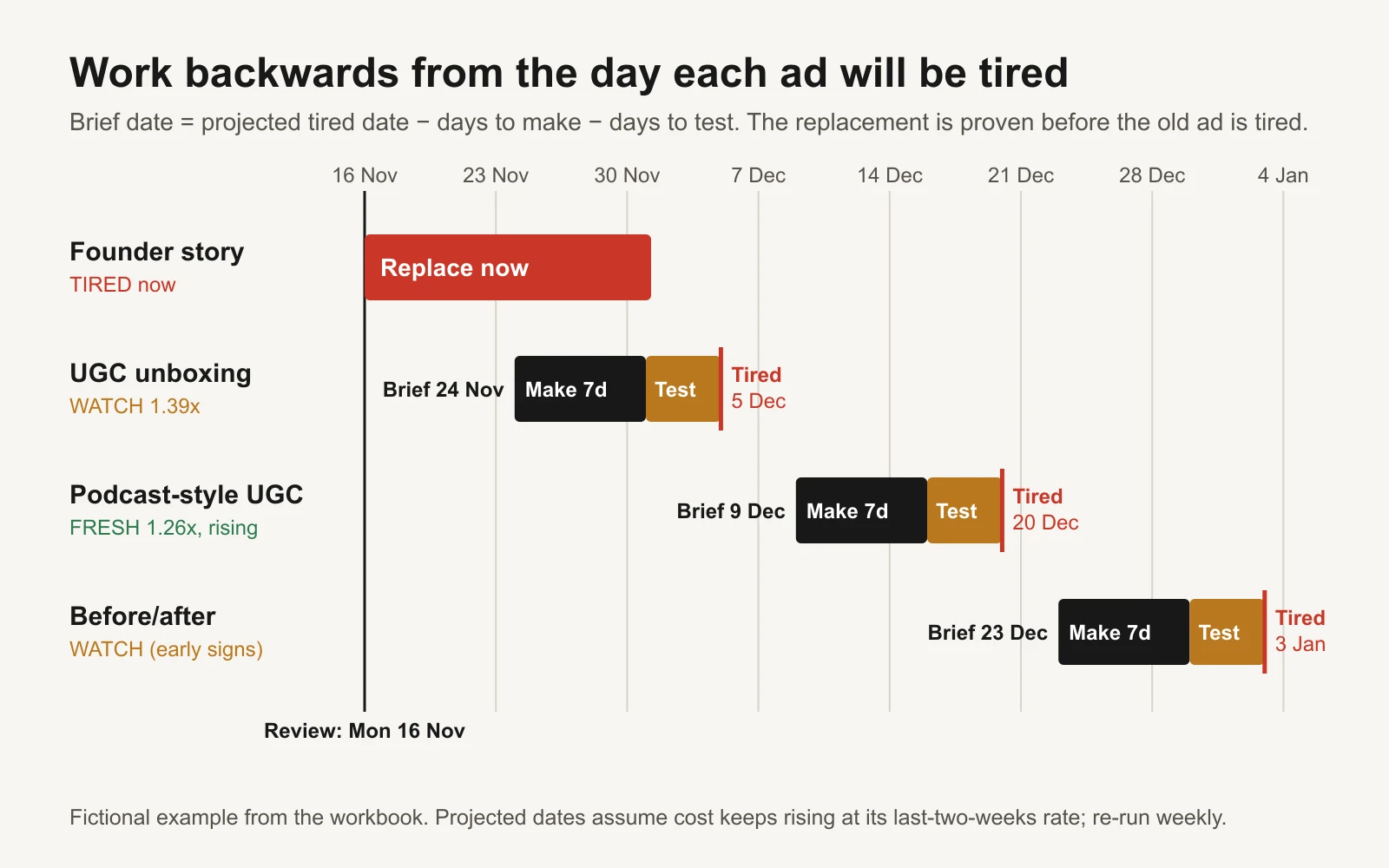
The Refresh calendar tab: amber when the brief is due within 7 days, red when it is overdue.
Be honest about "days to make". If an ad needs a shoot, a creator's availability or your own approval, count those days. Most late replacements are late because the brief went out late, not because production was slow.
Step 5: pick how different the replacement must be
Not every refresh is the same size. From least to most different:
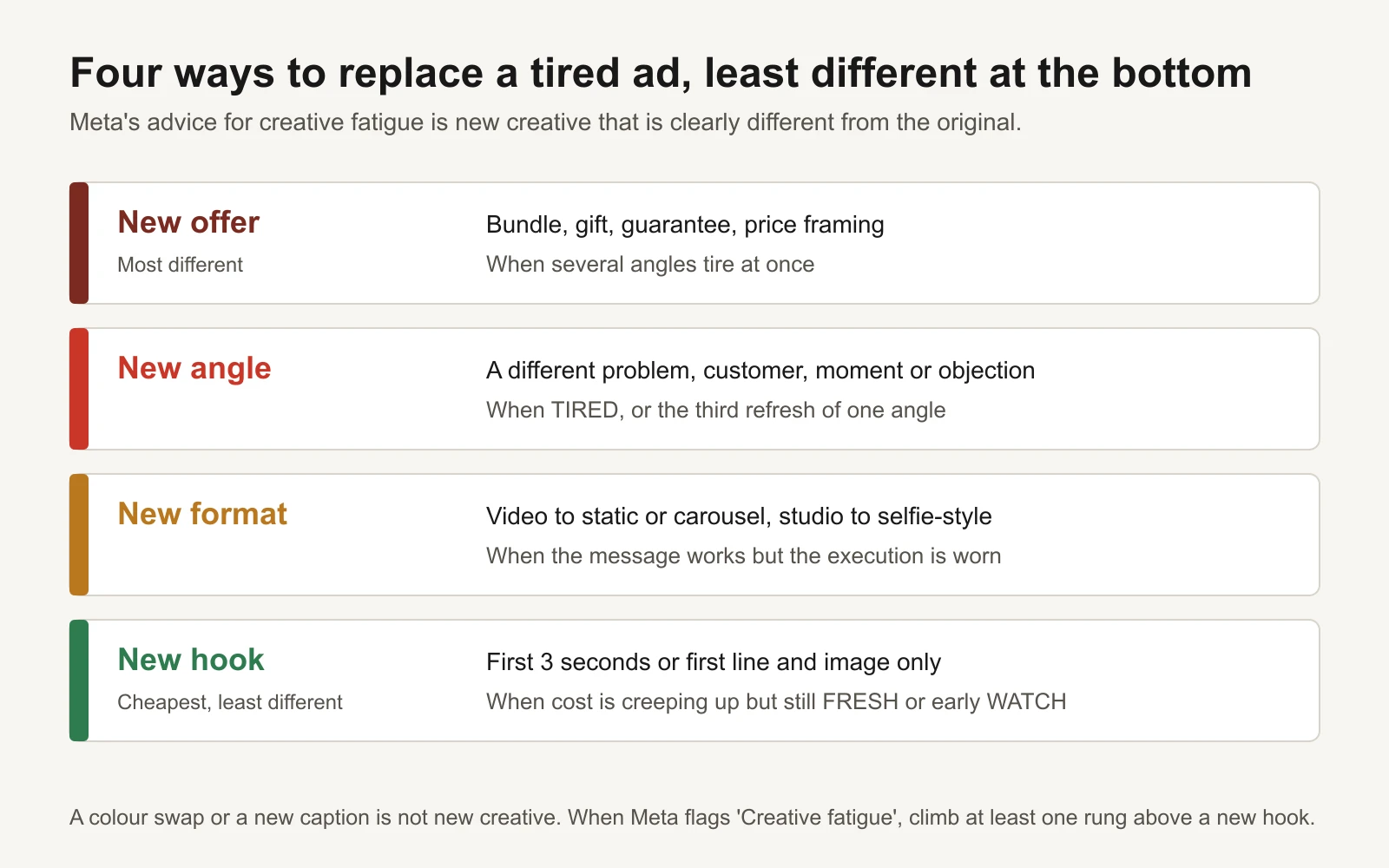
A colour swap or a new caption is not new creative.
- New hook (cheapest): same body, new first 3 seconds or first line. Good for an ad in early WATCH. The hook bank has 100 templates and a cheap way to test them.
- New format: the same message as a static, carousel or selfie-style video.
- New angle: a different reason to buy, such as a different problem, customer or moment. Use this for TIRED ads. Your reviews and support tickets are the best source of angles, and so are competitors' long-running ads (see the Ad Library playbook).
- New offer: bundle, gift, guarantee or a different way to frame the price. If several angles tire at once, the offer may be what people have stopped responding to. Check the margin first.
When Meta has flagged "Creative fatigue", its advice is creative that is clearly different from the original. A new hook on the same footage may not be different enough. Go at least one rung higher.
Step 6: how many new ads you need each week
This is the number most accounts never work out, and it is the one that decides whether you are always behind.
The Lifespan tab takes a simple log of your past ads: launch date, stop date, and whether it became a winner. From that it works out your hit rate (how many tested ads become winners) and how long your winners usually last. Then:
New winners needed per week = winner slots ÷ (median winner lifespan in weeks)
New ads to test per week = new winners needed ÷ hit rate
Worked example (fictional): a coffee brand logged 20 past ads. Five became winners: they lasted 24, 31, 38, 45 and 52 days, so the median winner lasted 38 days (about 5.4 weeks). The other 15 lasted 3 to 14 days. The owner wants 6 winner slots filled.
- Winners needed: 6 ÷ 5.4 = 1.1 a week
- Hit rate: 5 ÷ 20 = 25%
- New ads to test: 1.1 ÷ 0.25 = about 4.4 a week
Four or five new ads a week sounds like a lot for a small brand. It is the honest maths. If you can't make that many, you have three levers: accept fewer winner slots, make cheaper variations (new hooks on proven bodies raise the hit rate), or get better at briefs so more of your tests win. The creative brief template helps with the last one.
What Grüns does instead
Grüns, the greens-gummy brand, is a useful extreme. On 16 November 2026 we read every Grüns ad live in the Meta Ad Library (Grüns in the Meta Ad Library). In the all-countries view there were 192 live ads. Only 3 had been running for more than two weeks, and all 3 were for Nütrops, a partner mushroom-gummy brand, not for Grüns gummies.
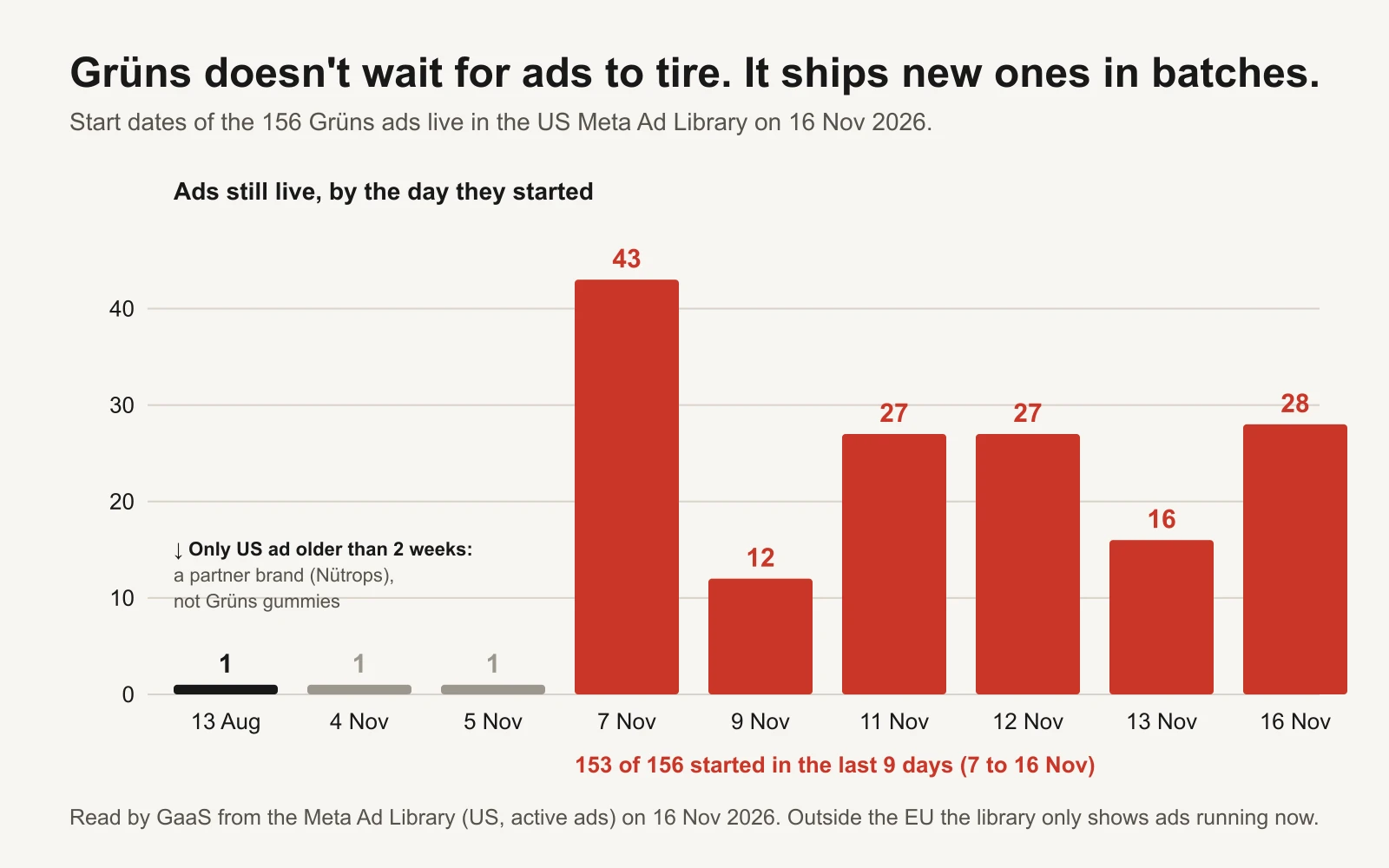
Read by GaaS from the Meta Ad Library on 16 November 2026.
Grüns doesn't try to keep a winner alive. It ships new ads in batches (43 started on 7 November, 28 on 16 November) and very few of its own survive past two weeks. Two caveats: outside the EU the Ad Library only shows ads that are running now, and it shows no spend or results. So we can see the rhythm, not which ads made money. And most brands can't make 40 ads in a day. The lesson to copy is the rhythm, not the volume: new creative arrives on a schedule, before it is needed.
How to swap in a replacement without breaking what works
- Test the replacement first. Run it in your testing campaign until it passes your data rule. The Kill / Hold / Scale rulebook gives a minimum-spend rule for that.
- Don't switch the tired ad off on the same day. Meta notes that keeping the original ad active, rather than turning it off, may maximise results. Leave it at the same budget and don't scale it.
- Batch your additions. Adding a new ad to an ad set is a significant edit that can restart that ad set's learning phase (Meta: Significant edits and learning phase). Add replacements together, once a week, not one a day.
- Retire the old ad when the new one beats it on cost per result over the same date range, or when it stops getting delivery.
The worked example: 8 ads, one review
A fictional coffee brand runs the review on Monday 16 November 2026. Settings are the defaults: WATCH at 1.3x, TIRED at 2x, early signs at 30% CTR drop and 3.5 frequency, 7 days to make, 4 days to test.
| Ad | Start cost | 2 weeks ago | Last 7 days | Cost vs start | CTR now / start | Freq. | Status | Projected tired | Brief by |
|---|---|---|---|---|---|---|---|---|---|
| Founder story | $20 | $30 | $41 | 2.05x | 1.0 / 1.8 | 4.1 | TIRED | now | replace now |
| Discount carousel | $21 | $33 | $46 | 2.19x | 0.8 / 1.5 | 4.6 | TIRED | now | replace now |
| UGC unboxing | $18 | $19 | $25 | 1.39x | 1.2 / 1.6 | 3.0 | WATCH | 5 Dec | 24 Nov |
| Before/after | $19 | $21 | $24 | 1.26x | 1.3 / 2.0 | 3.8 | WATCH (early signs) | 3 Jan | 23 Dec |
| Podcast-style UGC | $23 | $24 | $29 | 1.26x | 1.1 / 1.3 | 2.6 | FRESH | 20 Dec | 9 Dec |
| Comparison chart | $22 | $22 | $23 | 1.05x | 1.35 / 1.4 | 1.8 | FRESH | about 29 weeks out | on the calendar |
| Review quote | $25 | $24 | $24 | 0.96x | 1.2 / 1.2 | 1.5 | FRESH | not rising | no action |
| Myth-buster | $17 | – | $18 | 1.06x | 1.85 / 1.9 | 1.6 | FRESH | needs 2 more weeks | – |
What the example teaches:
- Two ads are tired and nothing was ready. That is the gap this system closes. The other six now have dates.
- "Before/after" is WATCH while its cost is only up 26%. CTR is down 35% and frequency is 3.8. Cost usually follows.
- "Podcast-style UGC" is FRESH but has a brief date. Its cost is rising almost 10% a week. FRESH does not mean safe.
- This fortnight: three replacements to start (two tired ads, plus the UGC unboxing brief due 24 November).
Make it a routine
- Same day every week, export the last 7 days at ad level with cost per result, CTR and frequency. Same attribution setting every time.
- For every new winner, record its first-week cost per result and CTR once.
- Update the Tracker. Read the Action column.
- Replace TIRED ads with clearly different creative. Don't scale them.
- Send every brief that is due this week, with the refresh type and an owner.
- Each month, update the Lifespan log and check the "new ads to test per week" number against what you actually made.
Or let GaaS keep the pipeline full
GaaS is an AI agent that creates, launches and optimises Meta and Google ads from three inputs: your website, a spend limit and a one-line goal. It watches every live ad against its own history, makes replacement creative before winners tire, and asks before anything that changes spend. We have made more than 60,000 ads this way. If you'd rather run it yourself, the workbook does the same maths.
Limits of this system
- It uses platform-reported results, which depend on Meta's attribution setting. A rising cost per result can come from tracking changes, a site problem or a seasonal shift as well as fatigue. Rule those out first.
- The thresholds (1.3x, 2x, 30% CTR drop, 3.5 frequency) are starting points. The 2x line mirrors Meta's label; the others are our defaults, not Meta rules or benchmarks.
- The projected tired date is a straight extrapolation of two weeks' change. Treat it as a planning date, not a prediction.
- Lifespan maths needs history. With fewer than about 20 logged ads, the median is shaky; use it as a rough guide.
- AdSpyder's data and our Grüns reading measure how long ads are seen running, not how well they performed.
Sources
- AdSpyder: Ad fatigue benchmarks (May 2026 archive, 24,650 ads; checked 17 November 2026)
- Meta Business Help Center: About creative fatigue recommendations in Meta Ads Manager
- Meta Business Help Center: Significant edits and learning phase
- Meta Ad Library: Grüns (page 107585658730958), read by GaaS on 16 November 2026