
Every new ad is a bet. Some of your budget has to go on ads that haven't proven themselves yet, or you never find the next winner. Spend too little per ad and you judge on luck. Spend on too many ads at once and none of them gets enough money to tell you anything.
This guide gives you the arithmetic to settle three questions before you make a single ad:
- How much should each new ad spend before you judge it?
- How many new ads can your budget actually test each month?
- How many days until you get a verdict?
You can run the numbers in the free creative testing budget calculator. The workbook below does the same maths, then adds a budget table, a testing calendar and a test log that applies one keep-or-cut rule to every ad.
Every number in this article is a worked example for a fictional shop. None of it is a benchmark or a forecast for your account.
The short answer, in one table
Our example shop sells candles. It spends $6,000 a month on Meta ads. A first order is worth $90 on average, and the most it can pay for a sale is $45.
| Input | Example value | What it means |
|---|---|---|
| Monthly ad budget | $6,000 | Everything you spend on ads this month |
| Value per conversion | $90 | Average order value (AOV), or what a lead is worth |
| Target CPA | $45 | Cost per acquisition you can afford: ad spend ÷ sales |
| Testing share | 20% | Money reserved for ads that haven't proven themselves |
| Judging multiple | 2× | Each new ad spends 2 × $45 = $90 before you decide |
| Ads per round | 3 | New ads launched together, sharing the testing money |
| Result | Calculation | Answer |
|---|---|---|
| Monthly testing budget | $6,000 × 20% | $1,200 |
| Spend each ad gets before a verdict | $45 × 2 | $90 |
| New ads you can judge per month | $1,200 ÷ $90, rounded down | 13 |
| Testing money per day | $1,200 ÷ 30 days | $40 |
| Days to judge one round of 3 | 3 × $90 ÷ $40 | 6.75 |
| Conversions an on-target ad shows by then | $90 ÷ $45 | 2 |
| ROAS at target CPA | $90 ÷ $45 | 2× |
ROAS means return on ad spend: the value of sales divided by what you spent to get them.
That last-but-one row matters most. An ad that performs exactly on target will show two sales by the time you judge it. Two sales is enough to cut obvious losers. It is not enough to prove a winner. The rest of this guide is about living with that honestly.
How much should each ad spend before you judge it?
Tie the spend per ad to your target CPA, not to a round number like $50 or "three days".
Here is why. If your target is $45 per sale, an ad that has spent $30 hasn't had a fair chance to make even one sale at the price you can afford. Cutting it at $30 mostly measures luck. Giving each ad two or three target CPAs lets a working ad show a couple of sales, and lets a failing ad show that it's failing.
The catch is that conversions arrive randomly. Even a good ad can go quiet for a while. The chart below uses a simple model of that randomness (a Poisson distribution, the standard model for counts of independent events at a steady rate) to show two kinds of mistake.
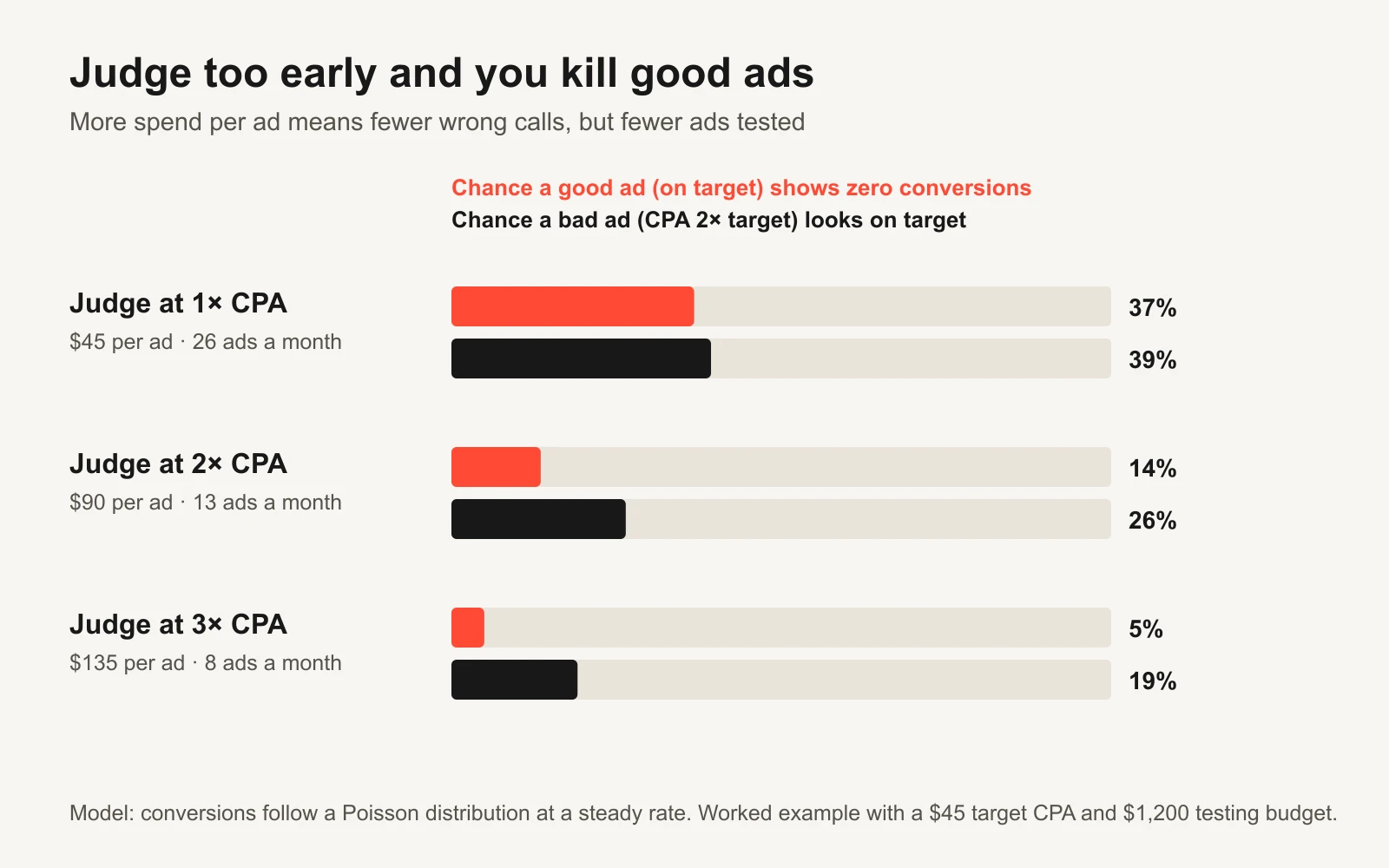
More spend per ad means fewer wrong calls but fewer ads tested. Model only: real accounts add noise from delivery, tracking and conversion delays.
| Judging rule | Spend per ad | Ads judged a month (from $1,200) | Good ad shows 0 sales | Bad ad looks on target | Best for |
|---|---|---|---|---|---|
| 1× target CPA | $45 | 26 | 37% | 39% | Cutting obvious losers fast when ads are cheap to make |
| 2× target CPA | $90 | 13 | 14% | 26% | A sensible default for most small accounts |
| 3× target CPA | $135 | 8 | 5% | 19% | Expensive ads (video shoots, creators) where a wrong cut hurts |
"Bad ad" here means an ad whose true CPA is double the target. "Looks on target" means it shows enough sales, by luck, to hit the target CPA at the moment you judge it.
Read the table like this. At 1×, more than a third of good ads will show zero sales and get cut. At 3×, you rarely kill a good ad, but you test far fewer ideas. There is no free option. You're choosing which mistake you'd rather make.
A practical rule many teams use, and the one built into the workbook:
- Below the threshold: keep running. No verdict yet.
- At the threshold with CPA at or under target: keep it, move it toward the proven budget and plan a retest.
- At the threshold with at least one sale but CPA above target: extend once, to 1.5 times the threshold. Then decide.
- At the threshold with zero sales, or past the extension: cut it, and write down what you learned.
If you sell something with long consideration, like a sofa or a B2B service, the sale may come days after the click. Judge on an earlier event you trust (a qualified lead, an add-to-cart) or wait for conversions to arrive before calling it. Our guide to conversion lag explains why recent numbers look worse than they will.
How many ads can your budget test?
Once you fix the spend per ad, the number of ads you can judge is simple division. Your budget, not your creative team, sets the limit.
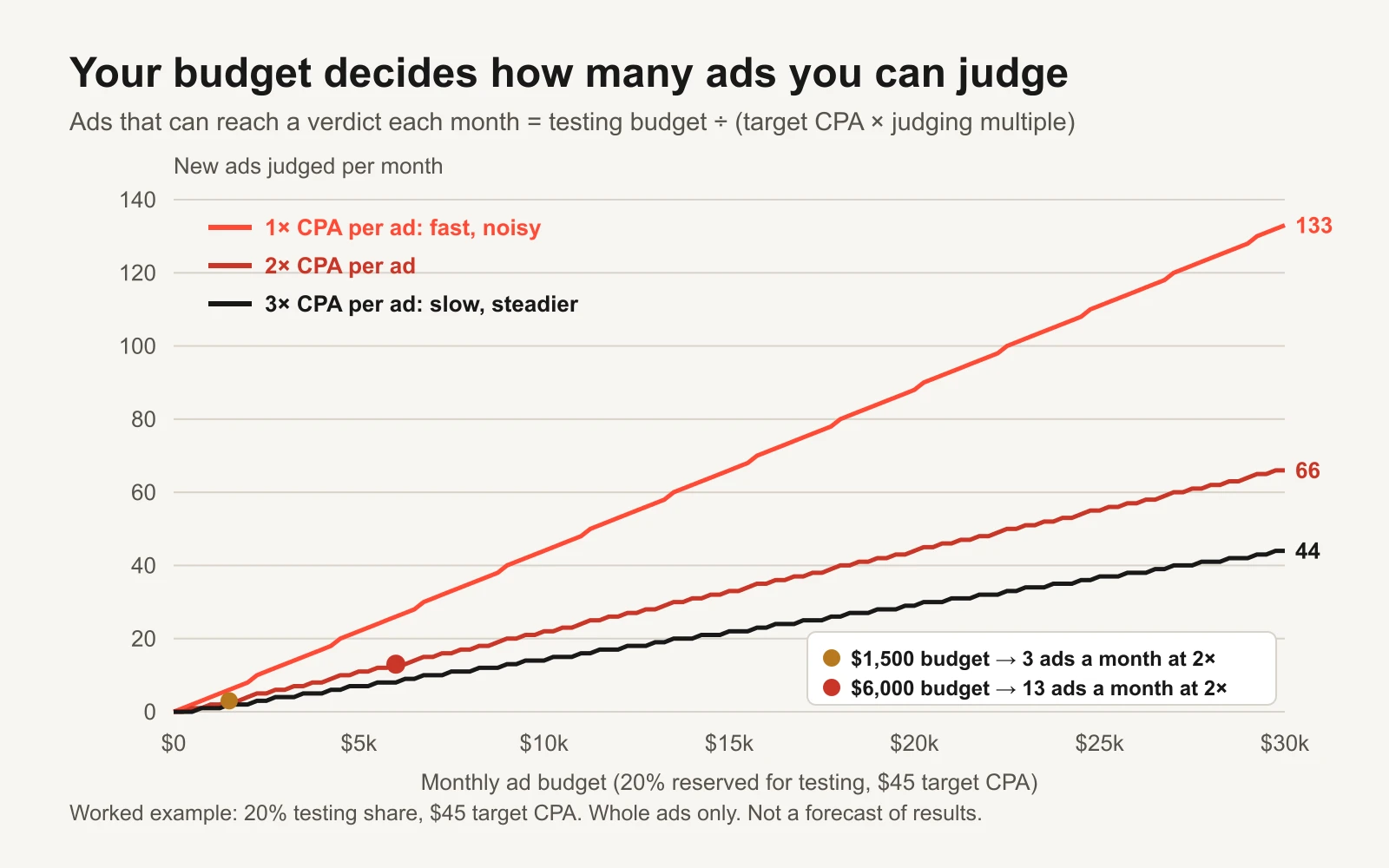
Ads you can judge grow in a straight line with budget. Doubling your judging multiple halves them.
| Monthly budget | Testing budget (20%) | Ads judged at 2× ($90 each) | Days for a round of 3 |
|---|---|---|---|
| $1,500 | $300 | 3 | 27 |
| $3,000 | $600 | 6 | 13.5 |
| $6,000 | $1,200 | 13 | 6.75 |
| $10,000 | $2,000 | 22 | 4.05 |
| $20,000 | $4,000 | 44 | 2.0 |
| $50,000 | $10,000 | 111 | 0.8 |
Look at the top row. A $1,500 budget can judge three new ads a month. Launch ten, and each gets about $30: less than one target CPA. None of them reaches a verdict, and you learn nothing you can trust.
Why small budgets should test fewer ads
This mistake is easy to make in a small account, so it's worth spelling out.
Money spread thin produces no verdicts. Ten ads at $30 each give you ten coin flips. Three ads at $90 each give you three answers.
The ad platform learns from results, too. Meta's delivery system goes through a learning phase after a launch or a significant edit, while it works out who to show the ads to (Meta: about the learning phase). Its Marketing API reports each ad set's learning status alongside the conversions counted since the last significant edit (Meta: learning stage reference). You'll often see "about 50 optimization events in a week" quoted. Treat it as a rule of thumb, not a fixed rule. Either way, splitting a small budget across many ad sets means each one learns from very little. Our guide to account structure fragmentation goes deeper.
Different ideas teach more than small variations. With three tests a month, don't spend them on three background colours. Test three different ideas: a new angle, a new offer or a new format. A clear loss on a big idea still teaches you something. A tiny difference between two near-identical ads usually teaches you nothing.
| Testing budget a month | What to test | What to avoid |
|---|---|---|
| Under $500 | 1–2 new ideas at a time, each a different angle or offer | Hook tweaks, colour tests, more than 3 live test ads |
| $500–$2,000 | Rounds of 2–3 ads: one new angle, one new format, one iteration of your best ad | Splitting into many ad sets |
| $2,000–$10,000 | Rounds of 3–6 ads; start testing hooks on proven angles | Changing budget, audience and ads all at once |
| Above $10,000 | Structured hook, format and offer tests; controlled A/B tests for big decisions | Calling winners on tiny spend because volume feels high |
These bands are a planning starting point, not a platform rule. The calculator tells you the real number for your CPA.
How long until you get a verdict?
Days to a verdict depend on how much testing money you spend per day and how many ads share it.
Days per round = ads per round × spend per ad ÷ testing budget per day.
At $6,000 a month, three new ads share $40 a day. Each needs $90, so the round needs $270, which takes 6.75 days. That gives you roughly four rounds a month.
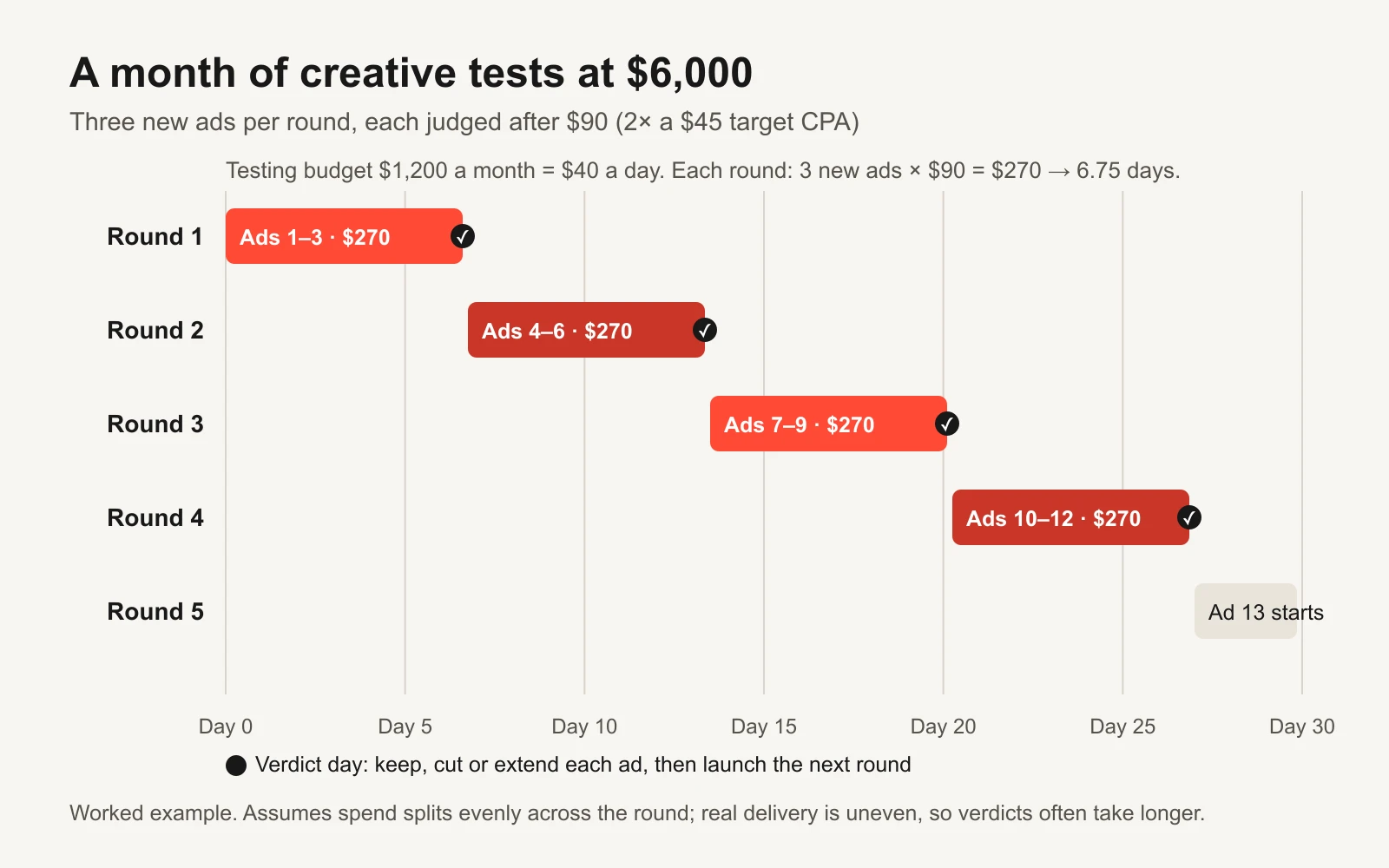
A month of rounds at the example budget. The calendar tab in the workbook builds this from your first launch date.
Two cautions:
- Spend won't split evenly. Meta and Google push more money to the ads they predict will do best. One ad may hit $90 in two days while another has spent $15. Treat the calculator's days as the fastest possible case. Move the verdict day if you have to, never the spend threshold.
- Brief the next round before this one ends. If a round takes a week and making ads takes three days, you need the next brief by day four. The workbook's calendar shows a "brief next ads by" date for each round.
How to split your budget
The testing share is the biggest lever you control. There is no single right split. Here are four common shapes.
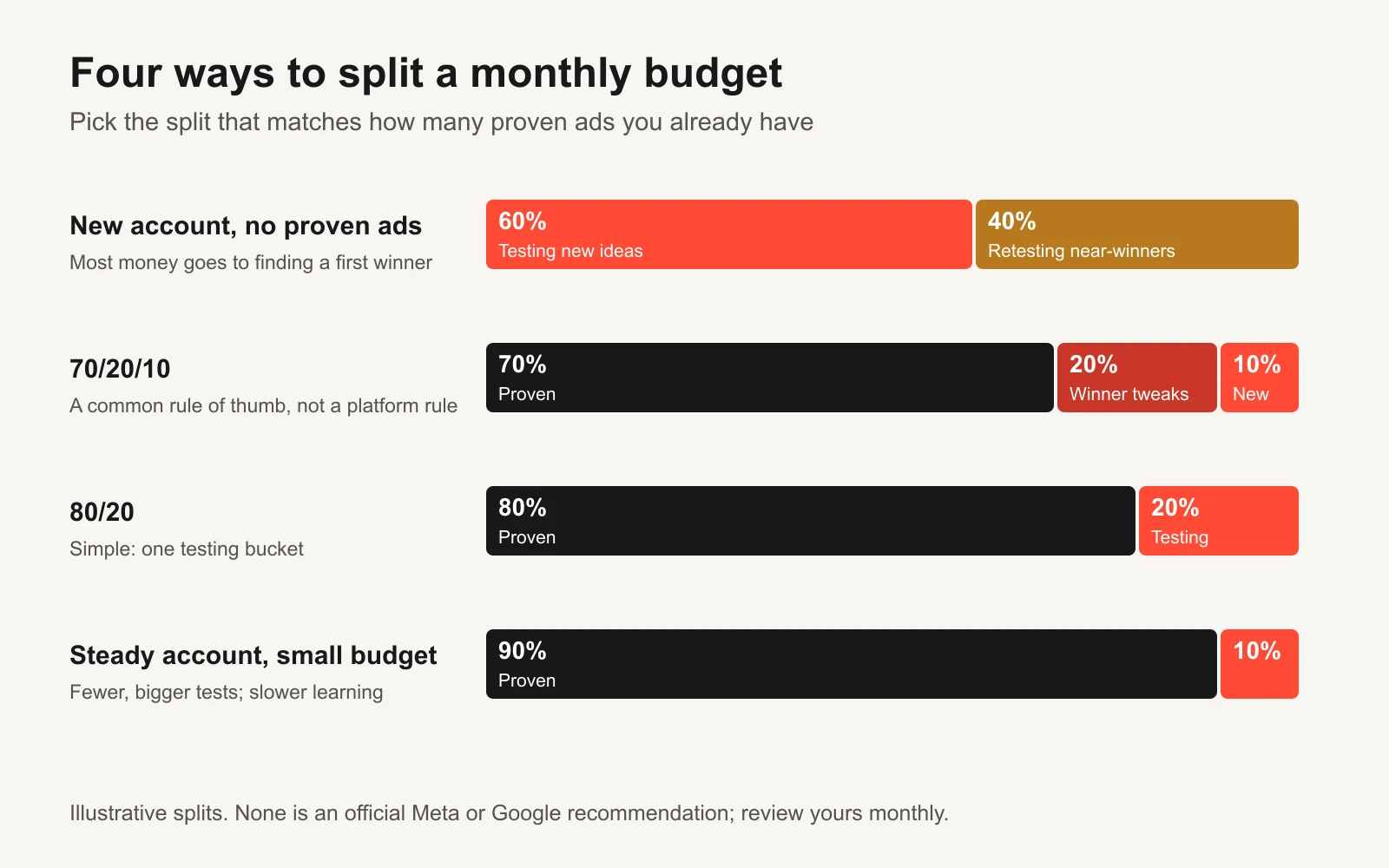
Illustrative splits. None of them is an official Meta or Google recommendation.
| Split | Proven ads | Testing | When it fits |
|---|---|---|---|
| All-in testing | 0% | 100% | Brand-new account with nothing proven. You're searching, not scaling. |
| 70/20/10 | 70% | 30% (20% iterations, 10% new ideas) | You have winners and want steady improvement plus some bigger swings. |
| 80/20 | 80% | 20% | Simple, one testing bucket. Good for most steady small accounts. |
| 90/10 | 90% | 10% | Small budget with a reliable winner you can't afford to starve. |
70/20/10 is a popular rule of thumb in marketing: most money on what works, some on improving it, a little on new bets. It's one option, not a law. In a brand-new account there is no "proven 70%" yet, so most of the budget is testing by definition.
Review the split monthly. If tests keep winning, you're probably under-testing. If nothing has won for two months, change what you test (bigger ideas), not just how much.
How to call a winner without fooling yourself
Most "winning ads" are noise that got lucky early. These are the traps, and how to avoid each one.
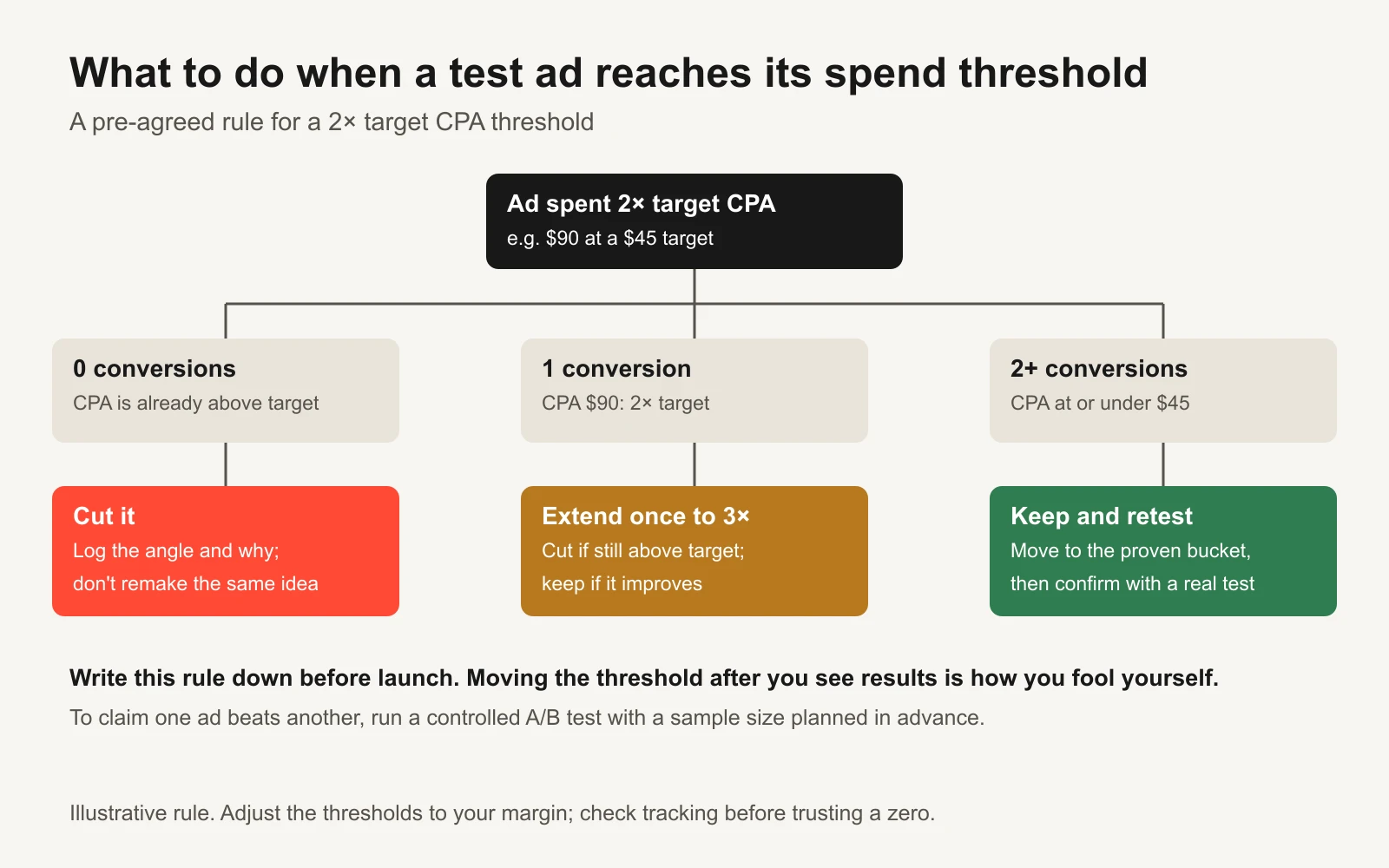
Write the rule down before launch. Moving the threshold after you see results is how you fool yourself.
1. Decide the rule before you look. If you set the threshold after seeing the numbers, you'll set it wherever your favourite ad wins. The workbook's test log applies one rule to every ad, with a separate column for your own decision and why.
2. Don't peek and stop. Checking daily and stopping the moment one ad looks ahead inflates false winners. Wait for the threshold.
3. More ads means more lucky winners. Test 10 ads that are all truly equal, and one will still look best by chance. The more ads in a round, the more you should discount the top result.
4. Uneven spend isn't a fair race. If the platform gave one ad $200 and another $20, they weren't compared on equal terms. A delivery comparison tells you what the algorithm preferred, not what customers preferred.
5. Check tracking before trusting a zero. An ad with clicks but zero conversions may have a broken landing page or a missing event. Confirm the conversion path before you cut a whole idea.
6. Retest before you scale the lesson. An ad that wins a screening round should face your current best ad in a cleaner comparison. Our guide to retesting a winning ad covers how.
When you need real proof, use a controlled A/B test. Meta's split testing splits the audience into groups that don't overlap and asks you to change one thing per test. It also notes that larger reach, longer schedules or higher budgets tend to give more statistically significant results (Meta for Developers: split testing). Its documented Creative Test study type compares 2 to 7 cells with one ad in each, and reports high performers rather than a single declared winner. Plan the size first with the A/B test sample-size calculator, and write the experiment up with the ad creative testing template. Our guide to planning an A/B test your traffic can support explains why proof usually costs far more than screening.
Once an ad is live and proven, a separate set of rules decides when to pause, hold or scale it. The Kill / Hold / Scale rulebook covers that side.
A worked month: the test log
Here's how the first two rounds might look in the workbook's test log for the candle shop. All rows are fictional.
| Ad | Angle | Format | Spend | Sales | CPA | Rule verdict |
|---|---|---|---|---|---|---|
| R1-pain-ugc-v1 | Problem/pain | UGC video | $96.40 | 3 | $32.13 | Keep and retest |
| R1-gift-static-v1 | Gift | Static image | $92.10 | 0 | none | Cut |
| R1-proof-carousel-v1 | Social proof | Carousel | $88.75 | 1 | $88.75 | Keep running (under $90) |
| R2-pain-ugc-v2 | Problem/pain | UGC video | $41.20 | 1 | $41.20 | Keep running |
| R2-offer-static-v1 | Offer | Static image | $30.00 | 0 | none | Keep running |
UGC means user-generated content: video that looks like a customer filmed it. Notice what the log teaches beyond the verdicts. The pain angle worked in video, so round 2 tests a new hook on the same angle. The gift angle failed as a static image. That's one data point about one execution, so the log notes it rather than banning gift ads forever.
The ad creative learning repository guide shows how to turn a log like this into lessons your team reuses.
Checklist before you launch a round
- Target CPA written down, from margin or mature account data
- Testing share chosen and the monthly testing budget calculated
- Spend threshold per ad agreed (for example 2× target CPA)
- Round size fits the budget: the calculator shows no "cannot fund a full round" warning
- Each ad in the round is a different idea, with its angle and format logged
- Conversion event tested end to end, so a zero means zero
- Verdict day and "brief next ads by" day in the calendar
- Keep, extend and cut rules written in the test log before launch
Tools and repos that help
These are public, actively maintained projects we checked on 16 November 2026. Each line says what it's for and who should use it.
| Tool or repo | What it does | Who it's for |
|---|---|---|
| meta/facebook-python-business-sdk | Meta's official Python SDK for the Marketing API. Pull ad-level spend and conversions straight into your test log. | Marketers or developers who want the log to fill itself |
| googleads/google-ads-python | Google's official Python client for the Google Ads API. The same idea for Google ads. | Teams testing creative on Google |
| googleads/google-ads-mcp | A Model Context Protocol (MCP) server for the Google Ads API, so an AI agent can query your account. Write actions use a propose-then-confirm step. | People running ads with Claude or other agents |
| pipeboard-co/meta-ads-mcp | A third-party MCP server (not made by Meta) that lets AI assistants read and manage Meta ads. | Agent users who want ad data in chat; review its permissions first |
| statsmodels/statsmodels | Python statistics library with proportion tests and sample-size functions for proper A/B analysis. | Anyone confirming a winner with a real test |
| growthbook/growthbook | Open-source experimentation and feature-flag platform. Useful for landing-page tests that sit behind your ads. | Teams with a developer and their own website |
| facebookresearch/Ad-Library-API-Script-Repository | Scripts for pulling data from Meta's Ad Library API. A source of test ideas from ads already running in your market. | Anyone researching angles before a round |
| anthropics/skills | Anthropic's public Agent Skills, including an xlsx skill. An agent can extend or fill a workbook like this one. | People who work with Claude on spreadsheets |
How to use the workbook
The Excel file mirrors the calculator and adds the parts you need to run tests week after week:
| Tab | What it does |
|---|---|
| Start here | Plain-English instructions and key terms |
| Calculator | Your six inputs; testing budget, spend per ad, ads per month, days per round, ROAS, both error risks and warning checks. Optional 70/20/10 split planner. |
| Budget table | Ads you can judge at 12 budget levels and four judging multiples. Red cells mean a full round isn't affordable. |
| Calendar | Launch date, verdict day, round budget and "brief next ads by" date for eight rounds |
| Test log | 40 rows with angle and format dropdowns, CPA and ROAS formulas, the rule verdict, your decision and a summary with hit rate |
Yellow cells with blue text are yours to change. Grey cells are formulas.
Or let GaaS run the tests
GaaS is an AI agent that makes, launches and tests ads from three inputs: your website URL, a spend limit and a one-line goal. It sizes test rounds to your budget, proposes new ads when a round ends, and asks before anything spends. It has made 60,000+ ads for 200+ founders. You can use this guide and workbook either way; the arithmetic is the same.
What this calculator can't tell you
- Whether an ad is truly better. It plans a screening budget. Proof needs a controlled test sized in advance.
- How the platform will deliver. It assumes even spend across a round. Real delivery is uneven.
- Your right CPA. It uses the target you enter. Work that out from your margins with the break-even ROAS calculator or the allowable CAC calculator.
- Long-term value. It values a conversion on the first order or lead only. Repeat purchases aren't included.
Sources checked 16 November 2026. Platform features and documentation change; check the linked pages before you rely on a specific limit.