
Most first campaigns don't fail because the ads are bad. They fail because nobody can tell whether the ads are bad. The Pixel fires twice, the purchase event has no value, the budget is split ten ways, or the owner edits everything on day two.
This checklist gets you from three inputs to a campaign that spends and measures, in 72 hours:
- Your website URL. The page people land on after they click.
- A spend limit. The most you are willing to spend in the first month, in total.
- A one-line goal. One sentence that names one measurable action and a target cost, for example "Sell gift sets online at $35 or less per order."
The plan is written for Meta (Facebook and Instagram) because that is where most small businesses start. Every setup step links to Meta's own help center or developer documentation, checked on 16 November 2026. Meta renames things often. If a menu in your account looks different, the linked page is the current source of truth.
The workbook has the full checklist with an owner, a status and a due hour for every task. It also calculates a launch-readiness score and holds the day 1, day 3 and day 7 check sheets.
The worked example used in this guide
Every number below belongs to one made-up business, so you can follow the arithmetic. These are example values, not benchmarks or results.
| Input | Example value |
|---|---|
| Business | An online candle shop |
| Website URL | The shop's gift-set page |
| Spend limit | $1,500 for the first 30 days |
| One-line goal | "Sell gift sets online at $35 or less per order" |
| Average order value (AOV) | $60 |
| Daily budget | $1,500 ÷ 30 = $50 a day |
| Measurable event | Purchase, with value and currency |
The goal sentence does real work. "Get more sales" can't be measured. "Purchases at $35 or less" tells you which event to track (Purchase), which number to watch (cost per purchase, often called CPA, cost per acquisition) and what counts as success. If you sell services, use a qualified lead instead: "Booked consultations at $50 or less each."
Check the target makes sense before you start. If one order is worth $60 and the product and shipping cost $30, a $35 cost per purchase loses $5 on the first order. That may be fine if customers come back, but decide it on purpose. The allowable CAC calculator works this out for you.
The 72 hours at a glance
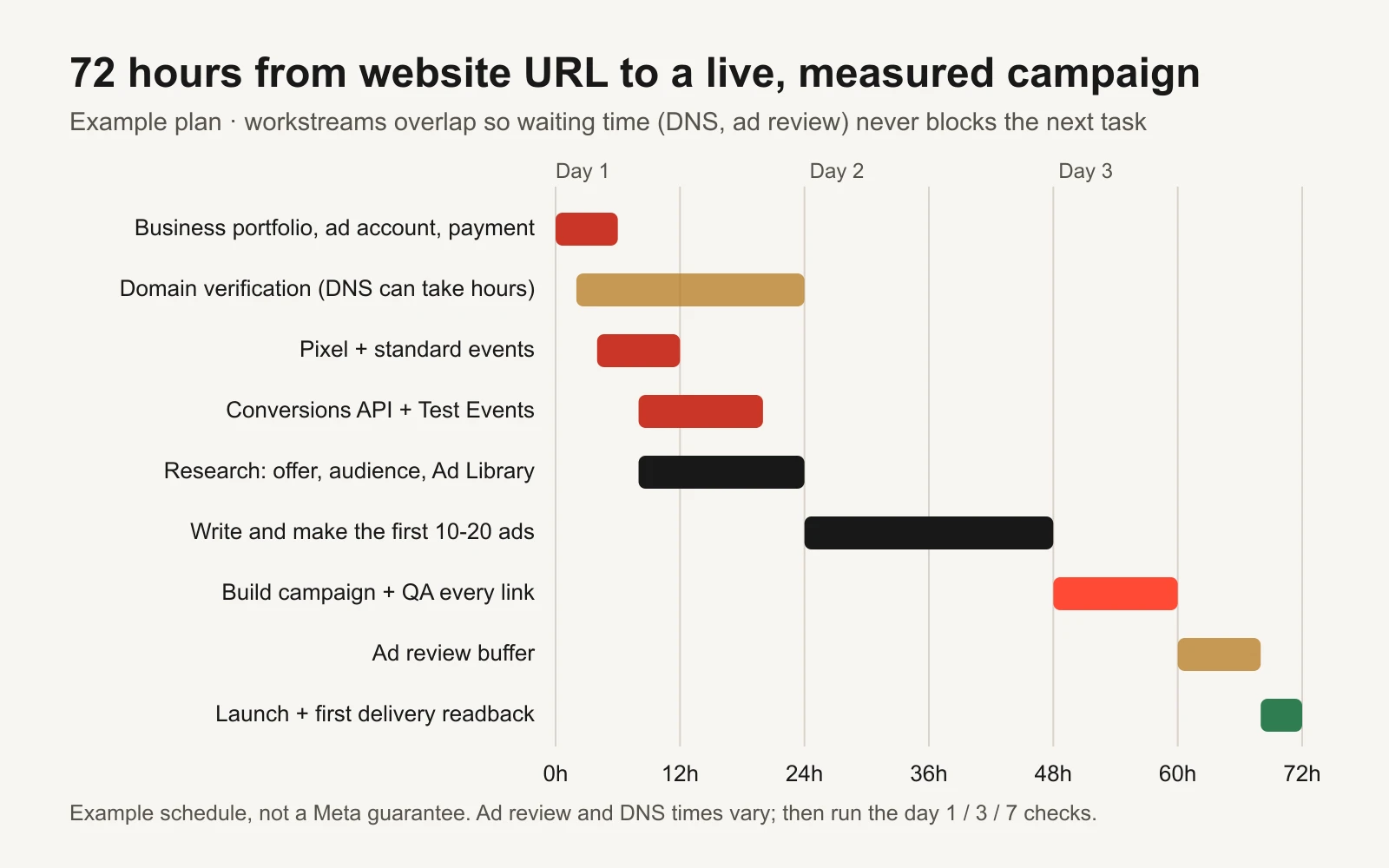
Example schedule. Waiting time, like DNS changes and ad review, runs alongside other work instead of blocking it.
The trick is to overlap the work. Domain verification can take hours because DNS (domain name system) changes need time to spread. Ad review takes time you don't control. So you start those early and keep working while they finish.
| Block | Hours | What you finish | Who usually does it |
|---|---|---|---|
| Accounts | 0-6 | Business portfolio, ad account, Page and Instagram, payment, spending limit | Owner |
| Tracking | 4-20 | Pixel, standard events, Conversions API, Test Events check | Owner or developer |
| Research | 8-24 | Offer sheet, audience notes, 10-20 competitor ads logged | Owner or marketer |
| Creative | 24-48 | 10-20 finished ads in the right sizes, copy, links with UTMs | Marketer, designer or AI tool |
| Build and QA | 48-60 | One campaign, ads attached, every link tested | Marketer |
| Review and launch | 60-72 | Ads approved, campaign live, first delivery checked | Marketer |
What has to exist before you can launch
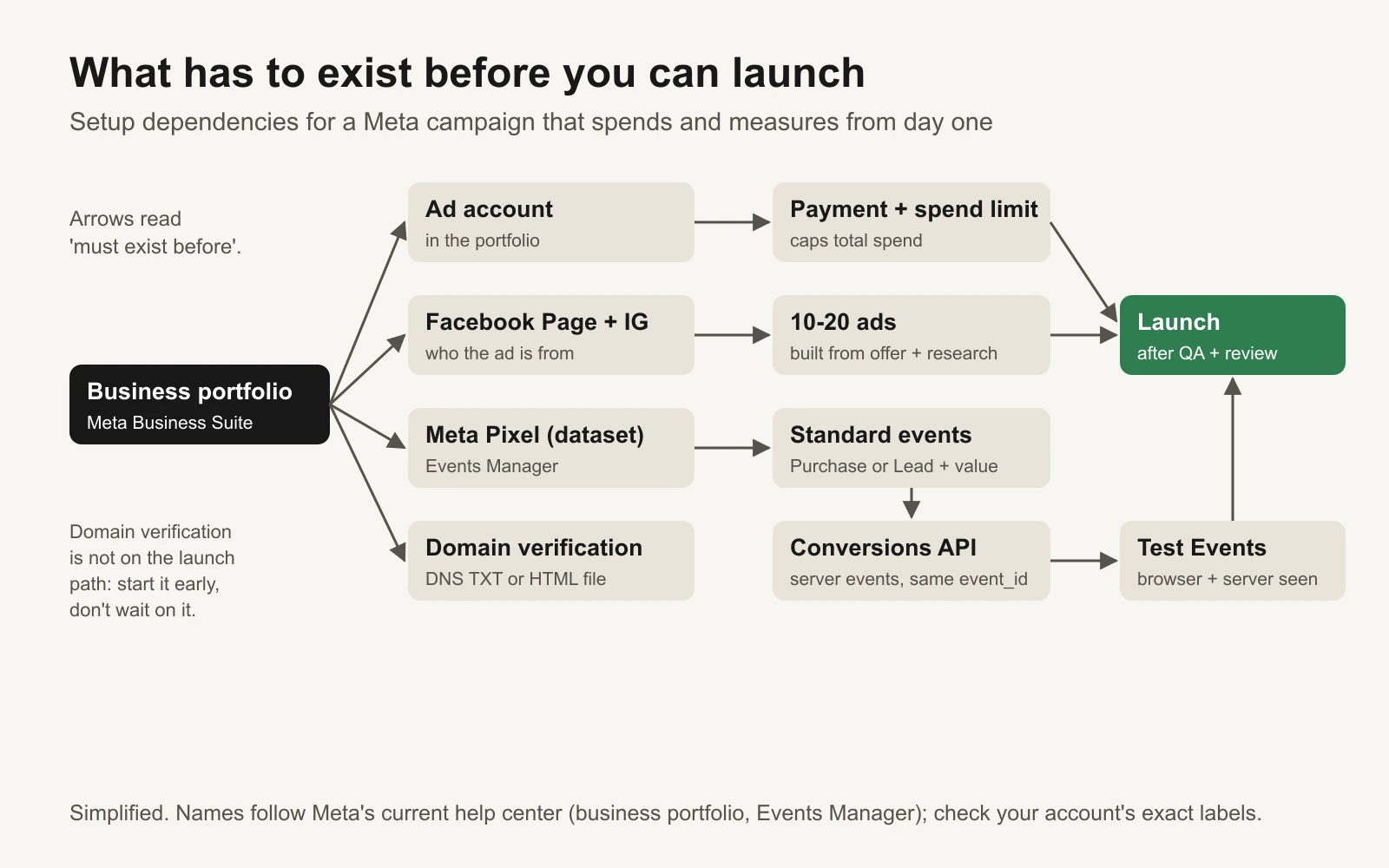
Arrows mean "must exist before". Domain verification matters, but it should never hold up a launch.
Read the diagram from left to right. Everything hangs off the business portfolio. Three chains then have to finish before launch: money (ad account, payment, spending limit), measurement (Pixel, events, Conversions API, Test Events) and creative (Page, ads). If one chain is late, the launch is late. That's why the plan works on all three at once.
Hours 0-6: accounts and money
Do this in one sitting, signed in as the person who owns the business. Turn on two-factor authentication for every admin before you start; a locked account on hour 5 costs you a day.
- Create a business portfolio in Meta Business Suite. This is what Meta used to call Business Manager. It holds your ad accounts, Pages, Pixels and the people who can use them. Meta's guide: How to create a business portfolio in Meta Business Suite.
- Connect your Facebook Page and Instagram account to the portfolio. Ads run from a Page, so the Page must exist and belong to the business, not to a former employee or agency.
- Create or add the ad account inside the portfolio. Set the time zone and currency carefully; both are hard to change later. Meta's guide: Add an ad account to your business portfolio.
- Add a second admin you trust. One admin is a single point of failure.
- Add a payment method to the ad account. Meta's guide: Add a payment method to a Meta ad account.
- Set the account spending limit to your spend limit. In the example that is $1,500. An account spending limit caps what the ad account can spend in total across all campaigns. When it is reached, ads stop until you raise or reset it. It is your hard safety net, separate from the daily budget. Meta's guide: Change your ad account spending limit.
- Start domain verification now, so the DNS change has time to spread. Meta's developer documentation describes two methods, a DNS TXT record or an HTML file in your site's root folder, and explains that verification lets you control who can edit link previews that point to your domain. See About domain verification and Domain verification for developers.
Check: before hour 6, open the ad account and confirm you can see the payment method, the spending limit and two admins.
If your ads are about credit, employment, housing, or social issues, elections or politics, Meta requires a special ad category with extra rules and restricted targeting. Read How to choose a special ad category before you build anything. This 72-hour plan assumes you don't need one.
Hours 4-20: measurement you can trust
This is the part people skip, and it's the part that decides whether you learn anything in week one. The goal is simple: when someone buys, Meta should receive exactly one Purchase event with the right value.
Step 1: install the Meta Pixel and your standard events (hours 4-12)
The Meta Pixel is a snippet of code on your website that tells Meta what visitors do. Events Manager may call it a dataset; it's the same thing. Meta's guide: How to set up a Meta Pixel and events on your website.
If you use Shopify, WooCommerce or a similar store builder, use its official Meta connection instead of pasting code. If you can't edit code, Meta's event setup tool adds events by clicking on your buttons, once the Pixel base code is on the site.
Map your goal to Meta's standard event names. These names come from the Meta Pixel reference, which also says Purchase requires a value and a currency.
| Your business | Main event (the goal) | Supporting events | Must include |
|---|---|---|---|
| Online store | Purchase | ViewContent, AddToCart, InitiateCheckout | value and currency on Purchase |
| Service business | Lead or Schedule | Contact, ViewContent | the lead form or booking that counts |
| Subscription or app | Subscribe or StartTrial | CompleteRegistration | value if you know it |
Pick one main event and optimize for it. Supporting events help you see where people drop off, but your campaign should chase the one thing in your goal sentence.
Step 2: add the Conversions API (hours 8-20)
Browsers block or lose some Pixel events. The Conversions API (CAPI) sends the same events from your server, so Meta still hears about a purchase when the browser doesn't report it. Meta's overview: About Conversions API.
There are three ways to set it up. Meta compares them in Compare Conversions API setup options:
| Option | Effort | Best for |
|---|---|---|
| Partner integration (Shopify, WooCommerce and others) | A few clicks | Most small stores. Start here if your platform offers it |
| Conversions API Gateway | Low code, needs a cloud server | Sites without a partner integration |
| Direct integration | A developer | Custom sites and backends. See Get started with the Conversions API |
Meta's developer guide says to use the same Pixel ID for browser and server events, and to send server events as soon as they happen, ideally within an hour (Using the API).
Deduplication is the step that matters most. If both the browser and your server report the same purchase, Meta needs to know they are one purchase, not two. Meta's recommended method: send the same event name and the same event ID from both. The Pixel passes it as eventID; the server sends it as event_id. Meta only deduplicates events that arrive within 48 hours of the first one with that ID (Handling duplicate Pixel and Conversions API events). If you skip this, your purchase count can double, your cost per purchase looks half as big as it really is, and you scale the wrong thing.
Step 3: prove it in Test Events (hours 16-20)
Don't trust a green tick. Make a real test purchase or lead and watch it arrive.
- Open Test Events in Events Manager. Meta's guide: Test your server events using the Test Events tool.
- For server events, send the
test_event_codethat the tool gives you. Remove it before you go live. Meta notes that test events are not thrown away; they still count in Events Manager (Using the API). - Place one test order. You should see the Purchase from the browser and from the server, with the same event ID, the right value and the right currency.
- Check the Event Deduplication tab in Event Details. Meta says a warning appears when the deduplication rate is too low (Verifying your setup).
- Look at Event Match Quality, a 1-10 score for how well your events can be matched to people. Meta's developer guide says it typically recommends aiming for 6.0 or higher where possible. New setups may need a little traffic before the score appears.
- Refund or cancel the test order in your own store system so it doesn't pollute your sales numbers.
For a deeper check later, use our Pixel and Conversions API deduplication audit.
Hours 8-24: research that feeds the ads
You can't write 15 good ads without knowing what to say. Spend about a day here, in parallel with tracking.
The offer sheet (2 hours)
Write one page that answers:
| Question | Example (candle shop) |
|---|---|
| What exactly are we selling? | A three-candle gift set |
| What does it cost, and is there a reason to buy now? | $60, free shipping over $50, gift wrap included |
| Why should anyone believe us? | 1,200 reviews averaging 4.8 stars (use your real numbers only) |
| What's the risk for the buyer, and how do we remove it? | 30-day returns |
| What's the one sentence a customer would say to a friend? | "They smell expensive and arrive gift-wrapped" |
Use only claims you can prove. If a claim needs a source, write the source next to it now; the ad review and your customers will both check.
The audience notes (2 hours)
Read your own reviews, support emails and comments. Copy the exact words people use for the problem, the moment they bought and the doubts they had. Those phrases become hooks. You don't need detailed targeting for a first campaign; you need the right words.
Competitors in the Meta Ad Library (3 hours)
The Meta Ad Library shows ads that are currently running across Meta's apps. Anyone can search it, no ad account needed. Meta explains what it contains in About the Meta Ad Library.
Log 10-20 ads from three to five competitors in the workbook:
| Field | What to write |
|---|---|
| Advertiser | Name |
| Started running | The date the library shows |
| Format | Video, image, carousel, creator-style |
| Hook | The first line or first two seconds |
| Offer | Price, discount, guarantee |
| Angle | Problem, proof, offer or demo |
| Idea for us | What you'd do differently |
One warning: an ad that has run for months tells you the advertiser kept paying for it. It doesn't prove it was profitable. Use the library for patterns and gaps, not as proof of what works. Never copy another brand's creative.
If you want to pull library data with code, Meta's research team keeps a public script collection, listed in the tools section below.
Hours 24-48: the first 10-20 ads
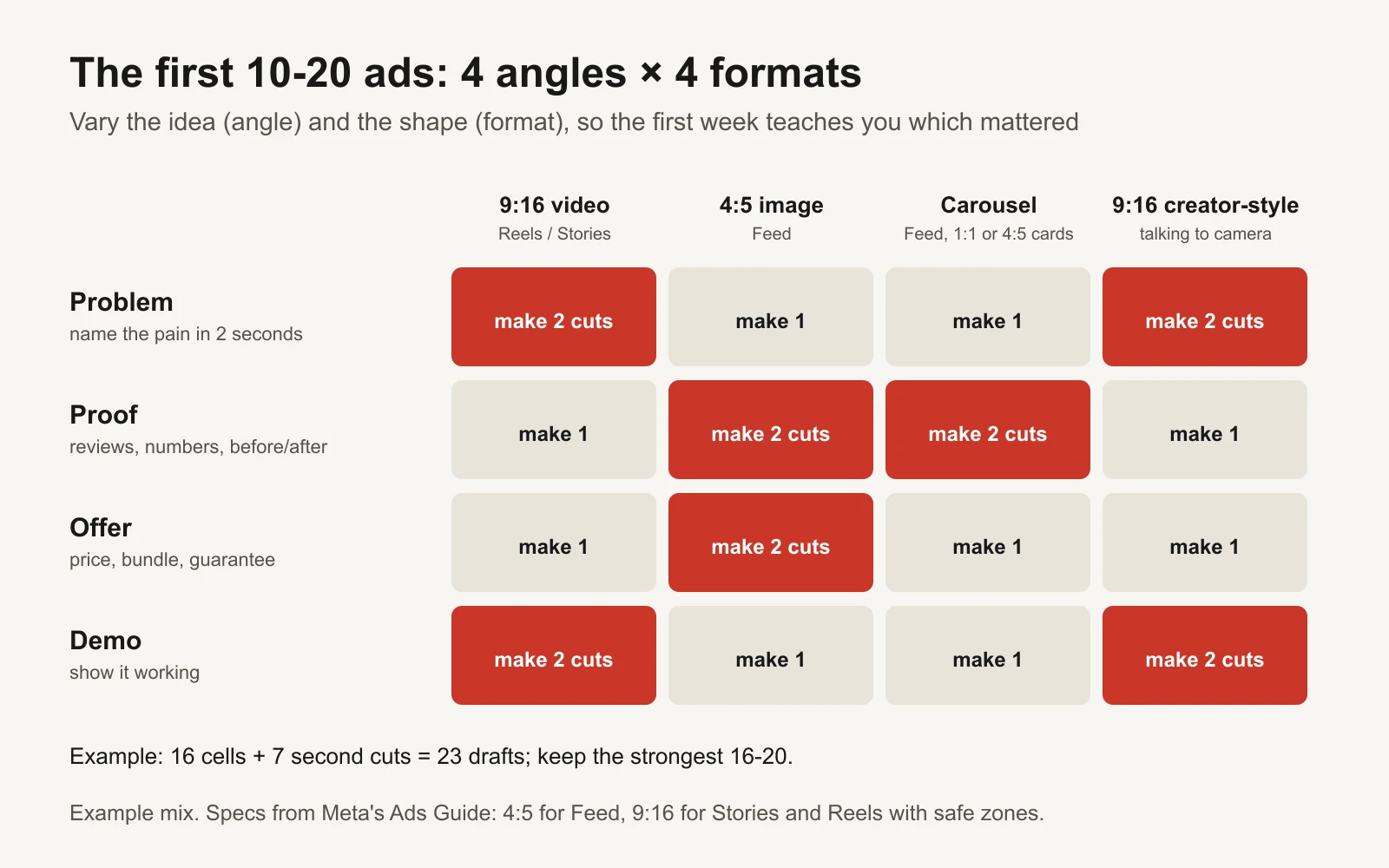
Example mix. Vary both the idea and the shape so week one tells you which one mattered.
Why 10-20 ads, and why so different from each other? Because in week one you are not testing whether a blue button beats a red one. You are finding out which idea and which format get attention from your buyers. Ten near-identical ads teach you nothing. Sixteen ads across four angles and four formats teach you a lot.
The four angles:
- Problem. Name the pain in the first two seconds. "Your candles smell like nothing after 20 minutes?"
- Proof. Reviews, numbers, before and after. Only real ones.
- Offer. The price, the bundle, the guarantee, stated plainly.
- Demo. Show the product working: unboxing, lighting, the room filling.
The four formats and their sizes, from Meta's Ads Guide:
| Format | Shape | Where it runs | Note |
|---|---|---|---|
| Short video | 9:16 vertical | Reels and Stories | Keep text out of the top 14%, bottom 35% and 6% each side (Reels spec) |
| Static image | 4:5, 1440 × 1800 px | Feed | Meta's recommended Feed ratio (Feed image spec) |
| Carousel | 1:1 or 4:5 cards | Feed | Good for several products or a step-by-step |
| Creator-style video | 9:16 vertical | Reels and Stories | One person talking to camera; a phone is fine |
For every ad, fill in a row in the workbook's creative tracker: the angle, the format, the hook, the headline, the primary text, the link and a name that follows one pattern, such as angle_format_hook_v1. Our ad creative brief template helps if someone else is making them.
Add UTM tags to every link. UTM tags are labels in the link (like utm_source=meta) that let your analytics tool see which ad sent the visitor. Check them with the bulk UTM validator and keep them in the UTM tracking template.
Hours 48-60: one simple campaign
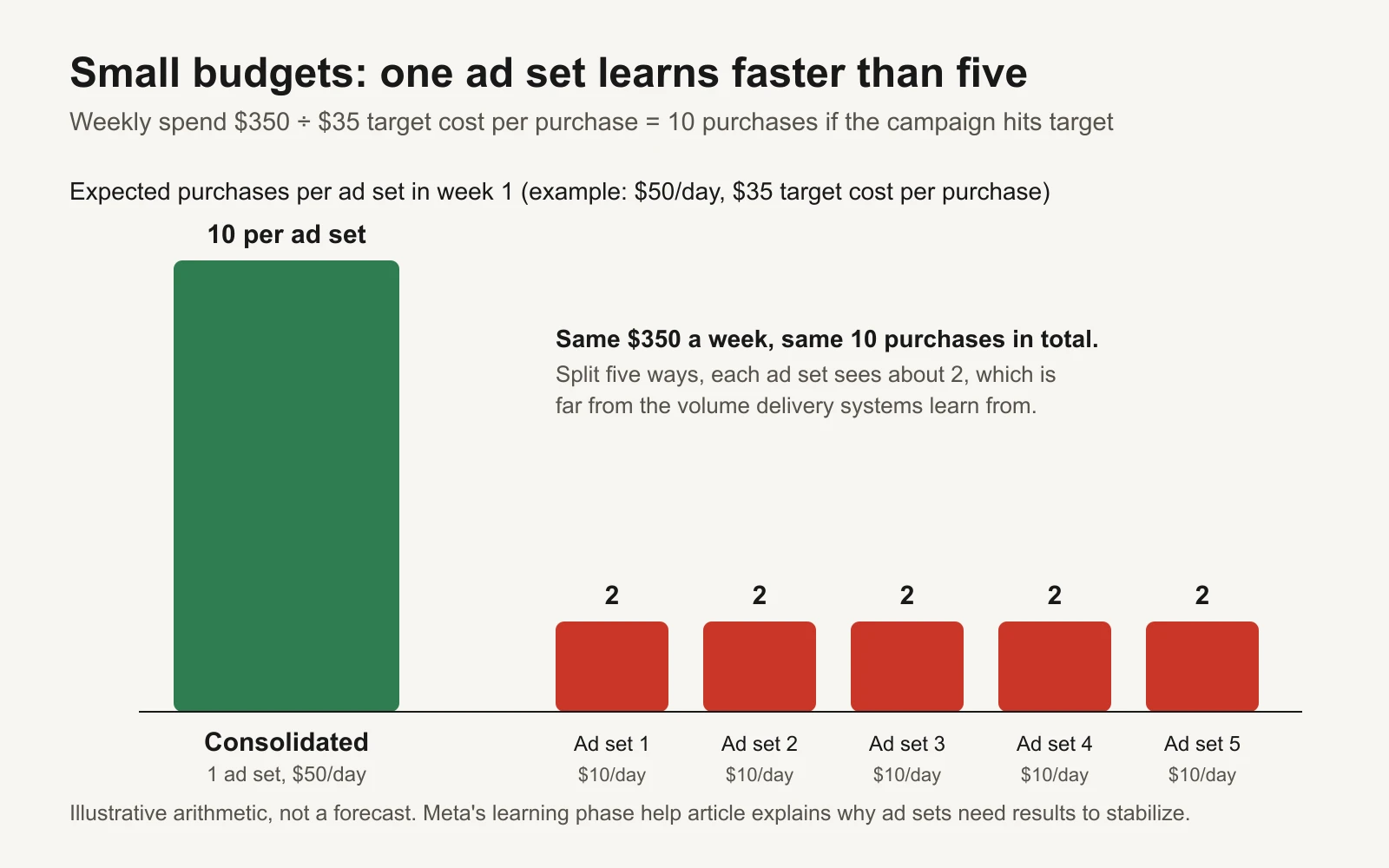
Illustrative arithmetic, not a forecast. Splitting a small budget splits the signal.
With a small budget, keep the structure boring:
| Level | Setting | Example |
|---|---|---|
| Campaign | Objective that matches your goal: Sales for purchases, Leads for leads. Meta's guide: How to choose an ad objective | Sales |
| Campaign | Budget at campaign level | $50 a day |
| Ad set | Conversion location and event | Website, Purchase |
| Ad set | Audience | Your country, broad. Let Meta find buyers |
| Ad set | Placements | Automatic (Advantage+ placements) |
| Ads | All 16-20 ads in the one ad set | 16 ads |
Why one ad set? Meta's delivery system learns from results. After launch, or after a significant edit, an ad set goes through a learning phase where delivery is less stable. Meta explains this in About the learning phase. Its Marketing API reports each ad set's learning status (still learning, exited, or not getting enough results to exit) together with the conversions counted since the last significant edit, and it includes fields for a dynamic threshold (learning stage reference). So you'll often see "about 50 optimization events in a week" quoted. Treat it as a rule of thumb, not a fixed rule. Either way, $350 a week split five ways gives each ad set about 2 purchases to learn from. One ad set gets all 10. Our guide to account structure fragmentation goes deeper.
What "Advantage+" means here. Meta's developer documentation says a sales, app or leads campaign counts as an Advantage+ campaign when three settings are all on: campaign-level budget (Advantage+ campaign budget), Advantage+ audience and Advantage+ placements (Advantage+ campaign experience). For a first campaign with a small budget, that combination is a sensible default. You can still exclude existing customers or add limits later.
Before you leave this block:
- Daily budget × 30 is at or under your spend limit, and the account spending limit is set.
- Every ad's link opens the right page on a phone, with the price and offer the ad promises.
- The UTM tags survive any redirects.
- The optimization event is the one from your goal sentence.
- The
test_event_codeis removed from your server events. - The campaign is set to start at a time someone can watch the first hours.
Our paid campaign launch checklist is a good second pair of eyes for this QA pass.
Hours 60-72: review and launch
Meta reviews ads before they run, and sometimes again after. Meta explains the process in About ads in review. You can't speed it up, so publish the campaign by hour 60 and use the wait to finish the day-1 check sheet.
If an ad is rejected, read the reason, fix the claim or image, and resubmit that one ad. Don't rebuild the campaign. Common causes are claims you can't back up, before-and-after images in sensitive categories, and landing pages that don't match the ad.
When the ads are approved and delivering, do a first readback within a few hours: is money being spent, are impressions coming in, and are new PageView events arriving in Events Manager as the clicks come in? If yes, you're live and measuring. You made it.
After launch: the day 1, day 3 and day 7 checks
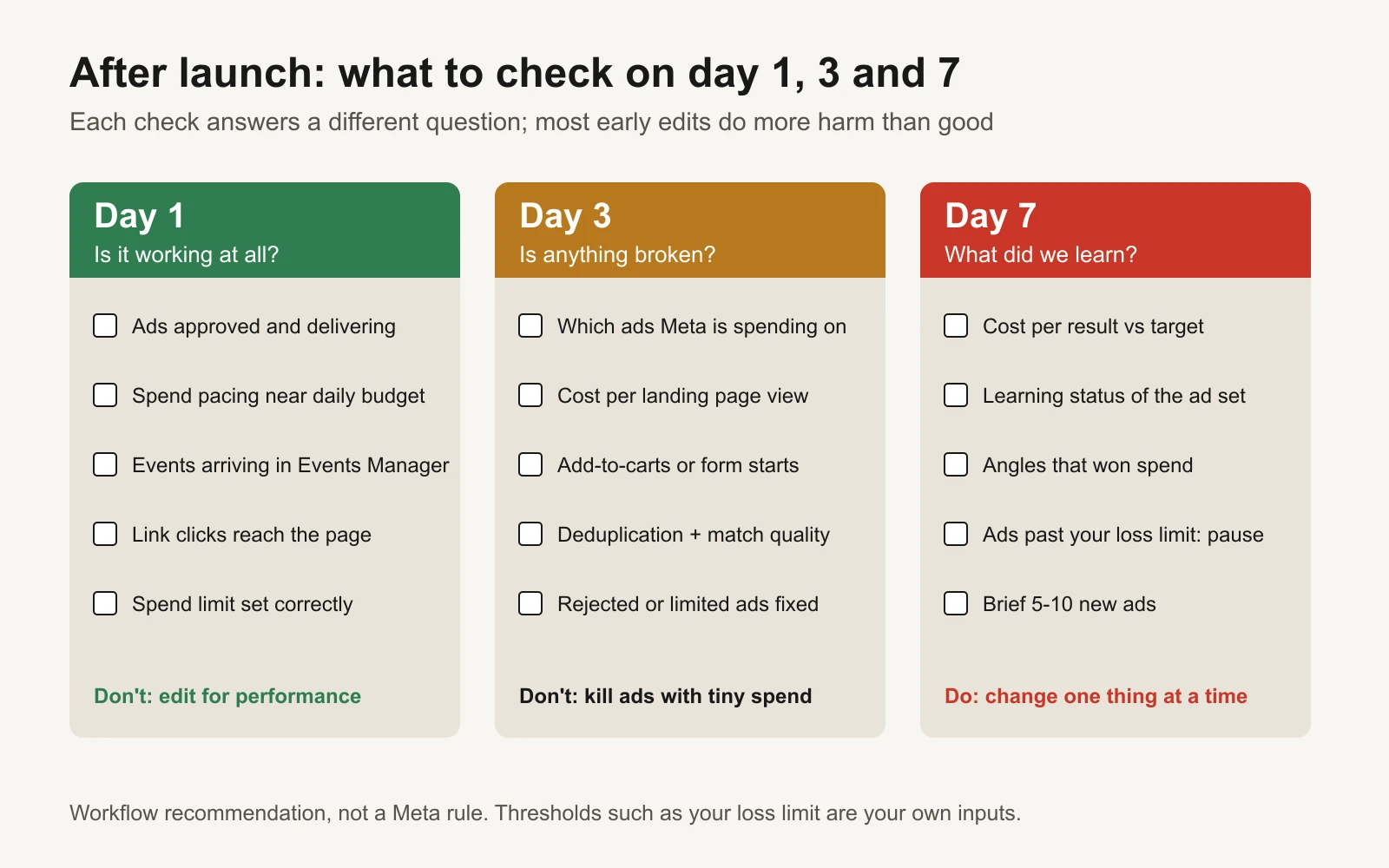
Each check answers a different question. Most early edits do more harm than good.
Day 1: is it working at all?
| Check | Where | Healthy | If not |
|---|---|---|---|
| Ads approved and delivering | Ads Manager, Delivery column | Active | Fix rejected ads one at a time |
| Spend pace | Ads Manager | Close to $50 for the day | Under-delivery on day 1 is common; wait |
| Events arriving | Events Manager | Purchases or leads show from both browser and server | Recheck deduplication and the event code |
| Clicks reach the page | Compare link clicks with landing page views | Most clicks become page views | Slow or broken page. See the clicks vs landing page views gap |
| Safety net | Billing settings | Spending limit equals your spend limit | Set it now |
Don't change budgets, audiences or ads on day 1 because of performance. One day of data is noise.
Day 3: is anything broken?
- Where is the money going? Meta will spend unevenly across your ads. Some will get almost nothing. That's normal and is itself information. Our guide to new creative that gets low spend explains why.
- Middle-of-funnel signals. Cost per landing page view, add-to-carts or form starts. These come before purchases and tell you if people are interested.
- Measurement health. Deduplication rate and Event Match Quality in Events Manager.
- Anything rejected or limited gets fixed now.
Don't pause ads that have spent less than your target cost per purchase. They haven't had a fair chance yet.
Day 7: what did we learn?
By day 7 the example has spent about $350. At a $35 target that is about 10 purchases if things are on target. That is enough to read the campaign, not enough to crown a single ad.
| Question | How to answer it |
|---|---|
| Is cost per purchase near the target? | Total spend ÷ purchases, from the same date range |
| Is the ad set still learning? | The Delivery column shows the learning status |
| Which angles and formats did Meta spend on, and which converted? | Group your ads by the angle and format in their names |
| Which ads hit your loss limit? | Example rule: pause any ad that has spent twice the target ($70) with no purchase |
| What's next? | Brief 5-10 new ads that build on the angles that won spend |
Change one thing at a time and write it down. If you change the budget, the ads and the audience on the same day, you won't know which change did what. Our post-edit performance review shows how to read a change afterwards. If you're spending with no purchases at all by day 7, work through the spending-no-purchases diagnosis before anything else.
Budget increases are a day-7 decision, not a day-2 one. Use the budget pacing calculator to keep spend in line with the limit you set at hour 0.
The full hour-by-hour checklist
| Due hour | Task | Done when | Meta source |
|---|---|---|---|
| 0 | Write the three inputs: URL, spend limit, goal sentence | Goal names one event and a target cost | n/a |
| 1 | Create the business portfolio, turn on two-factor | You can open Business settings | Business portfolio |
| 2 | Connect Page and Instagram | Both listed under the portfolio | n/a |
| 2 | Start domain verification | TXT record or HTML file added | Domain verification |
| 3 | Create the ad account, set time zone and currency | Account visible in the portfolio | Ad account |
| 4 | Add a second admin | Two people with full control | n/a |
| 5 | Add payment method | Payment method shows as active | Payment method |
| 6 | Set account spending limit | Limit equals your spend limit | Spending limit |
| 8 | Install Pixel base code | PageView arriving in Events Manager | Pixel setup |
| 12 | Add standard events with value and currency | Purchase or Lead fires on the real action | Pixel reference |
| 12 | Write the offer sheet | One page, proof for every claim | n/a |
| 16 | Connect the Conversions API | Server events arriving | Setup options |
| 16 | Audience notes from reviews | 10+ customer phrases copied | n/a |
| 18 | Match event IDs between browser and server | Same event name and ID from both | Deduplication |
| 20 | Test purchase in Test Events | One deduplicated Purchase with value | Test Events |
| 24 | Log 10-20 competitor ads | Rows filled in the research tab | Ad Library |
| 30 | Write hooks and copy for 4 angles | 16-23 drafts | n/a |
| 44 | Produce ads in 9:16 and 4:5 | Files meet specs and safe zones | Ads Guide |
| 48 | Name ads and tag links with UTMs | Every link validated | n/a |
| 52 | Build campaign, ad set, ads | Objective and event match the goal | Objectives |
| 58 | QA every link on a phone | No broken or mismatched pages | n/a |
| 60 | Remove test event code, publish | Ads in review | Ads in review |
| 70 | Ads approved and delivering | Spend and impressions above zero | n/a |
| 72 | First readback | Events from ad traffic visible | Verifying setup |
The workbook turns this table into a working sheet with owners, statuses and a readiness score that only reaches 100% when the critical items are done.
When something blocks you
| Blocker | What it usually means | What to do |
|---|---|---|
| Payment declined | Card bank blocked an international charge | Call the bank, or add a second method |
| Domain still unverified | DNS hasn't spread, or the TXT record has a typo | Recheck the record, wait, then verify again. Don't hold the launch for it |
| Pixel shows no events | Code on the wrong page, or blocked by a consent banner | Use the Pixel Helper browser extension and Test Events |
| Purchases counted twice | Browser and server events without matching IDs | Fix eventID and event_id; see the deduplication audit |
| Ad rejected | A claim, image or landing page breaks a policy | Fix and resubmit that ad only |
| Account restricted | Meta flagged the account or the business | Follow the steps in Account Quality. Don't create new accounts to get around it |
| No spend after 12 hours | Ads still in review, payment issue, or a very narrow audience | Check review status and billing first |
Tools and repos that help
Every repository below was checked on GitHub on 16 November 2026. The facebook/ business SDK links now redirect to Meta's meta/ organization.
| Tool | What it's for | Who should use it |
|---|---|---|
| meta/facebook-python-business-sdk | Meta's official Python SDK for the Marketing API, including Conversions API calls | Developers sending server events or pulling reports in Python |
| meta/facebook-nodejs-business-sdk | The same, for Node.js | JavaScript and TypeScript backends |
| meta/capi-param-builder | Meta's library that helps you collect and format Conversions API parameters correctly, in PHP, Java, Node.js, Python, Ruby and browser JavaScript | Anyone with a direct Conversions API integration who wants better match quality |
| facebookincubator/ConversionsAPI-Tag-for-GoogleTagManager | Files for sending Conversions API events from server-side Google Tag Manager | Teams that already run server-side GTM |
| facebookresearch/Ad-Library-API-Script-Repository | Python scripts for pulling data through the Ad Library API | Researchers and marketers who want competitor ads in a spreadsheet |
| pipeboard-co/meta-ads-mcp | A third-party MCP (Model Context Protocol) server that lets AI assistants such as Claude read and manage Meta ads. Not made by Meta | Marketers who want an AI assistant to report on the account. Start with read-only access and keep your spending limit in place |
Or let GaaS do it
GaaS is built around the same three inputs: your website URL, a spend limit and a one-line goal. Its agent researches the business, makes the first ads, proposes the campaign and asks before anything spends. GaaS has made 60,000+ ads for 200+ founders. You still need the accounts, payment and tracking from the first 20 hours to exist; GaaS works inside your own ad account, under your limit.
Whether you do it yourself or not, the workbook keeps the 72 hours honest:
What this checklist doesn't cover
- Special ad categories. Credit, employment, housing, and social issues, elections or politics have their own rules. See Meta's guide linked above.
- Google, TikTok and other platforms. The order of work is similar, the menus and policies are not.
- Statistical proof. A week of results on a small budget tells you where to look next. It doesn't prove one ad beats another. For real tests, use the creative testing budget calculator and the guide to budgeting a creative test.
- Guardrails for automation. If an AI tool or agency will make changes for you, set limits first. Our guide to budget guardrails for an AI media buyer lists the ones that matter.