
R.I.P. Advantage+ Shopping. Meta's API froze the old campaigns on 19 May 2026.
If you set up an Advantage+ shopping campaign ("ASC") in 2023 or 2024, it has either been moved into Meta's newer Advantage+ setup or is waiting for you to move it. And if you still run a manual account with a dozen small ad sets, the same question applies: what goes into one Advantage+ sales campaign, what stays yours, and which settings quietly turn Advantage+ off?
This checklist answers that. It is written for business owners running their own Meta ads, with enough detail for a performance marketer migrating several accounts.
The workbook has an Ad set inventory that recommends merge or keep separate for each ad set, a Summary of the merged campaign with a chart, the 11-line Switch checklist that flags anything that would turn Advantage+ off, and a Migration path for old ASC campaigns. Numbers in this article are a fictional worked example unless a source is linked.
What actually changed
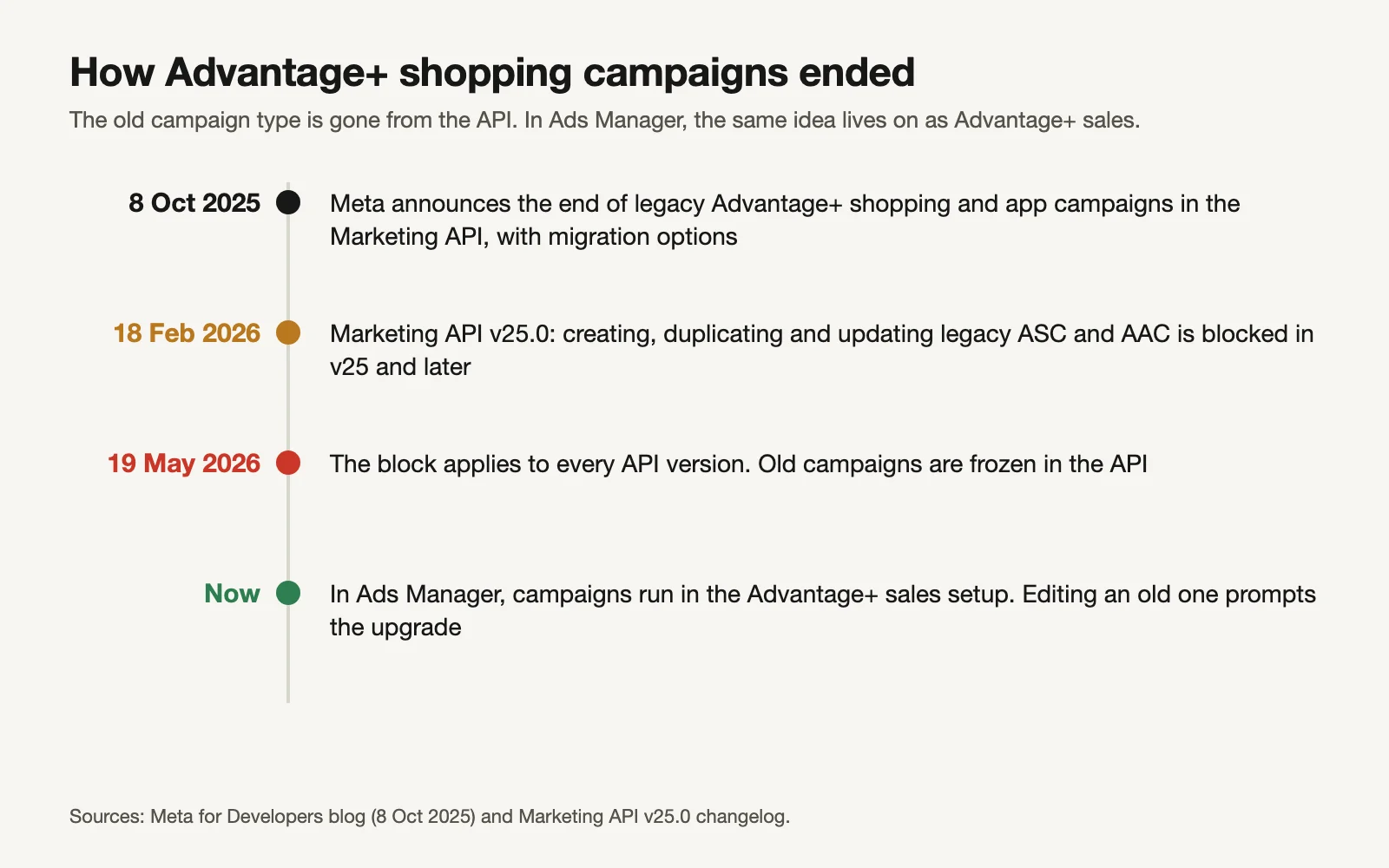
Here's the timeline, from Meta's developer documentation:
Sources: Meta for Developers.
- 8 October 2025: Meta announced that legacy Advantage+ shopping campaigns (ASC) and Advantage+ app campaigns (AAC) would be retired from the Marketing API, with three ways to migrate: migrate in place (keeps the campaign ID), copy and migrate (new ID), or edit the campaign in Ads Manager and accept the upgrade prompt (Meta for Developers, 8 Oct 2025).
- 18 February 2026: Marketing API v25.0 shipped. Creating, duplicating and updating ASC and AAC is "no longer allowed" in v25.0 and later.
- 19 May 2026: the same block applies to all API versions (Marketing API v25.0 changelog).
"Froze" is precise for the API: tools and agencies that manage campaigns through it can no longer touch a legacy ASC. In Ads Manager, most of these campaigns have been moved into the Advantage+ setup, so you're more likely to see a migrated campaign than a frozen one. Two exceptions from Meta's notes: campaigns that used the existing-customer budget percentage can only be moved by duplicating the campaign in Ads Manager, and ASC campaigns with more than 50 ads in an ad set stay editable but can't be duplicated.
What replaced ASC is the Advantage+ sales campaign: a normal Sales campaign where Meta's automation is switched on, rather than a separate campaign type.
Meta's case for switching
Meta says businesses see "a 20% lower cost per result on average with Advantage+ sales campaigns" (Meta: Advantage+ sales campaigns). That figure carries a footnote Meta doesn't show on the page, so treat it as Meta's average across its advertisers, not a promise for your account. In April 2025 Meta also reported that advertisers saw a 9% lower cost per action with the new streamlined setup on average (Meta: The Creative Advantage).
The stronger argument for a small account isn't Meta's average; it's arithmetic. Fourteen ad sets on $40 a day can't each collect the roughly 50 results a week that Meta's learning phase wants. One ad set with the whole budget can (more on that below).
The checklist: 3 levers, 4 controls, 4 off-switches
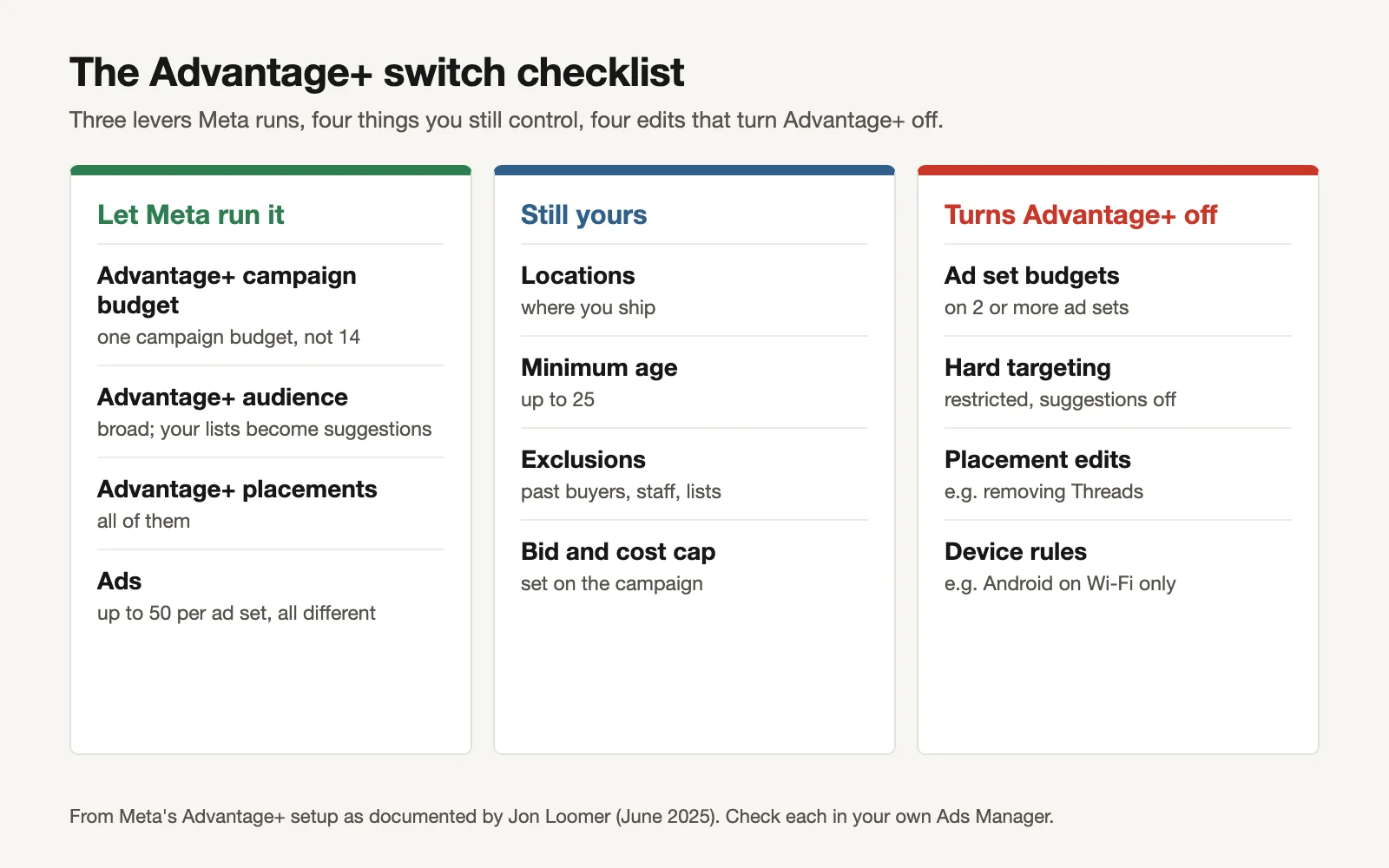
From Meta's Advantage+ setup as documented by Jon Loomer. Check each in your own Ads Manager.
The 3 levers Meta runs
A campaign counts as Advantage+ when all three are on (Jon Loomer: Advantage+ campaign creation; Meta: What turns Advantage+ on and off):
- Advantage+ campaign budget. One budget on the campaign, moved between ad sets in real time. What marketers used to call CBO.
- Advantage+ audience. Meta finds the people. Your age range, interests and custom audiences go in as suggestions it starts from, not walls.
- Advantage+ placements. Your ads can run across Facebook, Instagram, Messenger, Audience Network and Threads.
Meta's sales page also lists Advantage+ destination alongside these. And remember the ad limit: up to 50 ads per ad set (Loomer notes Meta discourages running anywhere near that many at once).
The 4 things you still control
These stay hard limits even with Advantage+ on:
- Locations. Only where you ship or sell.
- Minimum age. You can raise it, but in this setup only up to 25. Older minimums need the audience controls outside Advantage+.
- Custom audience exclusions. Past buyers if you only want new customers, staff, people already in a sales sequence.
- Bid strategy and cost controls, set at campaign level, if you need a cost cap.
Languages are also a hard control. If a business or legal rule applies to every campaign (no under-21s, no shipping to certain countries), set it once in account controls; new campaigns inherit it and it doesn't count against Advantage+.
The 4 edits that quietly switch Advantage+ off
Each of these turns the campaign back into a manual one, often without you noticing:
- Ad set budgets on two or more ad sets. One ad set with its own budget is fine; several is manual budgeting.
- Hard targeting. Restricting the audience to your inputs with suggestions switched off.
- Placement edits. Removing a single placement, such as Threads, is enough.
- Device or connection rules, such as Android devices on Wi-Fi only, or excluding skippable video placements.
The workbook's Switch checklist has all 11 lines with a dropdown each. Anything that would switch Advantage+ off turns red, and the bottom line reads "Ready to publish" only when every line is checked and nothing is red.
A caution: this list comes from Jon Loomer's June 2025 guide, which documents Meta's setup in detail; Meta's own help pages for it didn't load for us, and Meta moves these settings. Confirm each line in your own Ads Manager before publishing.
What to merge, what to keep apart
Not everything belongs in one ad set. Keep a separate campaign only when there's a business reason, not a targeting idea:
| Keep separate when… | Merge when… |
|---|---|
| A different country, currency or margin needs its own budget or goal | The ad set is an interest, lookalike or "broad" variant of the same offer |
| A legal or age rule applies only to some products | It exists to "test an audience" (use a Meta A/B test instead) |
| A product line has a very different target cost per purchase | It's retargeting on a small budget (the broad campaign reaches past visitors too) |
Retargeting is the judgment call. Meta's own guidance says Advantage+ audience isn't recommended for retargeting (Meta: About Advantage+ audience), but on a small budget a separate retargeting ad set usually starves both. Fold it in, and keep it apart only if an A/B test shows it earns its budget. Our account structure blueprint covers the bigger-budget version, where a separate testing campaign makes sense.
Worked example: 14 ad sets into one
A fictional activewear store runs one manual Sales campaign with 14 ad sets at $40/day ($560/day): five interest ad sets, four lookalikes, two "broad" variants and three retargeting ad sets, 42 ads in all. Last week it got 140 purchases, so its cost per purchase is $28. Every ad set got between 7 and 14 purchases.
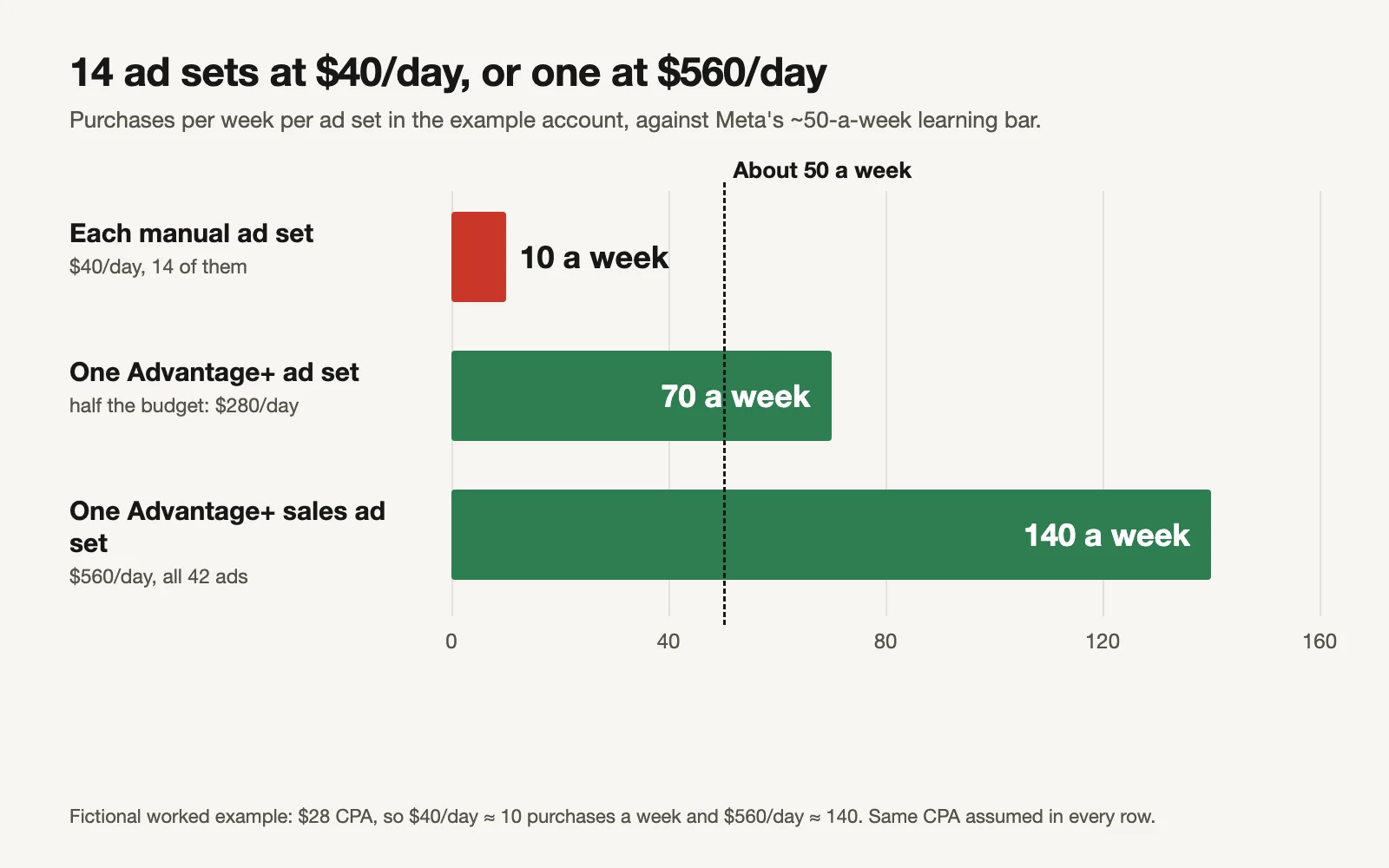
Fictional example. Same cost per purchase assumed in every row.
| Number | Before | After |
|---|---|---|
| Ad sets | 14 | 1 |
| Daily budget per ad set | $40 | $560 |
| Purchases per ad set per week | 7–14 | about 140 |
| Ad sets under ~50 a week | 14 | 0 |
| Ads | 42 across 14 ad sets | 42 in one (cap is 50) |
Every manual ad set sits far below the roughly 50 optimization events a week Meta wants before an ad set leaves learning (Meta: About learning limited). Merged, the same spend gives one ad set about 140. That assumes the cost per purchase holds, which it may not exactly; the point is that the merged ad set can learn at all.
None of the 14 had a separate country, currency or legal rule, so the inventory recommends merging all of them. In the workbook, mark an ad set "Yes" under "Separate country, currency or margin?" and it moves to "Keep separate".
Moving an old ASC campaign
The workbook's Migration path asks three questions and gives the route, from Meta's October 2025 notes:
| Your campaign | Path |
|---|---|
| Used the existing-customer budget cap | Duplicate it in Ads Manager, then switch the old one off |
| Has an ad set with more than 50 ads | Cut to 50 or fewer first; it can't be duplicated as is |
| Managed through the API (a tool or agency) | Migrate in place (keeps the ID), or copy and migrate |
| None of the above, managed in Ads Manager | Edit it (name or budget) and accept the Advantage+ upgrade prompt |
Whichever path you take, treat the move as a significant edit: expect a fresh learning phase and leave it alone for 7 days.
The switch, step by step
- Fill the Ad set inventory. Merge everything without a business reason to be apart.
- Check the merged ad set reaches about 50 purchases a week (Summary tab). If not, see our $100/day guide for what to optimize for instead.
- Bring your best ads across, all different from each other, under 50. Meta's own advice is at least 20 diversified ads in its Advantage+ campaigns.
- Set the four controls: locations, minimum age, exclusions, bid or cost cap.
- Go down the Switch checklist. Publish only when it reads "Ready to publish".
- Pause the old ad sets the same day so they don't compete.
- Hands off for 7 days, then review.
Or let GaaS make the switch
GaaS is an AI agent that creates, launches and optimises Meta and Google ads from three inputs: your website, a spend limit and a one-line goal. It builds accounts in the consolidated Advantage+ structure, keeps the controls you need, makes enough genuinely different ads to feed it, and asks before any change that affects spend. We have made more than 60,000 ads this way. If you'd rather do it yourself, the checklist covers the same ground.
Limits of this checklist
- The "still yours" and "turns it off" lists come from Jon Loomer's June 2025 guide, not a Meta help page we could load. Meta changes these settings often; check each one in Ads Manager.
- Meta's 20% and 9% figures are its own averages across advertisers, footnoted, with no method shown.
- The merged-ad-set maths assumes your cost per purchase holds after merging. It may rise or fall.
- Some businesses have real reasons for separate campaigns. The inventory only knows what you tell it.
Sources
- Meta for Developers: Upcoming ASC and AAC Marketing API deprecation: migration options (8 October 2025)
- Meta for Developers: Marketing API v25.0 changelog (released 18 February 2026; applies to all versions 19 May 2026)
- Meta for Business: Advantage+ sales campaigns (20% lower cost per result on average, footnoted)
- Meta for Business: The Creative Advantage (22 April 2025; 9% lower cost per action with the streamlined setup)
- Meta for Business: Three steps to optimize your performance with creative diversification (19 November 2024; at least 20 diversified ads)
- Meta Business Help Center: What turns Advantage+ on and Advantage+ off and About learning limited
- Jon Loomer: Advantage+ Campaign Creation: A Complete Guide (23 June 2025)