
$100 a day on Meta can't leave the learning phase if your cost per sale is over $14.
That's not a rule of thumb. It's arithmetic on Meta's own guidance: $100 × 7 days ÷ about 50 conversions a week = $14. If a sale costs you $35, one ad set on $100/day gets about 20 a week. Split the same $100 across five ad sets and each gets 4.
This guide explains the maths, what "Learning limited" really means (it isn't a penalty), what to optimize for when you can't reach 50, and the simple starter account we recommend for small budgets. It is written for business owners spending $20–$300 a day on Meta (Facebook and Instagram), with enough detail for a performance marketer.
The workbook has a Calculator tab (budget, ad sets and cost per result in; max CPA, events per week, the budget you'd need and a verdict out), an Event ladder that picks what to optimize for, a Budget table from $20 to $1,000 a day with a chart, and a Starter checklist. Numbers in this article are a fictional worked example unless a source is linked.
What Meta actually says
Every new or significantly edited ad set goes through a learning phase while Meta's delivery system works out who to show it to. Meta's Help Center says an ad set becomes Learning limited when it's unlikely to get about 50 optimization events in the week after its last significant edit (Meta: About learning limited). An optimization event is whatever the ad set is told to get: a purchase, a lead, an add to cart.
Three things on the same page are worth knowing:
- It isn't a penalty. Meta describes Learning limited as a sign that the budget isn't being spent as efficiently as it could be, because the system can't optimize with the current setup. Ads still deliver; they just learn slowly.
- "About 50" is Meta's own soft wording. Not a hard cliff at 50.
- Meta lists the fixes: combine ad sets and campaigns, broaden the audience, raise the budget or bid, or choose an event that happens more often (for example add to cart instead of purchase).
Meta's performance marketing page adds two more lines. It tells advertisers to "combine ad sets and minimize changes during this phase to help AI learn quickly", and it says advertisers who keep under 20% of their spend in the learning phase can lower cost per purchase by as much as 68% (Meta: Performance marketing). That 68% is Meta's footnoted claim, not a promise for your account, but the direction is clear: fewer, better-fed ad sets.
You will also read that Meta lowered the bar to 10 events for some purchase campaigns (a 2024 Madgicx blog post says so). We couldn't find that on any Meta page, and the Help Center still says about 50, so the calculator uses 50 and lets you change it.
The $14 rule
Turn "about 50 a week" into a cost limit:
Highest cost per result that can leave learning = daily budget × 7 ÷ 50
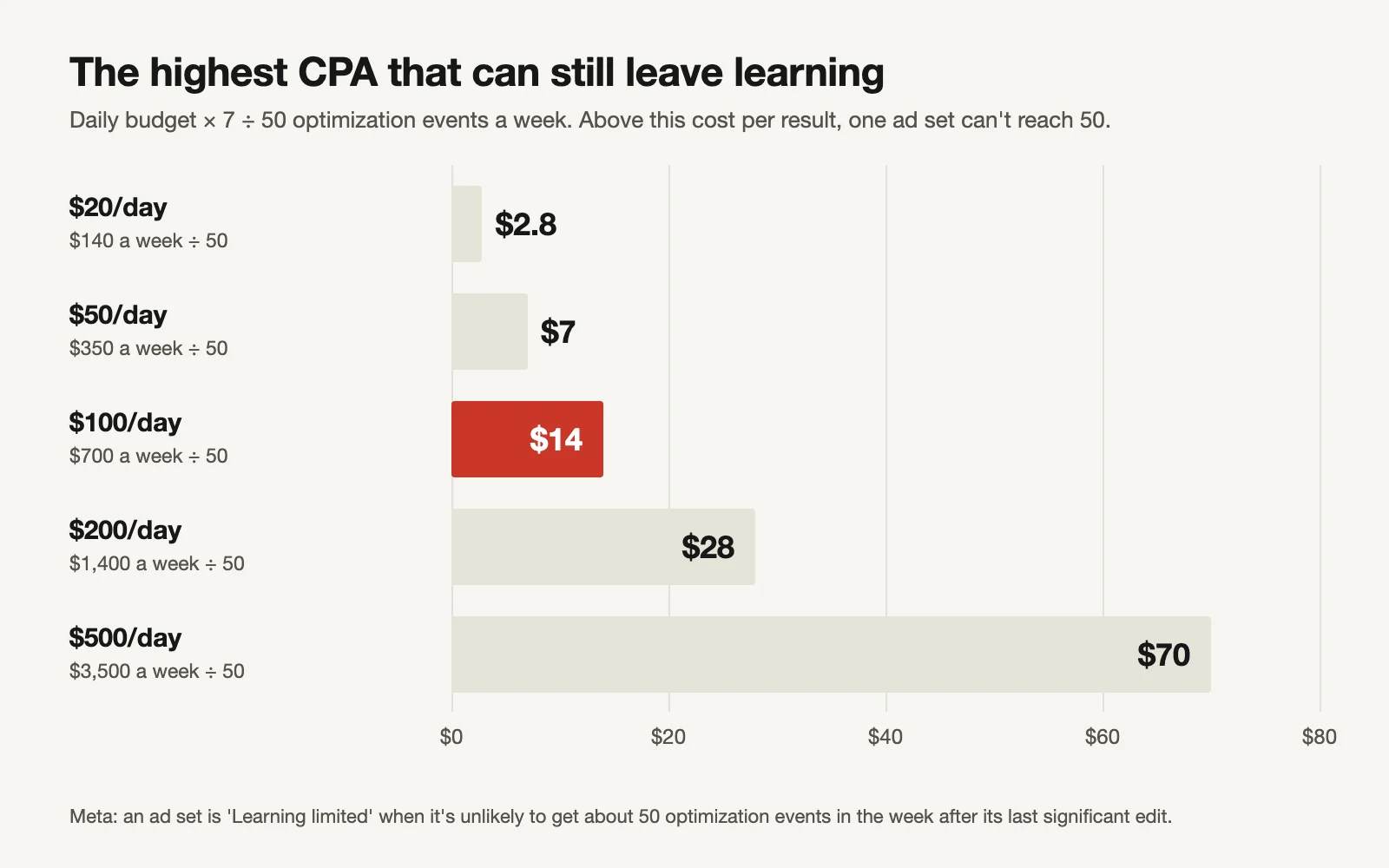
Daily budget × 7 ÷ 50.
| Daily budget | Weekly budget | Max cost per result to reach ~50 a week |
|---|---|---|
| $20 | $140 | $2.80 |
| $50 | $350 | $7 |
| $100 | $700 | $14 |
| $200 | $1,400 | $28 |
| $250 | $1,750 | $35 |
| $500 | $3,500 | $70 |
Read it the other way and it tells you the budget a single ad set needs: cost per result × 50 ÷ 7. At a $35 cost per purchase, that's $250 a day, for one ad set.
Most small stores selling a $40–$80 product pay more than $14 per purchase. So at $100/day, purchase-optimized ad sets will usually be Learning limited. That doesn't mean you can't advertise; it means you need to set up the account so the budget isn't cut into pieces, and choose the event with care.
Why five ad sets is the worst option
Worked example (fictional): a store spends $100/day at a $35 cost per purchase.
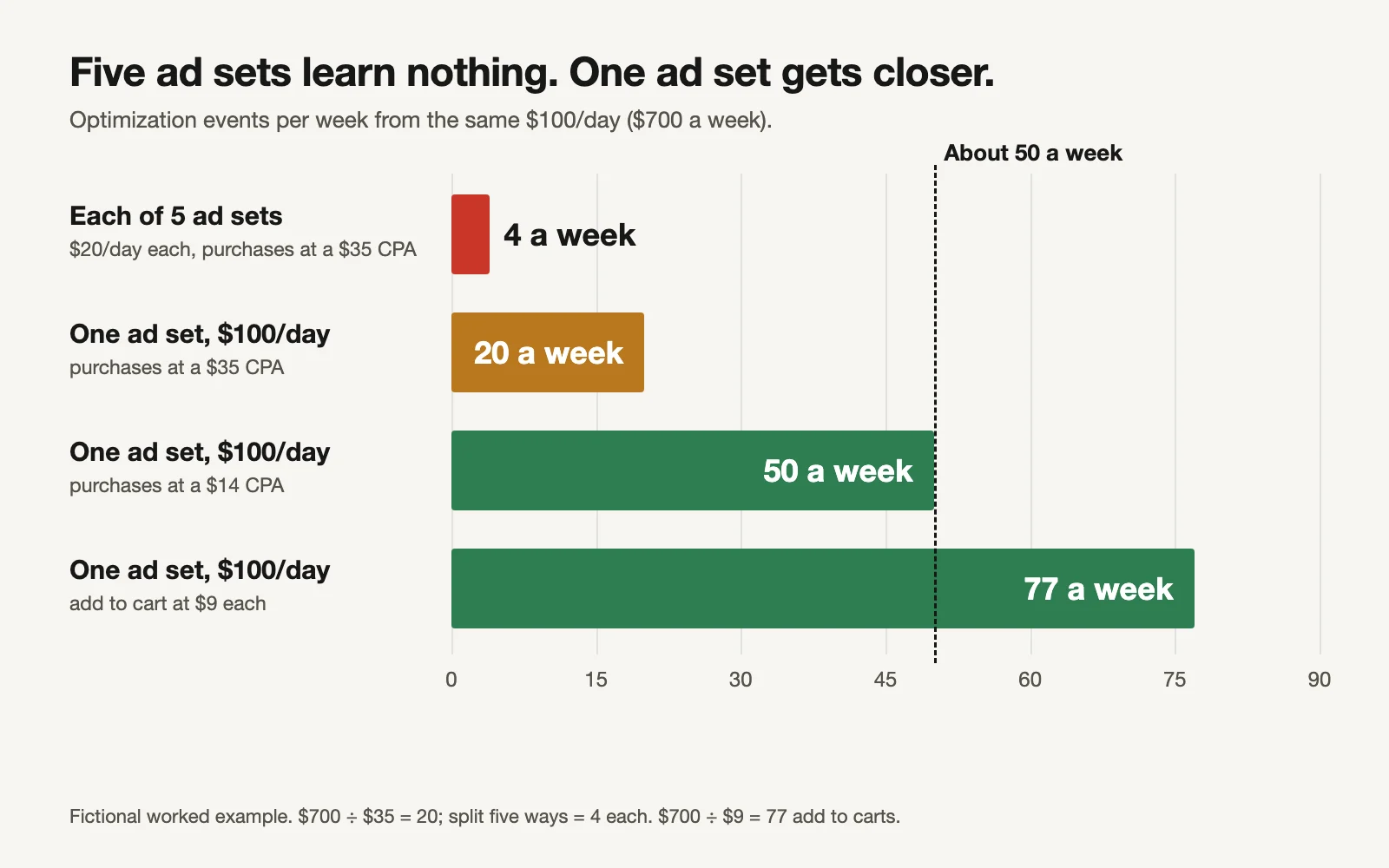
Fictional example. $700 a week ÷ $35 = 20; split five ways, 4 each.
| Setup | Events per ad set per week | Verdict |
|---|---|---|
| 5 ad sets × $20/day, purchases at $35 | 4 | Nobody learns |
| 1 ad set × $100/day, purchases at $35 | 20 | Closer, still limited |
| 1 ad set × $100/day, purchases at $14 | 50 | Leaves learning |
| 1 ad set × $100/day, add to cart at $9 | 77 ($700 ÷ $9 = 77.8) | Leaves learning, on a weaker signal |
Five ad sets usually come from good intentions: one for each interest, one for each lookalike, one for retargeting. Each one feels like a test. In practice each ad set starts from zero, overlapping ad sets compete for the same people, and none collects enough results for Meta to learn. Our guide to account fragmentation covers how to audit this in a bigger account.
What to optimize for when you can't reach 50
If one ad set still can't get 50 purchases a week, you have four options. These are Meta's own fixes, in the order we'd try them on a small budget:
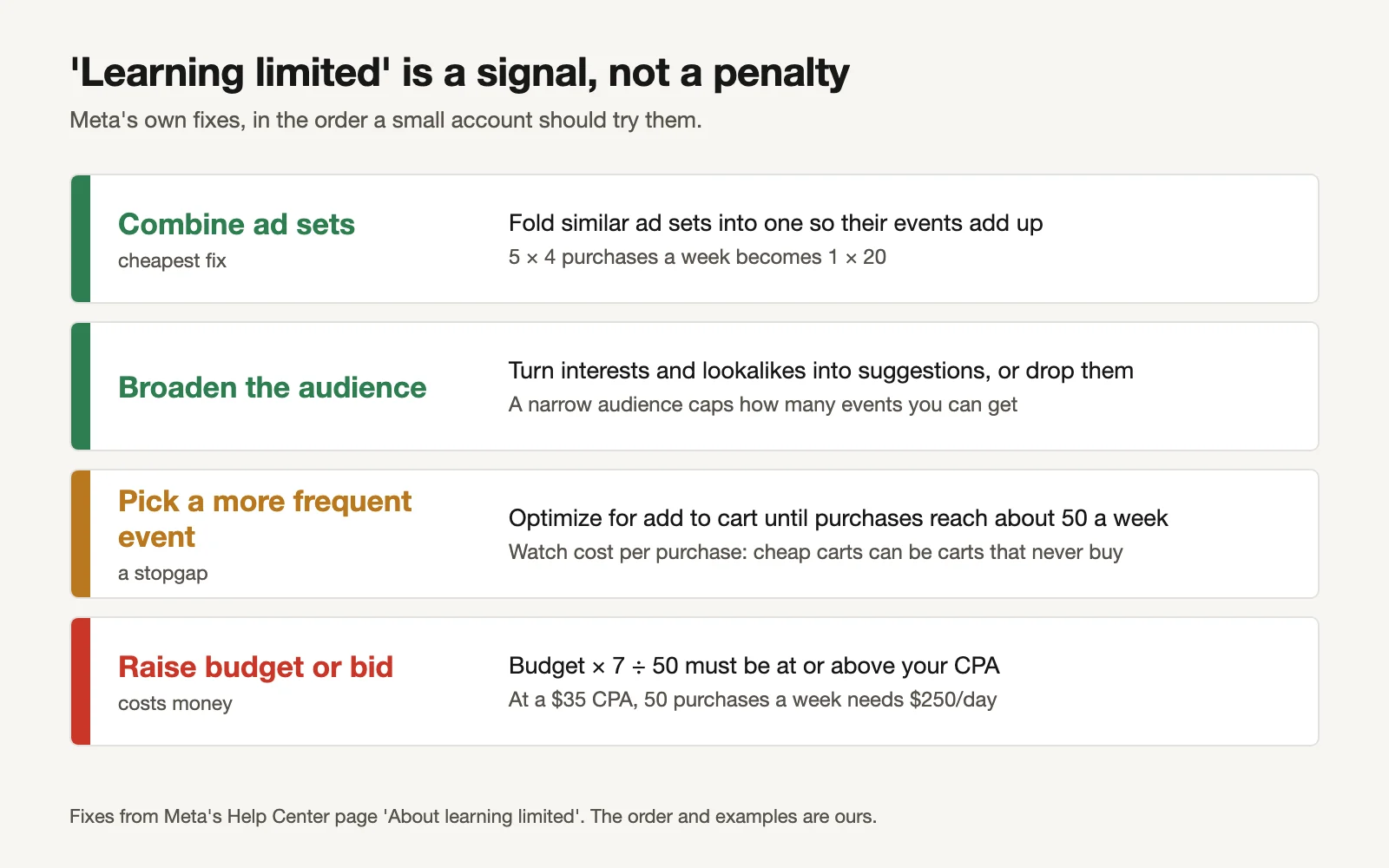
Meta's fixes; our order and examples.
- Combine ad sets. Free, and usually the biggest jump.
- Broaden the audience. With Advantage+ audience on, your interests and lookalikes become suggestions rather than walls. Location, minimum age and exclusions stay hard limits.
- Pick a more frequent event. The workbook's Event ladder lists your funnel from purchase down, works out the events per week for each, and picks the first one that reaches 50.
- Raise the budget. Only if the numbers say it pays.
The event ladder (fictional):
| Event | Cost per event | Events per week at $100/day | Reaches 50? |
|---|---|---|---|
| Purchase | $35 | 20 | No |
| Initiate checkout | $18 | 38.9 | No |
| Add to cart | $9 | 77.8 | Yes: optimize for this |
| View content | $2.50 | 280 | Yes |
The ladder picks add to cart because it's the closest event to a sale that one ad set can hit 50 times a week.
A warning that matters: optimizing for add to cart is a stopgap, not a strategy. Meta will find people who add to cart. Some of them never buy. Watch your cost per purchase every week; if it rises while carts get cheap, the signal is pulling you in the wrong direction. Move back to purchase as soon as purchases reach about 50 a week, and make that switch once (changing the event is a significant edit that restarts learning).
The $100/day starter account
This is the setup we recommend for a small budget. It's our recommendation, built on Meta's guidance to combine ad sets and minimise changes while the system learns.
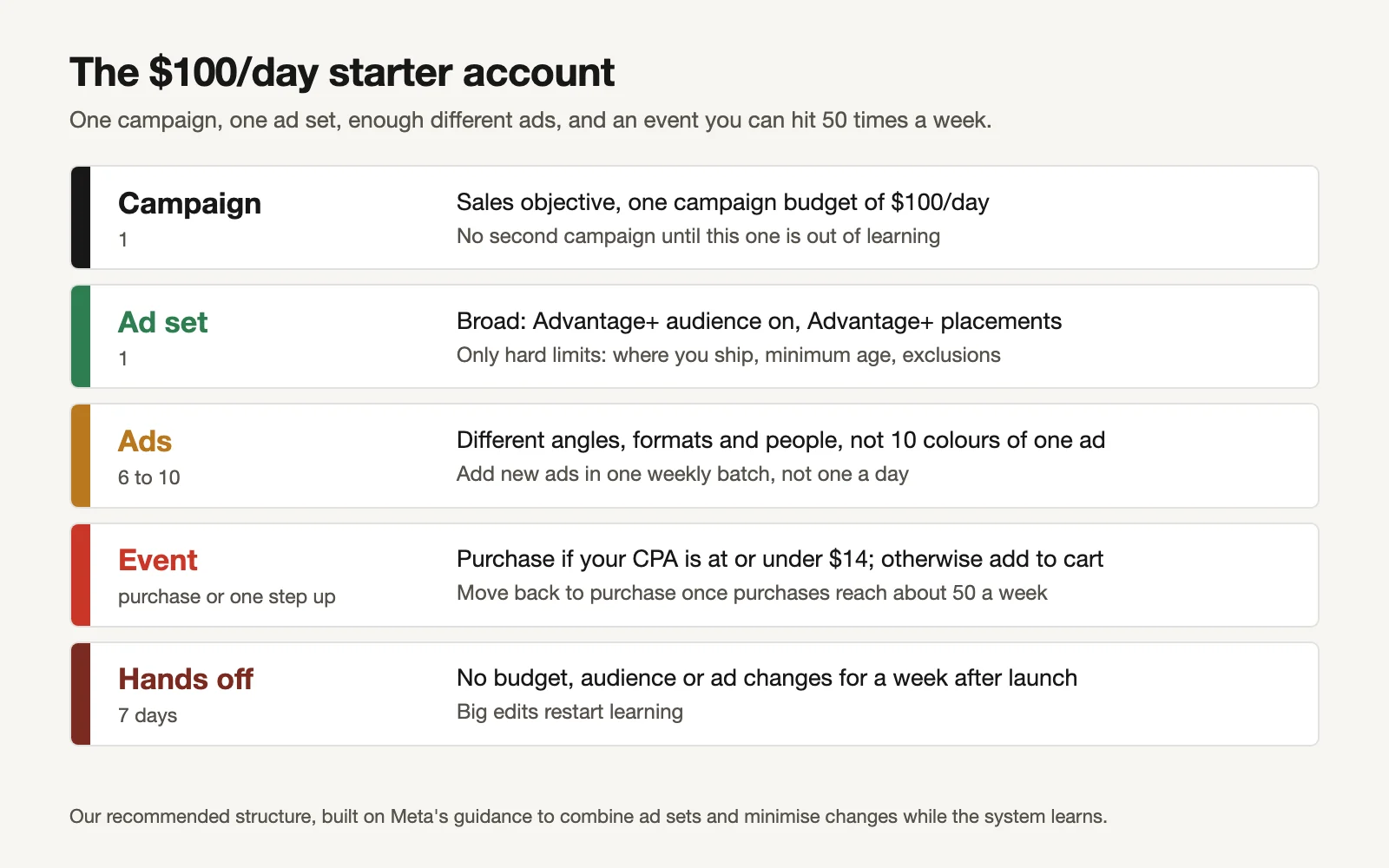
One campaign, one ad set, enough different ads, an event you can hit 50 times a week.
| Level | Setting | Why |
|---|---|---|
| Campaign | One Sales campaign, one campaign budget | One pool of results instead of five |
| Ad set | One, broad: Advantage+ audience and placements | Room to find buyers; overlap is gone |
| Ads | 6–10, each a different angle, format or person | Different ideas reach different people |
| Event | Purchase if CPA ≤ budget × 7 ÷ 50, else one step up | An event you can hit ~50 times a week |
| Changes | None for 7 days; new ads in one weekly batch | Significant edits restart learning |
Why 6–10 ads and not 30? Each ad needs some spend to show whether it works. On $100 a day, 30 ads means most never get a fair run. Meta also warns that when too many ads run at once, each delivers less and fewer leave learning (Meta: About managing ad volume). Our account structure blueprint covers ads per ad set and when to add a testing campaign as the budget grows.
What about retargeting? On $100/day, a separate retargeting ad set usually starves both. A broad sales campaign still reaches people who visited your site. Add a separate one only when the budget can feed both.
Worked example: the review after 7 days
A fictional store launches the starter account on $100/day, optimizing for add to cart because purchases cost $35. After 7 days:
- Add to carts: 74 (out of learning).
- Purchases: 21, so cost per purchase ≈ $33.
- Decision: leave the event on add to cart; purchases are still far from 50. Add the week's batch of new ads. Re-run the calculator next week.
If purchases had climbed to 45–50 a week (from a lower CPA or a bigger budget), the next step would be to switch the event back to purchase, once, and leave it alone for another 7 days.
Make it a routine
- Before launch: run the Calculator. If the verdict says merge, merge first.
- Pick the event from the Event ladder.
- Tick off the Starter checklist.
- Hands off for 7 days.
- Each week: add new ads in one batch, check cost per purchase, re-run the Calculator.
- When purchases reach about 50 a week, switch the event back to purchase.
Or let GaaS run the starter account
GaaS is an AI agent that creates, launches and optimises Meta and Google ads from three inputs: your website, a spend limit and a one-line goal. On a small budget it builds the consolidated structure, makes the 6–10 different ads, picks an event the budget can actually feed, and asks before changing spend. We have made more than 60,000 ads this way. If you'd rather do it yourself, the workbook runs the same maths.
Limits of this calculator
- "About 50" is Meta's soft guidance, and Learning limited is an efficiency signal, not a penalty. Ad sets can deliver results while limited.
- It assumes a steady cost per result. Real costs move week to week, and a merged ad set won't always keep the same CPA.
- Optimizing for a higher-funnel event can buy cheap actions that never turn into sales. Judge it on cost per purchase.
- Meta changes these rules. If Meta tells you something different in your account, change the "events needed" cell.
- The starter structure is our recommendation, not a Meta rule.
Sources
- Meta Business Help Center: About learning limited (about 50 optimization events in the week after the last significant edit; not a penalty; suggested fixes). The page didn't render for our fetch; the wording was checked against Meta's indexed copy on 17 November 2026.
- Meta for Business: Performance marketing ("combine ad sets and minimize changes"; under 20% of spend in learning, up to 68% lower cost per purchase, footnoted).
- Madgicx: Meta lowers learning phase requirement for select campaigns (June 2024 claim of 10 events; not confirmed by Meta).
- The $14 rule, all worked examples and the starter structure: GaaS calculations and recommendations.