
Most ad audits are a person reading a spreadsheet. They sort by spend, look at ROAS (return on ad spend), squint at click-through rates and write up an opinion. The opinion changes with who wrote it and what mood they were in. You pay for it every month, and you can't check the working.
Claude can read the same spreadsheet. What it lacks out of the box is a fixed set of rules, so ask it twice and you may get two different audits. A skill fixes that. It is a short file of written instructions Claude loads whenever the job matches, so the audit runs the same way every time.
This guide gives you that skill for free: the full SKILL.md text, how to install it in Claude or Claude Code, what each rule means and why it is there, and a worked example with 10 ads. It is written for business owners running their own Meta ads (Facebook and Instagram), and it is exact enough for a performance marketer to adopt as a team standard.
The download is an Excel workbook. One tab holds the SKILL.md text ready to copy. The other tabs run the same rubric with formulas, so you can check Claude's grades by hand, or run the whole audit without any AI at all. All numbers in this article are a fictional worked example unless a source is linked.
The short version
- Copy the SKILL.md text below into a file called
SKILL.md, inside a folder calledmeta-ads-audit. - Zip the folder and upload it in Claude, or save it in Claude Code's skills folder.
- In Meta Ads Manager, export one date range at ad level with eight columns: ad name, amount spent, impressions, link clicks, purchases, purchase value, frequency and 3-second video plays.
- Attach the export and ask Claude to audit your Meta ads. Give it your average order value, your margin and the profit you want to keep.
- Read the account grade, then the three actions. Act on the F ads first.
- Run it again next week on the same day with the same date range.
What a Claude skill is (in one minute)
Anthropic introduced Agent Skills in October 2025. A skill is a folder containing a SKILL.md file: a short header with a name and a description, then instructions in plain Markdown. Claude reads only the name and description at the start of a chat, and loads the full instructions when your request matches (Anthropic: Equipping agents for the real world with Agent Skills). In December 2025 Anthropic published the format as an open standard at agentskills.io, so other AI tools can read the same folder (The Decoder, Agent Skills specification).
Three rules from the specification matter here. The name can only use lowercase letters, numbers and hyphens, up to 64 characters. It must match the folder name. And the description, up to 1,024 characters, should say both what the skill does and when to use it, because that is what Claude reads to decide whether to load it.
Why a skill instead of a long prompt you paste each time? Three reasons:
- It's the same every time. The rubric lives in a file, not in your memory of what you typed last month.
- It loads itself. Say "audit my Meta ads" with an export attached and Claude picks it up.
- You can share it. A team, a freelancer and an agency can all run the identical audit and compare results.
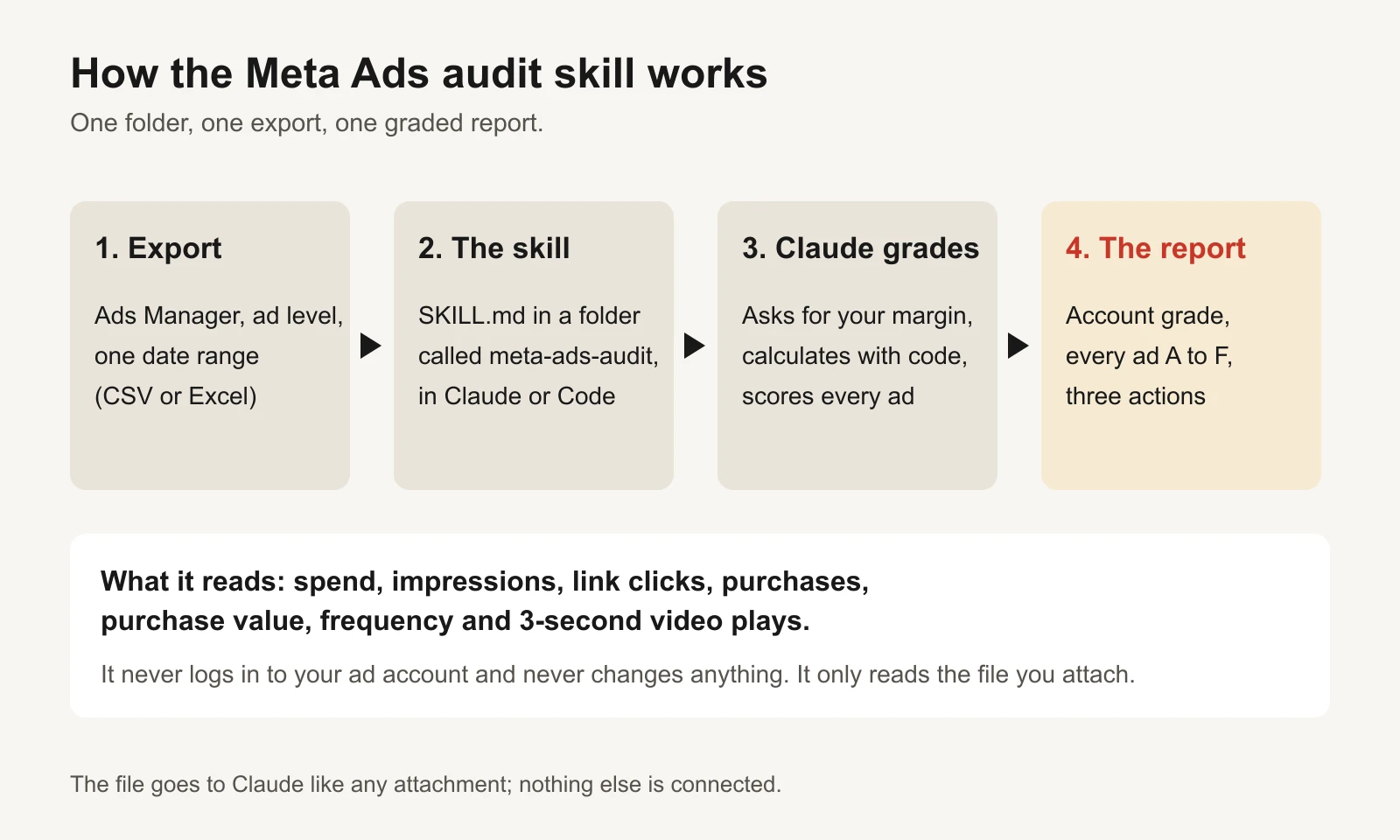
The skill only reads the file you attach. It has no access to your ad account.
One honest note on privacy: the export goes to Claude like any attachment you upload. The skill makes no other connection and changes nothing in Meta, but the numbers do leave your computer. If that matters, use the workbook instead; it runs entirely in Excel.
The skill, in full
Copy everything in the box into a plain-text file named SKILL.md. The workbook's SKILL.md tab has the same text, one line per row.
---
name: meta-ads-audit
description: Grades a Meta (Facebook and Instagram) Ads Manager export. Gives every ad a score out of 100 and a letter grade from A to F, grades the whole account, and lists the next actions. Use when the user shares a Meta Ads Manager CSV or Excel export, or asks to audit, grade or review their Meta ads.
license: MIT
metadata:
  author: GaaS (trygaas.com)
  version: "1.0"
---

# Meta Ads audit

You grade a Meta Ads Manager export the same way every time. You read the file, you do the arithmetic with code, and you explain the result in plain words for a business owner. You never change anything in the ad account. You only read the file the user gives you.

## Step 1: get the numbers you need

Ask for these if the user has not given them. Ask once, all together.

1. **Average order value** (revenue per purchase). If they do not know it, use total purchase value divided by total purchases from the file and say so.
2. **Contribution margin before ads**: the share of a sale left after product cost, shipping, payment fees and returns. If they do not know it, ask for product cost as a % of price and assume nothing else. Never invent a margin.
3. **Profit they want to keep** as a % of revenue. Default 10%.

Then work out:

- Break-even ROAS = 1 / margin
- Target ROAS = 1 / (margin - profit share). If profit share is at or above the margin, stop and tell the user the target is impossible.
- Break-even CPA = average order value x margin
- Target CPA = average order value x (margin - profit share)

## Step 2: read the export

The export should be at **ad level**, one date range (the last 7, 14 or 30 days), one attribution setting. Column names change with language, account and Meta's updates, so match them by meaning, not exact text:

| You need | Usually called |
| --- | --- |
| Ad name | Ad name |
| Spend | Amount spent |
| Impressions | Impressions |
| Link clicks | Link clicks |
| Purchases | Purchases, Website purchases, or Results when the result indicator is a purchase |
| Purchase value | Purchases conversion value, Website purchases conversion value |
| Frequency | Frequency |
| 3-second video plays | 3-second video plays (blank or missing for images) |

Rules:

- If the file has campaign or ad set rows instead of ads, grade them the same way and say which level you graded.
- If purchases or purchase value are missing for the whole file, stop grading profit. Say tracking or the export columns need fixing first. That is the first finding.
- Remove the totals row if there is one. Ignore ads with zero spend.
- Report the date range and attribution setting if the file shows them. If it does not, say you could not see them.
- Use code (Python with pandas, or the spreadsheet tool you have) for every number. Do not do arithmetic in your head.

## Step 3: work out each ad's numbers

- ROAS = purchase value / spend
- CPA = spend / purchases
- Link CTR = link clicks / impressions
- Click-to-purchase rate = purchases / link clicks
- Hook rate = 3-second video plays / impressions (video ads only)

Account averages are totals, not averages of rows: total link clicks / total impressions, total purchases / total link clicks, total 3-second plays / impressions of video ads only.

## Step 4: check there is enough data

- **Hard stop**: zero purchases and spend at least 3 x break-even CPA. Grade F. Reason: "spent 3 sales' worth of margin with no sale".
- **Not enough data**: spend below 3 x target CPA. Do not grade. Write N/A and the spend still needed. Never call a low-spend ad a loser or a winner.

## Step 5: score every graded ad out of 100

| Part | Points | How |
| --- | --- | --- |
| Profit | 40 | ROAS at or above target ROAS = 40. At or above break-even = 25. At or above 80% of break-even = 10. Lower = 0 |
| Conversion | 15 | Click-to-purchase rate vs account: 1.2x or more = 15, 0.9x or more = 10, 0.6x or more = 5, lower = 0 |
| Click | 15 | Link CTR vs account, same steps as Conversion |
| Hook | 15 | Video only. Hook rate vs the account's video hook rate, same steps |
| Freshness | 15 | Frequency 2.5 or lower = 15. Up to 3.5 = 8. Above 3.5 = 0 |

For an ad without video, Hook does not apply: score = points earned / 85 x 100.

Letter grade: A 85 or more, B 70 to 84, C 55 to 69, D 40 to 54, F below 40.

**Profit cap**: an ad below break-even ROAS can never score above D, however good its clicks look. Clicks do not pay the bills.

## Step 6: grade the account

- Account score = the spend-weighted average score of the graded ads. Same letter bands.
- Account cap: if total ROAS for the file is below break-even, the account can score no higher than D.
- Also report: total spend, total ROAS against break-even and target, share of spend in A and B ads, share of spend in D and F ads, share of spend not yet graded, and the share of spend on the single biggest ad.

## Step 7: say what to do

For each ad, one action:

- **A**: candidate to scale. Raise its budget about 20%, then wait 3 days before judging again. (A rule of thumb, not a Meta rule.)
- **B**: keep running. No change.
- **C**: fix its weakest part. Weak hook: new first 3 seconds. Weak click rate: new angle, headline or thumbnail. Weak conversion: check the landing page and the offer match the ad. High frequency: add new creative.
- **D**: cut its budget or replace it within a week.
- **F**: pause it.
- **N/A**: leave it until it has spent enough.

## Step 8: write the report

Use this order and keep it short:

1. **Account grade** with one sentence on why.
2. **The numbers**: spend, ROAS, break-even ROAS, target ROAS, and the spend shares from Step 6.
3. **Every ad** in a table sorted by spend: ad name, spend, ROAS, grade, score, the one number that hurt most, action.
4. **This week's three actions**, most money first.
5. **What this audit cannot see**: Meta's numbers are Meta's attribution, not your bank account. Compare with store revenue before big budget changes. Thresholds are starting points, not Meta rules.

Write for someone who does not work in marketing. Spell out ROAS (return on ad spend) and CPA (cost per purchase) the first time. No jargon without a plain explanation.

## Things you must not do

- Do not invent numbers, benchmarks or industry averages.
- Do not change grades because an ad "looks good". The rubric decides.
- Do not tell the user to make edits in the account for them. Give the actions; they decide.
- If the user asks for different thresholds, use theirs and say you did.
The license line (MIT) means you can copy it, change it and share it, including inside your own company or agency. Change any threshold you disagree with; the rules only need to be written down, not to be ours.
How to install it
In Claude (web, desktop or mobile app). Claude's help centre lists skills on Free, Pro, Max, Ultra, Team and Enterprise plans, and they need code execution switched on (Claude Help Center: Use skills in Claude).
- Turn on code execution: Settings > Capabilities ("Code execution and file creation", or "Create and edit files" in the newer layout). On Team and Enterprise an owner turns it on for the organization.
- Put
SKILL.mdin a folder calledmeta-ads-auditand zip the folder. - Go to Customize > Skills, click +, then Create skill, then Upload a skill, and choose the zip.
- Switch the skill on in your skills list.
The two most common upload errors, per the same help page: the folder name doesn't match the name in the file, or the file is missing. The folder must be called exactly meta-ads-audit.
In Claude Code. Save the file as ~/.claude/skills/meta-ads-audit/SKILL.md to use it in every project, or .claude/skills/meta-ads-audit/SKILL.md inside one project folder to share it with your team through git. Claude loads it when your request matches, or you can type /meta-ads-audit (Claude Code docs: Skills).
No skills available? The workbook's Prompt tab has one message you can paste into any AI chat that reads files, followed by the skill text. You lose the automatic loading, not the rules.
How to export the right report from Ads Manager
The audit is only as good as the export. This takes about five minutes the first time; save the column set and it takes one minute after that.
- Open Ads Manager and click the Ads tab (not Campaigns or Ad sets).
- Pick one date range. The last 7, 14 or 30 days all work. Use the same one every week so grades are comparable.
- Columns > Customize columns. Add: Amount spent, Impressions, Link clicks, Purchases, Purchases conversion value, Frequency and 3-second video plays. Save the set as "Audit".
- Reports > Export table data, as CSV or Excel.
Meta renames columns from time to time and they differ by language, so the skill matches columns by meaning, not exact spelling. If your purchases come through as "Results" with a purchase result indicator, that works too. If your account has no purchase tracking at all, the skill stops grading profit and tells you the first job is fixing tracking. That is a finding, not a failure.
The rubric, explained
Every rule in the skill is there for a reason. Here they are in plain words.
Step 1: three numbers from your margin
Before any ad is judged, the skill works out what one sale can afford. You give it three things: average order value, contribution margin (what's left of a sale after product cost, shipping, payment fees and returns, before ads) and the profit you want to keep.
| Number | Formula | Worked example |
|---|---|---|
| Break-even ROAS | 1 / margin | 1 / 0.40 = 2.50 |
| Target ROAS | 1 / (margin − profit) | 1 / 0.30 = 3.33 |
| Break-even CPA | Order value × margin | $60 × 0.40 = $24 |
| Target CPA | Order value × (margin − profit) | $60 × 0.30 = $18 |
CPA is cost per acquisition: ad spend divided by purchases. Below break-even ROAS, every sale loses money after the ad that made it. Above target ROAS, the ad earns the profit you asked for. If you don't know your margin, the skill asks rather than guessing; for the full logic see break-even ROAS and contribution margin or the free break-even ROAS calculator.
Step 2: don't grade ads that haven't spent enough
An ad that has spent $30 has told you almost nothing. One lucky sale makes it a star; no sale makes it a dud. So the skill doesn't grade any ad until it has spent 3 times your target CPA ($54 in the example). Below that it writes N/A and how much more spend it needs.
There is one exception: the hard stop. An ad with zero purchases after 3 times break-even CPA ($72) gets an F straight away. It has spent the margin of three sales and made none. These are the same spend rules as our Kill / Hold / Scale rulebook, so the two tools agree with each other.
Step 3: score out of 100
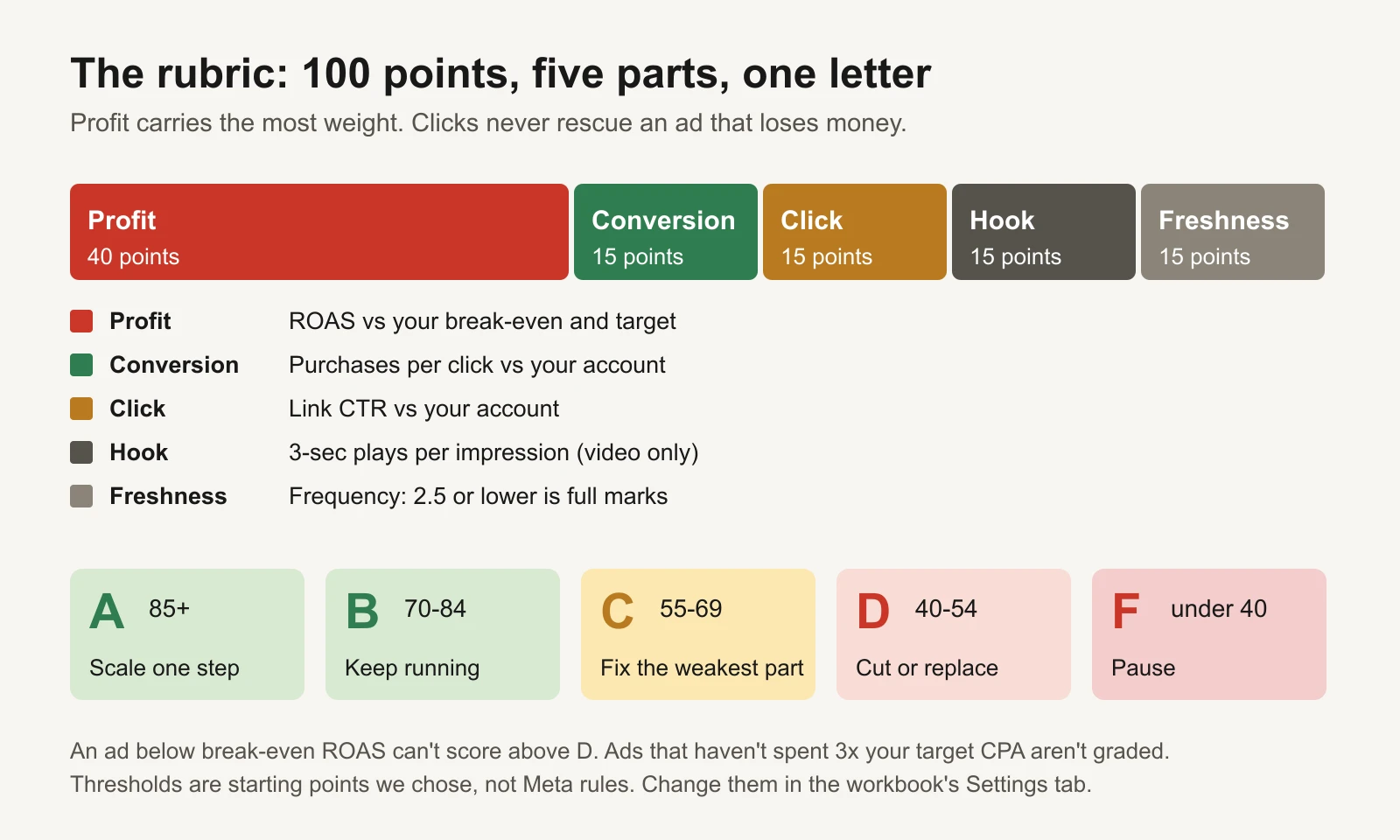
Profit carries 40 of the 100 points. The other four parts explain why an ad is winning or losing.
| Part | Points | How it is scored |
|---|---|---|
| Profit | 40 | ROAS at or above target: 40. At or above break-even: 25. At or above 80% of break-even: 10. Lower: 0 |
| Conversion | 15 | Purchases per link click, compared with your whole account: 1.2 times or better: 15. 0.9 times: 10. 0.6 times: 5. Lower: 0 |
| Click | 15 | Link CTR (link clicks divided by impressions) compared with your account, same steps |
| Hook | 15 | Video only. Hook rate (3-second plays divided by impressions) compared with your account's video ads, same steps |
| Freshness | 15 | Frequency (average times each person saw the ad) of 2.5 or less: 15. Up to 3.5: 8. Above 3.5: 0 |
Two choices here are deliberate.
Click, conversion and hook are compared with your own account, not an industry average. Published "average CTR" figures mix industries, countries, placements and objectives, and none of them describe your store. Your account average does. An ad that converts clicks 20% better than your other ads is genuinely better, whatever the industry says.
Image and carousel ads aren't punished for having no hook rate. For ads without video, the skill scores the other four parts out of 85 and scales the result to 100.
Step 4: the profit cap
An ad below break-even ROAS can never score above D, however good its clicks and hook look. This is the rule people most want to break ("but the CTR is amazing"), and the reason it exists. A cheap click that doesn't turn into enough revenue is still losing money. If a high-CTR ad is below break-even, the problem is after the click: the landing page, the offer or the audience. See high CTR, low sales for how to find which.
Step 5: grade the account, then act
The account score is the spend-weighted average of the graded ads: a $1,000 ad counts ten times as much as a $100 ad, because it is ten times the money. If the whole file's ROAS is below break-even, the account can't score above D either.
Each grade has one action:
| Grade | Action |
|---|---|
| A | Candidate to scale: raise its budget about 20%, then wait 3 days before judging again. That step size is a common practitioner habit, not a Meta rule |
| B | Keep running. No change |
| C | Fix its weakest part. Weak hook: a new first 3 seconds. Weak click rate: a new angle, headline or thumbnail. Weak conversion: check the landing page and the offer match the ad. High frequency: add new creative |
| D | Cut its budget or replace it within a week |
| F | Pause it |
| N/A | Leave it until it has spent enough |
The worked example: 10 ads, one audit
Here is what the skill and the workbook return for a fictional store selling a $60 product with a 40% margin, keeping 10% profit. That gives break-even ROAS 2.50, target ROAS 3.33, target CPA $18 and break-even CPA $24. The account spent $5,045 in 14 days.
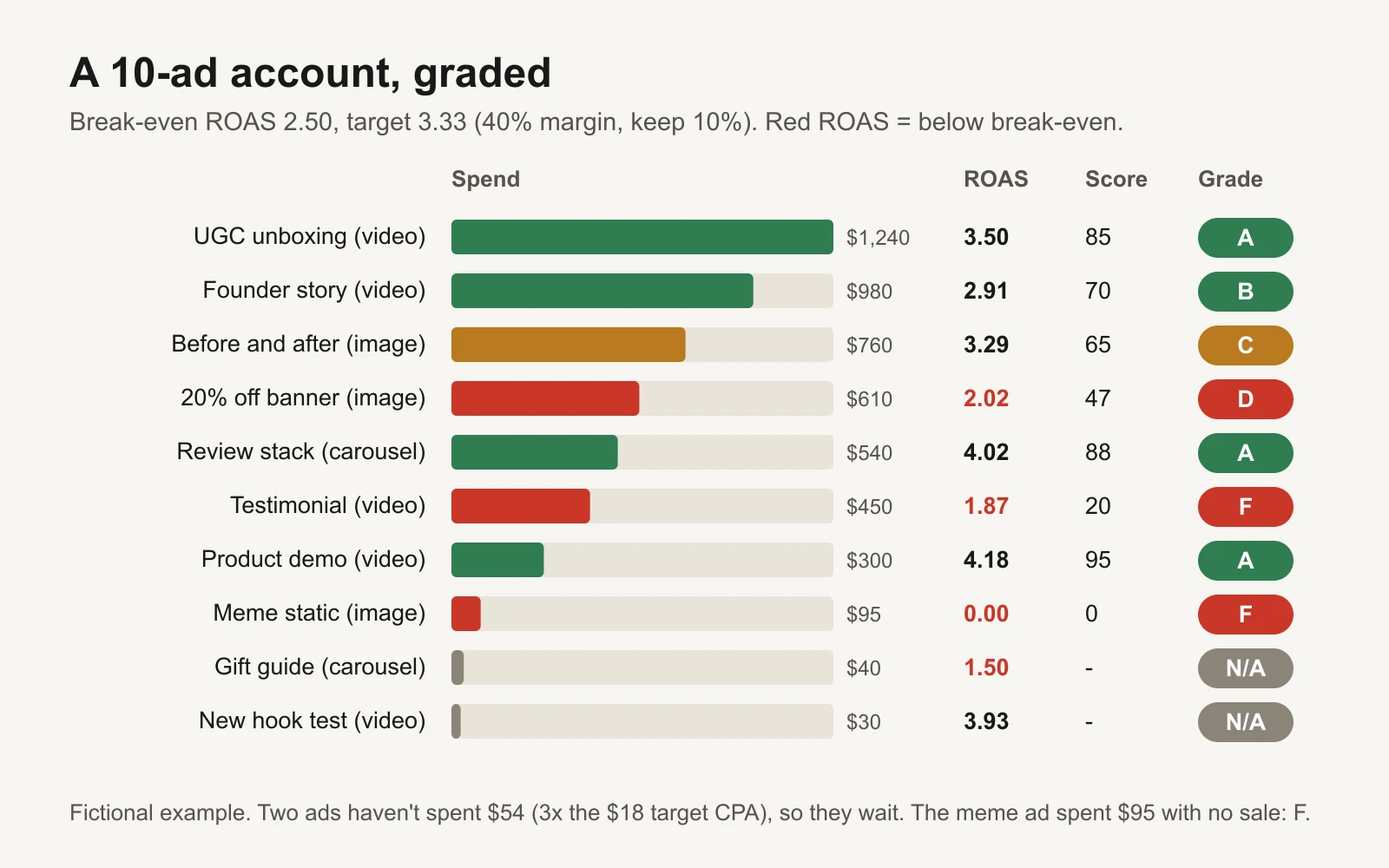
Fictional example. Red ROAS is below the 2.50 break-even.
| Ad | Spend | ROAS | Score | Grade | Weakest part | Action |
|---|---|---|---|---|---|---|
| UGC unboxing (video) | $1,240 | 3.50 | 85 | A | Hook rate only 1.1 times the account's | Scale +20%, wait 3 days |
| Founder story (video) | $980 | 2.91 | 70 | B | Profit: above break-even, below target | Keep running |
| Before and after (image) | $760 | 3.29 | 65 | C | Conversion: 4.9% of clicks buy vs 5.7% for the account | Check the landing page matches the ad |
| 20% off banner (image) | $610 | 2.02 | 47 | D | Profit: below break-even, so capped at D | Cut or replace this week |
| Review stack (carousel) | $540 | 4.02 | 88 | A | Click rate, though still above the account's | Scale +20%, wait 3 days |
| Testimonial (video) | $450 | 1.87 | 20 | F | Profit, and frequency 4.1 | Pause |
| Product demo (video) | $300 | 4.18 | 95 | A | Conversion, right at the account's rate | Scale +20%, wait 3 days |
| Meme static (image) | $95 | 0.00 | 0 | F | No sales after $95 (hard stop at $72) | Pause |
| Gift guide (carousel) | $40 | 1.50 | – | N/A | Needs $14 more spend | Wait |
| New hook test (video) | $30 | 3.93 | – | N/A | Needs $24 more spend | Wait |
Notice two things. The 20% off banner has a respectable 47 points from clicks and freshness, but its ROAS of 2.02 is under break-even, so the cap holds it at D. And the new hook test shows a 3.93 ROAS on $30, which looks like the best ad in the account. It has made two sales. The skill refuses to call it anything yet.
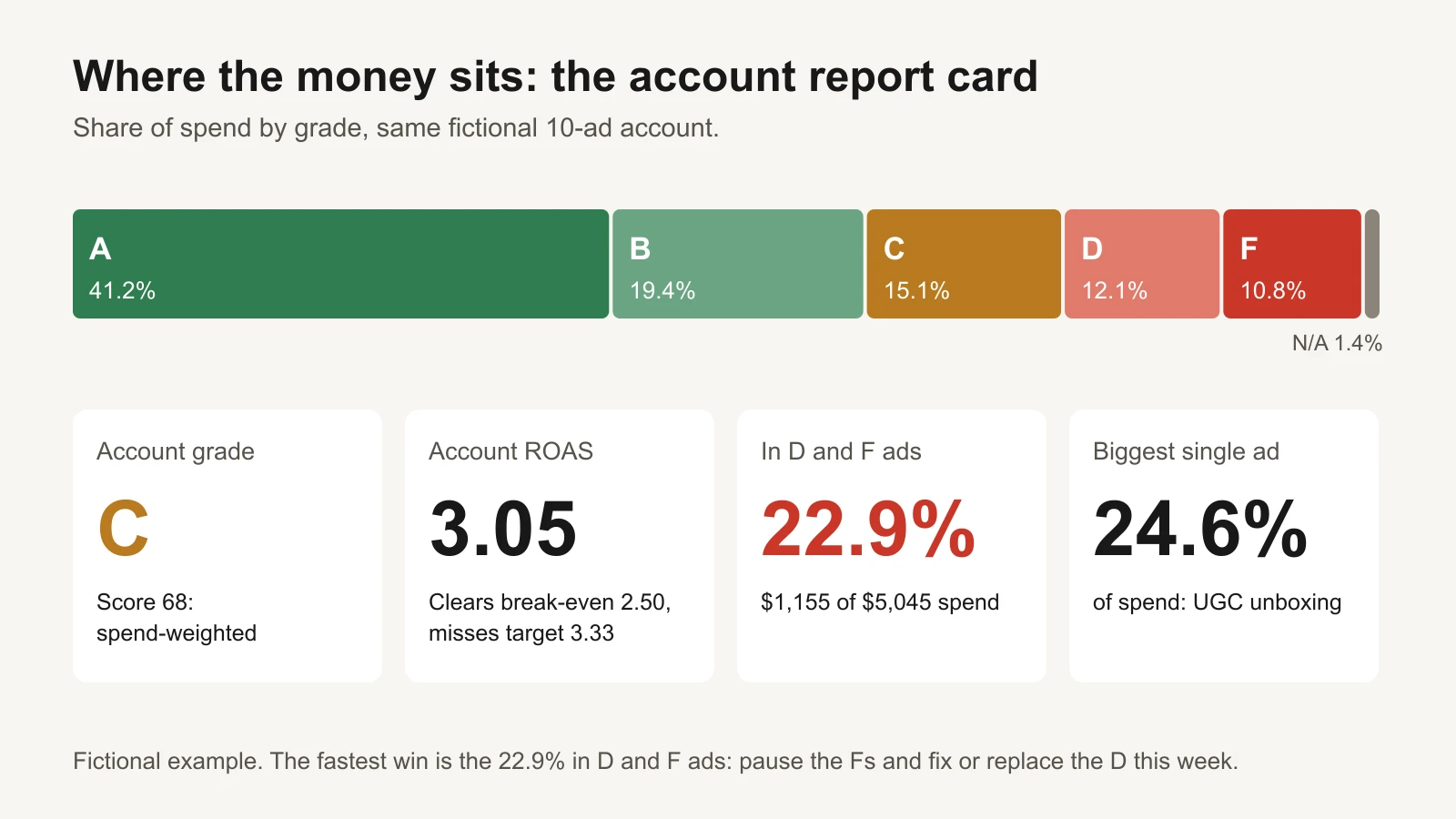
The account in one picture: profitable, but nearly a quarter of the money sits in ads that lose it.
Account grade: C (score 68). ROAS of 3.05 clears break-even (2.50) but misses the 3.33 target. 60.6% of spend is in A and B ads; 22.9% ($1,155) is in D and F ads.
This week's three actions, most money first:
- Pause the testimonial video and the meme static. Together they spent $545 and returned $840.
- Raise the three A ads (UGC unboxing, review stack, product demo) by about 20% each, then leave them alone for 3 days.
- Replace the 20% off banner with a non-discount angle, and check the before-and-after ad's landing page shows the same product and offer as the ad.
That is the whole audit. An agency deck would wrap the same three actions in 30 slides.
How to read Claude's answer (and catch mistakes)
Claude is good at this, and the skill tells it to calculate with code rather than in its head. It is still worth checking the first few audits, the same way you'd check a new hire's work.
- Check the inputs it used. The report should state your order value, margin, profit target, break-even and target ROAS at the top. If any is wrong, every grade is wrong.
- Spot-check one ad. Pick the biggest ad and compute its ROAS yourself: purchase value divided by spend. If it matches, the arithmetic is almost certainly fine.
- Paste the same export into the workbook. Its Ads tab runs the identical rubric with formulas. The grades should match Claude's exactly. If they don't, the workbook is the referee; tell Claude which ad differs and ask it to show its working.
- Watch for invented context. The skill forbids benchmarks and industry averages. If the report says "your CTR is below the industry average of...", that line didn't come from the rubric. Ignore it.
What this audit can't see
- Meta's numbers are Meta's attribution. Purchases in Ads Manager are sales Meta credits to its ads under your attribution setting, not your bank account. Before big budget changes, compare total store revenue with total ad spend. Our attribution window reconciliation guide shows how.
- It grades ads, not your setup. Tracking, campaign structure, audiences and the landing page are outside the export. For those, use the free ad account audit checklist.
- It's a snapshot. A C ad that was an A last month is tiring; an A that just launched may fade. Run it weekly and watch the grades move. The Monday ad report tracks the trends.
- Frequency is a blunt fatigue signal. A frequency of 3.5 means different things for a $20 impulse buy and a $2,000 sofa. Read is high frequency really fatigue? before acting on Freshness alone.
- Thresholds are starting points we chose, not Meta rules or industry benchmarks. Change them in the skill or in the workbook's Settings tab, and write down why.
Make it a weekly routine
- Same day each week (Monday works), same date range, same attribution setting.
- Export, attach, "audit my Meta ads".
- Do the F actions the same day. Do the A actions the same day. Leave B ads alone.
- Give C ads one fix each and check them next week.
- Keep the reports. Four weeks of grades show you which kinds of ads keep earning As.
Tools and repos that help
These are public, maintained projects (checked 17 November 2026):
| Repo | What it is | Who it's for |
|---|---|---|
| anthropics/skills | Anthropic's public repository of Agent Skills, including a skill-creator and an Excel (xlsx) skill | Anyone who wants to extend this skill or write their own |
| agentskills/agentskills | The specification and documentation for the open Agent Skills format | Developers checking that a skill folder is valid, or running it in another AI tool |
| meta/facebook-python-business-sdk | Meta's official Python SDK for its Marketing APIs: pull ad-level spend, purchases and frequency on a schedule | A developer who wants the export to build itself every Monday |
A word of caution on AI tools with write access to your ad account: this skill is read-only by design. If you connect an AI assistant directly to Meta, keep anything that changes a budget or pauses an ad behind your own approval.
Or let GaaS run it
GaaS is an AI agent that creates, launches and optimizes Meta and Google ads from three inputs: your website, a spend limit and a one-line goal. It grades every ad against your own margin every day, explains what it wants to change in plain words, and nothing that changes spend happens without your approval. If you'd rather run the audit yourself, the skill and workbook below are yours to keep.
Sources
- Anthropic: Equipping agents for the real world with Agent Skills (16 October 2025)
- Agent Skills: Overview and Specification
- The Decoder: Anthropic publishes Agent Skills as an open standard for AI platforms
- Claude Help Center: Use skills in Claude
- Claude Code docs: Skills
- GitHub repositories listed above, checked 17 November 2026.