
Meta tells you 3-second plays and ThruPlays. It never tells you which of your videos is losing people in the first 3 seconds.
That matters because a video ad has two jobs before it can sell anything. It has to stop the scroll, and it has to keep people watching long enough to hear the point. Most accounts grade video ads on the third job only, cost per purchase or ROAS, so when a video fails nobody knows which part to fix. They re-edit the ending of an ad that lost everyone in the first second, or throw away a strong opening because the middle dragged.
This guide gives you two numbers that split the problem in half, the bars we use for them, and a free scorer that takes your Ads Manager export and puts every video ad into one of four boxes: scale it, fix the hook, fix the middle, or kill it.
The workbook has an Ads tab (paste your export; every video gets a hook rate, hold rate, score, grade A to F and an action), a Settings tab with the bars, a Summary with charts, and a Fix playbook for each action. Example numbers in this article and the workbook are a fictional worked example unless a source is linked.
The two numbers
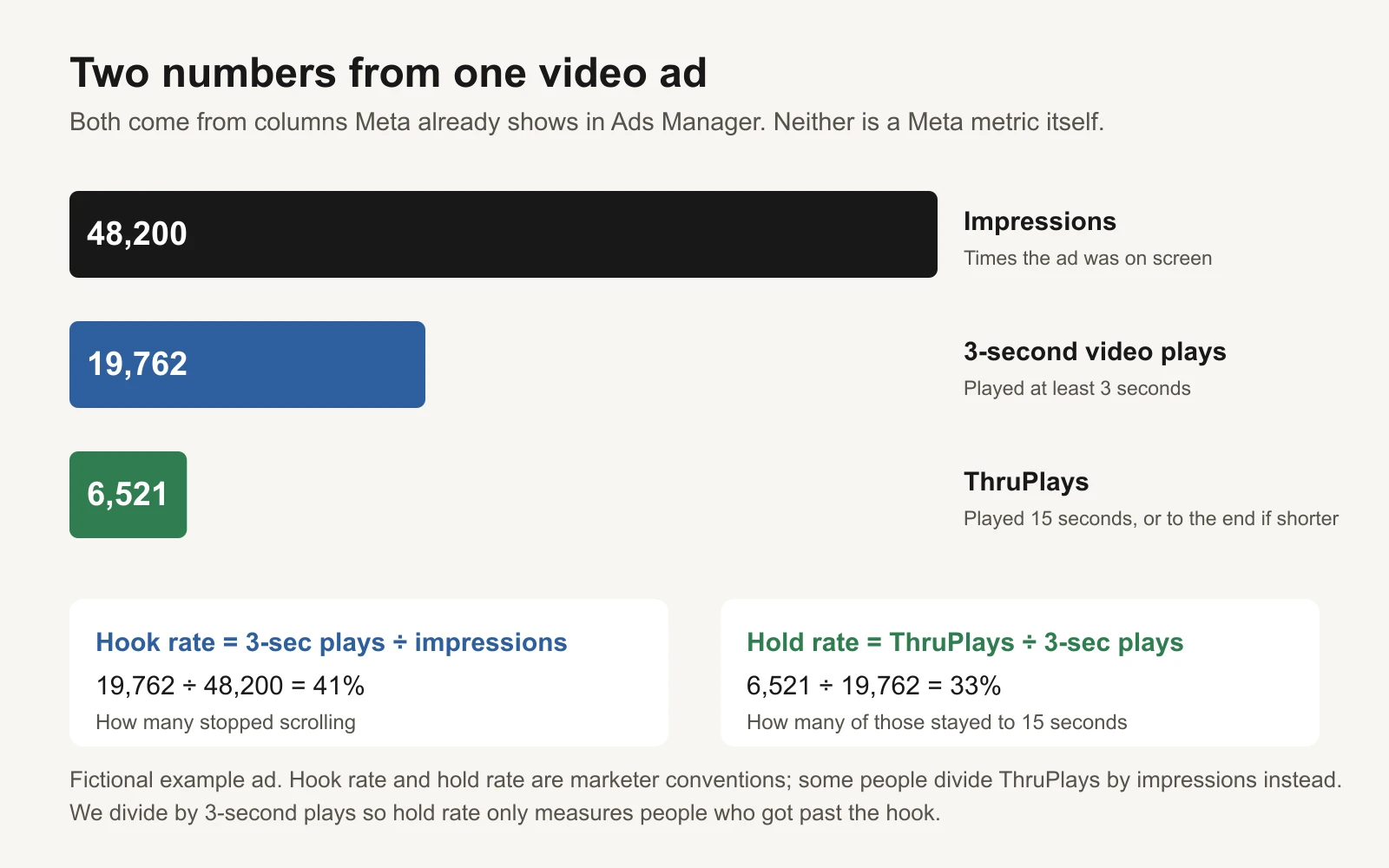
Fictional example ad. Both ratios come from columns Meta already reports.
Meta reports three columns you need, all in Ads Manager under Columns > Customize columns > Video engagement:
- Impressions: how many times the ad was on screen.
- 3-second video plays: the number of times the video played for at least 3 seconds (or nearly its full length, if it's shorter). See Meta's video ad metrics and Jon Loomer's Meta Ads glossary.
- ThruPlays: plays of at least 15 seconds, or to completion if the video is shorter than 15 seconds (Meta: About ThruPlay).
From those, two ratios:
| Ratio | Formula | The question it answers |
|---|---|---|
| Hook rate | 3-second plays ÷ impressions | Did people stop scrolling? |
| Hold rate | ThruPlays ÷ 3-second plays | Of the people who stopped, how many stayed to 15 seconds? |
Two honest notes before you use them.
They are not Meta metrics. "Hook rate" (also called thumbstop rate) and "hold rate" are conventions marketers built from Meta's columns. You won't find them in Meta's help pages, and people define hold rate differently: some divide ThruPlays by impressions. We divide by 3-second plays on purpose, so that hold rate measures only the people who got past the hook. Otherwise a weak opening drags the hold number down too, and you can't tell the two problems apart.
There is no official benchmark. We looked for a Meta-published "good" hook or hold rate and didn't find one. So the 30% and 25% bars below are ours: starting points that split our example set sensibly, not an industry standard. Once you have 20 or more graded videos, your own medians are a better bar, and the workbook's Summary tab works them out for you.
The four boxes
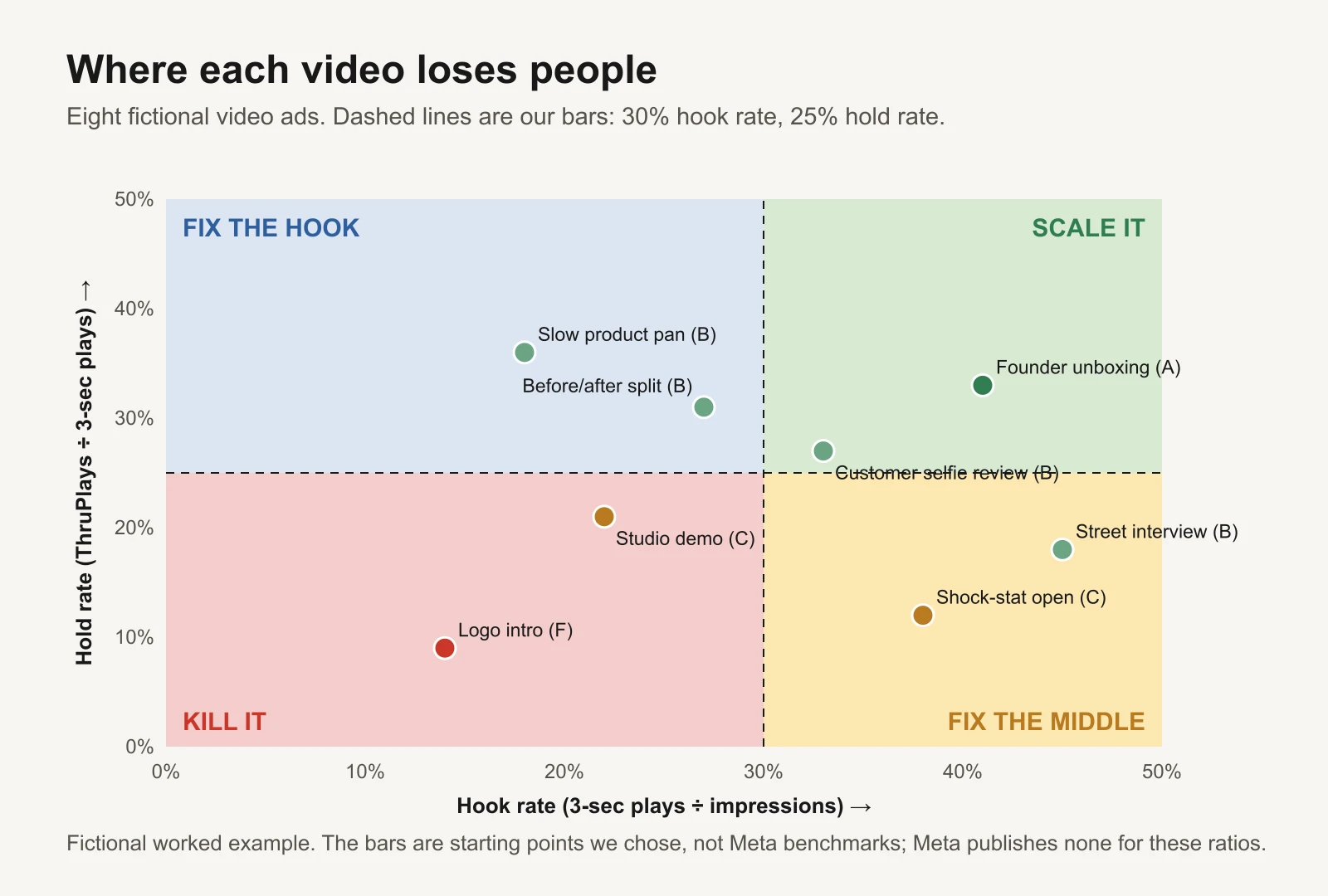
Fictional worked example. The bars are ours, not Meta's.
Plot every video on the two numbers and it falls into one of four boxes:
| Box | Hook rate | Hold rate | What it means | What to do |
|---|---|---|---|---|
| Scale it | 30%+ | 25%+ | People stop and stay | Check cost per purchase, then give it more budget |
| Fix the hook | under 30% | 25%+ | Those who stop stay, but too few stop | Change only the first 3 seconds |
| Fix the middle | 30%+ | under 25% | Strong stop, then people leave | Change seconds 3 to 15, keep the opening |
| Kill it | under 30% | under 25% | Neither part works | Turn it off; keep the idea only if the angle was new |
The quadrant is the useful part. It tells you which half of the video to change, so your next version is a test of one thing.
A score and a grade, to sort the list
A long account has dozens of videos. To sort them, the scorer gives each one a single number:
Score = 0.5 × (hook rate ÷ 30%) + 0.5 × (hold rate ÷ 25%)
A score of 1.00 means exactly on both bars. Then a letter: A from 1.15, B from 0.95, C from 0.75, D from 0.55, F below. All five cut-offs live on the Settings tab.
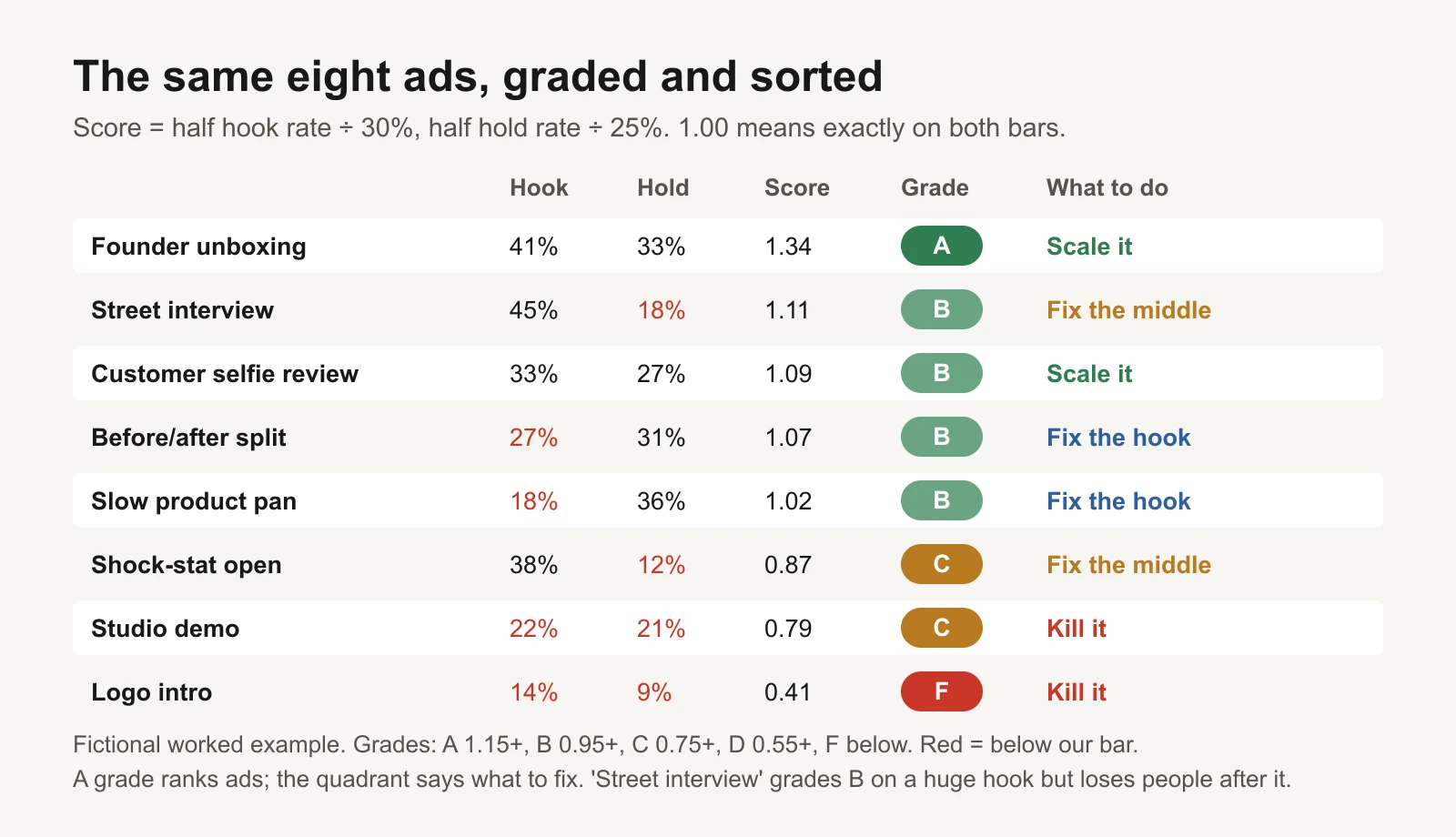
Fictional worked example. A grade ranks ads; the box says what to fix.
Look at "Street interview". It grades B because its hook is huge (45%), but it loses people straight after (18% hold). The grade alone would tell you it's fine. The box tells you the middle needs work, and that the opening is worth keeping. That is why the scorer gives you both.
The worked example: eight videos, one review
A fictional skincare brand exports the last 14 days of its video ads. Bars at the defaults: 30% hook, 25% hold, minimum 5,000 impressions to grade.
| Ad | Impressions | 3-sec plays | ThruPlays | Hook | Hold | Grade | Action |
|---|---|---|---|---|---|---|---|
| Founder unboxing | 48,200 | 19,762 | 6,521 | 41% | 33% | A | Scale it |
| Street interview | 36,100 | 16,245 | 2,924 | 45% | 18% | B | Fix the middle |
| Customer selfie review | 44,800 | 14,784 | 3,992 | 33% | 27% | B | Scale it |
| Before/after split | 41,700 | 11,259 | 3,490 | 27% | 31% | B | Fix the hook |
| Slow product pan | 39,900 | 7,182 | 2,586 | 18% | 36% | B | Fix the hook |
| Shock-stat open | 52,600 | 19,988 | 2,399 | 38% | 12% | C | Fix the middle |
| Studio demo | 27,300 | 6,006 | 1,261 | 22% | 21% | C | Kill it |
| Logo intro | 31,400 | 4,396 | 396 | 14% | 9% | F | Kill it |
What it teaches:
- Two ads to scale, two to kill. That part looks like any review.
- Four ads need one fix each, and the fixes are different. "Slow product pan" and "Before/after split" keep people once they stop; their openings are the problem. "Shock-stat open" and "Street interview" have openings that work and middles that don't. Re-editing the wrong half wastes a round of testing.
- "Shock-stat open" is a classic over-promise. A 38% hook and a 12% hold usually means the first line promised something the video didn't deliver fast enough.
- "Before/after split" is a 12-second video. For anything under 15 seconds, a ThruPlay means the video was watched to the end (Meta counts 97% as complete), so its hold rate is really a finish rate. The scorer flags short videos so you compare them with each other, not with 30-second ads.
What to change in each box
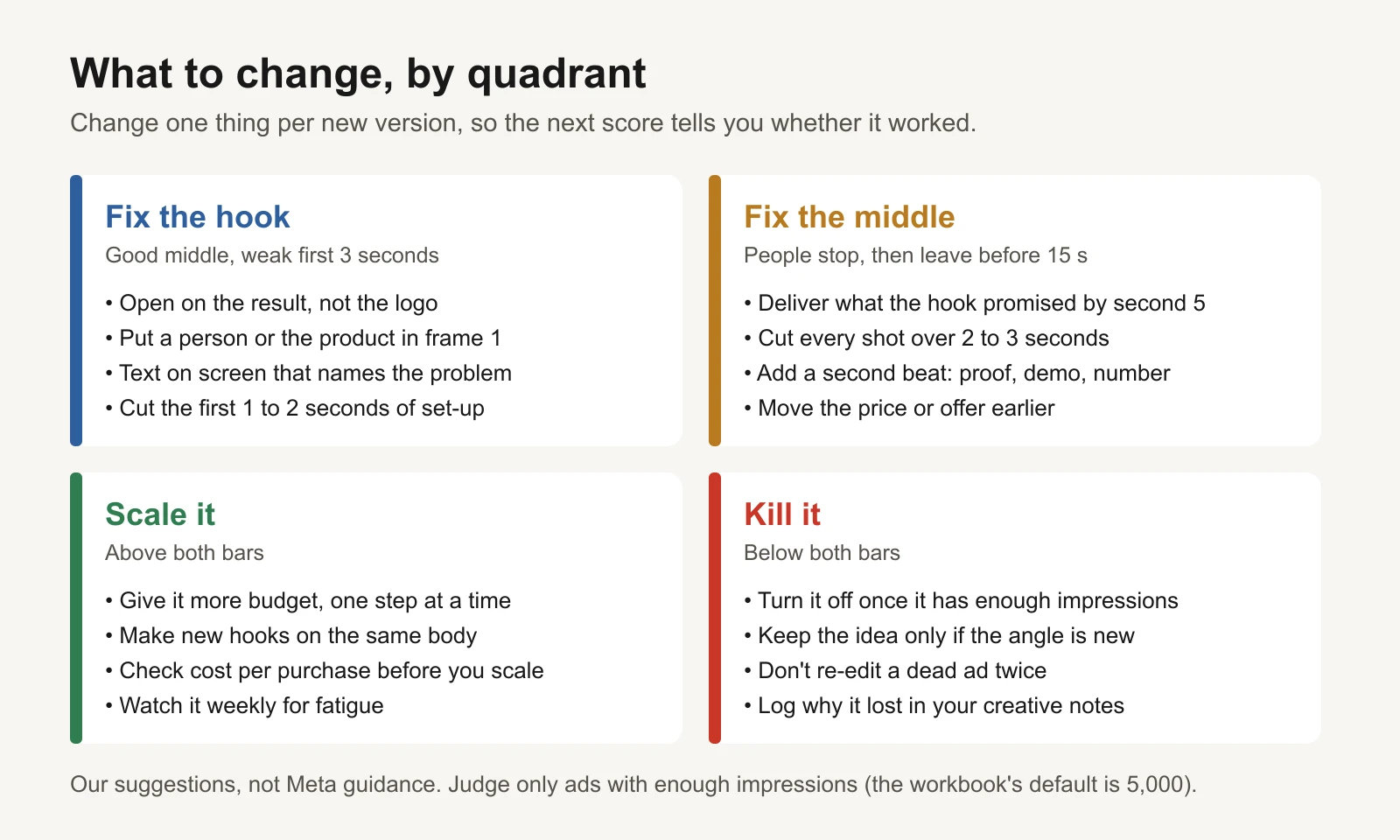
Our suggestions, not Meta guidance. Change one thing per new version.
Fix the hook. Keep everything after second 3 and make two or three new openings. Start on the result (the after, the unboxed product, the face reacting), not the logo or a slow establishing shot. Put a person or the product in the first frame and a line of on-screen text that names the viewer's problem. The hook bank has 100 opening lines, and the hook test design guide shows how to test new openings on the same body cleanly.
Fix the middle. Keep the opening and change seconds 3 to 15. Deliver what the hook promised by second 5. Cut any shot that runs longer than 2 or 3 seconds without new information. Add a second beat (a demo, a number, a customer quote) so there's a reason to keep watching, and bring the offer or price earlier. If a new middle doesn't move hold rate, the hook is probably promising something the product can't show; write a more honest hook.
Scale it. A great hook and hold don't guarantee sales. Check cost per purchase against your target first (the Kill, hold, scale rulebook has the rule), then raise budget one step at a time. The cheapest way to get more winners is new hooks on a proven body.
Kill it. Below both bars, after enough impressions, it's done. Don't re-edit a dead ad twice. If the angle was genuinely new, try it again with a different opening and format; if not, log why it lost and move on.
How to run it in 10 minutes
- In Ads Manager, open the Ads tab, pick a date range of 7 days or more, and add Impressions, 3-second video plays, ThruPlays, Amount spent and Purchases.
- Export at ad level and paste into the Ads tab from row 5. Add video length in seconds if you have it.
- Read the Action column. Rows under 5,000 impressions say "Too early"; image ads say "Not a video".
- Brief one change per ad in the "fix" boxes, using the Fix playbook tab.
- Re-run in a week on the new versions. If the box changes, the fix worked.
Common mistakes
- Judging a video on CTR alone. CTR mixes the hook, the middle, the offer and the landing page. Hook and hold tell you where in the video the problem is.
- Comparing a 6-second and a 30-second video on hold rate. For short videos it's a finish rate. Compare like with like.
- Grading too early. A few hundred impressions swing wildly. The default minimum is 5,000; raise it for big accounts.
- Treating 30% and 25% as targets everyone should hit. They're our starting bars. Your account's own medians, after 20 or more videos, are a better line.
- Scaling on hook and hold without checking sales. Attention is necessary, not sufficient.
Or let GaaS do the grading
GaaS is an AI agent that creates, launches and optimises Meta ads from three inputs: your website, a spend limit and a one-line goal. It reads every video's hook and hold alongside its cost per purchase, makes new openings or middles for the ones that need them, and asks before anything that changes spend. If you'd rather do it yourself, the scorer does the same maths.
Limits of this scorer
- Hook rate and hold rate are marketer conventions built on Meta's columns, not Meta metrics, and definitions vary. We divide ThruPlays by 3-second plays.
- The 30% and 25% bars and the grade cut-offs are ours, not benchmarks. Meta publishes none.
- It uses platform-reported numbers. 3-second plays can include autoplay in placements where video plays without sound; compare ads in similar placements.
- A strong hook and hold say nothing about whether people buy. Always check cost per purchase.
- The example ads and numbers are fictional.
Sources
- Meta Business Help Center: About video ad metrics (3-second video plays)
- Meta Business Help Center: About ThruPlay
- Jon Loomer: Meta Ads glossary (3-second video play, ThruPlay, frequency; checked 17 November 2026)