
Christmas 2026 is on a Friday. If you sell physical products in the US, the ten days before it are the strangest ten days of your year. Demand is still high, but every day a little more of it becomes impossible to serve: the parcel will not arrive in time, and the customer knows it.
Your ads don't know it. An ad that says "the perfect Christmas gift" on 22 December is selling a parcel that will land on the 28th. That costs you twice: the ad money, and the refund or the angry email afterwards.
This guide is the plan we would follow for those days. It turns the carriers' 2026 cutoffs into your own order-by dates, splits the ten days into phases, gives each phase its own ads and message, and moves the budget towards gift cards and digital offers as the cutoffs pass. It is written for a business owner running their own Meta and Google ads, with enough detail for a performance marketer to load it as a checklist.
The free workbook does the date maths for you. Type your packing time and the shipping options you offer, and it works out the last day a customer can order with each one, the phase for every day from 15 to 27 December, the line your ads and banners should say, and a budget split by day.
Carrier dates below are from the carriers' own 2026 pages, checked on 17 November 2026. All other numbers are a fictional worked example unless a source is linked.
The 2026 carrier cutoffs
These are the last days to hand a parcel to the carrier for delivery before Christmas, for addresses in the contiguous US.
| Carrier and service | Last day to ship (2026) | Arrives |
|---|---|---|
| FedEx Ground Economy | Tue 15 Dec | By 24 Dec |
| USPS Ground Advantage | Thu 17 Dec | Before 25 Dec |
| USPS First-Class Mail | Thu 17 Dec | Before 25 Dec |
| FedEx Ground and Home Delivery | Thu 17 Dec (5-day transit) to Wed 23 Dec (1-day transit) | By 24 Dec |
| USPS Priority Mail | Fri 18 Dec | Before 25 Dec |
| USPS Priority Mail Express | Sat 19 Dec | Before 25 Dec |
| FedEx Express Saver | Mon 21 Dec | By 24 Dec |
| FedEx 2Day and 2Day AM | Tue 22 Dec | By 24 Dec |
| FedEx First, Priority and Standard Overnight | Wed 23 Dec | By 24 Dec |
| FedEx SameDay | Thu 24 Dec | 24 Dec |
| UPS | Check ups.com |
Sources: USPS holiday shipping dates and the FedEx 2026 last days to ship (PDF).
Three things about this table matter more than any single date:
- They are recommendations, not guarantees. USPS calls its dates recommended send-by dates and says actual delivery depends on origin, destination, acceptance time and other conditions. FedEx says its dates are subject to change and will post updates on the same page. Never write "guaranteed by Christmas" in an ad unless your carrier guarantees it in writing.
- FedEx Ground depends on your zone. The 17 December date is for a 5-day transit; a 1-day transit can ship on 23 December. Look up your own transit days from your warehouse to your main customer areas, then use the earliest one that covers most orders.
- We could not confirm UPS. UPS's own holiday page did not load for us, and third-party lists are not the same as the carrier saying it. If you ship UPS, type the dates from the UPS holiday schedule into the workbook yourself.
Alaska, Hawaii, Puerto Rico, international and military addresses have earlier dates. USPS lists 9 December for First-Class Package International and Priority Mail International, for example. If those customers matter to you, add their own rows.
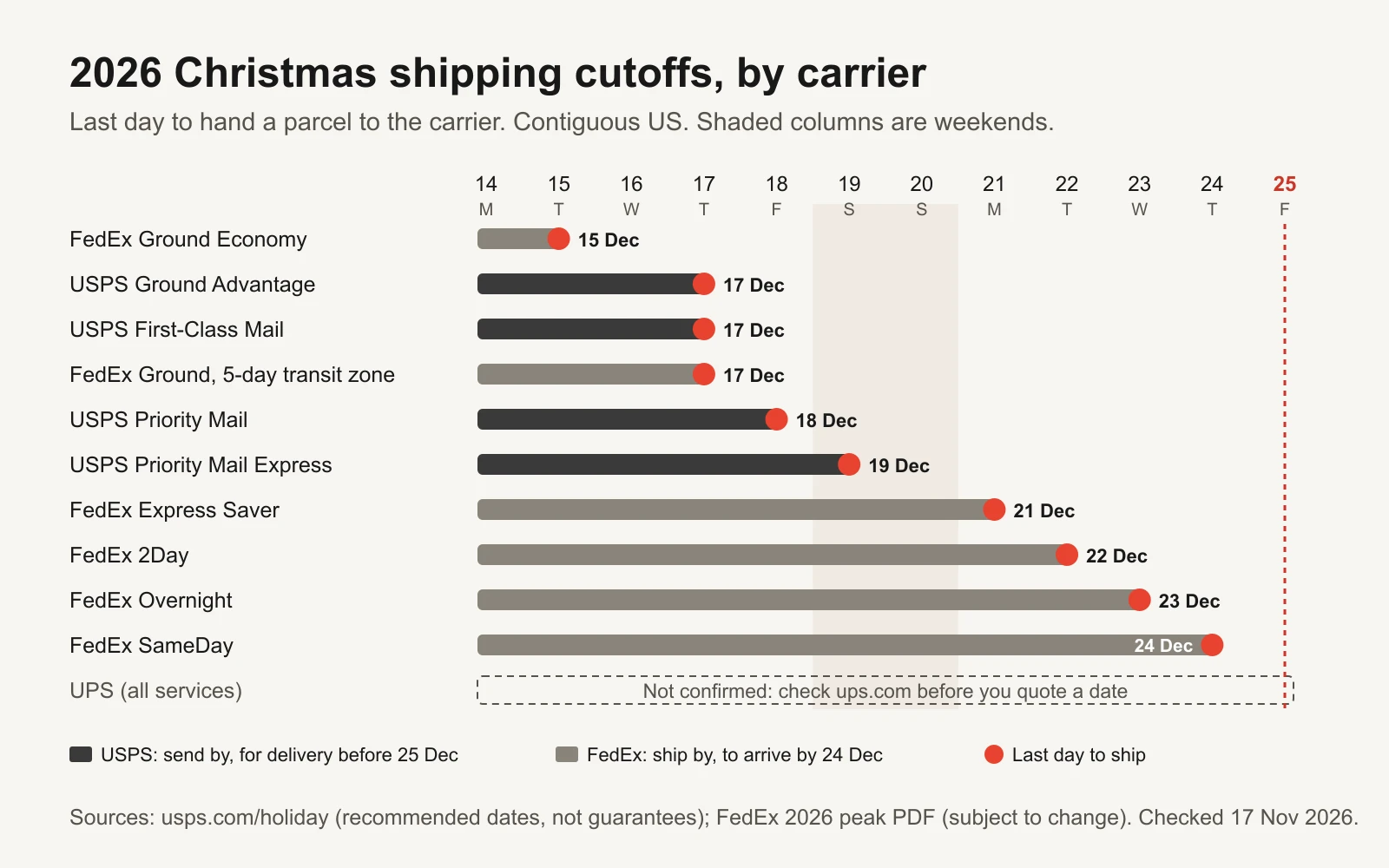
The carrier's last day to ship. Your customer's last day to order is earlier, as the next section shows.
Turn carrier dates into your order-by dates
The date your ad shows is not the carrier date. It is the last day a customer can order and still have you hand the parcel over in time. Two things move it earlier:
- Weekends. If the carrier's last day is a Saturday and you don't ship on Saturdays, your real last ship day is Friday. USPS Priority Mail Express's 2026 date, 19 December, is a Saturday.
- Your packing time. If an order placed today ships tomorrow, you have one business day of handling. Subtract it, skipping weekends again.
Here is the example store from the workbook: one business day to pack, no weekend shipping.
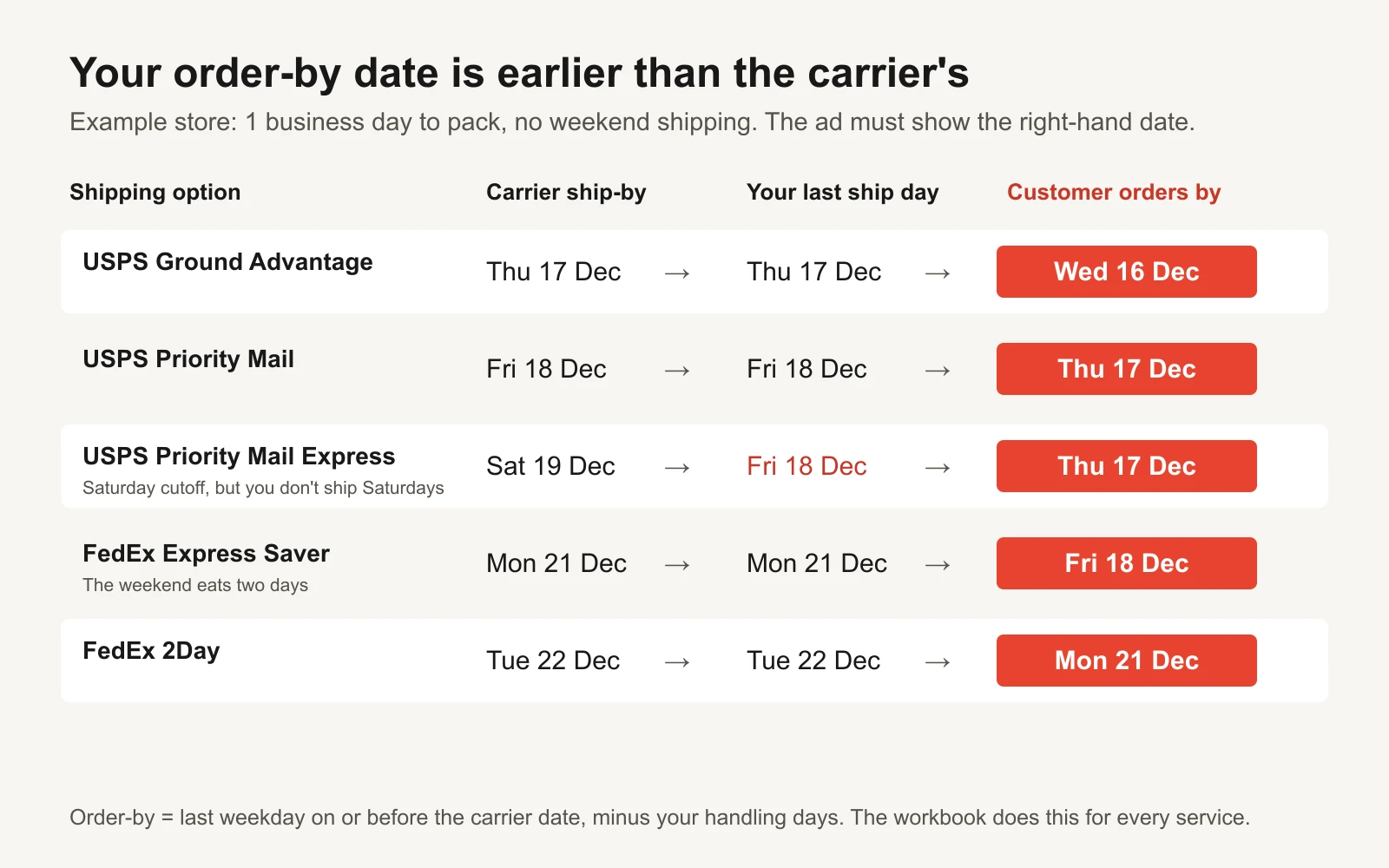
In this example, FedEx Express Saver's 21 December cutoff becomes a Friday 18 December order-by date for the customer.
The formula the workbook uses is simple: take the carrier's date, move it back to the last weekday on or before it, then go back by your handling days in business days. If you do ship at weekends, set that option to Yes and it subtracts calendar days instead. Add a safety buffer day if your packing slows down in December; most do.
Put the time of day in too. "Order by Wednesday 16 December" means nothing if your warehouse stops picking at 2pm. "Order by 2pm ET on Wednesday 16 December" is a promise you can keep.
The six phases, and what each one says
Once you have three order-by dates (your standard shipping, your paid faster option and your fastest express option), every day from 15 to 27 December falls into one of six phases. In the example store, standard is USPS Ground Advantage, faster is USPS Priority Mail and express is FedEx 2Day.
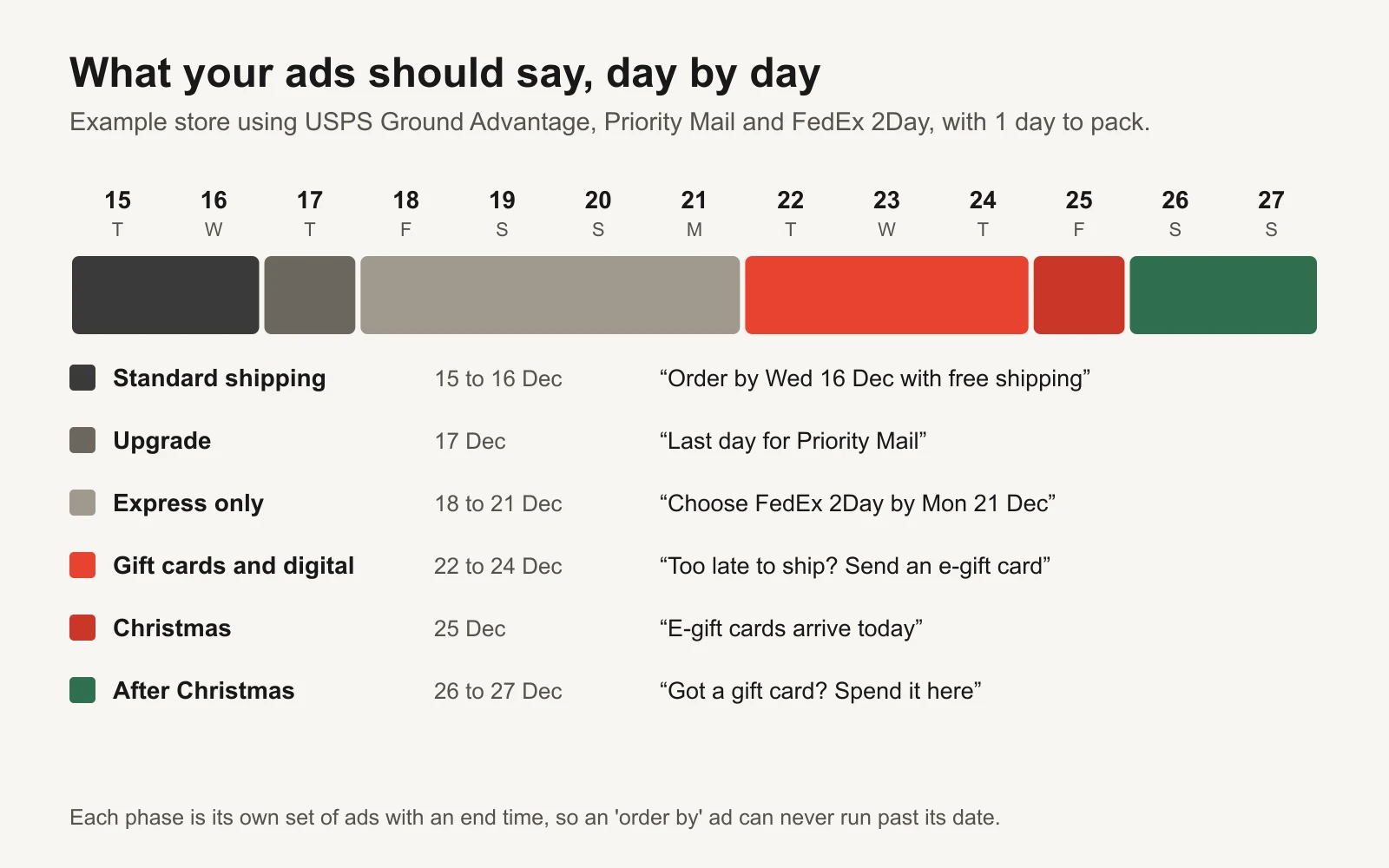
Each phase gets its own ads and its own end time.
| Phase | Example dates | What the ads say | What changes on the site |
|---|---|---|---|
| 1. Standard shipping | 15 to 16 Dec | Your products, with the standard order-by date and time in the ad | Banner: "Order by 2pm ET Wed 16 Dec for free delivery before Christmas" |
| 2. Upgrade | 17 Dec | "Missed free shipping? Priority Mail still makes it if you order today" | Banner and cart show the paid option first |
| 3. Express only | 18 to 21 Dec | "Choose FedEx 2Day by Mon 21 Dec"; gift cards start getting real budget | Express is the only option shown as arriving in time |
| 4. Gift cards and digital | 22 to 24 Dec | "Too late to ship? Send an e-gift card in a minute." Digital products and local pickup if you have them | Gift card at the top of the home page and nav |
| 5. Christmas Day | 25 Dec | "E-gift cards arrive today" | Same as phase 4 |
| 6. After Christmas | from 26 Dec | "Got a gift card? Spend it here." Easy returns | Normal products, returns window, gift-card balance check |
Why phases rather than one ad that you edit? On Meta, changing an ad's creative counts as a significant edit and can send the ad set back into learning (Meta: Significant edits and learning phase). Editing the same ad every day in the busiest week of the year is the worst time to do that. Separate ads, uploaded in advance with start and end times, avoid it. They also make it impossible for an "order by 16 December" ad to keep running on the 17th because someone forgot. The promotion expiry QA guide has a checklist for exactly that kind of mistake.
The workbook's Ad copy tab writes a headline and primary text for each phase with your dates filled in. Treat them as a starting point and keep the honesty rule: "for delivery before Christmas", not "guaranteed".
Move the budget as the cutoffs pass
The money question is simple to state: once a product can't arrive in time, how much do you keep spending on it?
Some shoppers will still buy for themselves or accept a late gift, so it is rarely zero. But your conversion rate on physical products usually drops as delivery promises weaken, and gift cards become the product that solves the shopper's problem. The workbook's phase rules let you set two numbers for each phase: total budget as a share of normal, and the share of that total that goes to gift-card and digital ads.
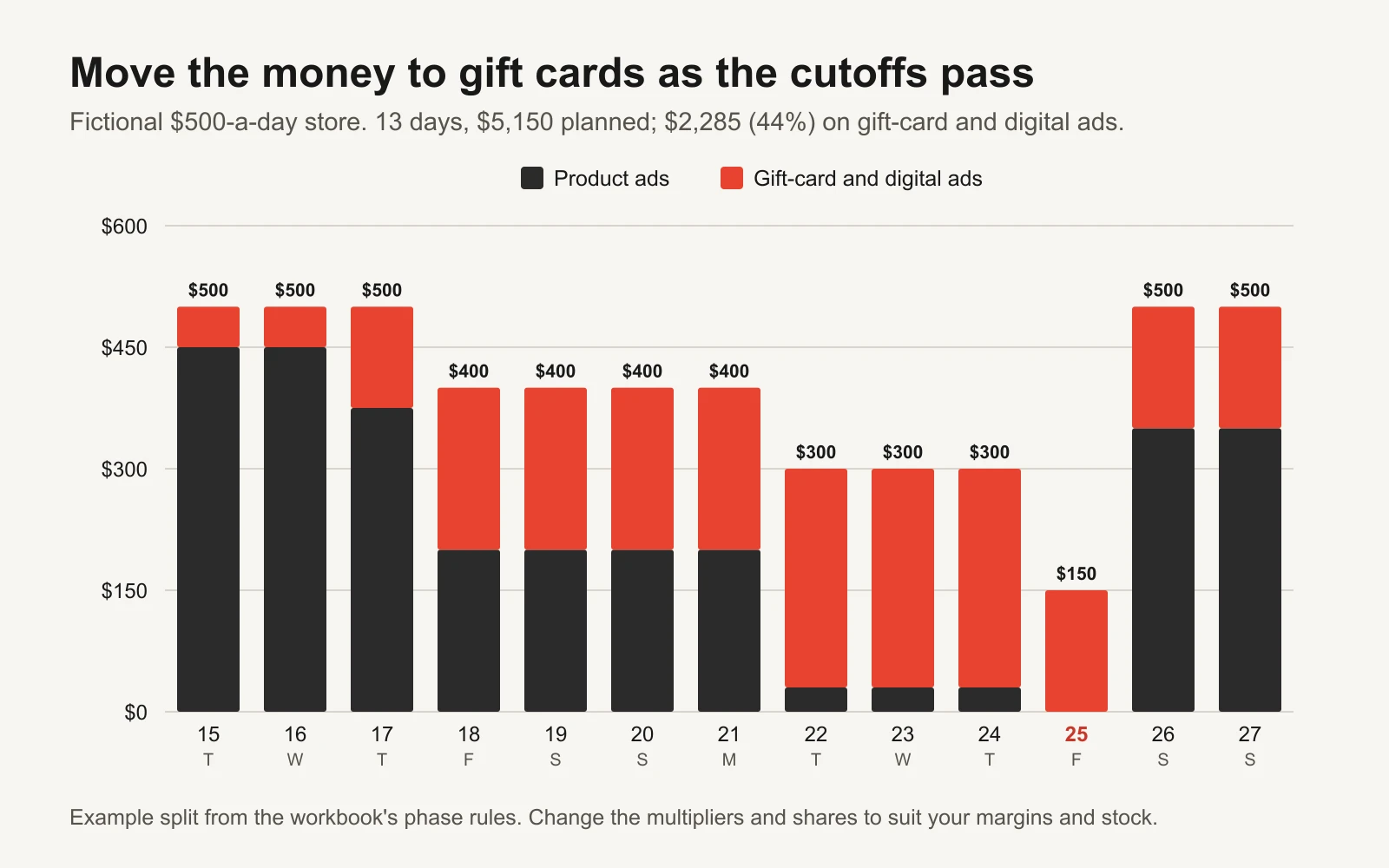
In this example, 44% of the 13 days' budget goes to gift cards and digital offers, almost all of it after the express cutoff.
| Phase (example) | Total budget | Gift-card and digital share | Why |
|---|---|---|---|
| Standard shipping | 100% | 10% | Products still arrive; start warming gift-card ads |
| Upgrade | 100% | 25% | Paid shipping lowers conversion a little; gift cards rise |
| Express only | 80% | 50% | Express costs the customer more, so fewer will buy; split evenly |
| Gift cards and digital | 60% | 90% | Nothing physical arrives; keep a little for self-purchase |
| Christmas Day | 30% | 100% | Last-minute givers only |
| After Christmas | 100% | 30% | Gift-card spending and self-gifting bring products back |
These are example settings, not benchmarks. Use your own numbers from last December if you have them: pull spend, purchases and revenue by day for 10 to 31 December 2025 and see where your conversion rate actually fell. The Black Friday playbook shows how to export daily numbers from Ads Manager and line them up against this year.
A note on Meta budgets. Meta's budget week runs Sunday to Saturday, and a daily budget can spend up to 75% more on a strong day (Meta: About daily budgets). Cutting a budget in big steps mid-week can also count as a significant edit. The cleanest set-up is to give the product ads and the gift-card ads separate ad sets from the start, each with its own budget, so the switch is a shift between two budgets you set in advance, not an edit to one live ad set.
Gift cards are the product of the last five days
Gift cards are not a consolation prize. In the National Retail Federation's 2026 holiday survey of 8,094 adults, gift cards were the most requested gift, wanted by 47% of holiday shoppers (NRF, 20 October 2026). And after the shipping cutoffs, they are the only thing you sell that still arrives on time.
Make the gift card worth advertising:
- Sell a digital gift card that can be scheduled. On Shopify, you can switch on recipient fields for gift card products: the buyer adds the recipient's name, email, a message and a send-on date, so a card bought on 22 December can land on Christmas morning (Shopify: add recipient fields to gift card products). Other platforms have similar apps or settings.
- Give the gift card its own landing page. The ad should go straight to it, not to your home page. Show the amounts, the message box and the send date above the fold.
- Show what it buys. "A $50 gift card covers our best-selling set" is more useful than "the perfect gift".
- Make it giftable in person too. A printable card or PDF lets someone hand over a gift on the day.
- Check your local gift-card rules. Expiry dates and fees are regulated in many places. In the US, federal rules and state laws apply; check yours before you write terms.
Google Shopping: make the delivery estimate tell the truth
If you run Shopping ads or Performance Max with a product feed, Google can show a delivery estimate on your listings and an "arrives by" date. Google builds it from three things you set in Merchant Center: your order cutoff time, your handling time and the carrier transit time. Orders placed after the cutoff get an extra business day, and if the handling or transit time overlaps a holiday, Google adds a day (Google Merchant Center: set up estimated delivery time).
So the same numbers that drive your order-by dates should be in Merchant Center: the cutoff time you use in your ads, the handling days you used in the workbook, and your real transit times. If your warehouse slows down in December, change handling time there too. A Shopping ad promising Christmas delivery that your warehouse can't keep is the same mistake as a Meta ad saying it.
Once standard shipping closes, also look at which products you push. Products that need ground shipping can be paused or moved to a lower-priority campaign, while gift cards and anything you can deliver locally get the budget.
The day-by-day plan
The same plan is on the workbook's Day plan tab, where the dates, phases and order-by lines move with your inputs.
| Day | Phase (example) | Ads | Site, email and ops |
|---|---|---|---|
| By Mon 30 Nov | Prep | Start making all six phases' ads | Shipping-cutoff banner live; cutoff dates on product pages, cart and FAQ; Merchant Center handling and cutoff updated |
| By Sat 5 Dec | Prep | Digital gift card with recipient fields and send-on date live | |
| By Thu 10 Dec | Prep | Gift-card ads and landing page ready | Customer-service saved replies for "will it arrive?"; "last day for free shipping" email scheduled |
| By Sun 13 Dec | Prep | Every phase's ads uploaded with start and end times | Carrier pickups and staff confirmed for the final week |
| Tue 15 Dec | Standard shipping | Products with "order by Wed 16 Dec" | Email: "two days left for free delivery before Christmas" |
| Wed 16 Dec | Standard shipping, last day | Same ads, ending at your cutoff time | Last-day email and SMS (consented subscribers); banner switches at cutoff |
| Thu 17 Dec | Upgrade | Paid-upgrade ads; gift-card ads at a quarter of budget | Cart shows the faster option first |
| Fri 18 to Mon 21 Dec | Express only | Express ads with the express order-by date; gift cards at half | Banner: "express only from here"; pause ground-only products in Shopping |
| Tue 22 to Thu 24 Dec | Gift cards and digital | Gift-card and digital ads; product ads only for self-purchase or local pickup | Gift card at the top of the home page; e-gift card email |
| Fri 25 Dec | Christmas Day | E-gift card ads at a low budget | Nothing else; enjoy the day |
| Sat 26 Dec onwards | After Christmas | "Spend your gift card" and products | Returns window clear; gift-card balance check easy to find |
The prep rows match the workbook's checklist, which counts each task back from Christmas (25, 20, 15 and 12 days before). Change them if your team needs more time.
Watch it while it runs
During the ten days, check once a day, at the same time, and look at three things:
- Is the right phase live? Every ad set showing today's message, nothing from yesterday still spending, banners and Merchant Center matching the ads.
- Return on ad spend (ROAS) against break-even. Type actual spend and revenue into the Day plan tab each evening. It colours each day against your break-even ROAS. If you don't know your break-even, the free break-even ROAS calculator works it out from your margin, and break-even ROAS and contribution margin explains the logic.
- Customer messages. "Will it arrive?" questions spike when the message is unclear. If they climb, the banner is too small or the date too vague.
CPMs (the cost of 1,000 impressions) can move around Christmas as other advertisers change their spend. If yours jump, how to investigate a Meta CPM spike walks through the causes before you change anything.
Tools and repos that help
| Tool or repo | What it is for | Who should use it |
|---|---|---|
| USPS holiday shipping dates | Official 2026 send-by dates, including Alaska, Hawaii, international and military | Anyone shipping USPS |
| FedEx 2026 last days to ship | Official FedEx dates by service, plus Ground transit maps linked inside | Anyone shipping FedEx |
| Google Merchant Center delivery estimates | How cutoff, handling and transit times become the "arrives by" date on Shopping | Stores running Shopping or Performance Max |
| Shopify gift card recipient fields | Lets buyers schedule an e-gift card for a recipient and date | Shopify stores |
| meta/facebook-python-business-sdk | Official Python SDK for Meta's Marketing API: create ads with start and end times, read daily spend | Teams who want to script the phase switches |
| anthropics/skills | Public agent skills, including an xlsx skill that lets Claude read and edit spreadsheets like this workbook | Anyone who wants an assistant to fill in the plan |
After Christmas
The day after Christmas is not the end of the season. People have gift cards to spend, returns to make and money they were given. Load the after-Christmas ads before you stop for the holiday, so they start on 26 December without anyone at a laptop. Then write down, while it is fresh, which phase made money, where conversion actually fell and how many "will it arrive?" emails you got. Next year, that note and this workbook are the plan.
Or let GaaS run it
GaaS is an AI agent that creates, launches and optimizes Meta and Google ads from three inputs: your website, a spend limit and a one-line goal. It plans creative and budgets around dates like these, writes the phase ads, and nothing spends without your approval. If you would rather review a plan than build one, see how GaaS works. Either way, the workbook below is yours to keep.