
Today is Monday 16 November 2026. Black Friday is Friday 27 November and Cyber Monday is Monday 30 November. That leaves 11 days to get the maths, the offer, the creative, the tracking and the budgets ready.
This playbook is the plan we would follow with those 11 days. It is written for a business owner running their own Meta and Google ads, with enough detail for a performance marketer to use as a checklist. Every date is given as "days from Black Friday" too, so you can reuse it next November without rewriting it.
The free workbook does the arithmetic for you: break-even ROAS (return on ad spend) at your sale price, an offer margin calculator, a budget planner that uses your own CPM history, a day-by-day calendar and a pre-sale checklist. Change one cell (the year) and every date moves to that year's Black Friday.
All numbers in this article are a fictional worked example unless a source is linked. They show how the maths works. They are not benchmarks and they are not a forecast for your account.
The dates, and how to find them in any year
In the US, Thanksgiving is the fourth Thursday of November. Black Friday is the day after. Cyber Monday is the Monday after that.
| Year | Thanksgiving | Black Friday | Cyber Monday |
|---|---|---|---|
| 2025 (last year) | Thu 27 Nov | Fri 28 Nov | Mon 1 Dec |
| 2026 (this year) | Thu 26 Nov | Fri 27 Nov | Mon 30 Nov |
| 2027 | Thu 25 Nov | Fri 26 Nov | Mon 29 Nov |
| 2028 | Thu 23 Nov | Fri 24 Nov | Mon 27 Nov |
Notice that Black Friday 2025 was 28 November and Black Friday 2026 is 27 November. When you compare this year with last year, compare the same number of days before or after Black Friday, not the same calendar date. Comparing 27 November 2026 with 27 November 2025 compares Black Friday with Thanksgiving. The workbook lines everything up this way.
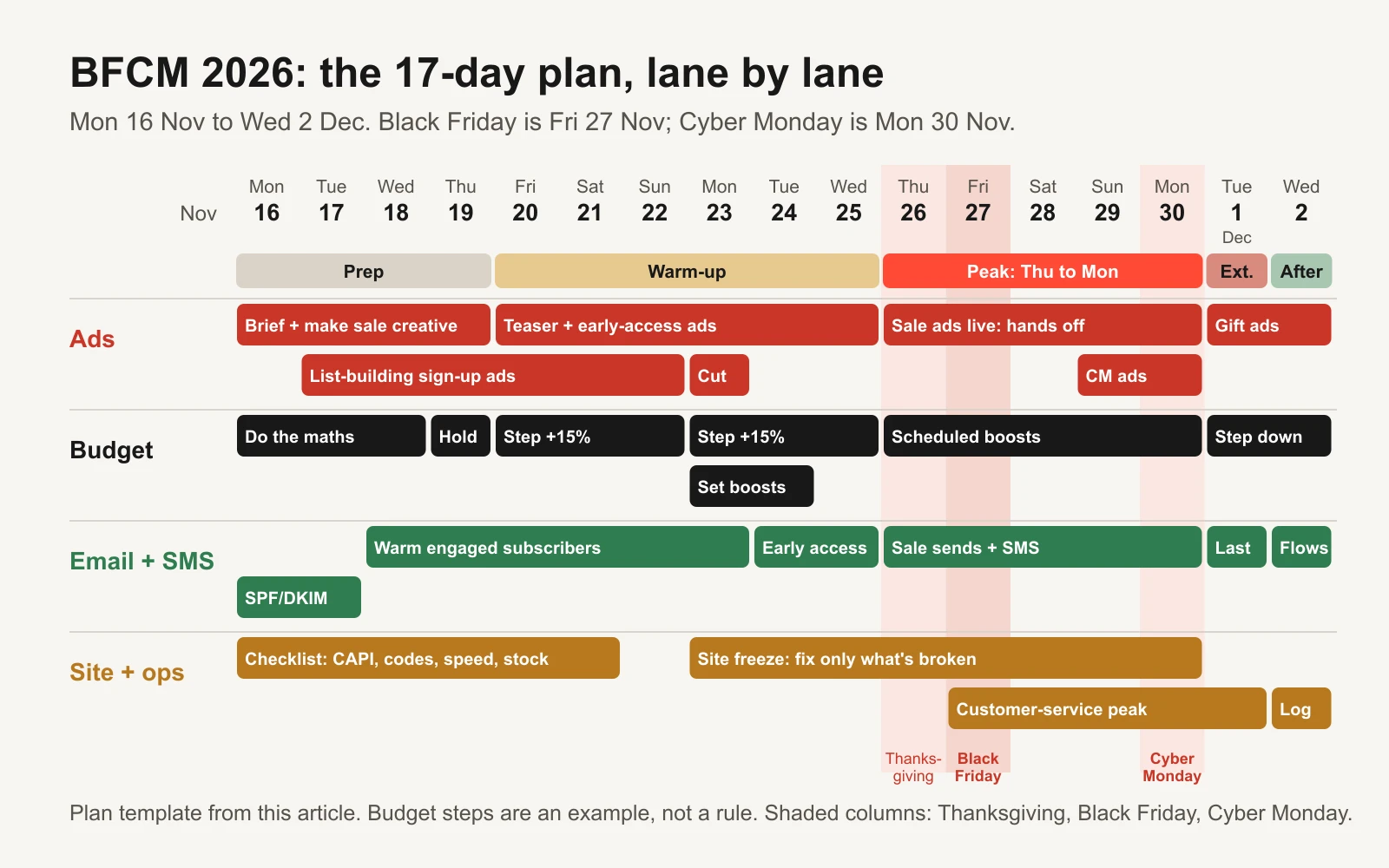
The whole plan on one page. The full day-by-day table is further down and in the workbook.
Step 1: know your break-even at the sale price
Before you touch a budget, work out what one sale order leaves you to spend on ads. Three numbers do this.
- Contribution per order is the order value minus the costs that come with every order: product cost (often called COGS, cost of goods sold), shipping and fulfilment, payment fees and any other per-order cost. It is not net profit, because rent, salaries and software are not included.
- Break-even ROAS is the order value divided by contribution per order. ROAS is revenue divided by ad spend. If your ROAS is below break-even, the ads cost more than the orders earn.
- Max CPA is the most you can pay in ads for one order before you lose money on it. CPA means cost per acquisition (ad spend divided by orders). At break-even, max CPA equals contribution per order.
Here is a worked example for a product that sells for $80, costs $24 to make, $8 to ship and 3% in payment fees.
| Full price | 25% off | |
|---|---|---|
| Order value | $80.00 | $60.00 |
| Product cost | $24.00 | $24.00 |
| Shipping and fulfilment | $8.00 | $8.00 |
| Payment fees (3%) | $2.40 | $1.80 |
| Contribution per order | $45.60 | $26.20 |
| Break-even ROAS | 1.75 | 2.29 |
| Max CPA | $45.60 | $26.20 |
A 25% discount cut the price by $20 but cut the contribution by $19.40, because product cost and shipping didn't fall. The break-even ROAS rose from 1.75 to 2.29. An ad that was comfortably profitable at full price can lose money at sale price with exactly the same ROAS.
If you want some profit per order after ads, subtract it. Wanting $6 per order leaves a target CPA of $20.20 and a target ROAS of $60 / $20.20 = 2.97. The workbook's Inputs tab does all of this, and the free break-even ROAS calculator does the core sum in a browser. For the deeper version of this logic, read break-even ROAS and contribution margin.
Step 2: pick the offer on margin, not habit
Most brands run a percentage discount because that is what they ran last year. Before you do, compare the alternatives on the same product. The workbook's Offer calculator does this side by side.
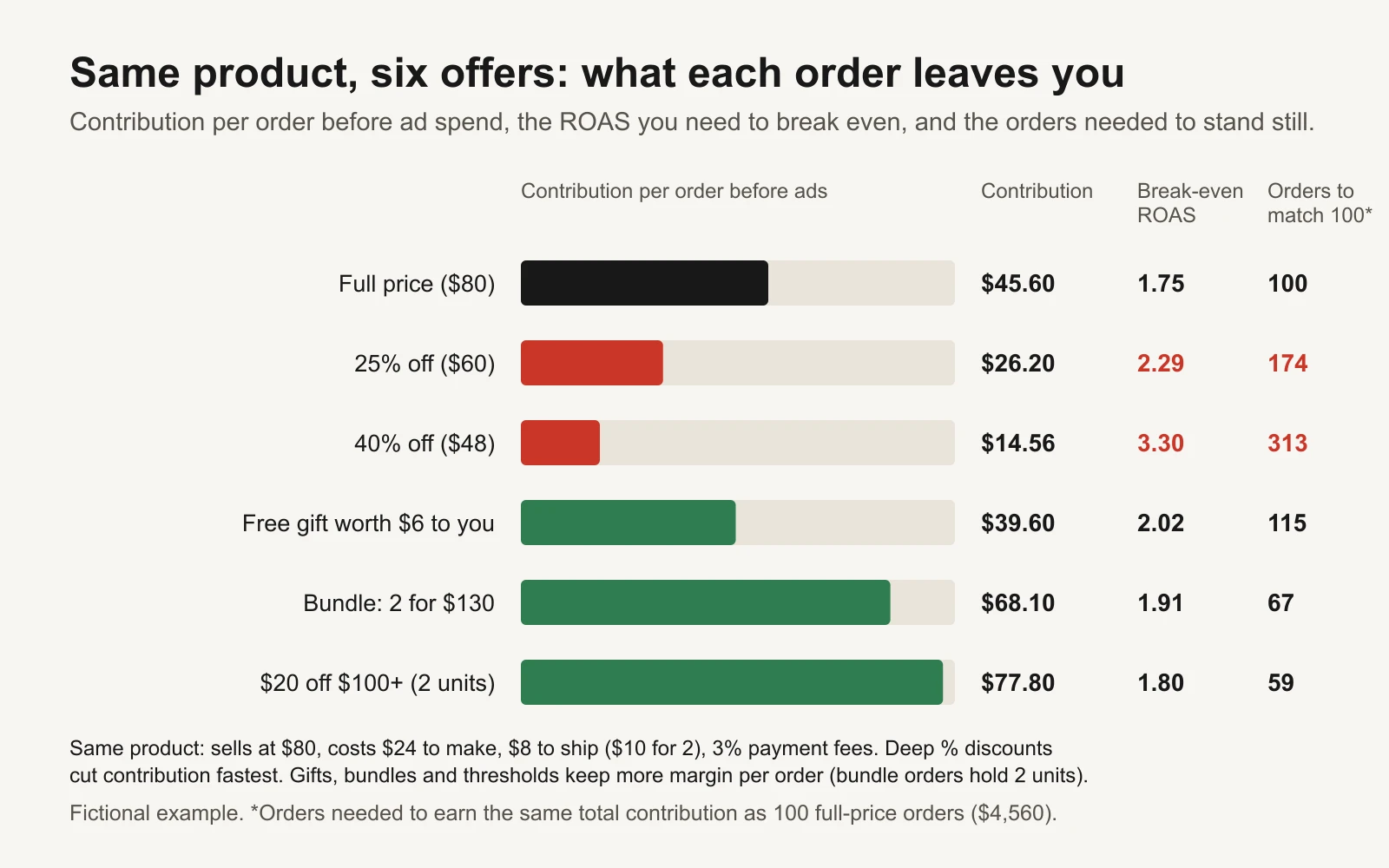
Same product, six offers. The last column is the number that matters: how many orders you need just to stand still.
The "orders to match 100" column is the one to look at. At full price, 100 orders leave $4,560. At 25% off, you need 174 orders to leave the same amount. At 40% off you need 313. A sale that "did great" on orders can still leave less money than an ordinary week.
| Offer type | How it reads to a shopper | What it does to margin | Use it when |
|---|---|---|---|
| % off (25% off) | Easy to grasp, feels big on cheap items | Cuts every order by the full discount | Lower-priced items; when the % sounds bigger than the dollars |
| $ off ($20 off) | Concrete, feels big on expensive items | Same as the equal % off on one item | Higher-priced items; when the dollars sound bigger than the % |
| Spend threshold ($20 off orders over $100) | "Add one more to unlock it" | Discount spread over a bigger order | You have a natural second item; shipping cost doesn't double |
| Bundle (2 for $130) | Solves "which one should I get?" | Smaller % discount, bigger order | Complementary products or a consumable people restock |
| Gift with purchase | "Free" feels generous and protects your price | Costs only what the gift costs you | You have a low-cost item people value more than it costs |
| Free shipping | Removes a checkout surprise | You absorb shipping on every order | Shipping is a known reason people abandon carts |
On % versus $ framing, a common rule of thumb comes from marketing professor Jonah Berger's book Contagious: under about $100, a percentage usually sounds bigger; over $100, a dollar amount usually does. A $20 discount on an $80 item is "25% off". A $50 discount on a $250 item sounds bigger as "$50 off" than "20% off". Test it if you can, but it is a sensible default.
Two honesty rules matter here. In the US, a "was" price must be a genuine former price that you actually charged for a reasonable period, not a price invented to make the discount look bigger (FTC Guides Against Deceptive Pricing, 16 CFR 233). In the EU, an announced price reduction must show the lowest price you charged in the previous 30 days (Directive 2019/2161). If you sell elsewhere, check your local rules. The promotional discount economics guide goes deeper on discount maths, and the bundle test guide shows how to test a bundle against a discount.
Step 3: raise budgets early, in steps, then boost the peak
Most of the money moves on four or five days. The question is how to spend more on those days without breaking what is already working. The answer is different on Meta and Google, so they get separate sections.
How Meta's learning phase affects a budget increase
Meta's delivery system needs time to learn how to deliver a new or changed ad set. Meta says an ad set usually leaves the learning phase after about 50 results in the week following its last significant edit, and that ad sets still learning are less stable and usually have a higher CPA (Meta: About the learning phase).
Meta's list of significant edits is what matters for Black Friday (Meta: Significant edits and learning phase):
- These always count: any change to targeting, any change to ad creative, any change to the optimization event, adding a new ad to the ad set, pausing for 7 days or longer, and changing bid strategy.
- These count depending on how big the change is: the budget amount, the ad set spending limit, and bid, cost or ROAS goal amounts. Meta's own example: going from $100 to $101 is unlikely to restart learning; going from $100 to $1,000 may.
- With Advantage+ campaign budget (budget set at campaign level), changing the campaign budget can send several ad sets back into learning at once.
Meta does not publish a percentage that counts as "big". Many advertisers use a rule of thumb of raising budgets by roughly 15% to 20% at a time, a few days apart. Treat that as a practitioner habit, not a Meta rule. The workbook lets you set your own step size and flags any day that breaks it.
Two other Meta facts change how you plan (Meta: About daily budgets):
- Daily budgets already flex. On a day with better opportunities Meta may spend up to 75% more than the daily budget, but never more than 7 times the daily budget across a Sunday-to-Saturday week. A $400 daily budget can spend up to $700 on Black Friday by itself, while the week still averages out.
- Meta's budget week runs Sunday to Saturday. Changing a daily budget mid-week makes Meta prorate the rest of the week, so a change on Wednesday 25 November behaves differently from one on Sunday 22 November.
The tool built for this: budget scheduling
Meta's budget scheduling lets you schedule a budget increase for a set window without editing the live budget. Meta's developer documentation calls these windows high-demand periods and sets the limits clearly (Meta Marketing API: high-demand periods):
- It only works with daily budgets, not lifetime budgets.
- Each period must be at least 3 hours long.
- The total budget in a period can't exceed 8 times the daily budget.
- You can set up to 50 periods per campaign or ad set, and recurring periods aren't supported.
Meta calls the feature budget scheduling; in the Marketing API it is the budget schedules endpoint. Options can roll out to accounts at different times, so check yours this week. Set the periods by Monday 23 November so nothing has to be edited during the peak.
Google Ads works differently
Google Ads is more forgiving about budgets. Google states that changes to budgets, targets, creatives or targeting settings never wipe your historical data and never trigger the Learning bid-strategy status (Google Ads: About bid strategy statuses). One day can spend up to twice the average daily budget, and a month no more than 30.4 times it (Google Ads: overdelivery).
If you expect your conversion rate to jump far above normal for a short sale, Google offers seasonality adjustments. Google describes them as ideal for short events of 1 to 7 days, warns they may not work as well over more than 14 days, and says to use them only for major changes because Smart Bidding already handles normal seasonality. They work on Search, Shopping, Demand Gen and Display campaigns using Target ROAS or Target CPA, and on Performance Max with any bid strategy (Google Ads: About seasonality adjustments). One adjustment covering Friday 27 to Monday 30 November (4 days) fits that window.
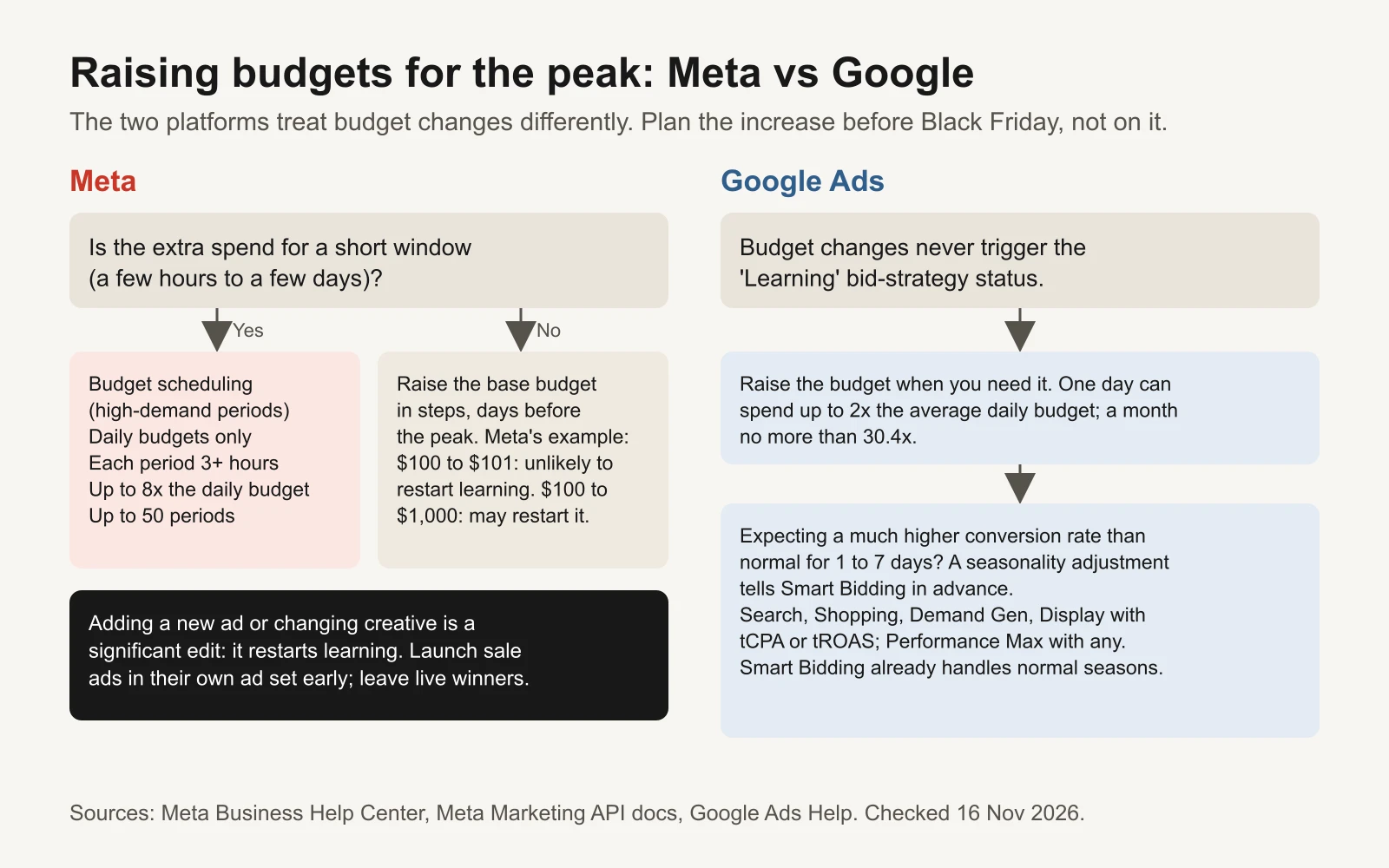
Plan the increase before Black Friday. On Meta, the safest peak-day budget change is one you scheduled days earlier.
How much to spend: a worked plan
Start from what you can afford, not from what you hope to spend. Three limits set the ceiling: the target CPA from Step 1, the stock you have, and the orders your team can pack and ship. Multiply expected peak-day orders by target CPA to get a peak-day budget you can defend. Then shape the days around it.
Here is the example plan from the workbook, for an account that normally spends $300 a day.
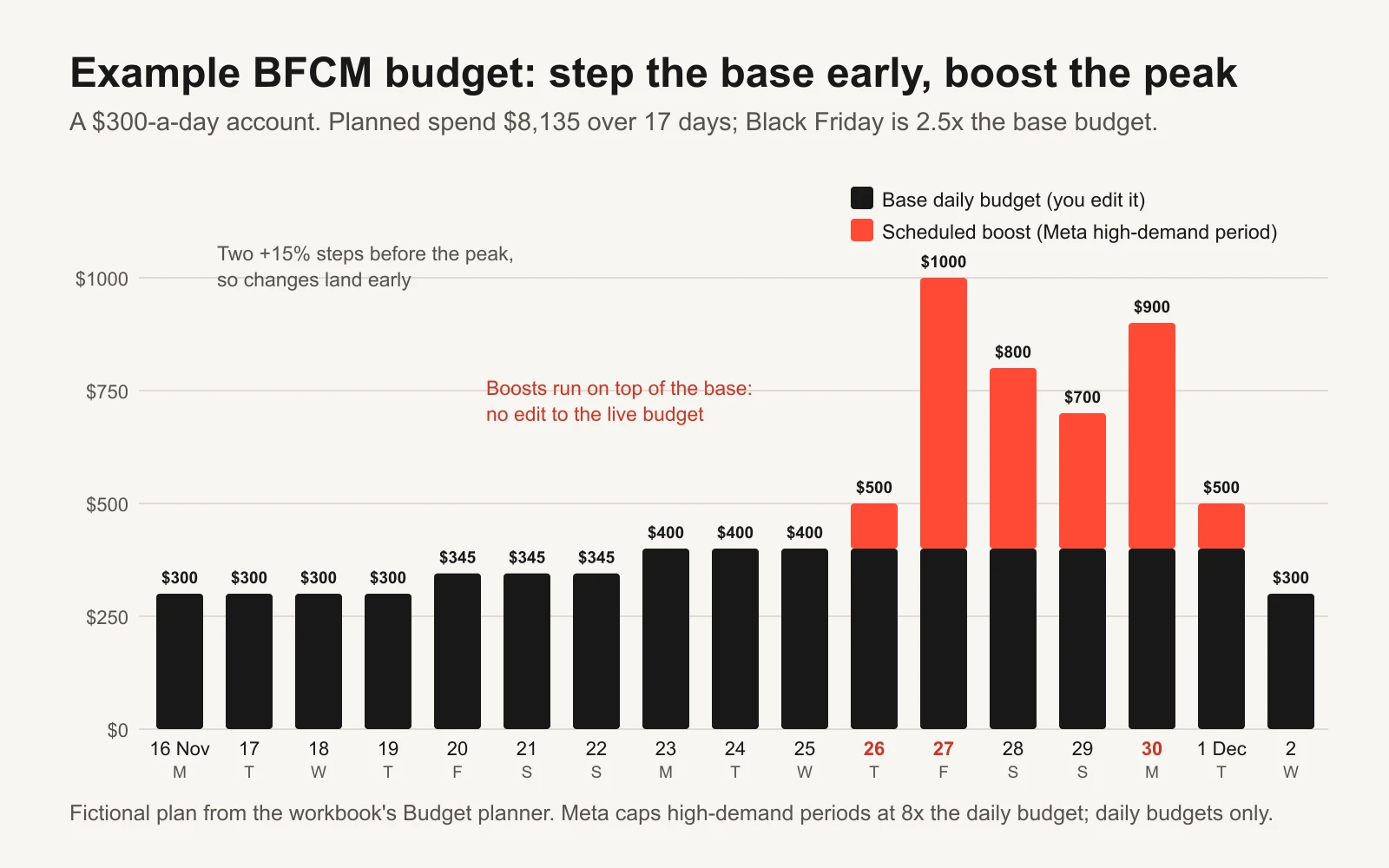
Base budgets step up twice before the sale; scheduled boosts do the heavy lifting on peak days.
| Days | Base daily budget | Scheduled boost | Planned spend per day | Why |
|---|---|---|---|---|
| Mon 16 to Thu 19 Nov | $300 | none | $300 | Normal spend while you prepare |
| Fri 20 to Sun 22 Nov | $345 | none | $345 | First +15% step; teaser ads learn |
| Mon 23 to Wed 25 Nov | $400 | none | $400 | Second step; base is now set for the peak |
| Thu 26 Nov (Thanksgiving) | $400 | $100 | $500 | Sale opens |
| Fri 27 Nov (Black Friday) | $400 | $600 | $1,000 | 2.5x the base, well under Meta's 8x cap |
| Sat 28 Nov | $400 | $400 | $800 | |
| Sun 29 Nov | $400 | $300 | $700 | |
| Mon 30 Nov (Cyber Monday) | $400 | $500 | $900 | |
| Tue 1 Dec | $400 | $100 | $500 | Sale ends on schedule |
| Wed 2 Dec | $300 | none | $300 | Back to normal |
The workbook turns this plan into expected orders and ROAS using your normal CPA, last year's CPM pattern and the conversion-rate lift you expect. In the example, Black Friday has the highest spend and the thinnest margin: its expected ROAS of 2.31 only just clears the 2.29 break-even. That tells you which day to watch most closely. Over all 17 days, the plan expects a ROAS of about 2.9. The step back down on 2 December is a big change; after the sale that is usually fine, but it is worth knowing it may send ad sets back into learning.
Step 4: plan for higher CPMs without guessing
CPM is cost per 1,000 impressions: what you pay for attention. Around Black Friday many more advertisers bid for the same people, so CPMs usually rise. How much depends on your country, category and audience, so we won't give you a number. You have a better source: your own account's history.
Pull last year's daily CPMs in five minutes:
- In Meta Ads Manager, set the date range to about five weeks before last Black Friday through five days after. Last year that is roughly 24 October to 3 December 2025.
- Choose Breakdown, then By time, then Day.
- Export spend and impressions. Do the same in Google Ads for the same dates if you run Shopping or Performance Max.
- Paste them into the workbook's CPM history tab. It calculates each day's CPM and a CPM index: that day's CPM divided by your normal CPM. An index of 1.40 means 40% more expensive than normal.
- Read the index by days from Black Friday, not by calendar date.
Then ask the question that matters: how much CPM rise can your sale absorb? CPA depends on three things: CPA = CPM / (1,000 x CTR x conversion rate). CTR is click-through rate (link clicks divided by impressions); conversion rate is orders divided by clicks. If CPM rises 40% and nothing else changes, CPA rises 40%. If your sale also lifts the conversion rate, some of that is cancelled out.
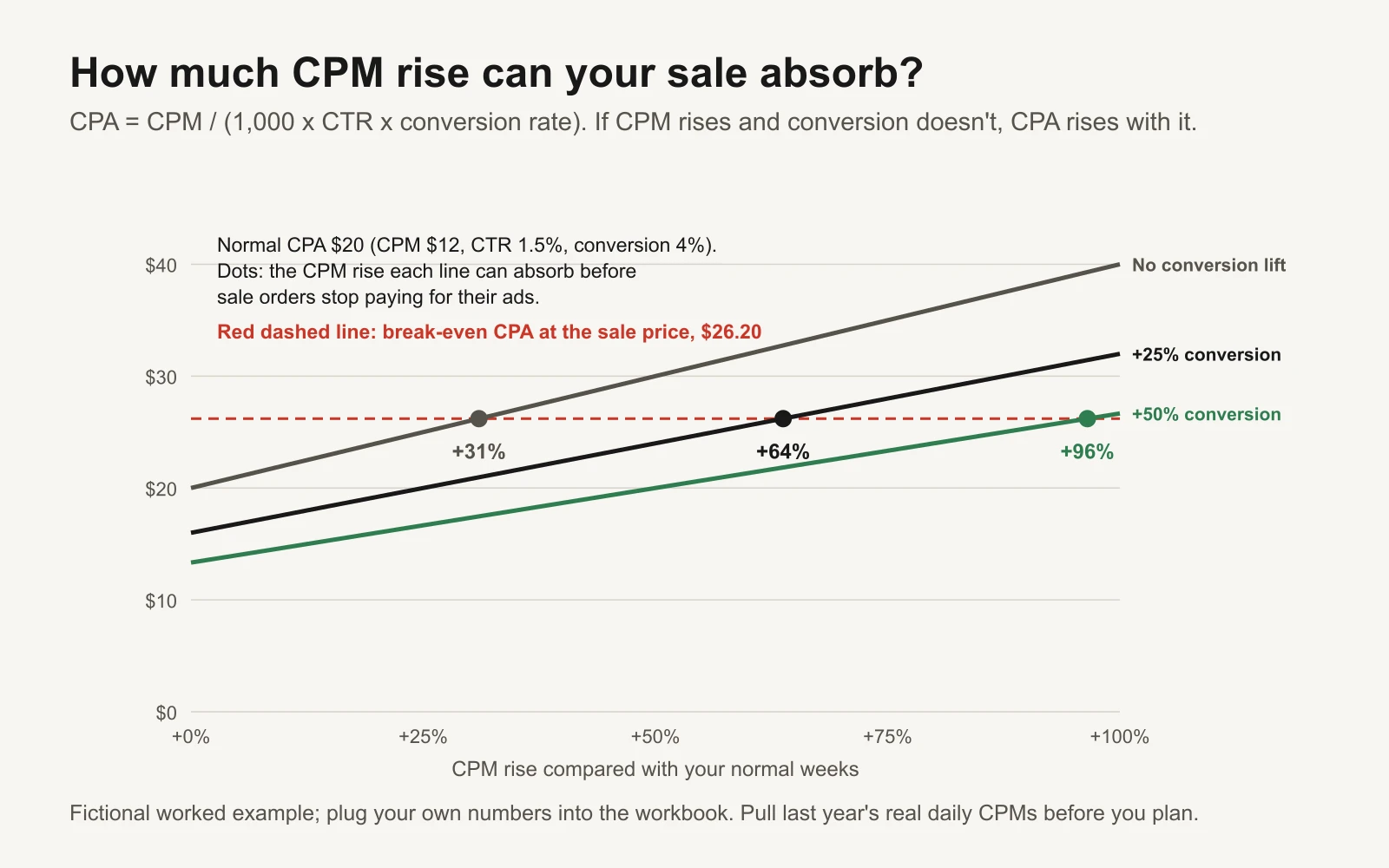
In the example, a sale that lifts conversion by 25% can absorb up to a 64% CPM rise before orders stop paying for their ads.
The formula for the dots is simple enough to do on a phone: maximum CPM rise = break-even CPA x (1 + conversion lift) / normal CPA, minus 1. In the example, $26.20 x 1.25 / $20 - 1 = 64%. If last year's CPM index on Black Friday was above 1.64 and your conversion lift was only 25%, you would know before spending a dollar that Black Friday itself needs a better offer, a cheaper audience (your own customers and email list) or a smaller budget. For a deeper look at reading CPM jumps, see how to investigate a Meta CPM spike.
Step 5: creative, and how often to refresh it
Because adding an ad or changing creative are significant edits on Meta, the usual instinct ("swap in the Black Friday creative on Black Friday") is the one that hurts most. It restarts learning on your best ad set on your most expensive day. Instead:
- Leave your evergreen winners alone. Keep the 2 or 3 ad sets that already work running untouched through the peak.
- Put sale creative in its own ad sets, uploaded early. Upload them by Friday 20 November with start and end times, so any review problems surface days before the sale rather than on it. Teaser and early-access ads can deliver (and learn) from 20 November; sale ads switch on at their scheduled start, in ad sets that are separate from your evergreen winners.
- Make the creative in waves, all before 21 November. Wave 1: teaser and early access. Wave 2: sale live. Wave 3: last chance and Cyber Monday. After the sale: gift guide, gift cards and shipping cutoffs.
- Refresh by adding, not editing. If you need fresh creative mid-peak (frequency is climbing and hook rate is falling), add it as new ads in a separate ad set rather than editing a live winner.
- Set end times on every sale ad. An offer ad that keeps running after the sale ends is a customer-service problem and an honesty problem. The promotion expiry QA guide has a checklist.
| Wave | Live from | Message | Formats that suit it |
|---|---|---|---|
| 1. Teaser and early access | Fri 20 Nov | "Get early access", gift guide | Gift guide carousel, founder to camera, notes-app list |
| 2. Sale live | Thu 26 Nov | The offer, plainly | Offer card, product demo with offer overlay, review stack, bundle builder |
| 3. Last chance and Cyber Monday | Sun 29 to Mon 30 Nov | Deadline and Cyber Monday offer | Countdown, objection handler, price anchor |
| 4. After the sale | Wed 2 Dec | Gifts, gift cards, shipping cutoffs | Gift guide, unboxing, guarantee-led |
For 50 formats with hook templates and what to shoot for each, see our teardown of 50 ad formats that keep winning. To know when creative is tiring, track hook rate and frequency weekly with the Monday report.
Step 6: retargeting and warming your email and SMS list
The cheapest Black Friday sales usually come from people who already know you. Use the 11 days to make that group bigger and reachable.
Retargeting audiences to build by Sunday 22 November:
- Website visitors in the last 30 and 180 days
- People who added to cart but didn't buy
- Past customers (for cross-sell offers and exclusions)
- Email and SMS subscribers who opted in, uploaded as a customer list
- People who watched your videos or engaged with your Instagram or Facebook page
Keep some prospecting running between now and the peak; it fills those audiences. And exclude people who bought in the last few days from prospecting ads, so you don't pay to show a discount to someone who just paid full price.
Email and SMS warm-up:
- Check authentication now. Google's sender guidelines require SPF and DKIM, plus DMARC for bulk senders, one-click unsubscribe on marketing email, and a spam rate kept below 0.3% in Postmaster Tools, with 0.1% as the safer target (Google: Email sender guidelines). A failing setup on Black Friday morning is very hard to fix in time.
- Send to engaged people first. Build segments of people who opened or clicked in the last 30, 60 and 90 days. Start the big sends with the most engaged group, then widen. If your volume is about to jump far above normal, step it up over the week instead of all at once.
- Grow the list with early access. From 17 November, run "get early access" ads to a sign-up page or a lead form. Early access gives people a reason to give you an email or phone number now, and gives you a warm audience on 24 November.
- Get SMS consent right. Use your SMS provider's consent wording and follow local law (in the US that includes the TCPA). We're not giving legal advice here; just don't improvise this part.
The day-by-day plan: Monday 16 November to Wednesday 2 December
The same plan is in the workbook's BFCM calendar tab, with an owner and status column for every day.
| Day | Phase | Ads | Budget | Email and SMS | Site and ops |
|---|---|---|---|---|---|
| Mon 16 Nov (-11) | Prep | Audit what's running; pick 2 or 3 evergreen winners to leave alone; brief sale creative | Work out break-even ROAS and max CPA at the sale price; export last year's daily CPMs | Check SPF, DKIM, DMARC; split engaged and unengaged | Start the checklist: test purchase through pixel and CAPI, stock count |
| Tue 17 Nov (-10) | Prep | Launch early-access sign-up ads | Keep evergreen budgets steady | Announce early access; collect SMS opt-ins with consent | Create and test every promo code |
| Wed 18 Nov (-9) | Prep | Make creative waves 1 and 2 | Fill in the budget plan; agree a total cap | Send a useful gift guide | PageSpeed Insights on key pages, on mobile |
| Thu 19 Nov (-8) | Prep | Make wave 3 and post-sale creative | Check account spending limit and payment method | Load sale messages into cart and browse flows | Customer-service saved replies |
| Fri 20 Nov (-7) | Warm-up | Upload all sale ads in new ad sets with start and end times; teaser ads live | First step up (example +15%) | Early-access reminder | Announce site change freeze from 23 Nov |
| Sat 21 Nov (-6) | Warm-up | Check every sale ad is approved; fix rejections | Hold | Social proof email | Recheck stock; agree the sold-out plan |
| Sun 22 Nov (-5) | Warm-up | Build retargeting audiences | Hold (Meta's budget week starts Sunday) | Gift guide email | Publish holiday shipping cutoffs |
| Mon 23 Nov (-4) | Warm-up | Read teaser hook rate and CTR; turn off clear losers | Second step up; schedule Meta high-demand periods; Google seasonality adjustment only if needed | Hold sends to unengaged contacts | Site freeze starts; test checkout on a phone |
| Tue 24 Nov (-3) | Warm-up | Early-access sale for subscribers, if you run one | Hold | Early access opens | Staff the inbox |
| Wed 25 Nov (-2) | Warm-up | Final check: ads, landing pages, banners show the right offer | Confirm boosts are saved | "Tomorrow" teaser | Returns policy and cutoffs visible at checkout |
| Thu 26 Nov (-1) | Peak | Sale ads live; don't edit live ads | Scheduled boost starts | Sale is live | Watch uptime, checkout errors, stock |
| Fri 27 Nov (0) | Peak | Hands off winners; check morning, midday, evening | Largest boost; check pacing at midday | Morning email; SMS to engaged | Customer-service peak; pause ads for sold-out products |
| Sat 28 Nov (+1) | Peak | Add review-stack ads in a separate ad set | Boost continues | Reminder to non-openers | Keep watching stock |
| Sun 29 Nov (+2) | Peak | Load Cyber Monday ads to start at midnight | Compare ROAS by campaign with break-even | Cyber Monday preview | Check codes still work |
| Mon 30 Nov (+3) | Peak | Cyber Monday ads live; last-chance message in the evening | Second-largest boost | Cyber Monday email; evening SMS | Customer-service peak |
| Tue 1 Dec (+4) | Extension | Sale ads end on schedule; "extended" only if true and planned | Boosts end; step base down | Thank-you, or last call if genuinely extended | Check codes expired on time |
| Wed 2 Dec (+5) | Wind-down | Gift, gift-card and shipping-cutoff ads; exclude recent buyers | Back to base; read MER for the period | Post-purchase flows | Write the learning log |
Black Friday and Cyber Monday themselves
On the peak days, your job is to watch and protect, not to tinker. Check three times a day, morning, midday and evening, and look at the same things each time:
- Delivery: is every sale campaign spending? Any rejected ads, payment failures or "Learning limited" warnings?
- Spend against plan: is the day pacing roughly to the budget planner? Remember Meta can spend up to 75% over a daily budget on a strong day.
- Stock: has anything sold out? Pause ads for sold-out products straight away.
- Site: checkout errors, slow pages, discount codes failing.
- Money: ROAS and CPA by campaign against the break-even from Step 1. Read them for the whole day so far, not hour by hour; platform reporting is delayed and attribution fills in later.
What not to do on peak days: don't edit creative or targeting in ad sets that are working, don't make big budget changes by hand (that is what the scheduled boosts are for), and don't turn off a campaign because of one bad hour.
Cyber Monday deserves its own creative and, ideally, its own angle: a different featured product, a bundle, or the same offer with a clear "last day" message. Schedule it to start at midnight on Sunday night so nobody has to be awake to switch it on. If you use a Google seasonality adjustment, one window from Friday to Monday covers both days.
The pre-sale checklist
Tick these off by the dates in the workbook's checklist tab (each row has an owner and a due date counted back from Black Friday).
Tracking
- Pixel records Purchase with the right value and currency: place a real test order, refund it, and compare Events Manager's Test events with the order.
- Conversions API (CAPI, Meta's server-side event connection) sends Purchase with an event_id, so browser and server events deduplicate. The CAPI deduplication audit walks through it.
- Event match quality checked for Purchase in Events Manager.
- Google Ads counts each order once, with value.
- UTM tags on every ad and email link.
Inventory
- Stock by product covers the sale-period demand you expect.
- Meta catalog and Google Merchant Center show correct sale prices and availability.
- A sold-out plan: one named person per channel pauses the affected ads.
Site speed and checkout
- Run PageSpeed Insights on the home page, top product pages and cart, on mobile. Google's "good" thresholds for Core Web Vitals are LCP (largest contentful paint, how fast the main content appears) of 2.5 seconds or less, INP (interaction to next paint, how fast the page responds to a tap) of 200 milliseconds or less, and CLS (cumulative layout shift, how much the page jumps around) of 0.1 or less (web.dev: Core Web Vitals).
- Checkout tested on a phone with each payment method.
- Sale banners and landing pages built and scheduled.
- Site change freeze agreed from 23 November.
Promo codes
- Every code works with the right products, minimum spend and stacking rules.
- Start and end times match in the store, the ads and the emails, in the same time zone.
- Any "was" price is genuine.
- Auto-apply discount links tested in a private window.
Customer service
- Saved replies for shipping times, returns, order status and code problems.
- Staffing and hours agreed for Thanksgiving to Cyber Monday.
- Holiday shipping cutoff dates published on product pages, cart and FAQ.
Ad account
- Payment method valid with room for peak spend; account spending limit raised if needed.
- All sale ads uploaded with start and end times, and approved by Saturday 21 November.
- Retargeting audiences built.
- Meta high-demand periods scheduled; Google seasonality adjustment only if you expect a big conversion-rate change.
Email and SMS
- SPF, DKIM and DMARC set up; one-click unsubscribe works.
- Engaged segments built.
- SMS consent wording reviewed with your provider's guidance.
After the sale: the wind-down
The sale ending is a plan, not a surprise.
- End on schedule. Sale ads and codes stop at the stated time. Only say "extended" if you decided that in advance and it is true; a fake extension trains customers to ignore your deadlines.
- Step budgets back down. Scheduled boosts end on their own. Bring base budgets back towards normal over a day or two. A large cut can send ad sets back into learning; after the sale that is usually an acceptable trade.
- Change the message. From 2 December, switch to gift guides, gift cards and "order by" shipping-cutoff ads. Exclude recent buyers from prospecting.
- Look after the new customers. Post-purchase emails, a useful how-to after delivery, then a cross-sell. Black Friday buyers who come back at full price are where the sale really pays off. The repeat-order measurement guide shows how to track that.
- Measure the whole period. Read MER (marketing efficiency ratio: total store revenue divided by total ad spend) for 16 November to 2 December, how many buyers were new versus returning, and actual spend and revenue against the planner. Platform ROAS will claim a lot of credit in a week when everyone is shopping anyway; MER is the reality check. The MER vs platform ROAS guide explains the difference.
- Write it down while it is fresh. Which offer, which creative, which days, what broke. Next November, that page plus this workbook is your plan.
Tools and repos that help
| Tool or repo | What it is for | Who should use it |
|---|---|---|
| PageSpeed Insights | Free mobile and desktop speed test with Core Web Vitals | Everyone, before the site freeze |
| GoogleChrome/lighthouse | The open-source auditing engine behind speed and best-practice reports; run it from the command line or CI | Developers who want repeatable speed checks on every theme change |
| GoogleChrome/web-vitals | Small library that measures LCP, INP and CLS from real visitors | Stores that want real-user speed data during the sale |
| meta/capi-param-builder | Meta's library to improve the parameters sent with Conversions API events | Developers implementing or fixing CAPI |
| meta/facebook-python-business-sdk | Official Python SDK for Meta's Marketing API: pull daily insights, manage budgets and budget schedules in code | Marketers or developers who want to script the CPM export or the budget plan |
| googleads/google-ads-mcp | Google's MCP server (a connector that lets AI assistants use the Google Ads API). It reads data with GAQL queries, and its write tools use a propose-then-confirm step | Teams asking an AI assistant to pull Google Ads numbers |
| pipeboard-co/meta-ads-mcp | A third-party MCP server for Meta Ads, with tools for insights and budget schedules | Performance marketers comfortable granting an AI tool access to an ad account |
| anthropics/skills | Public agent skills, including an xlsx skill that lets Claude read and edit spreadsheets like this workbook | Anyone who wants an assistant to fill in or extend the planner |
A word of caution on AI connectors with write access: during the peak, anything that can change a live budget should need a human approval first.
Or let GaaS run it
GaaS is an AI agent that creates, launches and optimizes Meta and Google ads from three inputs: your website, a spend limit and a one-line goal. It does the break-even maths, plans budgets and creative around dates like these, and nothing spends without your approval. If you would rather review a plan than build one, see how GaaS works. Either way, the workbook below is yours to keep.