
Stop running TikTok ads from your brand account. Run them from your creators'.
Most brands that work with creators still do it the old way: "send me the MP4 and I'll upload it." The video then runs from the brand's account, with the brand's name on top, as an obvious ad. TikTok has a format built for the alternative. Spark Ads run a real TikTok post as an ad, and that post can be a creator's, running from the creator's own account, with their handle, their caption and their comments.
This guide covers what TikTok says about Spark Ads, how the authorization code works step by step, which code length to choose, the terms to agree before a creator sends a code, and how to price it. It is written for business owners running their own TikTok ads, with enough detail for a performance marketer managing a creator roster.
The kit is one workbook: DM templates (first message, follow-up, code request with the creator's steps, renewal, results), eight agreement clauses, a usage-fee calculator, a Creator tracker that flags codes about to expire and works out the all-in cost per conversion, and a code walkthrough with every Ads Manager error and its fix. Numbers in this article are a fictional worked example unless a source is linked.
What Spark Ads are
TikTok describes Spark Ads as a native ad format that lets you use organic TikTok posts and their features in your advertising (TikTok: Spark Ads). In practice:
- The ad is a real post. It shows the account's handle, caption and sound, and people can follow, like and comment as on any post.
- Engagement counts on the original post. Views, likes, comments, shares and follows from the ad are attributed to the organic post.
- The post can be your own brand's or a creator's, if they authorize it.
That last point matters for reading TikTok's numbers.
What TikTok reports
On its help page for Spark Ads in Video Shopping Ads, TikTok compares Spark Ads with non-Spark ads (TikTok: Spark Ads for Video Shopping Ads):
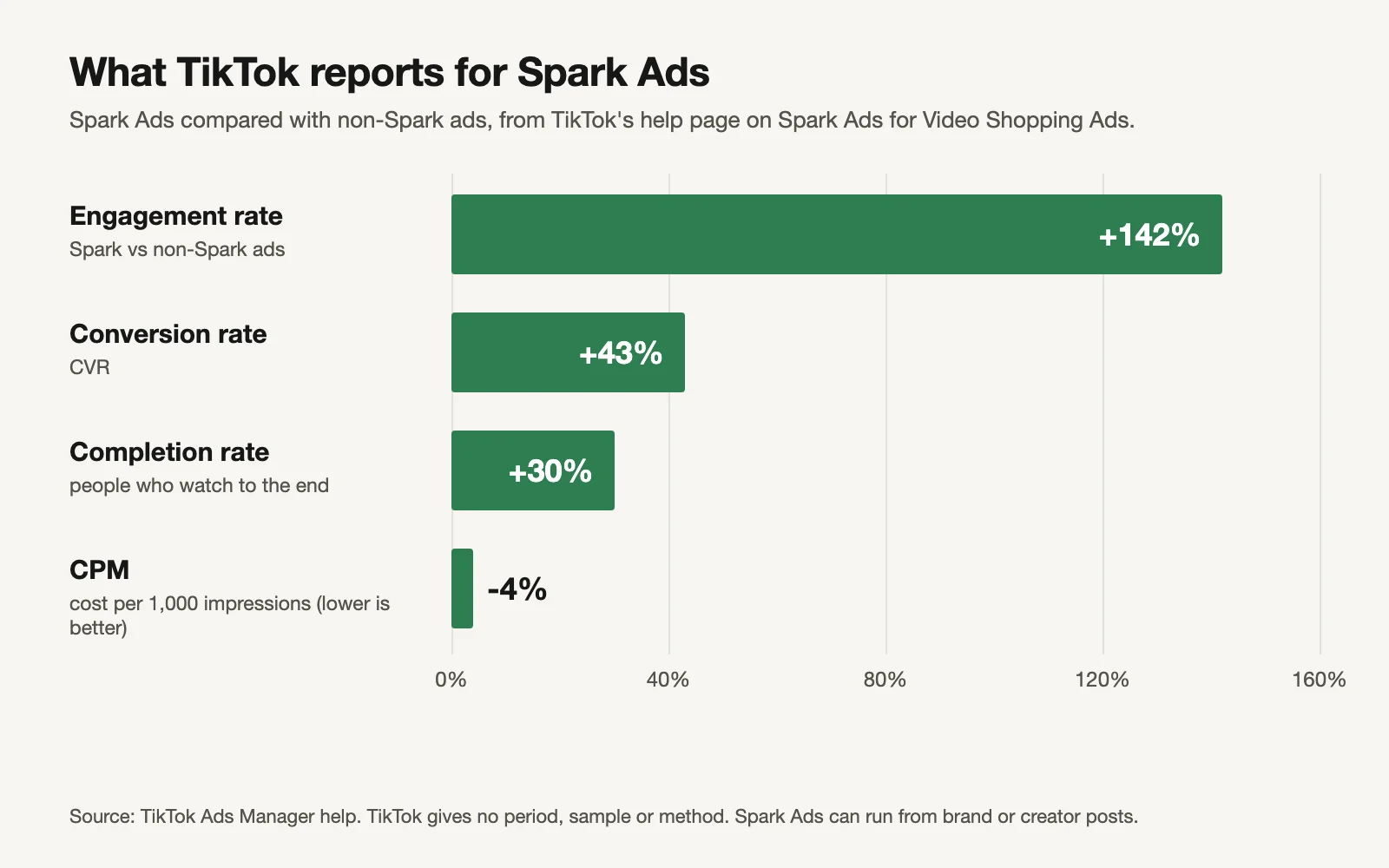
Source: TikTok. No period, sample or method given.
| Metric | Spark Ads vs non-Spark ads |
|---|---|
| Engagement rate | +142% |
| Conversion rate (CVR) | +43% |
| Completion rate | +30% |
| CPM | −4% |
Read these the way you'd read any platform's numbers about its own product. TikTok gives no period, sample size or method, and the page is about Video Shopping Ads. And because Spark Ads can run from a brand's own posts too, these numbers compare Spark vs non-Spark, not strictly "creator account vs brand account". They're a reason to test Spark Ads, not a promise of 43% more sales. Your own tracker will tell you more than any average.
How the code works
To run a creator's post as a Spark Ad, the creator gives you an authorization code for that post. Here's the whole flow, from TikTok's help pages:
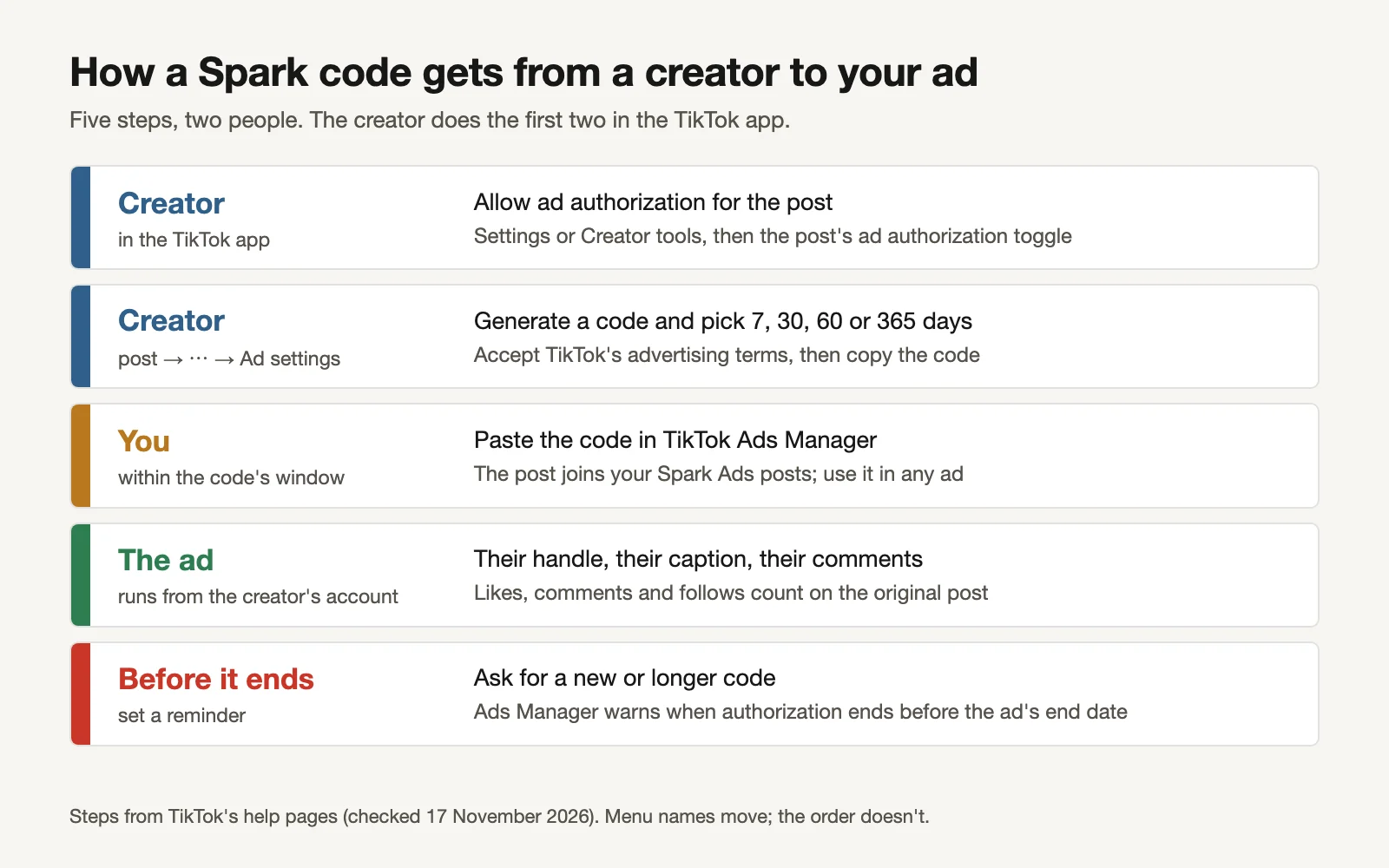
From TikTok's help pages. Menu names move; the order doesn't.
The creator's steps (TikTok: How to create Spark Ads for Smart+ campaigns):
- Allow ad authorization in their settings or Creator tools.
- On the post, tap the ⋯ menu, then Ad settings, and turn on ad authorization.
- Tap Generate, choose how long the code lasts (7, 30, 60 or 365 days) and accept TikTok's advertising terms.
- Copy the code and send it to you.
Your steps: paste the code into TikTok Ads Manager where you add Spark Ads posts, then pick the post as the ad's creative. The kit's code-request DM has the creator's four steps written out, so you can send them in one message.
Some brands also find and pay creators through TikTok's own creator marketplace. The code route works with any creator, so it's the one this kit covers.
Pick the code length from the contract
The creator picks the code's length, and the length decides how long the ad can run.
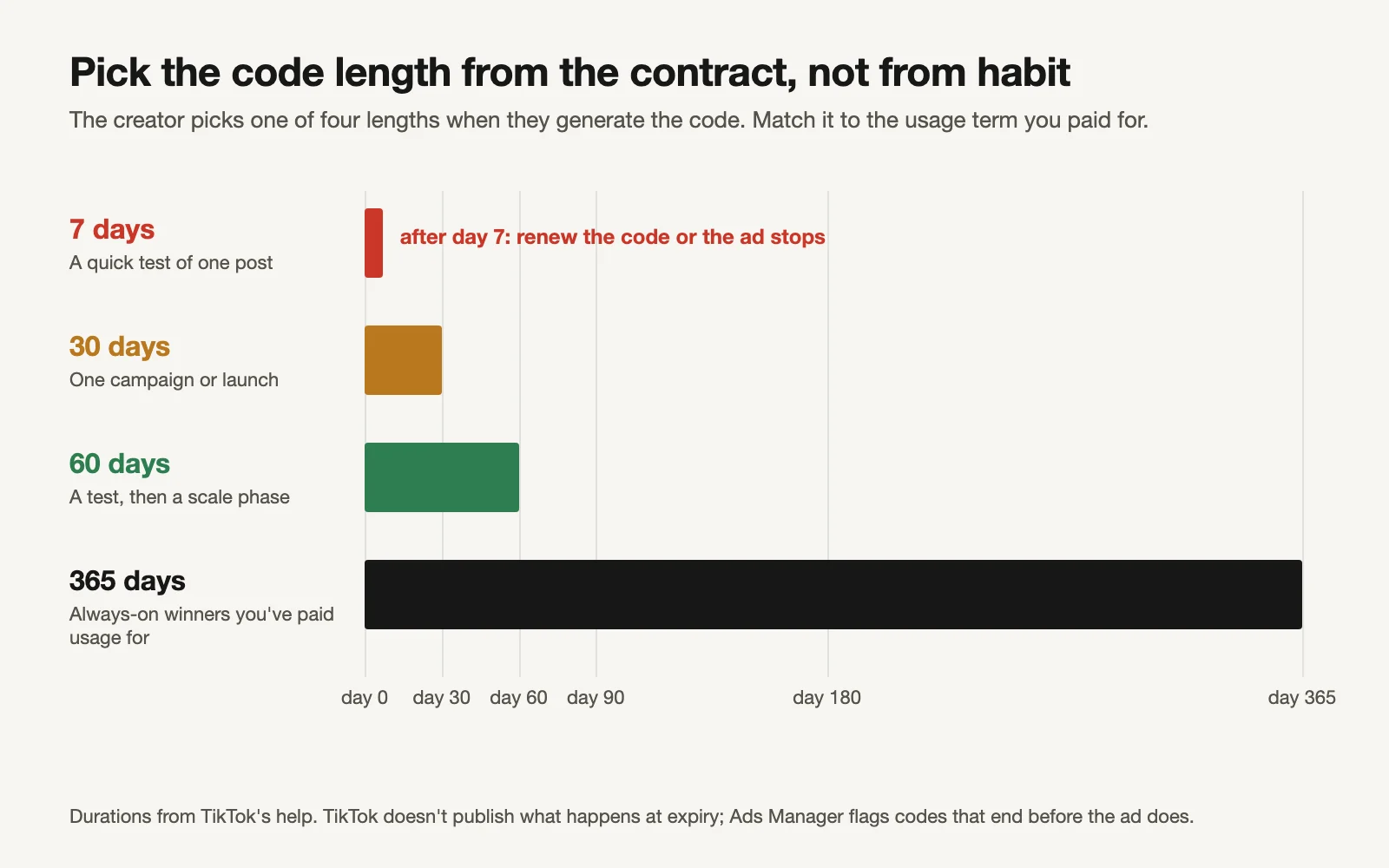
Code lengths from TikTok's help.
| Code length | Use it for |
|---|---|
| 7 days | A quick test of one post |
| 30 days | One campaign or launch |
| 60 days | A test, then a scale phase |
| 365 days | An always-on winner you've paid a year's usage for |
What happens when a code runs out? TikTok's pages don't spell it out. They do list an Ads Manager error, "Authorization ends before the ad's end time", with the fix "contact the creator to adjust authorization" (TikTok: Spark Ads code error notifications), and third-party guides say the ad stops delivering when the authorization period ends (Relevant Audience: TikTok Spark Ads guide). So plan as if it does.
The classic mistake: a creator picks 7 days for a test, the post becomes your best ad, and on day 8 it stops while you chase them for a new code. Two rules fix it:
- The code must be at least as long as the usage term you paid for. The tracker flags any row where it isn't.
- Ask for the renewal before the code ends. The tracker shows RENEW NOW a week before expiry (you set the warning) and EXPIRED after.
Agree these six things before the code
A Spark code is a technical permission. The agreement is what protects both sides. The kit has eight template clauses; these six matter most:
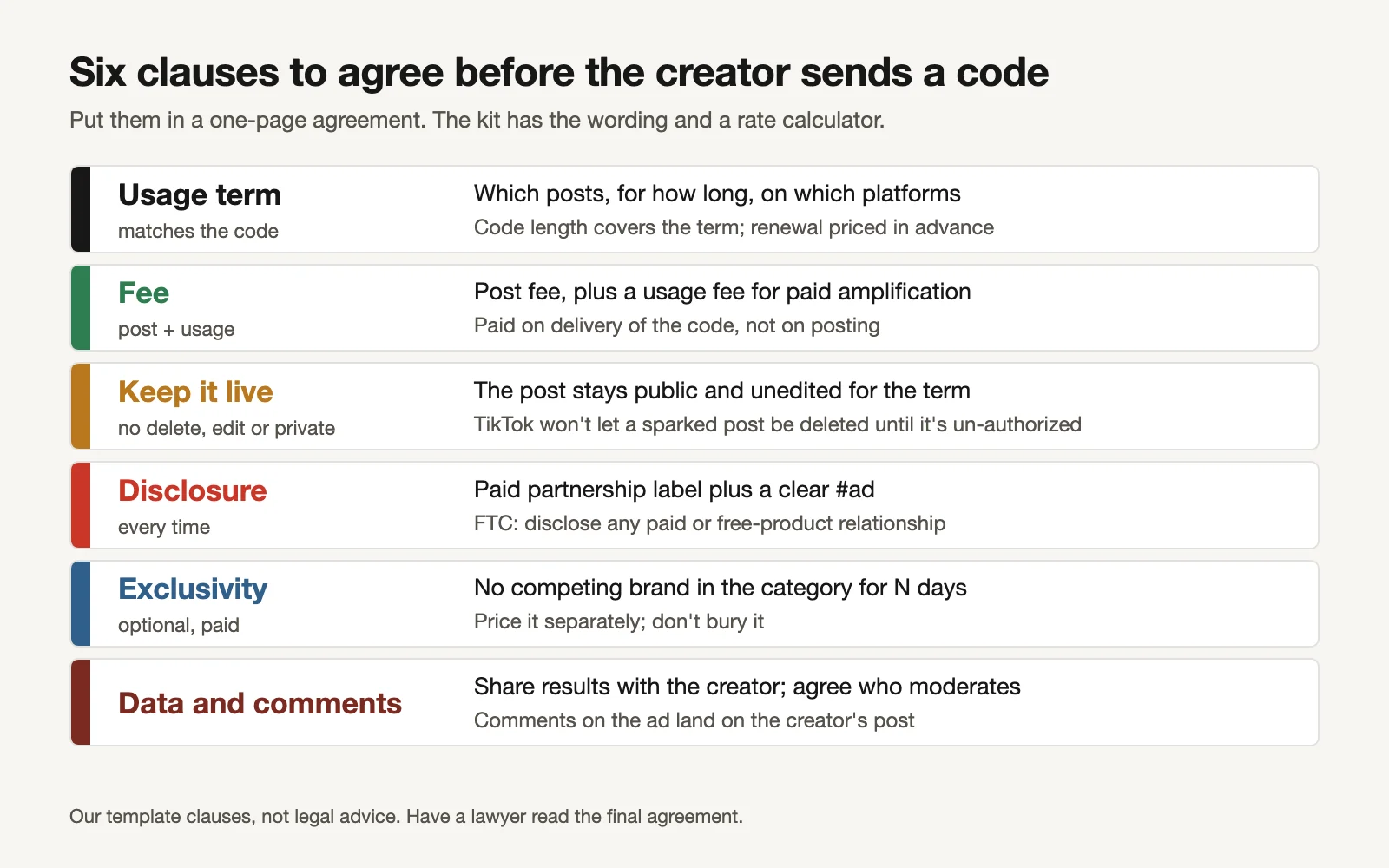
Our template clauses, not legal advice.
- Usage term. Which post, for how long, from which date. Match the code length to it.
- Fees. A post fee plus a usage fee for running it as an ad. Pay on delivery of a working code, and price renewals now.
- Keep it live. The post stays public, unedited and authorized for the term. TikTok's own help says a sparked video has to be un-authorized before the creator can delete it (TikTok: Spark Ads), and Ads Manager shows errors if the post is deleted or made private.
- Disclosure. The FTC expects creators to disclose paid and free-product relationships clearly (FTC: Disclosures 101 for social media influencers). Use TikTok's paid partnership setting plus a plain #ad.
- Exclusivity, if you want it, priced separately.
- Comments and results. Comments on your ad land on the creator's post; agree who replies and what gets hidden. Share results at the end: it makes renewals easy.
Have a lawyer read your final agreement. The clauses are a starting point.
What to pay
There is no public standard rate card for creator usage fees, and we won't invent one. What the kit gives you is a structure:
Total = post fee + usage fee (a % of the post fee that grows with the code length) + optional exclusivity
The Rates tab has placeholder percentages for each code length (7, 30, 60, 365 days) that you replace with what you agree. Two things to decide up front: what a renewal costs, so a winner never stalls while you negotiate, and whether you'll pay a bonus for posts that become winners.
Track every code
The Creator tracker has one row per sparked post. You type the code date, its length, the usage term you paid for, the fees, and later the ad spend and conversions. It works out the rest.
Worked example (fictional), reviewed on 17 November 2026:
| Creator | Code received | Length | Paid term | Expires | Status | Code covers term? | All-in cost per conversion |
|---|---|---|---|---|---|---|---|
| Maya | 20 Oct | 30 | 30 | 19 Nov | RENEW NOW: 2 days left | Yes | $36.92 |
| Jordan | 1 Sep | 365 | 365 | 1 Sep 2027 | OK | Yes | $39.31 |
| Daniela | 3 Nov | 7 | 30 | 10 Nov | EXPIRED | No: code shorter than the paid term | $61.43 |
| Sam | 1 Oct | 60 | 60 | 30 Nov | OK (13 days) | Yes | $48.51 |
| Kelsey | 12 Nov | 30 | 30 | 12 Dec | OK | Yes | $42.80 |
| Tessa | 10 Sep | 60 | 60 | 9 Nov | EXPIRED | Yes | $60.79 |
What the example shows:
- Maya's post is the cheapest per conversion and runs out in two days. The renewal DM goes today.
- Daniela paid for 30 days but sent a 7-day code. It stopped a week in. Ask for a longer code.
- "All-in" includes the creator's fees. Ad CPA alone would make Daniela look fine at $42.86; with her fees it's $61.43.
The all-in number is the one to compare with your other ads. A creator post that wins on engagement but loses on all-in cost per conversion isn't a winner.
The routine
- Find posts that already explain your product well, from creators you work with or customers who post about you.
- Send the first DM. Agree the clauses in writing.
- Send the code-request DM with the length that matches the paid term.
- Add every code to the tracker the day it arrives.
- Weekly: check the tracker. Send renewal DMs for every RENEW NOW. Replace EXPIRED posts or ask for new codes.
- Monthly: compare all-in cost per conversion across creators and against your brand-account ads.
For scripts and briefs when you want creators to make something new rather than spark an existing post, see our UGC script templates and prompts for TikTok UGC scripts.
Or let GaaS run the ads around them
GaaS is an AI agent that creates, launches and optimises ads from three inputs: your website, a spend limit and a one-line goal. Creators make the posts and relationships only you can make; the agent makes the rest of the ads, tests them alongside your sparked posts inside your spend limit, and asks before any change that affects spend. We have made more than 60,000 ads this way. The kit is free either way.
Limits of this kit
- TikTok's +142% / +43% / +30% / −4% are TikTok's own figures with no period or method, from a page about Video Shopping Ads, and they compare Spark with non-Spark ads (Spark Ads include brand-account posts).
- TikTok doesn't document what happens at expiry; we rely on its error notices and third-party guides. Check in your own Ads Manager.
- Menu names in the TikTok app and Ads Manager change. The steps' order is stable; the labels may not be.
- The rate percentages are placeholders, not market rates.
- The clauses are templates, not legal advice.
Sources
- TikTok Ads Manager help: Spark Ads for Video Shopping Ads (Spark vs non-Spark: completion +30%, engagement +142%, CVR +43%, CPM −4%)
- TikTok Ads Manager help: How to create Spark Ads for Smart+ campaigns (creator steps; 7, 30, 60 or 365 days)
- TikTok Ads Manager help: Spark Ads (engagement counts on the organic post; un-authorize before deleting)
- TikTok Ads Manager help: About Spark Ads code error notifications
- Relevant Audience: TikTok Spark Ads guide (ad stops when the authorization period ends)
- US Federal Trade Commission: Disclosures 101 for social media influencers