
Gymshark sells gym clothes to a very large audience; its Facebook Page alone has 2.2 million follows. A brand that size could run hundreds of evergreen ads. So what did it have live 10 days before Black Friday?
Almost nothing older than two days. On 17 November 2026, Gymshark had 72 live ad cards in the US Meta Ad Library. 70 of them started on 15 and 16 November. 70 of them say "% off", up to 50%. The only two older ads aren't a sale at all: they are a waitlist for Gymshark's gym in Miami.
That is the opposite of "find a winner and scale it". Gymshark switched its whole account to the sale in one move. This teardown shows what we found, the parts, and a template and a sale batch planner to do the same with your own offer and budget.
How we read the library, and what it can't tell you
We opened Gymshark's Page in the Meta Ad Library on 17 November 2026, signed in, with the US, active ads and all media selected, and scrolled to the end. 72 ad cards loaded.
72 is a card count. The library's header said "~640 results", because it counts every version of an ad, and 47 of the 72 cards held several versions (different images, sizes or text for the same ad). So "72 live ads" here means 72 distinct ads, each of which may show in several versions. If you open the library and see 640, that is the same set counted another way.
Three more limits:
- Live ads only. Outside the EU, Meta's library shows ads that are running now; ordinary US product ads disappear when they stop (Meta Transparency Center: Ad Library tools). Gymshark's pre-sale ads aren't visible because they're no longer running, not because they never existed.
- No results. The library shows no spend, sales or ROAS.
- A snapshot. "The last 48 hours" is relative to 17 November. The sale may add or remove ads every day until it ends.
Finding 1: the whole account went up in two days
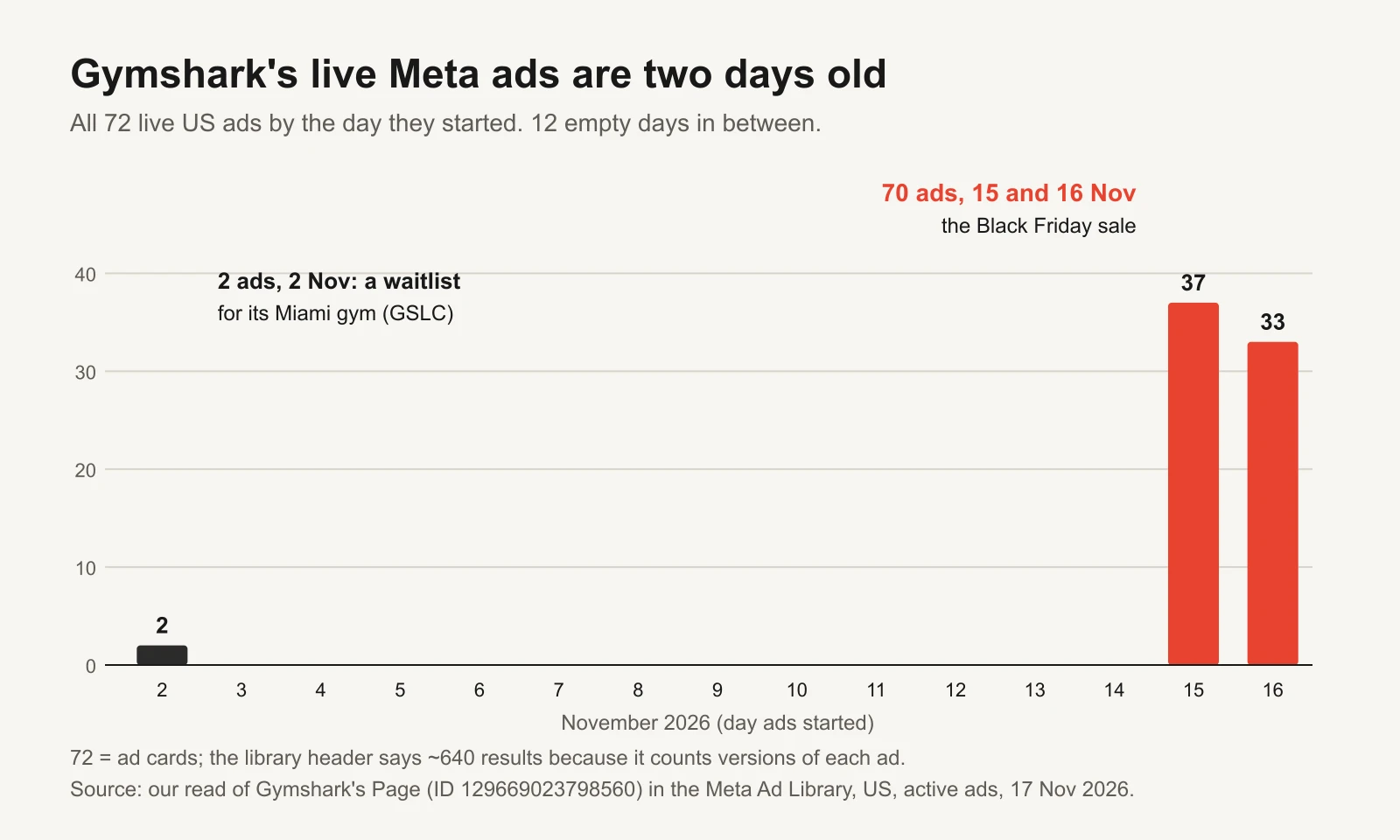
Twelve empty days, then 70 ads.
37 ads started on 15 November and 33 on 16 November. Between 2 and 15 November, nothing still live started at all. The median live ad was 2 days old and the oldest 15 days.
Whatever Gymshark ran in early November has been switched off. When the sale started, the account didn't add sale ads to its evergreen ads; it replaced them.
Finding 2: one message, 70 times
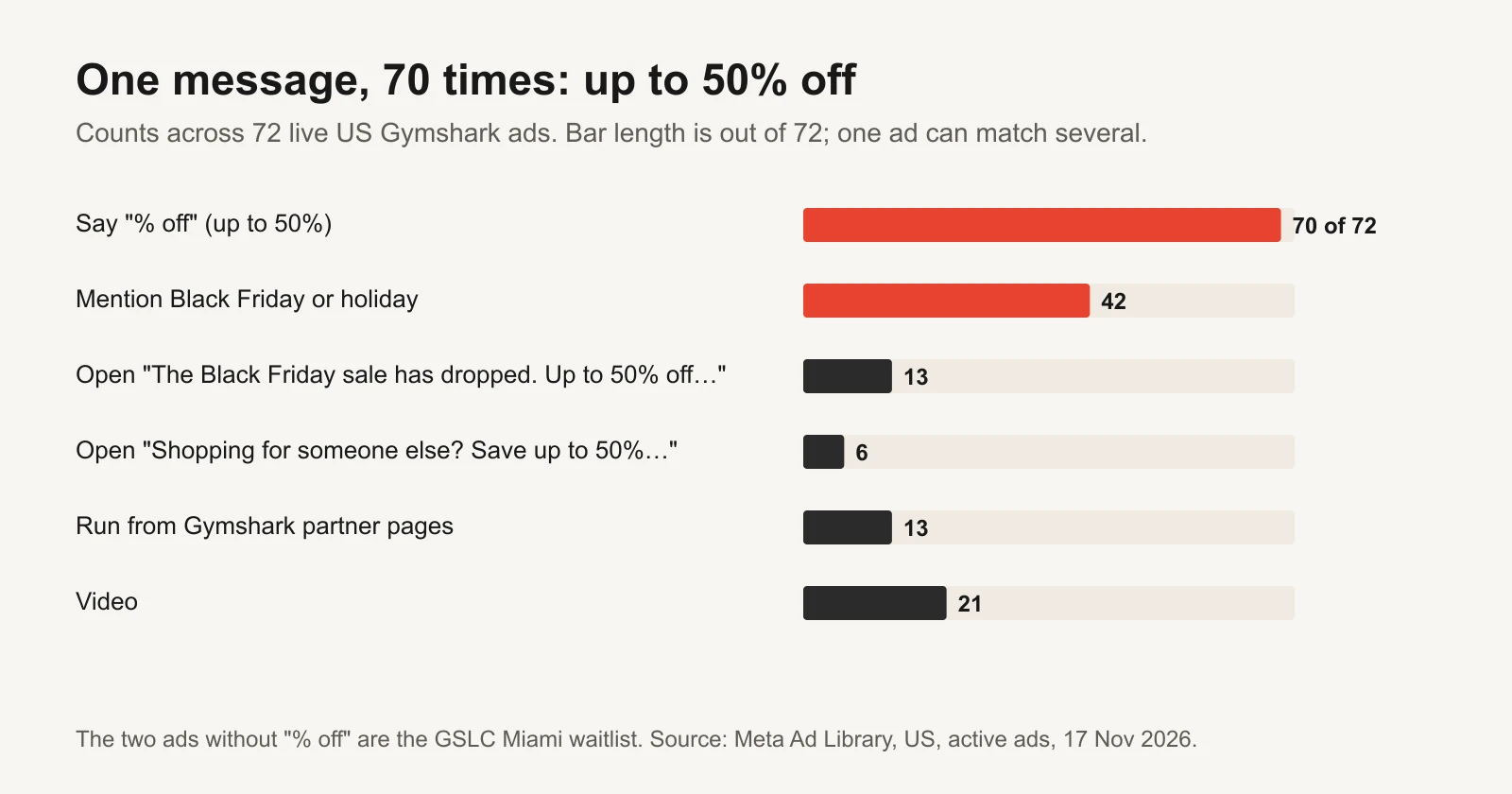
Every sale ad says the same offer, the same way.
70 of 72 ads say "% off", up to 50%, and 42 mention Black Friday or the holidays. The offer is said the same way across many products: "up to 50% off".
| Opening line | Ads | Who it's for |
|---|---|---|
| "The Black Friday sale has dropped. Up to 50% off the be[st]…" | 13 | People buying for themselves |
| "Shopping for someone else? Save up to 50% on gifts they…" | 6 | Gift buyers |
| Variants of the Black Friday line | 3 | Self-buyers |
The two opening lines split the audience the way the season does: some people are shopping for their own gym kit, others for a present. Same offer, different first sentence.
The format mix is mostly static: 21 video and 51 image or other ads. 59 run from Gymshark's own page and 13 from Gymshark partner pages.
Finding 3: the two ads that survived are a gym waitlist
The only ads older than 15 November are two images that started on 2 November (Ad, Ad). Both open "Want to be the first to know when GSLC Miami Founding m[embers]…": a sign-up for founding members of GSLC, Gymshark's lifting club gym, in Miami.
It is the only non-sale job in the account, and Gymshark kept it running through the switch. That is the useful detail: even when everything else becomes a sale, a brand can keep one ad doing something the sale can't, like building a list for a launch.
Where Gymshark sits among five brands
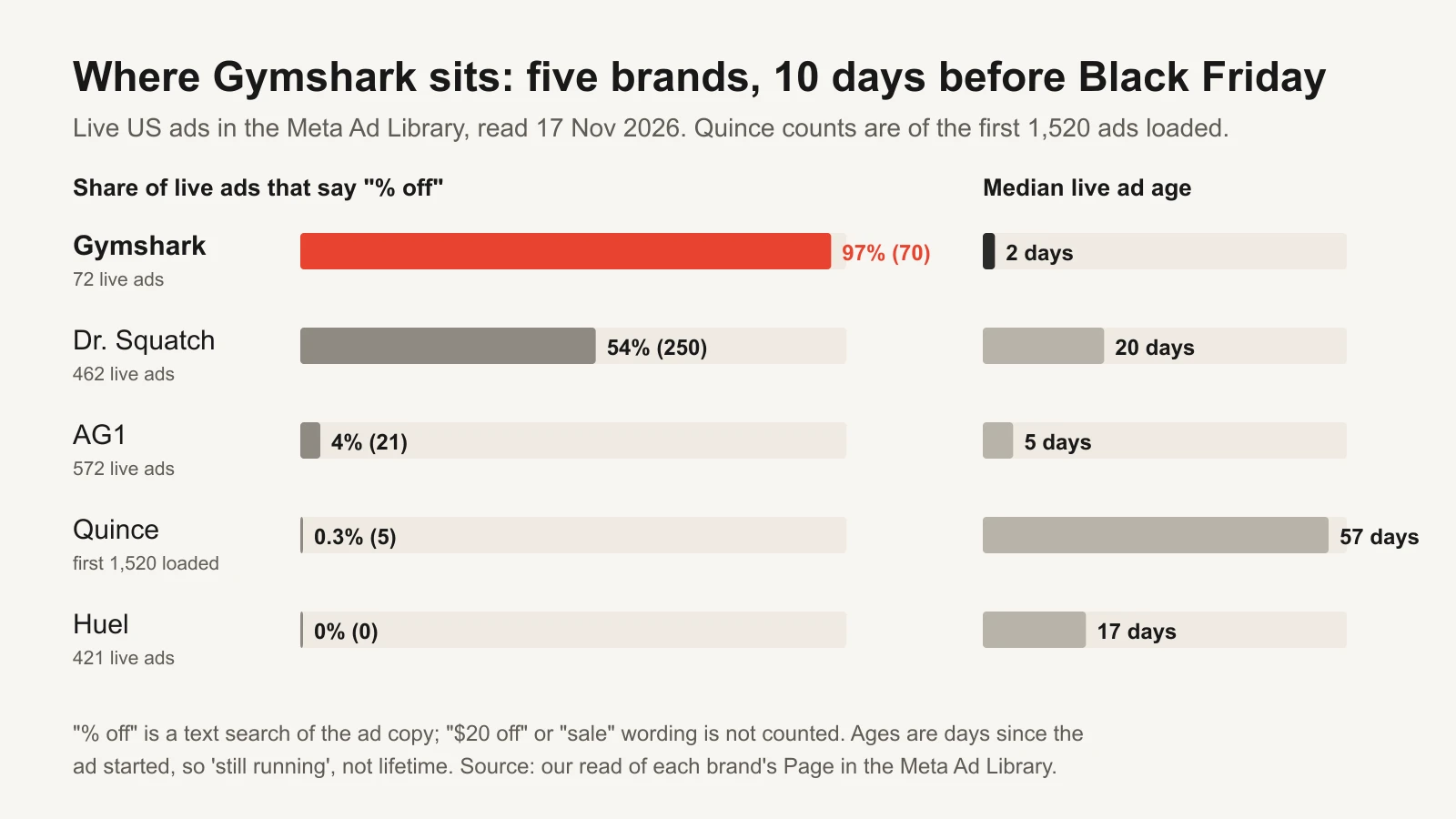
Gymshark is the most discount-led and the freshest of the five.
Dr. Squatch also leads with discounts but launched three weeks earlier. Quince and Huel barely mention one. There is no single right answer; a brand known for sales events can do what Gymshark does, a brand selling an everyday price can't.
The Gymshark sale playbook
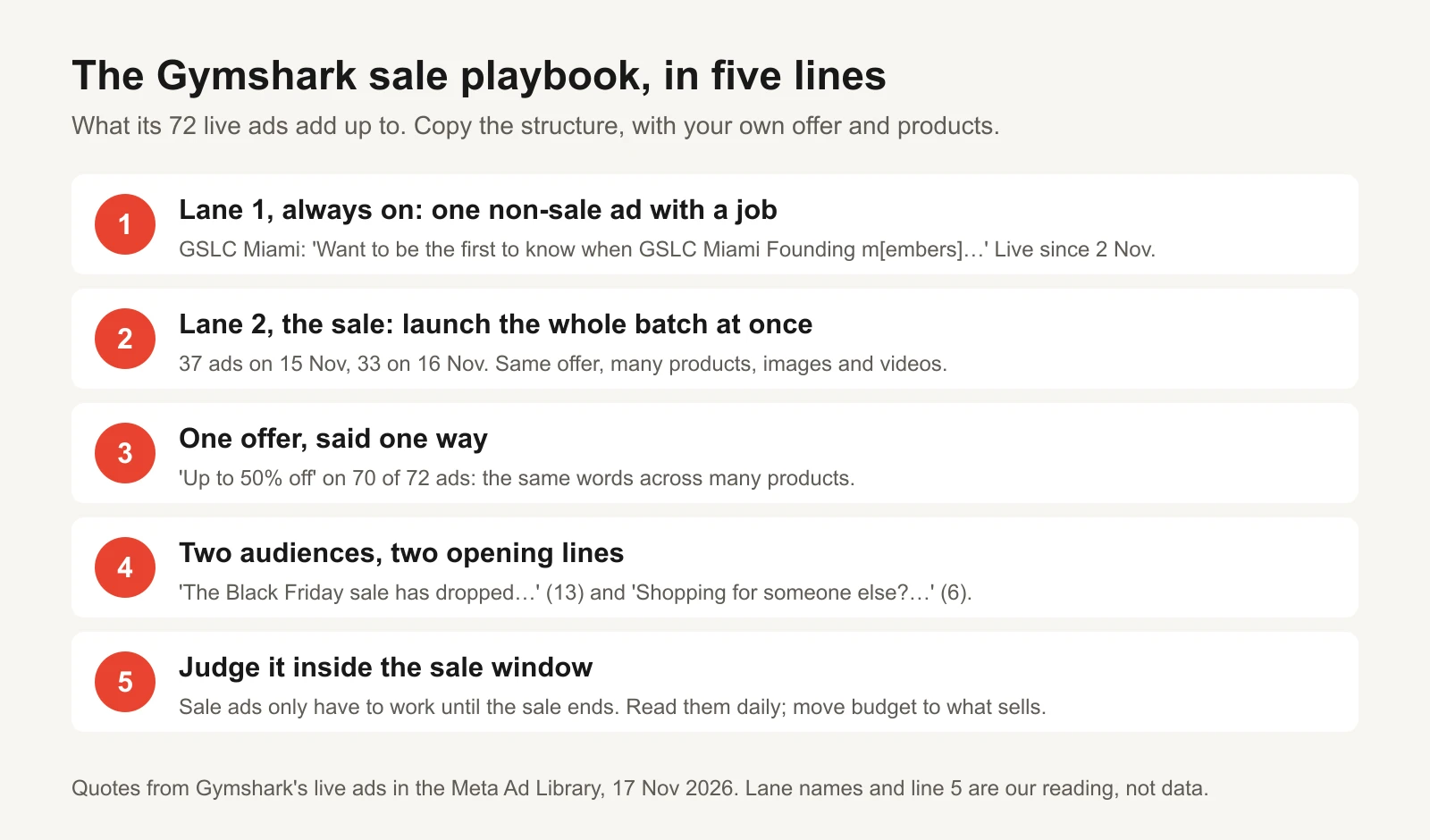
The first four lines are what the library shows. The fifth is our advice for running it.
1. Switch the account, don't add to it. When the sale starts, the sale ads go up together and the rest come down. Buyers see one consistent message wherever they meet the brand.
2. Say the offer one way. "Up to 50% off", 70 times. A single, repeated offer is easier to remember than five clever ones.
3. Write two opening lines: for me, for a gift. The offer is the same; the reason to care isn't.
4. Keep one non-sale lane. The GSLC waitlist kept running. Yours might be a waitlist, a launch or a thank-you ad for new buyers.
5. Judge the batch inside the sale window. Sale ads only need to work until the sale ends. Read them daily, move budget to the ads that sell, and don't wait two weeks for a verdict on an 11-day sale. The kill, hold, scale rulebook has rules for small numbers.
Copy the system: the Gymshark template
| Part | Gymshark example | Write yours |
|---|---|---|
| 1. The news | "The Black Friday sale has dropped." | Your sale, announced as news |
| 2. The offer, one way | "Up to 50% off" (70 of 72 ads) | One offer, the same words on every ad |
| 3. Who it's for | Yourself, or "Shopping for someone else?" | A self-buyer line and a gift line |
| 4. The product | One product or range per ad | Your best sellers, one per ad |
| Always-on lane | GSLC Miami waitlist, live since 2 Nov | One non-sale ad with its own job |
"Up to" needs to be honest: the top discount should apply to a real share of what's on sale, not one item. And before you copy the percentage, check your margin: the economics of promotional discounts shows how many extra orders each discount needs.
Plan your own sale batch
The workbook's Sale batch tab sizes the batch to your budget:
- Type the sale dates, products to feature, opening lines and formats. It multiplies them into ads in the batch.
- Type your daily sale budget, target CPA and how many purchases per ad you want to see each day. It works out the budget each ad gets and the spend each one needs to be read.
- Read the verdict: every ad can be read daily, read them over two days, or too many ads for the budget (with the number to cut to).
In the fictional example, an 11-day sale from 20 to 30 November features 10 products with 2 opening lines in 2 formats: 40 ads. At $1,000 a day each ad gets $25 a day, but at a $30 target CPA it needs $30 to show one purchase a day. Verdict: read ads over two days, or cut to the 33 ads the budget can read daily. The tab also has a row for your always-on, non-sale ads.
For the timing of the whole season, the Black Friday ad playbook has the day-by-day plan.
Read any competitor the same way
The workbook's Ad log is prefilled with Gymshark's two oldest live ads, each with a library link. Add your competitor below:
- Open their Page in the Meta Ad Library with US, active ads and all media selected, and scroll to the end. Count cards, and note the header's number separately.
- For each live ad, log the library ID, start date, format, face, angle, offer and first line. Set the check date at the top.
- The Summary tab counts ads by age, format and face, and gives the share older than 14 days. Log at least 20 ads before reading it.
Read a sale-driven competitor twice: once before its sale and once during. The difference between the two snapshots is its sale playbook. The Ad Library competitor playbook covers turning it into briefs that are yours.
Tools and repos that help
| Tool or repo | What it is for | Who should use it |
|---|---|---|
| Meta Ad Library | Every live ad for a Page, with start dates and versions | Everyone; this teardown is built on it |
| Meta Transparency Center: Ad Library tools | What the library keeps and for how long | Anyone reading "days running" |
| facebookresearch/Ad-Library-API-Script-Repository | Meta's Python examples for the Ad Library API. Ordinary product ads come back only if they reached the EU | Developers tracking EU ads |
| anthropics/skills | Public agent skills, including an xlsx skill so Claude can fill the tracker or planner | Anyone who wants an assistant to do the logging |
Or let GaaS run it
GaaS is an AI agent that creates, launches and optimizes Meta ads from three inputs: your website, a spend limit and a one-line goal. It builds the sale batch from your products and offer, launches it together, moves budget to what sells inside the window, and nothing spends without your approval. If you would rather approve a sale than build it, see how GaaS works. Either way, the workbook below is yours to keep.